Preferences
Privacy is important to us, so you have the option of disabling certain types of storage that may not be necessary for the basic functioning of the website. Blocking categories may impact your experience on the website. More information
Privacy is important to us, so you have the option of disabling certain types of storage that may not be necessary for the basic functioning of the website. Blocking categories may impact your experience on the website. More information

 Ahrefs, Reuters and a 2025 academic study measure how many websites block AI crawlers. See the rates by site type and how to audit your robots.txt.
In short
Most websites do not block AI crawlers, and the answer depends on what you count. Ahrefs found that 5.89% of about 140 million sites block GPTBot in their main robots.txt file (May 2025). A 2025 academic study found that 60.0% of reputable sites in its sample block at least one AI crawler. Which figure fits you depends on your sample and on which bots you count.
Want to go further? Ask
Quick quiz
Who should fix the technical side of your site?
Our advice for you
Check it yourself with free Google tools
Search Console lists the pages Google cannot read, and PageSpeed Insights tests speed. Many small issues are fixed from your website builder settings.
Our advice for you
A web developer
Your problem is in the code or the server: a developer who knows SEO is the right person. Give them the list of errors from Search Console.
Our advice for you
A technical audit tool
Your site has many pages: a crawler reads them all like Google does and gives a full list of errors to fix, page by page.
Our advice for you
An automatic audit, then content
Your site works but brings few visitors: technical issues are rarely the cause. Sorank audits the site, then writes the pages that bring traffic.
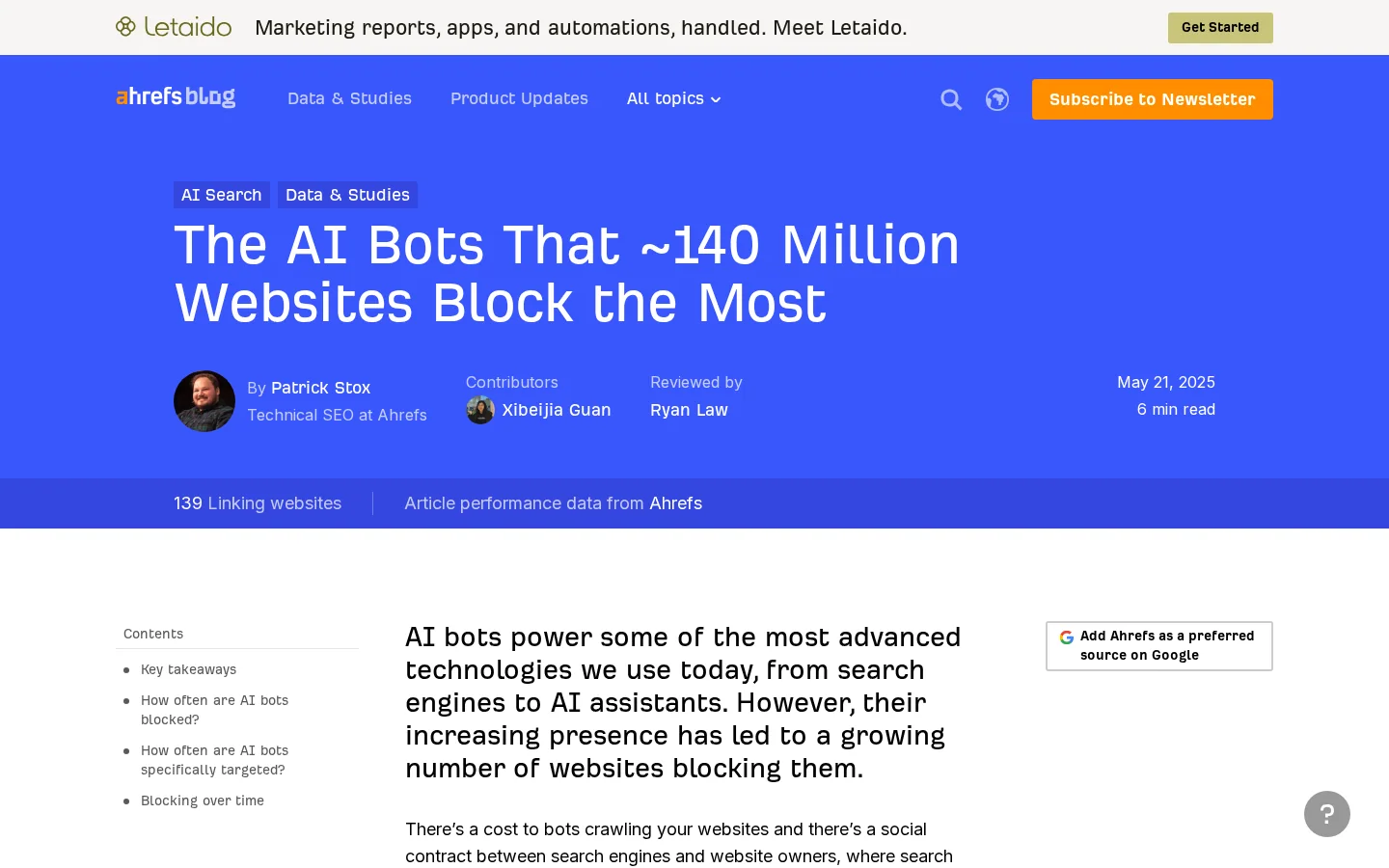
Most websites still leave AI crawlers alone, but the share that blocks them is no longer small, and it grows every year. The clearest large-scale number comes from Ahrefs. In May 2025, the Ahrefs blog counted explicit blocks in robots.txt files across about 140 million websites. The article, written by Patrick Stox and reviewed by Ryan Law, found that 5.89% of sites block GPTBot, the OpenAI crawler used to train its models, in their main robots.txt file (Ahrefs, May 2025).
That is one site in about seventeen. The number moves up when you count more files. Ahrefs says the share rises to 7.3% once it reads the robots.txt files of subdomains too, which adds up to about 461 million files, because a subdomain such as blog.example.com can have its own rules.
If you search for this topic, you will find figures between about 5% and 60%. They are not contradictory. They measure different groups, with different methods. Before you quote any of them, check three things: which sites were sampled, which bots were counted, and whether the study read robots.txt only or also looked at firewalls.
The Ahrefs figure is a broad sample of the web, so most of those sites are small and rarely think about bots. A sample of popular sites gives a much higher number, because the sites most likely to be scraped are the ones that have already reacted. News publishers are the most active group. In a Reuters Institute study, Richard Fletcher looked at the 15 most widely used news sources in ten countries. He found that 48% of them were blocking OpenAI's crawlers by the end of 2023, and 24% were blocking Google's AI crawler (Richard Fletcher, Reuters Institute, February 2024).
The Reuters sample is small and limited to news. It tells you what the most visible publishers do, not what a typical company does. Keep that in mind when you compare it with the Ahrefs figure.
An AI crawler is a bot that fetches web pages for an AI company. Some of them collect content to train models. Others fetch pages to answer a question in real time, or to build a search index. The key point is that one company often runs several bots, and each has a different job. If you block the wrong one, you change your visibility without changing what you intended.
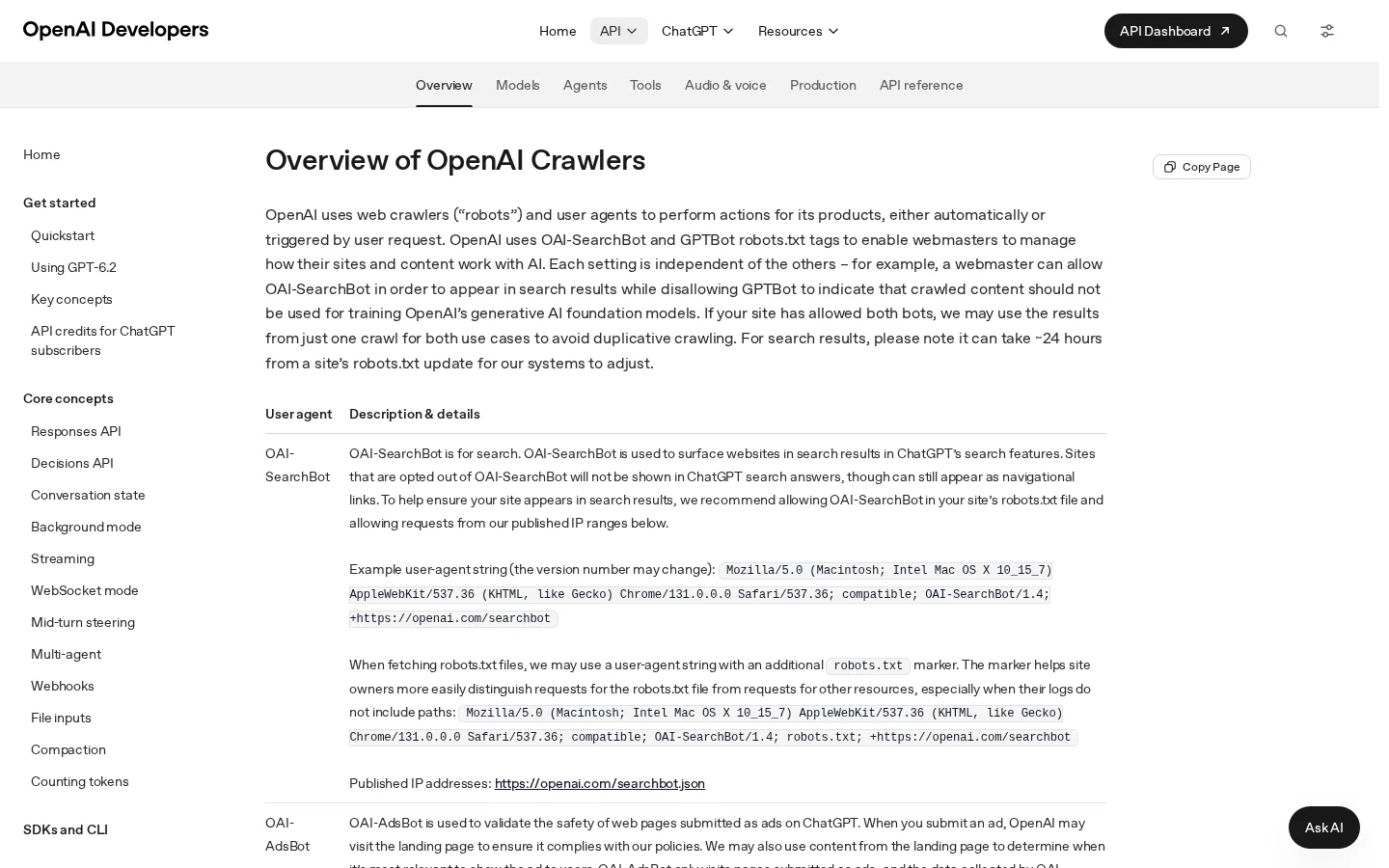
The OpenAI documentation shows the split clearly. GPTBot is used to make OpenAI's generative models more useful and safe, and OpenAI says that disallowing it "indicates a site's content should not be used in training generative AI foundation models." OAI-SearchBot is different: it "is used to surface websites in search results in ChatGPT's search features." ChatGPT-User is a third case. OpenAI states that it "is not used for crawling the web in an automatic fashion" and that "robots.txt rules may not apply" because a user starts the request (OpenAI, crawler documentation).
Training bot vs search bot
This is why a blanket block is a blunt tool. A site that blocks every OpenAI user agent to avoid training data also loses the search channel. The rest of this guide treats the two decisions separately.
The bots that show up most often in the Ahrefs data are a mix of training crawlers and general-purpose ones. The list includes CCBot from Common Crawl, which feeds many datasets, and Google-Extended, which is Google's control token for Gemini. For a deeper look at the first of these, read our guide on Common Crawl and whether to block CCBot, and the glossary entry on AI crawlers lists the main bots by company.
This is the most common misunderstanding. Google's crawler documentation says that Google-Extended "does not impact a site's inclusion in Google Search nor is it used as a ranking signal in Google Search" (Google, crawler documentation). The same page describes its use: it controls whether content Google crawls may be used to train future Gemini models, and whether it can be used for grounding, which means supplying content from the Google Search index to the model at prompt time.
The page does not say that Google-Extended controls AI Overviews. So do not block it expecting to vanish from AI Overviews, and do not block it out of fear that your rankings will drop. It is a training and grounding decision. Make it on purpose.
Reputable sites that block at least one AI crawler went from 23% in September 2023 to nearly 60% by May 2025. A 2025 study by Nicolas Steinacker-Olsztyn, Devashish Gosain and Ha Dao looked at the robots.txt files of reputable and misinformation sites over time. In the same study, 60.0% of reputable sites disallowed at least one AI crawler, against 9.1% of misinformation sites (Steinacker-Olsztyn, Gosain and Dao, arXiv, 2025).
Reputable sites blocking at least one AI crawler
Source: Steinacker-Olsztyn, Gosain and Dao, arXiv:2510.10315 (2025)
The studies above do not measure why the share grew. They show that it grew over two years, so a robots.txt file written in 2023 may already be out of date. If you have not reviewed yours since then, start there. The next section explains that robots.txt is only one of several blocking layers, which is one reason the published rates differ so much.
A robots.txt rule is a request. A compliant crawler reads it and obeys. A crawler that ignores it keeps going. Firewalls, CDN rules and IP blocks sit outside robots.txt and do not show up in the Ahrefs or Steinacker-Olsztyn counts. Ahrefs says so in its own methodology: the study "doesn't include any other block types such as firewalls or IP blocks." So a site can block AI bots at the network layer and still show as open in a robots.txt survey, and a site can show as blocked in robots.txt and still be crawled by a bot that does not respect it.
Keep this in mind for every number in this article. Robots.txt rates undercount real blocking, and they also overstate how well the blocking works.
Five approaches cover most decisions about AI crawlers: allow everything, block training only, block everything, allow only search bots, or block at the network layer. Each one has a clear effect on training, on AI search and on your risk. Pick the one that matches your goal, then test it.
You leave robots.txt open to all AI bots. Your content can be used for training and retrieved for answers. This makes sense if you want maximum reach in AI answers, and if your content is meant to be shared. Be aware that a model trained on your pages may answer a question without sending a click, so measure the traffic that comes back.
You block GPTBot, Google-Extended and CCBot, and leave search bots such as OAI-SearchBot open. This is the approach that most publishers take when they want to keep AI search visibility but refuse training use. It is the best default for many businesses, and it matches the split in the OpenAI documentation. Take a B2B software blog as an example. Its articles bring in trial sign-ups when an AI assistant cites them, but the company does not want its text in a training set. Blocking GPTBot, Google-Extended and CCBot, and leaving the search bots open, gives it that split. The limit is that a compliant training bot simply stops visiting, so the logs show absence rather than a refusal, and you have to check the logs to confirm the block works.
You block every known AI user agent. You keep your content out of training and out of AI search. The cost is real: you give up citations in ChatGPT, Claude, Perplexity and Gemini for those pages. Choose this only if your content is paid, gated or legally sensitive. For a site that wants leads from AI answers, it is usually the wrong choice. Our page on robots.txt for AI crawlers lists the rules bot by bot.
You block the training crawlers and allowlist the search crawlers by name, with a wildcard block for everything else. This gives you the most control, but it needs maintenance, because new bots appear every few months and a missed one falls into the wildcard group.
You block bots in your CDN or firewall, by user agent, IP range or behaviour. This covers crawlers that ignore robots.txt. It also carries the highest risk of blocking a real search engine by mistake, so you must test it with the bot's documented IP ranges and check your logs after each change.
| Approach | Training use | AI search citations | Crawlers that ignore robots.txt | Best for |
|---|---|---|---|---|
| Allow everything | Allowed | Allowed | Not addressed | Reach and brand awareness |
| Block training bots only | Blocked | Allowed | Not addressed | Most businesses that want AI visibility |
| Block all AI bots | Blocked | Blocked | Not addressed | Paid, gated or sensitive content |
| Allow only search bots | Blocked | Allowed | Not addressed | Teams that can maintain a bot list |
| Network-layer blocking | Depends on rules | Depends on rules | Can be blocked | Sites with a crawl load problem |
The table is a starting point. The right row depends on what your pages are for. A product page that drives sales and a research article that brings in links are different cases, and you can use different rules for each path.
You can audit your robots.txt in five steps, and it takes about fifteen minutes on a small site and about an hour on a large one. Start by finding out what the file says today. Most sites have one rule written years ago and then forgotten.
Audit your robots.txt in five steps
Step 3 causes most of the errors we see. A crawler that matches its own group ignores the wildcard group entirely. So a site that writes User-agent: GPTBot with Disallow: / and then adds a separate User-agent: * group with Allow: / has blocked GPTBot and opened everything else. That is the intent for some sites and an accident for others.
A typical file that blocks training while keeping search open looks like this:
User-agent: GPTBot
Disallow: /

User-agent: Google-Extended
Disallow: /

User-agent: CCBot
Disallow: /

User-agent: OAI-SearchBot
Allow: /

User-agent: *
Allow: /
Each named group is read on its own. The last group gives the default for everything else. Check the order and the spelling, because a typo such as GPT-Bot matches nothing and fails silently. You can check your own file with our robots.txt checker, which reads your live file and labels each AI bot as allowed, partial or blocked.
Tip
Keep a short note next to your robots.txt that states the decision for each bot and the date you made it. Six months later, nobody will remember why GPTBot is blocked, and the note stops someone from removing it by accident.
A rule in robots.txt tells you what you asked for. It does not tell you what happened. To confirm that a block works, you need the server log. Look for requests from each bot's declared user agent and check the status code it received. A 403 response on a bot you meant to block shows that a server-side block is working. A 200 response means the bot read the page.
Start with a window of at least two weeks, so that a single crawl does not distort the result. Count the requests per bot and note the status codes. Then compare the count before and after the change. If a bot you blocked keeps sending full-page requests with 200 responses, the bot ignores robots.txt, and you need a network-layer rule. If the count drops to near zero, the block works for compliant crawlers.
Be careful with user agents. Any client can claim to be GPTBot in a header. A reliable check combines the user agent with the IP range that the operator publishes, when it publishes one. Without that, a log count proves only what the bot says about itself. For a practical walkthrough, our guide on log file analysis for SEO shows how to filter a server log by bot and status, and the glossary entry on AI crawler logs explains what each field means.
Measure three things each month. First, the number of requests per AI bot, split by status code. Second, the number of pages those bots fetched. Third, the change in citations or referrals from AI platforms, if you track them. The first two tell you whether the block works. The third tells you whether it cost you anything. If you have no referral data from AI platforms, you can still watch branded searches and direct visits over the same period, though the signal is weaker.
Most errors come from the same few causes: a wildcard rule that matches more than you meant, a training block read as a search block, and a file that changed on one subdomain but not the others. Each error below has a clear sign that you can find in a few minutes.
What it is: a rule such as User-agent: * followed by Disallow: /, usually added to stop unknown bots. Googlebot falls under the wildcard, so it stops crawling the site.
How to spot it: Search Console reports the pages as blocked by robots.txt, and the number of indexed pages falls over a few weeks. Our guide to the blocked by robots.txt status explains the report in detail.
How to fix it: add an explicit group for User-agent: Googlebot with Allow: /, or remove the wildcard block and name only the bots you want to stop. A named group overrides the wildcard for that bot, so the fix is local.
Warning
A single Disallow: / under the wildcard group is the most expensive line in a robots.txt file. Test it on a staging copy before you publish it, and check the status in Search Console the next day.
What it is: the belief that Google-Extended controls AI Overviews, so blocking it removes you from them. Google's documentation describes the token as a control for Gemini training and grounding, and it does not say that it controls AI Overviews.
How to spot it: you blocked Google-Extended, and you still see your pages in AI Overviews, or you see a drop in Gemini mentions that does not match the change in your traffic. Both are signs that the token is not the lever you thought it was.
How to fix it: decide on Google-Extended only for training and grounding, and measure AI Overview visibility separately with your own queries. If you need a control for AI Overviews, do not assume that robots.txt provides it.
What it is: a site that adds one rule for OAI-SearchBot because the name looks like the training bot. OAI-SearchBot is the search crawler, and OpenAI documents it as the one that surfaces websites in ChatGPT search results.
How to spot it: the requests from OAI-SearchBot return 403 or 404 after the change, and your pages stop appearing for queries where they used to be cited. You can see this in the log, not in robots.txt.
How to fix it: block GPTBot for training, and leave OAI-SearchBot open with Allow: / if you want search visibility. Then recheck the logs after a week.
What it is: a line such as User-agent: GPT-Bot or User-agent: ChatGPT User. Crawler names are matched as text, and a typo matches no real bot, so the rule never applies.
How to spot it: the bot still sends requests with 200 status after you blocked it, and your checker shows the bot as allowed. Compare the names in your file with the exact tokens in each operator's documentation.
How to fix it: copy the token from the operator's page, including the hyphens. Then run the checker again, because a correct name shows up as a match in the report.
What it is: you edit the robots.txt on www.example.com and forget that shop.example.com or docs.example.com reads its own file. The Ahrefs study counted about 461 million robots.txt files, not one per site, because subdomains have their own rules.
How to spot it: the crawl logs show a bot fetching pages on a subdomain you thought was blocked, while the main domain looks fine.
How to fix it: list every subdomain that serves public pages, and repeat the audit for each one. If you run many subdomains, put the same rule set in one place and deploy it to all of them.
What it is: a robots.txt URL that returns a 404 page, a redirect to a login page, or an HTML page from a framework catch-all route. Crawlers treat a missing or broken file in different ways, so your intent may not be applied.
How to spot it: the step 1 check in the audit above shows an HTML page or a non-200 status. Some hosts return a 200 with a maintenance page, which passes a quick glance but fails the parser.
How to fix it: serve a static text file at the root of each host, and confirm that the response has a text content type and the 200 status. If you use a framework, add the file as a static asset, not a route.
Use this list before you deploy a change to robots.txt or to your firewall. Each item takes a few minutes, and together they catch most of the errors above.
Before you publish a robots.txt change
If you publish to AI search, the crawler decision is one step in a larger plan. You also need content that AI assistants can read, cite and recommend. Sorank's GEO optimization covers how to get your brand recommended by ChatGPT, Claude and Gemini, and the free robots.txt checker covers the first step, which is making sure the bots you want can reach your pages.
Start with the file you already have. Fetch your robots.txt on every public host, list the AI bots it names, and read the rule groups in order. Decide for each bot whether you want it for training, for search, or for neither. Write that decision down, deploy it on a test host first, and check the logs two weeks after the change. Most of the damage from this topic comes from a wildcard rule nobody reread. A short audit once a quarter prevents it.
Most websites do not block AI crawlers. Ahrefs found that 5.89% of about 140 million sites block GPTBot in their main robots.txt file (May 2025), while reputable sites in a 2025 study block at least one AI crawler far more often.
No. Google's crawler documentation says Google-Extended does not impact inclusion in Google Search and is not a ranking signal. It controls whether your content can be used for Gemini training and grounding.
It depends on your goal. GPTBot is OpenAI's training crawler, so blocking it keeps your content out of training. OAI-SearchBot is a separate search crawler, and blocking it keeps your pages out of ChatGPT search results.
We analyse your competitors, your website and your AI visibility to create a tailored content plan for free.
 Duplicate Content Checker
 Mobile-Friendly Test
 Website Speed Test
 Subdomain Finder
 Domain Age Checker
 CMS Detector
 Googlebot Simulator
 Nofollow Link Checker
 Meta Tag Checker
 Keyword Cannibalization Checker
 Keyword Intent Checker
 Keyword Extractor
 Google Ads Cost Calculator
 CPC Calculator
 Local Citation Finder
 Reddit Threads Finder
 Disavow File Generator
 Redirect Generator
 Canonical Tag Generator
 Passive Voice Checker
 Google Location Changer
 Google Review Calculator
 Google Review Link Generator
 Keyword Combiner
 Podcast Show Notes Generator
 AI Content Rewriter
 AI Text Humanizer
 ChatGPT Prompt Generator
 Twitter Thread Generator
 Tweet Generator
 Landing Page Copy Generator
 Google Ads Copy Generator
 Pinterest Pin Description Generator
 Anchor Text Generator
 Social Media Post Generator
 LinkedIn Post Generator
 Free AI Writer
 Review Response Generator
 LSI Keyword Generator
 YouTube Video Ideas Generator
 YouTube Tag Generator
 YouTube Description Generator
 Product Description Generator
 CTA Generator
 Blog Introduction Generator
 Conclusion Generator
 Hook Generator
 AI Content Brief Generator
 FAQ Schema Generator
 AI Blog Post Ideas Generator
 Structured Data Validator (Schema Validator)
 Alt Text Checker
 Internal Link Analyzer
 Backlink Challenge
 AI Meta Description Generator
 AI Blog Title Generator
 Google Indexability Checker
 AI Blog Outline Generator
 UTM Link Builder
 Keyword Clustering Tool
 Canonical Tag Checker
 XML Sitemap Generator
 Broken Link Checker
 AI SEO Title Generator
 Headline Analyzer
 SERP Preview Tool
 Redirect Checker
 Hreflang Tag Generator
 Heading Structure Analyzer
 HTTP Headers Checker
 Favicon Extractor
 SERP CTR Calculator
 SEO vs Paid Search Savings Calculator
 SEO Share of Voice Calculator
 SEO ROI Calculator
 SEO Traffic and Revenue Forecast Calculator
 SEO Budget Calculator
 SEO Break-Even Calculator
 SaaS SEO ROI Calculator
 ROAS Calculator
 Reading Time Calculator
 Ranking Gain Simulator
 Organic Traffic Value Calculator
 Organic Traffic Estimator and Website Traffic Checker
 LTV to CAC Ratio Calculator
 Local SEO ROI Calculator
 Link Building Cost Calculator
 Keyword Value Calculator
 Keyword Opportunity Score Calculator
 Keyword Density Calculator
 GEO ROI Calculator
 GEO Content Investment Calculator
 Ecommerce SEO ROI Calculator
 Customer Lifetime Value Calculator
 Customer Acquisition Cost Calculator
 CTR Calculator
 Cost Per Article Calculator
 Conversion Rate Calculator
 Content Marketing ROI Calculator
 ChatGPT Referral Traffic Estimator
 Bounce Rate Calculator
 Backlink ROI Calculator
 AI Visibility Score Calculator
 AI Traffic Value Calculator
 AI Share of Voice Calculator
 Cost of AI Invisibility Calculator
 AI Citation Rate Calculator
 llms.txt Validator
 AI Overview Checker and AI Overviews Rank Checker
 Robots.txt Checker
 AI SEO Audit
 LLM Readability Checker
 SearchGPT Readiness Checker
 Structured Data LLM Audit
 Website Crawlability AI Audit
 Why ChatGPT Is Not Recommending My Website
 Gemini Ranking Tool
 Perplexity Ranking Checker
 LLM Citation Checker
 Answer Engine Optimization Audit
 GEO Audit
 AI Search Visibility Test
 ChatGPT Visibility Checker
 llms.txt Generator
 URL Extractor
 Webpage to Markdown
 Sitemap Checker
 SERP Volatility Sensor
 Page Size Checker
 Word Counter
 Slug Generator
 Schema Generator
 Robots Generator
 OG Preview
 Meta Tags Generator
 Image Compressor
 Favicon Generator
 On-Page SEO Audit: SEO Checker and SEO Analyzer
 Backlink Analysis Tool
 Keyword Research Tool
 Domain Authority Checker
 “I tested Sorank on a real client site and it's insane. It does everything an agency would bill you $1500 a month for. It's going into production on that client now.”

 Guillaume Guersanguersanguillaume.com“We are an Ads agency and we wanted to get our SEO back on track once and for all. Sorank gave us a clear view of our site, helped us prioritize optimizations, and properly structure our content. The tool is easy to use, well designed for a team, and very practical for centralizing tracking without having to juggle multiple platforms. A very solid foundation to start fresh with our SEO.”
 Gaspard MadouiAds Agency
 “I just let the Sorank software do its thing, and now my DR is 25 and my page is ranking higher.”
 Lucas Flandrefoundertrace.fr“I specialized in GEO thanks to Sorank. The GEO Leaderboard allows me to show my clients their position vs competitors on ChatGPT. It’s a real commercial differentiator.”
 MélanieSEO Freelance“Great service, works well for our website and helps us understand how to improve it to rank better on Google and elsewhere. Congrats, keep going, I recommend it.”
 Hugo T.E-commerce merchant