Preferences
Privacy is important to us, so you have the option of disabling certain types of storage that may not be necessary for the basic functioning of the website. Blocking categories may impact your experience on the website. More information
Privacy is important to us, so you have the option of disabling certain types of storage that may not be necessary for the basic functioning of the website. Blocking categories may impact your experience on the website. More information

Link building statistics that matter: correlations, backlink counts, real cost per link and Google's spam rules, with sources and how to use them.

In short
Link building statistics are measured figures on how backlinks relate to rankings, how many links top pages have, and what links cost. The strongest recent figure is a correlation, not a cause: in Ahrefs' January 2025 study, referring domains scored 0.255 Spearman against rankings. Use these numbers to decide where to spend effort, not to predict a position.
Want to go further? Ask
Quick quiz
How should you get links from other websites?
Sorank matches your answers


Test it for 3 days on your own site and see where you stand on Google, ChatGPT and the other AIs.
Start 3-day free trial3 days free, then stop whenever you want. 90-day results guarantee, conditions apply.
Yes, but the effect is smaller and less direct than many guides suggest. Backlinks still track with rankings across large samples. No study shows that one extra link moves a page up one position. This article covers the links; for the wider search picture, see SEO statistics.
In its January 30, 2025 study, Ahrefs (Patrick Stox and Xibeijia Guan) compared the top 20 Google results with several link and authority metrics, across the 1 million US keywords with the most search volume. They used Spearman correlation, which runs from -1 to 1, where 0 means no relationship. Referring domains scored highest at 0.255, total backlinks scored 0.248, and Domain Rating scored 0.131. The authors call these correlations weak, and that is the right way to read them.
Two more details matter for planning. For local queries, links and referring domains correlated at 0.33, the highest figure in the study. The earlier Ahrefs study, which used low-volume, non-branded queries of 2000 to 5000 searches, also put referring domains first, at 0.29. The two studies used different query sets, so compare them with care, but both point the same way.
Note
A correlation of 0.255 means links and rankings tend to move together. It does not show that a link causes a ranking gain. Pages that already rank well also attract more links, so the two can rise together without one causing the other.
A referring domain is a distinct website that links to you. Ten links from one blog count as one referring domain, while ten links from ten sites count as ten. The 2025 data ranks referring domains above total backlinks, which is why you should track them first. For the definition and how to count them, see referring domains.
Use these metrics as a priority list, not a formula. Start with referring domains, because it correlated best in the 2025 study. Check your Domain Rating (DR) only as a rough gauge, because it is Ahrefs' own score, not a Google signal. Then look at where your links sit. A link on a page that gets visits can send you visitors, which a link on a dead page cannot. The same idea appears in domain authority, seen from another angle.
The top Google result has about 3.8 times more backlinks than positions 2 to 10, according to Backlinko's study of 11.8 million Google results. That ratio is a snapshot, not a target to copy. Top pages are often older, larger and better known, so they have had more time and more reasons to earn links.
Backlink figures from Backlinko's studies
Sources: Backlinko, SERP study (11.8 million Google results) and content study (912 million blog posts, page last updated 2019)
In Backlinko's content study of 912 million blog posts, 94% of posts had zero external links. That changes the goal. A page with a few links from different sites is already in a small minority, so you do not need to match the top result on day one. Count the links your best page has now, then set a target for the next three months instead of copying a competitor's total.
Open the top three results for your query and count their referring domains in a tool. If the top result has about three times the referring domains of your page, links are probably your bottleneck. If your page has a similar number of referring domains but ranks lower, the gap is more likely content, search intent or on-page relevance, and new links will not fix it. If links are the gap, plan the work with how many backlinks you need as your reference.

Long, specific and original content earns more links, but most content still earns none. In Backlinko's analysis of 912 million posts, posts over 3000 words received 77.2% more referring domains than posts under 1000 words, and only 2.2% of content earned links from multiple websites. Both figures are correlations across many posts, not proof that one feature causes the other.
| Finding | What the data says | What it means for you |
|---|---|---|
| Length | Posts over 3000 words get 77.2% more referring domains than posts under 1000 words | Length helps only when each section adds something |
| Zero links | 94% of blog posts have zero external links | Plan links from the start, with a reason for each target to cite you |
| Multi-site links | 2.2% of content earns links from multiple websites | Aim for one asset that many sites would cite, not one link per pitch |
Editors and site owners link to pages that save them work. The most common reasons are original data, a clear method, a free tool, and a definition that nobody else publishes. A page with one number that no one else has published gives a writer something to cite. A generic roundup gives them nothing to cite.
Word count is a sign of effort, not of value. The 77.2% gap compares long posts with short ones, so it does not tell you that a 3000-word post full of filler beats a 1200-word post with data. Write each section to answer one question, answer it with a number, a method or an example, and cut anything that repeats the section before. To judge which sites deserve your outreach, use the quality backlink criteria.
Seven methods cover most link building: original data, guest posting, broken link building, resource pages, link reclamation, sponsored placements and link exchanges. Six of them work when the reader gains something from the link. Link exchanges are the exception, because Google's spam documentation lists excessive link exchanges as link spam.
Principle: Publish a fact or a tool that other sites would cite, such as a survey, a benchmark, a calculator or a dataset.
When to use it: When you can produce data or a tool that nobody else has, and you can afford several weeks of work.
Advantages: Each link is editorial, and one strong asset can keep earning links for years.
Limits: A weak asset earns nothing. You need a real insight, not a rewritten list.
Example: A company that publishes median onboarding times from its own customer base, split by industry, gives reporters a number they can cite with a link to the source.
Principle: Write an article for another site's audience and link back to your site from the body or the author bio.
When to use it: When you have expertise the site's readers lack, and the site has an editor who rejects weak pieces.
Advantages: It builds a working relationship and can send referral visitors.
Limits: Many sites sell guest posts with no editorial standard. Google's documentation names optimized anchor text in guest posts as link spam, so use descriptive or branded anchors. The full process is in the guest posting guide.
Example: A regional HR consultant pitches a piece on hiring rules to the careers section of a regional business newspaper, with the author bio linking to the consultant's site.
Principle: Find a live page with a dead outbound link, then offer your page as the replacement.
When to use it: When the topic has many resource pages that link to outside tools or guides, which go stale over time.
Advantages: You help the site fix a problem, which makes a reply easier to get.
Limits: The pool of broken links is small, and many people run the same search. Use the broken link building method to qualify each target before you write.
Example: A guide to free SEO tools links to a checker that now returns an error. You offer your updated checker as the replacement and name the dead URL in your message.
Principle: Pitch a page that lists useful resources on your topic, and offer a guide that fits the list better than what is already there.
When to use it: When the topic has pages that collect links, and your page is clearly better than the ones listed.
Advantages: The link stays as long as the page is maintained, and maintained lists tend to stay up.
Limits: Many resource pages are outdated or spammy. Check the page's date and whether it still links to real sites before you pitch. The resource page link building method covers the checks.
Example: A library's list of accounting guides for small businesses accepts a new guide that has a checklist the other entries lack.
Principle: Recover links you already earned that were lost, through moved pages, changed URLs or mentions without a link.
When to use it: After a redesign, a domain change or a deleted page, or when you find brand mentions with no link.
Advantages: It is fast and cheap, because the link already existed once.
Limits: It needs regular monitoring to catch losses early. The link reclamation method explains how to find them.
Example: A writer mentions your study without a link. You send a short message asking for a link to the study URL.
Principle: Pay a site to publish content or a link for advertising or sponsorship.
When to use it: When you have a budget and need predictable placements on sites your audience reads.
Advantages: Timing and cost are predictable.
Limits: Quality varies widely across sellers. Google's documentation says buying and selling links is acceptable for advertising or sponsorship when the link carries rel="sponsored" or rel="nofollow", but buying links to influence rankings is link spam. Read the buying backlinks guide before you sign anything.
Example: A SaaS company pays for a sponsored article on a niche trade site, and the link carries rel="sponsored" as agreed in the contract.
Sorank's natural backlink acquisition feature places contextual links inside articles on sites in your niche, and it runs on a credit system. Ask any network the same questions: which rel attribute the link carries, how the placement is paid for, and who decides whether a site hosts a link.
Principle: Two sites agree to link to each other.
When to use it: Not as a link-building tactic. It is in this list so you can recognize it.
Advantages: None that outweigh the risk.
Limits: Google's spam documentation lists excessive link exchanges and partner pages made only for cross-linking as link spam. The reasoning is covered in why link exchanges get flagged.
Example: A "links for links" group where ten sites list each other on a resources page.
| Method | Effort | Google risk | Best use |
|---|---|---|---|
| Original data and tools | High | Low | Long-term, citable assets |
| Guest posting | Medium | Medium to high if anchors are optimized | Expert credibility with a specific audience |
| Broken link building | Medium | Low | Topics with many outdated resource pages |
| Resource pages | Medium | Low | Guides that fill a gap in an existing list |
| Link reclamation | Low | Low | Sites with past mentions or moved pages |
| Sponsored placements | Low to medium | Low when qualified with rel="sponsored" | Budgeted campaigns on known sites |
| Link exchanges | Low | High | None: avoid |
Outreach gets replies when your message names one specific page, one specific gap and one reason the site's readers care. A vague request for a link gets ignored, so build every email around a concrete fact about the site you pitch.
Five-step outreach method
Search for pages that already link to resources on your topic. Use a query like the one below, and replace the topic with your own keyword.
"your topic" "useful resources" OR "helpful links"Pages beat sites as targets, because you can read the exact sentence that makes a page a fit. A list of pages also shows you what the editor already accepts. If you want to go further, a backlink gap analysis shows which pages link to your competitors but not to you.
Confirm that the page is current, that it links to live sites, and that the site has an editorial standard. Read two or three articles on the domain. If they look like paid lists or auto-generated pages, drop the target. Sending outreach to weak sites costs time, and it can put your link in a poor neighborhood.
Keep the message to three sentences: the page, the specific problem or gap, and what you offer. Send it once. Follow up at most twice, and stop after that. For full templates and sending rules, see the email outreach guide.
Example
"Hi [name], your guide to local citations links to a checker that now returns an error. We rebuilt it as a free tool, updated for 2026. Would it work as a replacement in your list?"
Log each target, the date you sent the message, the reply and the link status. A spreadsheet is enough. Check the links again after one month, because a link can be added and then removed later in an editing pass.
Google's spam documentation treats buying or selling links to influence rankings as link spam. It accepts paid links for advertising or sponsorship when they carry rel="sponsored" or rel="nofollow", as described in Google's link spam documentation.
Editorial link vs unqualified paid link
Source: Google Search Central, link spam documentation
The documentation gives a concrete list. Each item describes a pattern you can audit on your own profile:
Use rel="sponsored" when the link comes from a paid placement. Use rel="nofollow" when you do not want to pass ranking credit or cannot confirm the terms. In HTML, a qualified sponsored link looks like this:
<a href="https://example.com/partner-page" rel="sponsored">Partner page</a>Ask the publisher to add the attribute before the article goes live. A link you cannot qualify is a link you should not buy. For the difference between the two attributes, see nofollow links.
Anchor text is the visible words of a link, and it is one of the first things a spam review looks at. A profile with many identical keyword anchors looks engineered. Use a mix of brand names, page titles and descriptive phrases. The anchor text glossary entry covers the types in detail.
The real cost of a link is the placement fee, plus the writing fee, plus the time you spend on prospects who decline. Quoted prices hide that last part, which many budgets leave out.
real cost per link = placement + writing + (hours per prospect x hourly rate) / acceptance rateThe acceptance rate is the share of prospects who say yes, written as a decimal, so 20% becomes 0.2. The formula gives the cost per accepted link, which is why the time cost grows as the acceptance rate falls.
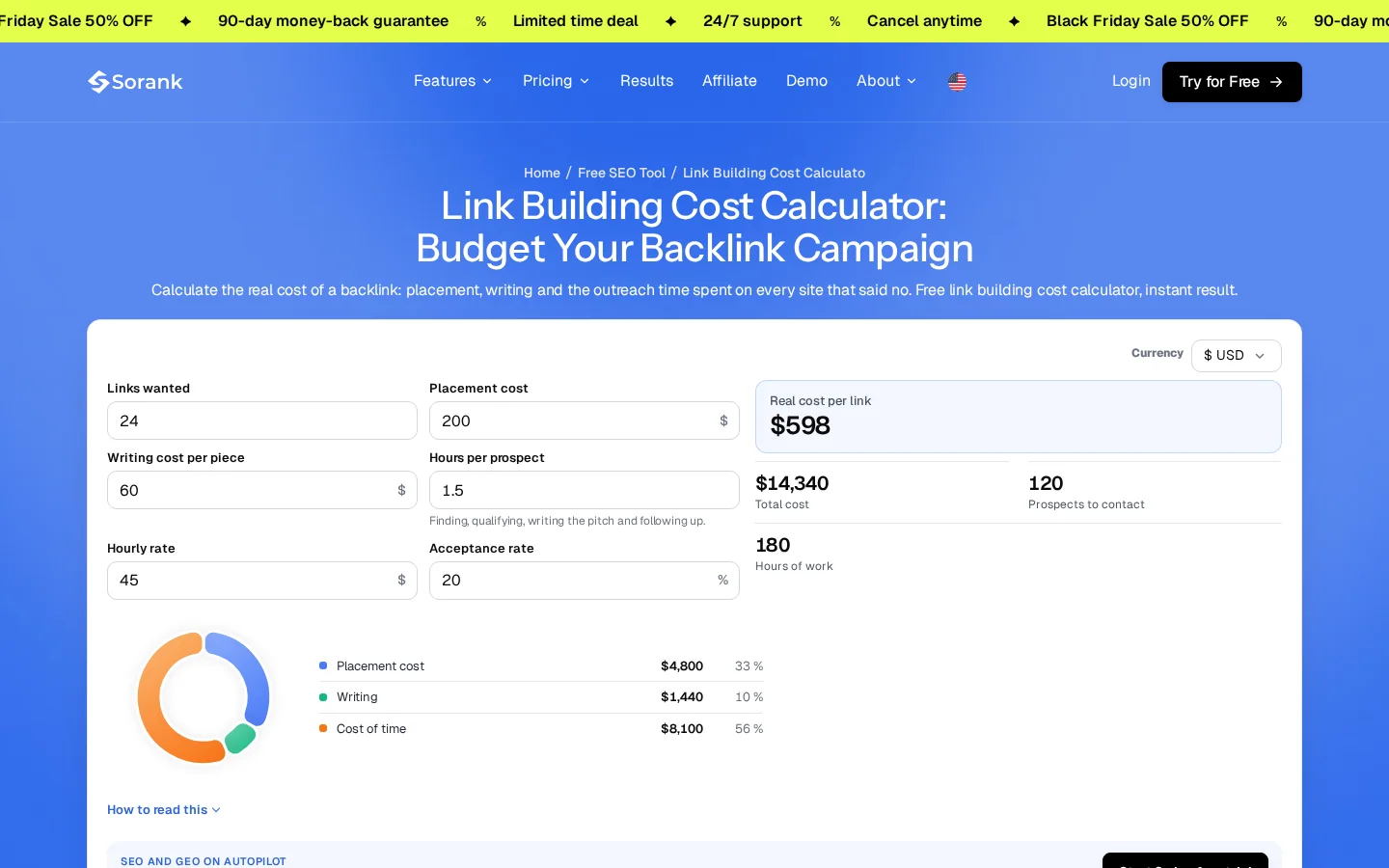
Imagine a placement at 200, a writing fee of 100, one hour per prospect at an hourly rate of 50, and an acceptance rate of 20%. The time cost per accepted link is 1 x 50 / 0.2 = 250. The real cost per link is 200 + 100 + 250 = 550. The quoted price is 300, but the real cost is 550 once outreach time counts. These numbers are illustrative, not market prices.
Tip
Run your own numbers in the link building cost calculator, which adds the outreach time to the price of each placement.
A low-priced link from a weak site costs little to buy, but it can cost a lot to explain later. Spam risk, a dead site and a page nobody reads all reduce its value. Compare the cost per link with the criteria in quality backlinks before you choose a price tier.
Audit your links every month. Check new and lost referring domains, the balance of anchor text, the follow status of each link, and the pages that receive links. A monthly routine catches problems while they are still small.
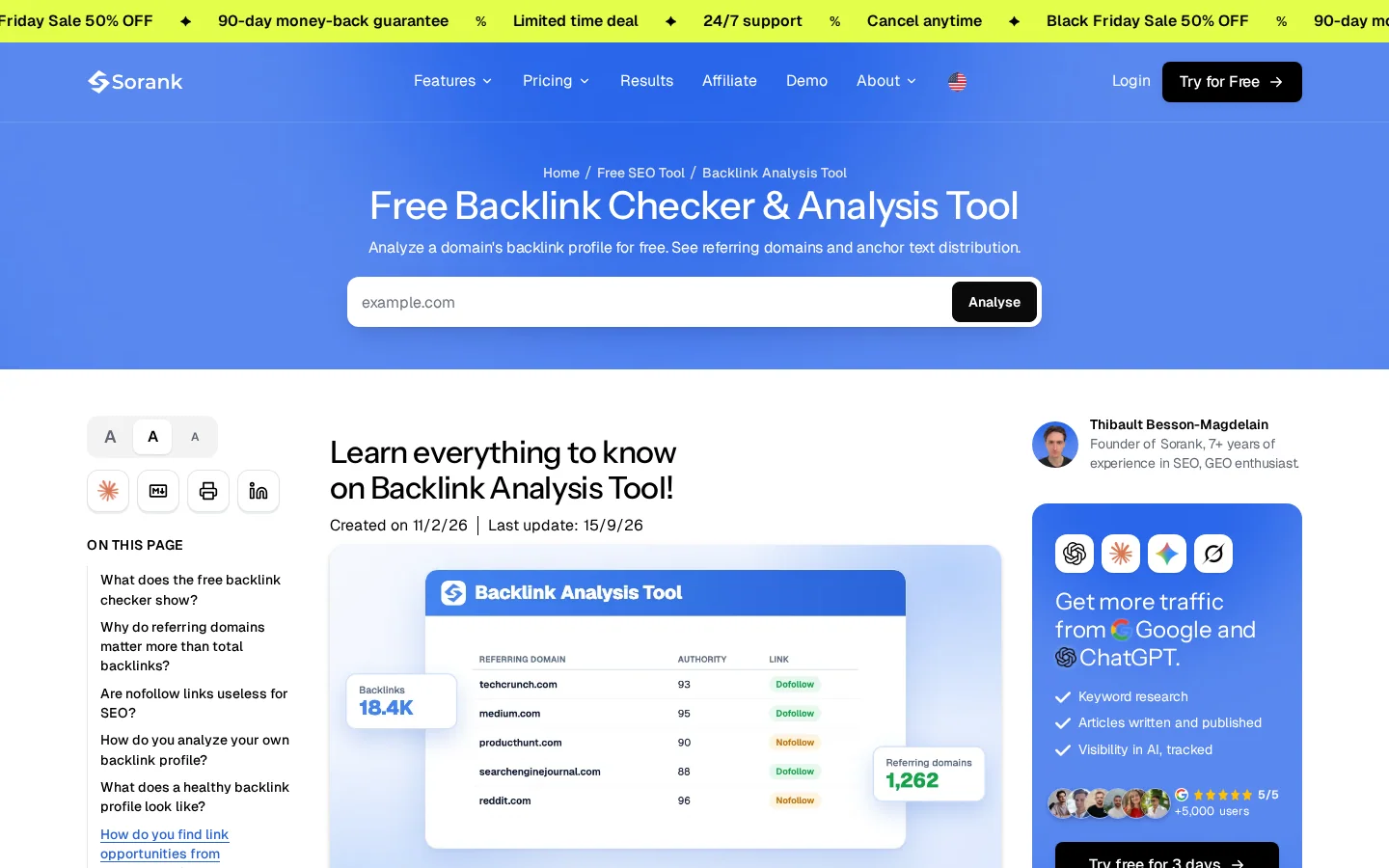
Start with a free check of your domain's profile. The free backlink checker returns total backlinks, referring domains, broken backlinks and the split between followed and nofollowed links.
Tip
Save each month's referring domain list. Comparing two saved lists shows you which links you gained and lost, which memory alone does not.
Monthly link audit
Count how often each anchor appears, and look for the same money keyword repeated across many sites. You can rarely change the anchors others have already published, so use the anchor text optimization guide to rebalance the anchors in your future outreach.
Links disappear when pages move, get deleted or get rewritten. A redirect keeps the value only when it points to the new version of the same page. Monitor your referring domains for changes, and when a link disappears, check whether the page moved. The backlink monitoring guide covers how to set up the alerts.
Run the audit in a fixed order, so each step uses the output of the one before. Start with referring domains, then anchor text, then lost links. The complete procedure is in the backlink audit method.
The costly mistakes are paying for links that carry no rel attribute, counting links instead of referring domains, and pitching without a specific reason. Each one has a sign you can check and a fix you can apply this month. The link building mistakes list covers more.
What it is: A sponsored article or placement where the link is a plain link, with no rel="sponsored" or rel="nofollow" attribute.
How to spot it: Open the published page, view its source, and look at the link's rel attribute. If there is none, the link is plain.
How to fix it: Ask the publisher to add the attribute, and stop buying from sellers who refuse. Keep a record of each placement, its terms and the invoice, so you can explain it later if you are asked.
What it is: Several guest posts that link to your money page with the same keyword as the anchor.
How to spot it: Filter your anchor report for one exact phrase that repeats across many domains.
How to fix it: Use the brand name or a descriptive phrase, and link to the page that best helps the reader. Google's documentation names optimized anchor text in guest posts as link spam.
What it is: Agreements to link to each other, or partner pages where many sites link only to one another.
How to spot it: A resources page where a dozen sites list each other, or a request that asks you to link back first.
How to fix it: Decline the exchange. Where a site agrees, remove the reciprocal links you already placed, and do not replace them with another swap.
What it is: A target such as "get 100 links this month", which a single blog could fill.
How to spot it: Your link count rises, but your referring domain count does not.
How to fix it: Set the target in referring domains and track it next to the link count. The 2025 data ranks referring domains above total backlinks, so diversity is the goal, not volume.
| Mistake | How to spot it | Fix |
|---|---|---|
| Paid links without a qualifier | Plain link with no rel attribute in the source | Ask for rel="sponsored", or stop buying |
| Optimized anchors in guest posts | One exact keyword repeated across many domains | Use brand or descriptive anchors |
| Link exchanges | Partner pages where sites only link to each other | Decline, and remove reciprocal links where possible |
| Counting links, not domains | Link count rises, referring domains stay flat | Track referring domains as the main target |
Start with one audit and one linkable asset, not with a volume target. A small, specific plan beats a long list of unfinished tasks.
Your first week
Link building statistics are most useful as a set of decisions: which metric to track, which method to use, which rules to respect, and what each link really costs. Keep the figures in one table, review it each quarter, and update the sources when a study is refreshed. For a broader plan, the backlink strategies guide puts these methods side by side.
Yes, but the effect is a correlation, not a guaranteed boost. In Ahrefs' January 2025 study, referring domains had the highest Spearman correlation with rankings at 0.255, which is weak. Treat it as a reason to earn more referring domains, not as a formula for a position.
The real cost of a link is the placement fee, plus the writing fee, plus the time spent on prospects who decline. Multiply the hours per prospect by your hourly rate, then divide by the acceptance rate. Add that to the fees to get the cost per accepted link.
Google's spam documentation treats buying or selling links to influence rankings as link spam. Paid links are acceptable for advertising or sponsorship when they carry rel="sponsored" or rel="nofollow".
We analyse your competitors, your website and your AI visibility to create a tailored content plan for free.
 AI Content Brief Generator
 FAQ Schema Generator
 AI Blog Post Ideas Generator
 Structured Data Validator (Schema Validator)
 Alt Text Checker
 Internal Link Analyzer
 Backlink Challenge
 AI Meta Description Generator
 AI Blog Title Generator
 Google Indexability Checker
 AI Blog Outline Generator
 UTM Link Builder
 Keyword Clustering Tool
 Canonical Tag Checker
 XML Sitemap Generator
 Broken Link Checker
 AI SEO Title Generator
 Headline Analyzer
 SERP Preview Tool
 Redirect Checker
 Hreflang Tag Generator
 Heading Structure Analyzer
 HTTP Headers Checker
 Favicon Extractor
 SERP CTR Calculator
 SEO vs Paid Search Savings Calculator
 SEO Share of Voice Calculator
 SEO ROI Calculator
 SEO Traffic and Revenue Forecast Calculator
 SEO Budget Calculator
 SEO Break-Even Calculator
 SaaS SEO ROI Calculator
 ROAS Calculator
 Reading Time Calculator
 Ranking Gain Simulator
 Organic Traffic Value Calculator
 Organic Traffic Estimator and Website Traffic Checker
 LTV to CAC Ratio Calculator
 Local SEO ROI Calculator
 Link Building Cost Calculator
 Keyword Value Calculator
 Keyword Opportunity Score Calculator
 Keyword Density Calculator
 GEO ROI Calculator
 GEO Content Investment Calculator
 Ecommerce SEO ROI Calculator
 Customer Lifetime Value Calculator
 Customer Acquisition Cost Calculator
 CTR Calculator
 Cost Per Article Calculator
 Conversion Rate Calculator
 Content Marketing ROI Calculator
 ChatGPT Referral Traffic Estimator
 Bounce Rate Calculator
 Backlink ROI Calculator
 AI Visibility Score Calculator
 AI Traffic Value Calculator
 AI Share of Voice Calculator
 Cost of AI Invisibility Calculator
 AI Citation Rate Calculator
 llms.txt Validator
 AI Overview Checker and AI Overviews Rank Checker
 Robots.txt Checker
 AI SEO Audit
 LLM Readability Checker
 SearchGPT Readiness Checker
 Structured Data LLM Audit
 Website Crawlability AI Audit
 Why ChatGPT Is Not Recommending My Website
 Gemini Ranking Tool
 Perplexity Ranking Checker
 LLM Citation Checker
 Answer Engine Optimization Audit
 GEO Audit
 AI Search Visibility Test
 ChatGPT Visibility Checker
 llms.txt Generator
 URL Extractor
 Webpage to Markdown
 Sitemap Checker
 SERP Volatility Sensor
 Page Size Checker
 Word Counter
 Slug Generator
 Schema Generator
 Robots Generator
 OG Preview
 Meta Tags Generator
 Image Compressor
 Favicon Generator
 On-Page SEO Audit: SEO Checker and SEO Analyzer
 Backlink Analysis Tool
 Keyword Research Tool
 Domain Authority Checker
 “I tested Sorank on a real client site and it's insane. It does everything an agency would bill you $1500 a month for. It's going into production on that client now.”

 Guillaume Guersanguersanguillaume.com“We are an Ads agency and we wanted to get our SEO back on track once and for all. Sorank gave us a clear view of our site, helped us prioritize optimizations, and properly structure our content. The tool is easy to use, well designed for a team, and very practical for centralizing tracking without having to juggle multiple platforms. A very solid foundation to start fresh with our SEO.”
 Gaspard MadouiAds Agency
 “I just let the Sorank software do its thing, and now my DR is 25 and my page is ranking higher.”
 Lucas Flandrefoundertrace.fr“I specialized in GEO thanks to Sorank. The GEO Leaderboard allows me to show my clients their position vs competitors on ChatGPT. It’s a real commercial differentiator.”
 MélanieSEO Freelance“Great service, works well for our website and helps us understand how to improve it to rank better on Google and elsewhere. Congrats, keep going, I recommend it.”
 Hugo T.E-commerce merchant