Preferences
Privacy is important to us, so you have the option of disabling certain types of storage that may not be necessary for the basic functioning of the website. Blocking categories may impact your experience on the website. More information
Privacy is important to us, so you have the option of disabling certain types of storage that may not be necessary for the basic functioning of the website. Blocking categories may impact your experience on the website. More information

Learn how SaaS SEO works in 2026: buyer keywords, comparison pages, app indexing, AI crawlers and link building, with a checklist you can use today.

In short
SaaS SEO means getting your software found when a buyer searches for a problem, for an alternative to a tool they already use, or for a comparison before they choose. It needs three things: pages that match those buyer queries, a site that Google and AI crawlers can read, and links from sites that already have authority. Measure it in trials and paid accounts, not only in visits.
Want to go further? Ask
Quick quiz
Is SEO right for you, and how should you start?
Sorank matches your answers


Test it for 3 days on your own site and see where you stand on Google, ChatGPT and the other AIs.
Start 3-day free trial3 days free, then stop whenever you want. 90-day results guarantee, conditions apply.
Many SaaS SEO guides focus on keywords, on-page work and backlinks. Those matter, but they skip three things that decide most SaaS results: how JavaScript-built apps get indexed, how AI crawlers are controlled, and how to measure revenue instead of clicks. This guide covers all three.
A SaaS company sells a subscription to a buyer who may compare options for weeks. The query tells you where that buyer is. "Project management software" is a category search. "Trello alternative for agencies" comes from someone who already has a tool and wants a reason to switch. Both can bring trials, but they need different pages.
Ecommerce SEO often ends at the product page. In SaaS, the buyer can enter through a guide, a comparison, an integration page or a free tool, then move on to the signup page. Each entry point must answer its own question and make the next step obvious.
Ecommerce SEO vs SaaS SEO
A new page must be crawled, indexed and shown for enough queries before it earns clicks. That takes months, not weeks. While you wait, track the leading signals: indexed pages, impressions for buyer queries and organic trial starts. Revenue follows those signals.
Many software teams launch a fast app with a three-page marketing site. The app is not built for search, the blog has a few posts, and the pricing text sits in an image or a script. Fixing those basics costs less than a content plan, and it should come first.
Clicks concentrate at the top of the results. A 2026 click study from First Page Sage, last updated on September 22, 2026, gives a blended click share of 7.1% for position 1, 3.0% for position 2 and 1.7% for position 3. Those are averages. The same study splits results by whether an AI answer appears on the page, and that split matters more for your planning.
Without an AI answer, position 1 takes 22.6% of clicks. With an AI answer on the page, it takes 3.6%. Position 2 falls from 10.2% to 1.4% on the same split. A top ranking no longer guarantees the traffic it used to.
The dataset behind those numbers
Source: First Page Sage, CTR study, updated September 22, 2026
Your page must therefore be the clearest, most quotable answer to its query, and your brand must show up in the answer itself. Start with the definitions in AEO vs SEO vs GEO, then check how AI tools mention you. AI mention tracking shows when ChatGPT cites your brand.

Search volume is a weak first filter for SaaS. A query with modest volume can bring more trials than a broad query with large volume, when the searcher is close to buying. Sort your list by buying intent first, then by volume.
Four intent groups cover most SaaS queries. Problem queries describe a pain, often with "how to". Alternative queries name a tool the buyer already uses. Comparison queries put two tools side by side. Category queries name the type of software. Each group calls for a different page.
| Intent | Typical query pattern | Page to build |
|---|---|---|
| Problem | how to rank a SaaS site on Google | Guide with a clear, direct answer |
| Alternative | X alternatives for small teams | Alternatives page |
| Comparison | tool A vs tool B | Honest comparison page |
| Category | SaaS SEO software | Product or category page |
Start with the Search Console queries that already bring impressions. They show what Google thinks your pages are about, and they often reveal buyer terms you did not plan for. Add the names of competitors and the comparison questions your sales team hears on calls. Then group everything with a keyword tool. Sorank's automated keyword research does that grouping, and the SEO Spy Tool tracks competitor keywords every week.
Search the query yourself and read the first ten results. If they are guides, a product page will struggle. If they are comparison or tool pages, a long blog post will struggle. Match the format the results already reward, then make your version more specific and more honest.
Four page types catch buyers who are close to a decision. Build them in this order: alternatives, comparisons, integrations and use cases.
| Page type | The buyer's question | What the page must contain |
|---|---|---|
| Alternatives | Which tool can replace mine? | An honest list, who each option suits, your real strengths and limits, and a migration path |
| Comparison | Which of these two fits me? | A criteria table, prices with the date you checked them, screenshots and a "choose this if" section |
| Integration | Does it work with my stack? | Setup steps, the data that moves between the two tools, and a link to the integration docs |
| Use case | Is this built for my job? | The job to be done, a worked example and the features that matter for that job |
A comparison that only praises you does not earn trust. Name the competitor's real strengths, show the date when you checked the prices, and say who should not choose you. A buyer who finds an honest page is more likely to read the rest of your site.
Someone who searches for your product plus another tool already uses that tool. An integration page answers that exact need: what connects, what data moves, how long setup takes. Update it when either product changes its interface, because outdated steps lose the click and the trust.
AI drafts can speed up comparison and integration pages, but volume is the risk. Google's guidance on generative AI content warns that using AI tools to generate many pages without adding value for users may violate its spam policies. It asks for accuracy, quality and relevance. Publish fewer pages, check each price and feature by hand, and add something a generic model cannot know.
Internal links tell crawlers which pages matter and how topics connect. They also carry readers from a guide to the page where they can act. Three structures are common. They can coexist, but choose one as your default so the link graph stays readable.
| Method | Core idea | Best for | Main limit |
|---|---|---|---|
| Wikipedia-style hub | A hub links to every key page on a theme, and those pages link back | Wide knowledge bases with a few main themes | A hub nobody maintains goes stale |
| Topic cluster | A pillar covers a broad query, and cluster articles cover its specifics | Owning one topic with many sub-questions | Cluster articles can compete for the same query |
| URL silo | The folder structure carries the topic | Large sites with clear product sections | Does not link across folders by itself |
Principle: a hub page links to every important page on a theme, and each of those pages links back to the hub and to its closest neighbours. When to use it: when you have many guides that answer related questions but no obvious parent. Advantages: the hub gathers relevance for the whole theme, and new visitors find everything from one place. Limits: a very long list makes each link less specific, and a hub nobody updates stops being useful. Example: a "SaaS SEO" hub that links to churn content, pricing page work and integration guides, each of which links back.
Principle: a pillar page covers a broad query, and cluster articles cover its specific questions. Every cluster article links up to the pillar, and the pillar links down to each one. When to use it: when you can write a series of specific articles on one subject. Advantages: the site clearly owns the topic, and reporting stays simple. Limits: two cluster articles that target the same query compete with each other, so check for overlaps before you publish. Sorank's topical cluster generator groups keywords into themed clusters and flags overlaps inside each cluster.
Principle: the directory tree carries the topic. Pages in a guides folder or an integrations folder link to each other, and the folder's index page links to all of them. When to use it: on large sites with clear product sections. Advantages: crawlers and visitors read the structure from the URL alone. Limits: a silo does not link across folders by itself, so you still add cross-links, and a later URL change needs redirects. Example: an integrations folder with one page per tool, all linked from the integrations index and from the matching guides.
Example
A project management SaaS wants to rank for "project management for agencies". Its pillar page covers the whole topic. Its cluster articles cover client portals, time tracking for agencies and alternatives for agencies. Each cluster article links up to the pillar and across to its two closest neighbours.
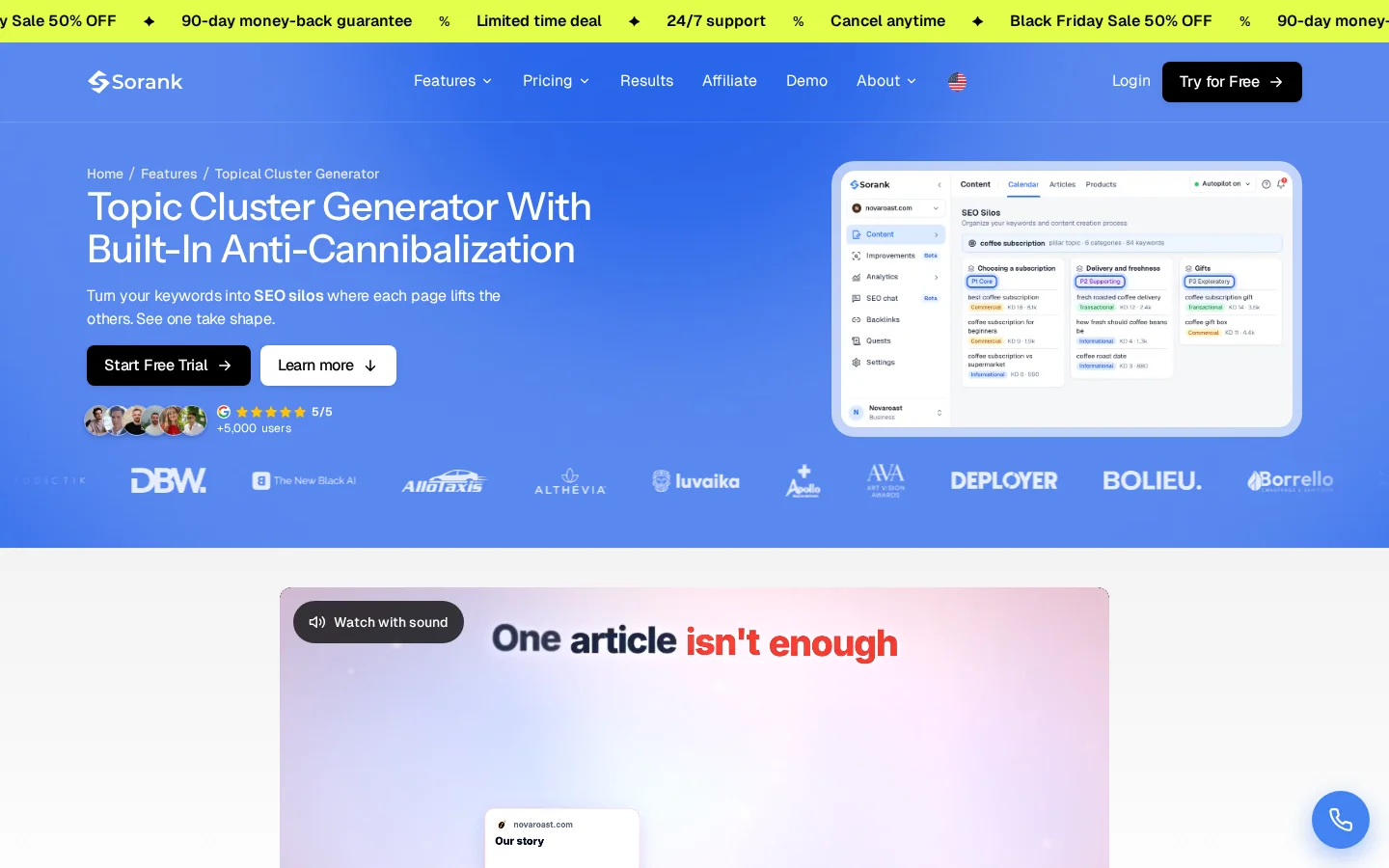
After you publish, check the link graph with the internal link analyzer. Look for pages with no internal links pointing to them. Google can still find those pages through a sitemap, but readers and crawlers that follow links will rarely reach them.
Many SaaS sites are built as single-page apps. The marketing pages, the blog and the product share one framework, and the text appears only after JavaScript runs. Google's JavaScript SEO basics guide explains that a headless Chromium renders the page once Google's resources allow, and that the page may wait in a queue for a few seconds or longer. The same guide says not all bots can run JavaScript, so server-side rendering or pre-rendering remains the safest choice.
A marketing page built as a client-side app vs rendered on the server
Load a marketing page with JavaScript turned off. If the title, the H1 and the main copy are missing, Google has to wait for rendering to see them. Then run the URL Inspection tool in Search Console on the same page and compare the rendered HTML with what you expected. Fix the template once, because one fix in the framework covers every page built from it.
Dashboards, logged-in areas and internal search results should stay out of Google. Put a robots meta tag in the head of those templates. Google's robots meta tag documentation describes the rule "do not show this page, media, or resource in search results". The same rule can be sent as an X-Robots-Tag header for files with no head section, such as PDFs.
<meta name="robots" content="noindex">Warning
Do not block those URLs in robots.txt if you want the noindex tag to work. Google's guide says that when robots.txt blocks a page, its indexing and serving rules are ignored. Google cannot read the tag, so the rule has no effect.
The technical SEO guide for SaaS covers the rest of the setup.
Your robots.txt file also decides how AI crawlers treat your site. OpenAI's crawler documentation lists four user agents, and each one has a different job:
Decide bot by bot. A common setup keeps your content out of training while leaving search visibility open. The snippet below does that. Test it with the robots.txt checker after every change, because one stray line can block a whole section.
User-agent: GPTBot
Disallow: /

User-agent: OAI-SearchBot
Allow: /

User-agent: ChatGPT-User
Allow: /The Page indexing report in Google Search Console lists why URLs are not indexed. Two statuses look alike but need different fixes. "Discovered - currently not indexed" means Google found the URL but has not crawled it yet, so check your internal links and your sitemap. "Crawled - currently not indexed" means Google crawled the page and chose not to index it. Google's help page notes that "Google doesn't index all pages across the web", so this status usually means the page adds little on its own.
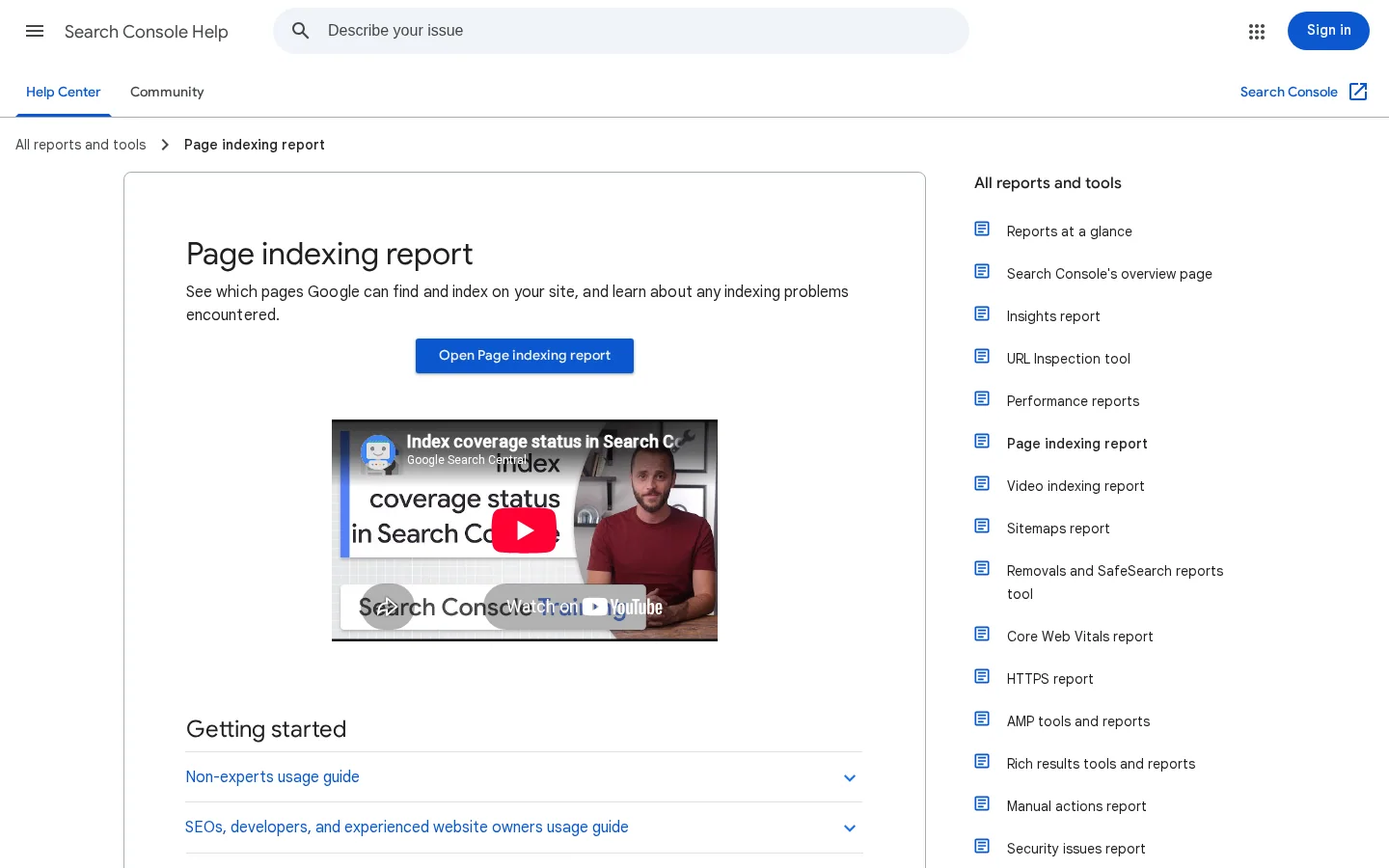
Use the URL Inspection tool on a few representative pages first, then fix the template that produced them.
Links still help a page rank, and they help AI systems find sources. The methods that work give another site a good reason to link. Paid link placements break Google's spam policies on link schemes, and they put your whole domain at risk. Skip them.
| Link type | Effort | Risk | Why it earns links |
|---|---|---|---|
| Free tool or calculator | Medium | Low | Pages that need the job done link to it |
| Original data study | High | Low | Writers cite numbers they can trace |
| Integration listing | Low | Low | Partner directories link to integrations |
| Guest article on a niche site | Medium | Medium | Works only when the topic fits that site |
| Paid link placement | Low | High | Breaks spam policies, so avoid it |
A free tool that solves one job for your buyer earns links from pages that need that job done. Keep the first use free and without a login. Answer the question on one screen, then publish a short page that explains the method. Sorank's SaaS SEO ROI calculator follows that pattern, and the backlink ROI calculator does the same for link projects. Any calculator with a clear formula can work.
If you have anonymized usage data, a small study can earn citations. Publish the method, the sample size and the date. Writers quote numbers only when they can trace them, so the method page matters as much as the headline figure.
For a full set of approaches, read SaaS link building. To find link opportunities in your niche, Sorank's backlink acquisition feature looks for contextual links.
A rise in clicks is not proof of revenue. Measure the path from query to trial to paid account, and keep each step visible. The formula below gives a first estimate. Replace each input with your own numbers, and do not reuse a benchmark you cannot trace.
trials = organic visits x visit-to-trial rate
customers = trials x trial-to-paid rate
new monthly revenue = customers x monthly price
lifetime revenue = new monthly revenue x months retained
Here is a hypothetical example. 8000 organic visits, a 2% visit-to-trial rate, 25% of trials that pay, a price of 49 per month and 12 months retained give 160 trials, 40 customers, 1960 in new monthly revenue and 23520 in lifetime revenue. Take the retention figure from your own cohorts, because a guessed churn rate can change the answer a lot.
| Metric | Where to read it | Question it answers |
|---|---|---|
| Clicks by page and query | Search Console, Performance report | Which pages earn attention? |
| Indexed pages | Search Console, Page indexing report | Are the right pages in Google? |
| Organic trial starts | Your product analytics, with source tags | Which pages bring signups? |
| Paid conversions from organic | Billing data joined to the first-touch source | Which pages bring revenue? |
| Retention by acquisition month | Your cohort data | Do organic customers stay? |
Tip
Run your own numbers through the free SaaS SEO ROI calculator. Enter your SEO spend, your organic visits and your conversion rates, and it shows the trials, customers, revenue and cost per customer.
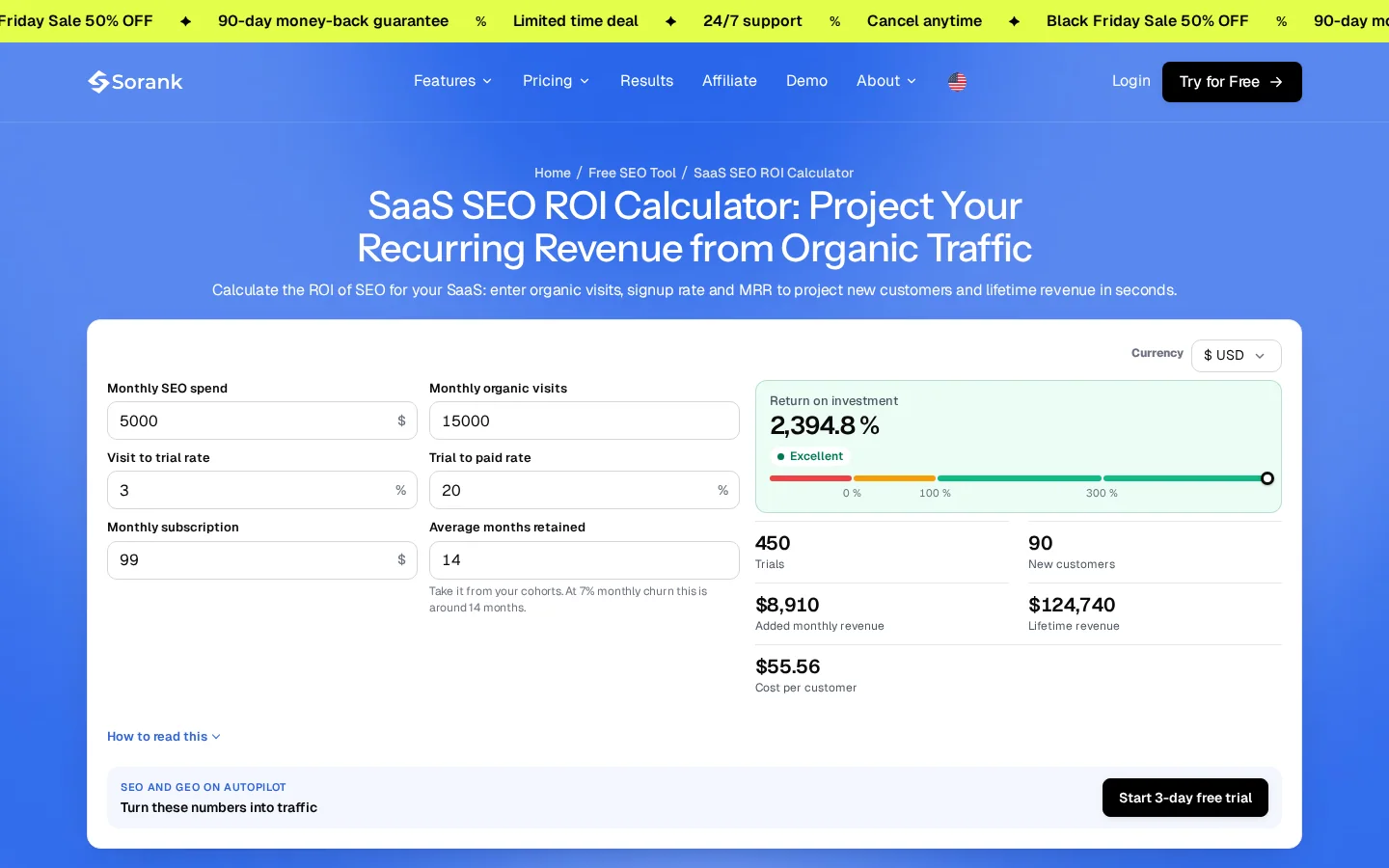
You need a tool for each job in the table below. Start with free tools for the first two rows, and add paid ones only where a free report leaves a question open.
| Job | Question it answers | Where to start |
|---|---|---|
| Render check | Is the text in the HTML, or only after JavaScript runs? | A browser with JavaScript off, then URL Inspection in Search Console |
| Indexing check | Which URLs does Google exclude, and why? | The Page indexing report in Search Console |
| Redirect and canonical check | Where does each URL finally land? | A free redirect checker and a free canonical checker |
| Page audit | Are titles, headings and links right on this page? | A free on-page SEO audit |
| Trial and revenue check | Which pages bring signups and paid accounts? | Your product analytics with source tags, joined to billing data |
| AI mention check | Do ChatGPT, Gemini or Perplexity name your brand? | A manual prompt test in each assistant, then a tracking tool once you need weekly data |
Search Console and Bing Webmaster Tools cover indexing, search queries and crawl errors at no cost. Set up both before you spend anything. Bing's reports give you a second view of what its index holds, and they take minutes to check.
A new site needs measurement and indexing first, so a free set is enough. A site with many guides and integration pages needs a crawler and a rank tracker, because manual checks stop scaling. Read the SEO tools for startups comparison before you buy, and the technical SEO tools list when a crawl problem shows up. If you want Google and AI traffic in one view, the GEO / SEO dashboard puts both side by side.
Two crawlers that disagree waste more time than either one saves. Pick one crawler for site-wide checks, and use the browser for single pages. Write down which tool you trust for each question, so the team does not argue over conflicting numbers.
These errors show up in most SaaS audits. Each one has a sign you can see and a fix you can finish in a sprint.
| Mistake | Sign | Fix |
|---|---|---|
| Marketing pages empty without JavaScript | Text missing when JavaScript is off | Server-render or pre-render the templates |
| App pages in the index | Thin or user pages showing in results | Noindex the templates and keep them out of the sitemap |
| Articles competing for one query | Several URLs with impressions for one query | Merge the weaker pages or retarget them |
| Stale comparison prices | Old plan names or old check dates | Recheck, update and date each price |
| AI crawlers blocked by accident | A broad disallow rule that catches every bot | One group per bot, tested after each deploy |
What it is: the title, the H1 or the body copy appears only after the app runs. How to spot it: view the page with JavaScript off, or compare the rendered HTML in URL Inspection. How to fix it: render the marketing templates on the server or pre-render them, so the text ships in the HTML.
What it is: dashboards, filtered lists and user pages get indexed, and they dilute the site with thin or duplicate pages. How to spot it: run a site search in Google and compare the count with your list of public pages. How to fix it: add noindex to those templates and keep them out of the sitemap. Do not block them in robots.txt, because Google must crawl a page to see its noindex tag.
What it is: two or three posts compete for one query, so Google switches between them and none ranks well. How to spot it: in Search Console, filter by query and look for several URLs with impressions. How to fix it: pick one winner, merge the others into it with redirects, and retarget what remains to different queries.
What it is: a comparison lists a plan that no longer exists, or an old price of your own. How to spot it: look at the visible date on the page, and set a reminder for each price you checked. How to fix it: recheck each price on the vendor's public pricing page, update the table, and write the new check date on the page.
What it is: a broad rule such as "Disallow: /" under the wildcard user agent blocks every bot, including the ones that send visits from AI search. How to spot it: run the robots.txt checker and read each user agent group. How to fix it: write one group per bot you want to control, and test the file after each deploy.
Some errors pass a technical crawl and still cost rankings. They sit in how pages connect to each other, to readers and to the URLs that came before them. Check these three after each launch and after each migration.
A guide that shows its text only after a login or a form gives Google almost nothing to index. Readers who hit the wall leave, and they rarely link to what they could not read. Keep guides public, and place the signup prompt in a sidebar or at the end of the article.
Moving a guide to another folder without a redirect drops the links and history the old URL had earned. Use a 301 for a permanent move, and read the 301 vs 302 guide if you are unsure which code to use. Google's guidance on how to specify a canonical URL ranks redirects as the strongest signal for choosing which URL to show, so the redirect has to point at the page you want to keep.
Generating hundreds of city, tool or industry pages from one template creates pages that differ only in a single noun. Google's spam policies describe scaled content abuse as creating many pages mainly to manipulate rankings, with little or no value for users. Give each page data or a use case that no other page has, or publish fewer pages. The programmatic SEO playbook for SaaS covers how to prune the pages that do not earn their place.
Warning
A canonical tag that points every page to the homepage, or to a URL that redirects elsewhere, sends Google to the wrong version. Check it with the canonical checker after any template change.
Follow this order. Each step makes the next one work, so do not start the content plan before the technical base holds.
Your 90-day plan
Keep a simple log of each change, with the date and the metric you expect to move. Without that log, you cannot tell whether a new template, a rewrite or a new link caused the result.
A SaaS SEO checklist covers the whole site, not one page. Run it once a quarter, and again after any release that changes templates, navigation or routing. Each check has a pass condition, so you can tell in minutes whether Google and AI crawlers can still read the site.
| Check | How to run it | Pass when |
|---|---|---|
| Marketing pages render without JavaScript | Load five templates with JavaScript turned off | Title, H1, main copy and links appear in the HTML |
| Sitemap lists only public pages | Open sitemap.xml and scan the URLs | No dashboard, login or filtered URLs appear |
| App templates are noindex | Check the robots meta tag on a logged-in page and a search page | Each one has noindex, and robots.txt does not block it |
| Page indexing report is stable | Compare the Search Console report with last quarter | No new error type, and excluded counts match your plan |
| Old URLs redirect cleanly | Test the URLs you moved in the last year | One hop to a live page, with no chains or 404s |
| Each AI bot has its own group | Read robots.txt one user agent at a time | The rules match the bot decisions you made |
| Every cluster page is linked | Crawl the cluster from its pillar page | No page in the cluster is an orphan |
Start with rendering and robots.txt, because they decide whether the other checks can see the pages at all. A clean sitemap will not fix a template that Google cannot read. Next, check indexing and redirects, which show the damage already done. Finish with internal links, since you can fix those in the next content release.
Five templates are enough for most SaaS sites: marketing, blog, integration, comparison and app. Test one live page from each. Record the date and the result, so next quarter you can see which check started to fail and when.
Tip
Test robots.txt with the robots.txt checker after every change. One broad Disallow line can block a whole section before anyone notices. For the fixes behind each failure, use the technical SEO checklist.
Run this list before each new page goes live. It takes minutes, and it catches most of the errors above.
Checklist before a SaaS page goes live
When the basics pass, run the on-page SEO audit on the page to check the rest. Then write for the buyer who is ready to try your product.
SaaS SEO is the work of getting a software product found in search results and AI answers when buyers look for a problem, an alternative or a comparison. It covers keyword research, pages that match buying intent, a site that crawlers can read and links from relevant sites. Success is measured in trials and paid accounts.
Expect months, not weeks. A new page must be crawled, indexed and shown for enough queries before it earns clicks, and the timing depends on competition and on the authority of your domain. Track indexed pages and buyer-query impressions while you wait.
Yes, if your buyers ask AI assistants for recommendations. Your pages must answer their query clearly, your robots.txt must let the AI search crawlers you want read your site, and your brand must appear in AI answers. Track those mentions and improve the pages that lose out.
We analyse your competitors, your website and your AI visibility to create a tailored content plan for free.
 AI Content Brief Generator
 FAQ Schema Generator
 AI Blog Post Ideas Generator
 Structured Data Validator (Schema Validator)
 Alt Text Checker
 Internal Link Analyzer
 Backlink Challenge
 AI Meta Description Generator
 AI Blog Title Generator
 Google Indexability Checker
 AI Blog Outline Generator
 UTM Link Builder
 Keyword Clustering Tool
 Canonical Tag Checker
 XML Sitemap Generator
 Broken Link Checker
 AI SEO Title Generator
 Headline Analyzer
 SERP Preview Tool
 Redirect Checker
 Hreflang Tag Generator
 Heading Structure Analyzer
 HTTP Headers Checker
 Favicon Extractor
 SERP CTR Calculator
 SEO vs Paid Search Savings Calculator
 SEO Share of Voice Calculator
 SEO ROI Calculator
 SEO Traffic and Revenue Forecast Calculator
 SEO Budget Calculator
 SEO Break-Even Calculator
 SaaS SEO ROI Calculator
 ROAS Calculator
 Reading Time Calculator
 Ranking Gain Simulator
 Organic Traffic Value Calculator
 Organic Traffic Estimator and Website Traffic Checker
 LTV to CAC Ratio Calculator
 Local SEO ROI Calculator
 Link Building Cost Calculator
 Keyword Value Calculator
 Keyword Opportunity Score Calculator
 Keyword Density Calculator
 GEO ROI Calculator
 GEO Content Investment Calculator
 Ecommerce SEO ROI Calculator
 Customer Lifetime Value Calculator
 Customer Acquisition Cost Calculator
 CTR Calculator
 Cost Per Article Calculator
 Conversion Rate Calculator
 Content Marketing ROI Calculator
 ChatGPT Referral Traffic Estimator
 Bounce Rate Calculator
 Backlink ROI Calculator
 AI Visibility Score Calculator
 AI Traffic Value Calculator
 AI Share of Voice Calculator
 Cost of AI Invisibility Calculator
 AI Citation Rate Calculator
 llms.txt Validator
 AI Overview Checker and AI Overviews Rank Checker
 Robots.txt Checker
 AI SEO Audit
 LLM Readability Checker
 SearchGPT Readiness Checker
 Structured Data LLM Audit
 Website Crawlability AI Audit
 Why ChatGPT Is Not Recommending My Website
 Gemini Ranking Tool
 Perplexity Ranking Checker
 LLM Citation Checker
 Answer Engine Optimization Audit
 GEO Audit
 AI Search Visibility Test
 ChatGPT Visibility Checker
 llms.txt Generator
 URL Extractor
 Webpage to Markdown
 Sitemap Checker
 SERP Volatility Sensor
 Page Size Checker
 Word Counter
 Slug Generator
 Schema Generator
 Robots Generator
 OG Preview
 Meta Tags Generator
 Image Compressor
 Favicon Generator
 On-Page SEO Audit: SEO Checker and SEO Analyzer
 Backlink Analysis Tool
 Keyword Research Tool
 Domain Authority Checker
 “I tested Sorank on a real client site and it's insane. It does everything an agency would bill you $1500 a month for. It's going into production on that client now.”

 Guillaume Guersanguersanguillaume.com“We are an Ads agency and we wanted to get our SEO back on track once and for all. Sorank gave us a clear view of our site, helped us prioritize optimizations, and properly structure our content. The tool is easy to use, well designed for a team, and very practical for centralizing tracking without having to juggle multiple platforms. A very solid foundation to start fresh with our SEO.”
 Gaspard MadouiAds Agency
 “I just let the Sorank software do its thing, and now my DR is 25 and my page is ranking higher.”
 Lucas Flandrefoundertrace.fr“I specialized in GEO thanks to Sorank. The GEO Leaderboard allows me to show my clients their position vs competitors on ChatGPT. It’s a real commercial differentiator.”
 MélanieSEO Freelance“Great service, works well for our website and helps us understand how to improve it to rank better on Google and elsewhere. Congrats, keep going, I recommend it.”
 Hugo T.E-commerce merchant