Preferences
Privacy is important to us, so you have the option of disabling certain types of storage that may not be necessary for the basic functioning of the website. Blocking categories may impact your experience on the website. More information
Privacy is important to us, so you have the option of disabling certain types of storage that may not be necessary for the basic functioning of the website. Blocking categories may impact your experience on the website. More information

Google spam updates in 2026: the dates, the policies they enforce, how to tell if your traffic fell because of one, and what to fix first, step by step.

Tools

In short
A Google spam update is a notable improvement to Google's automated spam systems, not a manual action you receive. Google released four of them in 2026: in March, June, August and September. If your organic traffic fell on or after one of those start dates, compare two windows in Search Console, find the pages and queries that lost clicks together, and check that group against Google's spam policies. Fix the pattern behind the loss, not only the first page you looked at.
Want to go further? Ask
Quick quiz
Is SEO right for you, and how should you start?
Sorank matches your answers


Test it for 3 days on your own site and see where you stand on Google, ChatGPT and the other AIs.
Start 3-day free trial3 days free, then stop whenever you want. 90-day results guarantee, conditions apply.
Google checks the web for spam all the time. Its automated systems look for pages and links that break its rules, and they run without a reviewer looking at each site. From time to time Google makes a notable improvement to those systems and calls the rollout a spam update. Its spam updates page names SpamBrain, its AI-based spam prevention system, as one example of the systems involved.
That matters for how you respond. A spam update does not add a rule by itself. It changes how well the existing rules are enforced, so sites that break them see their rankings move. The August 2026 entry on the dashboard does not name a specific policy. You find the effect in your search data, not in a notice.
A manual action means a person at Google reviewed your site and found a violation. You can see those in Search Console, and you can ask Google to reconsider once you have fixed the problem. A spam update works differently. Google describes it as a change to its automated systems, and its spam updates page does not mention a reconsideration request. So if your traffic dropped on a rollout date, do not look for a message or a form. Look for the pattern in your data. For the full difference between the two, read our guide to Google penalties, manual actions and algorithmic drops.
Google's spam policies page says what happens to sites that break the rules: they "may rank lower in results or not appear in results at all." The effect is on ranking and visibility. Nothing stops you from publishing.
Spam update or manual action
Google lists its ranking incidents on its Search Status Dashboard. For 2026 so far, the dashboard shows four spam updates. Each entry has a start time, a duration, and a note that the rollout is complete once it finishes. Google reports times in Pacific time, so convert them before you compare them with your analytics, which probably use another zone.
The rollouts did not all last the same time. The March update finished in under a day. The September update ran for 13 days and 16 hours, which is more than ten times longer. The August 2026 spam update entry is the most detailed. It started on 18 August 2026 at 09:27 PDT and was complete on 21 August at 01:49 PDT. Its only scope note is that it applies globally and to all languages. The entry does not name a tactic.
Google spam updates in 2026
Source: Google Search Status Dashboard, 2026
How long each rollout took, in hours
Source: Google Search Status Dashboard, 2026, durations as listed on the dashboard
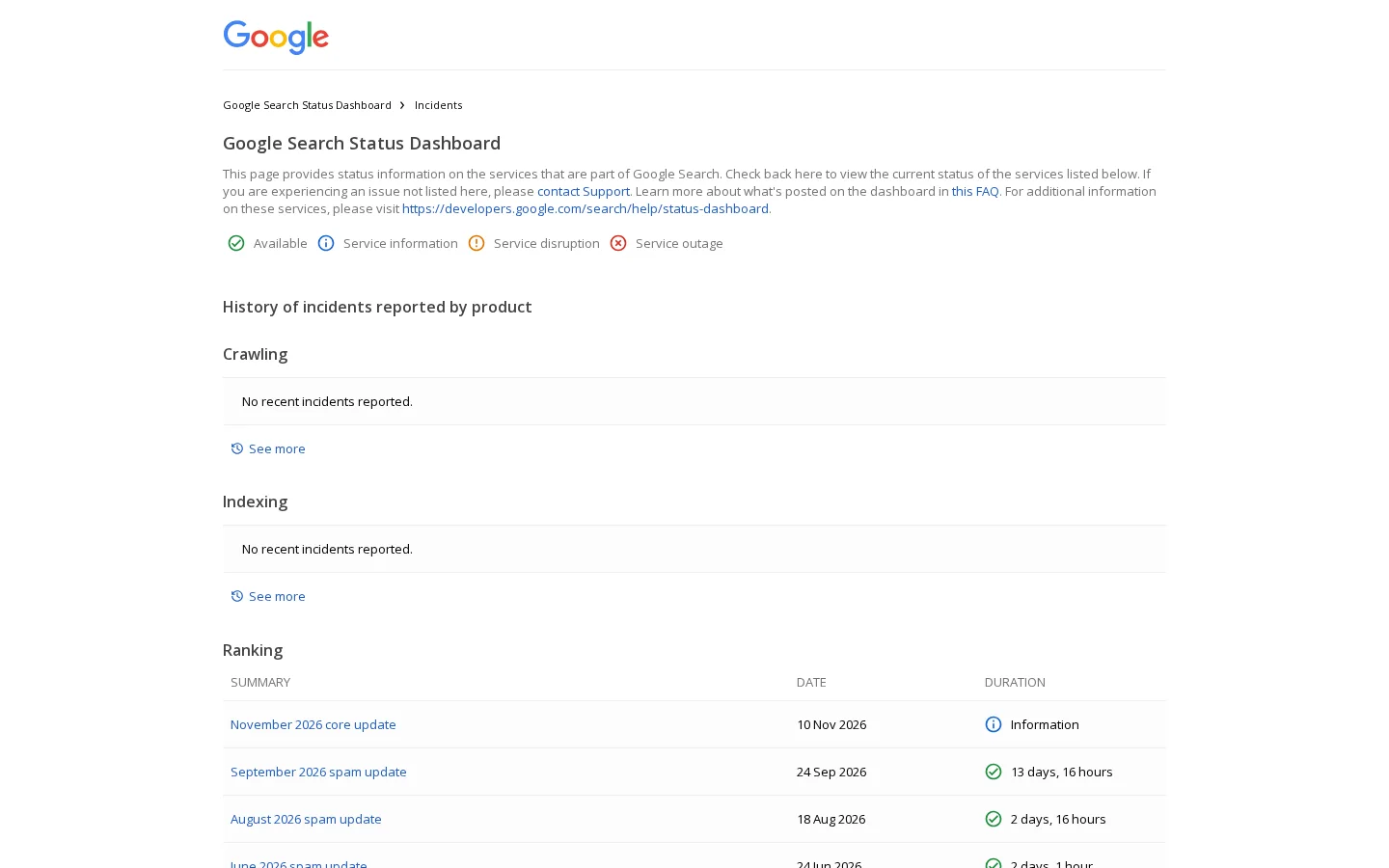
The start date tells you where to begin your comparison. Traffic changes can show up during a rollout, not only after it ends, so treat the start as the first line of your analysis. The completion date is the last line. A rollout that ran for two weeks gives you a long window in which your pages could move, and you should not assume the drop happened on day one.
Keep the calendar clean. The Search Status Dashboard also lists a November 2026 core update that started on 10 November. Core updates are a different kind of change. We cover them in our Google core update guide, and you should not match a core update drop to a spam policy without checking first.
Write down three dates: the start of the rollout, its completion, and the day your traffic started to move. If the traffic move and the rollout do not line up, you probably have another cause, such as a site change, a server outage or a seasonal shift. The section on ruling out other causes below covers that case.
Spam updates do not add new rules. Google's spam policies page lists 16 policies, from cloaking and doorway abuse to scraping and sneaky redirects. Google says sites that violate them may rank lower or disappear from results. A spam update is the moment the systems catch up with pages and links that already broke those rules.
Three policies deserve a closer look because they are about patterns at scale, which is where most large losses come from. Google introduced them in its March 2024 post on new spam policies. They are scaled content abuse, site reputation abuse and expired domain abuse. The table below turns each one into a question you can ask of your own site.
| Policy | What it covers | Quick test for your site |
|---|---|---|
| Scaled content abuse | Many pages generated mainly to manipulate rankings and not to help users | Group your URLs by template. Do many pages differ only by a keyword, a city or a product name? |
| Site reputation policy | Third-party pages published on your site with little or no first-party oversight | List every section you host that you did not write or review, such as partner pages or sponsored listings |
| Expired domain abuse | An expired domain bought and reused mainly to manipulate rankings | Check whether any domain you run was bought after it expired, and what it hosted before |
| Link spam | Links built to manipulate rankings, such as paid or exchanged links | Review the anchor text and the referring domains in your backlink profile |
Google's March 2024 post defines it as "when many pages are generated for the primary purpose of manipulating Search rankings and not helping users." Read that definition twice. It talks about purpose and volume. It does not mention AI, templates or automation. A system that produces hundreds of near-identical pages from one template breaks the rule, whatever tool made the text.
The usual case is a location or product template. Say you have one template per city. Each page has the same three paragraphs, the same bullet list and the same call to action, and only the city name changes. A reader gains nothing from the 40th copy, and the spam policy names exactly that pattern. The fix is to give each page facts that a local reader can use, or to merge the pages that have no real demand of their own.
The March 2024 post defines site reputation abuse as "when third-party pages are published with little or no first-party oversight or involvement," where the purpose is to take advantage of the host's ranking signals. The policy is not a ban on guest content. It asks who checked the page and who benefits from it. A partner listing that you review, edit and link to from your own navigation is a different case from a block of pages you never looked at.
Run a crawl and list every folder whose authors or owners you do not know. Look for sponsored blocks, coupon pages and listings that have no editor. Those folders need an owner, a review and a clear reason to be on your domain. If they have none, they are the first candidates for removal or noindex.
Google's definition is that an expired domain is "purchased and repurposed primarily to manipulate Search rankings" by hosting content that gives little value to users. The risk is for anyone who buys an old domain to reuse its links or history. A domain that carried spam before you bought it can drag down the pages you put on it, and redirects can pass that history to your main site.
Before you buy or redirect an old domain, check what it hosted, look at its history in archive tools, and ask whether its old content is something you would want on your own site. If the answer is no, do not redirect it there.
Link spam is the policy most people already know, and it is the one where recovery is hardest. The spam updates page says that for link spam, changes may not produce an improvement, because any ranking benefit from spammy links that Google removes cannot be regained. That is a strong reason to audit your links before a rollout, not after. Start with the backlink audit steps, then read our notes on backlink exchanges and buying backlinks to see which of your links fall into the risk group.
Google's intro to the spam policies also says that spam includes "attempting to manipulate generative AI responses in Google Search." If your pages exist only to be quoted by AI answers, with invented figures or fake reviews, that line applies to them too.
Which policy does your loss match?
The method is simple: compare two windows, find the losers, then group them. The hard part is resisting the urge to start with total traffic. Spam updates often hit a group of pages, and a loss in one section can be hidden by growth in another. Total clicks can look flat while a whole folder falls apart.
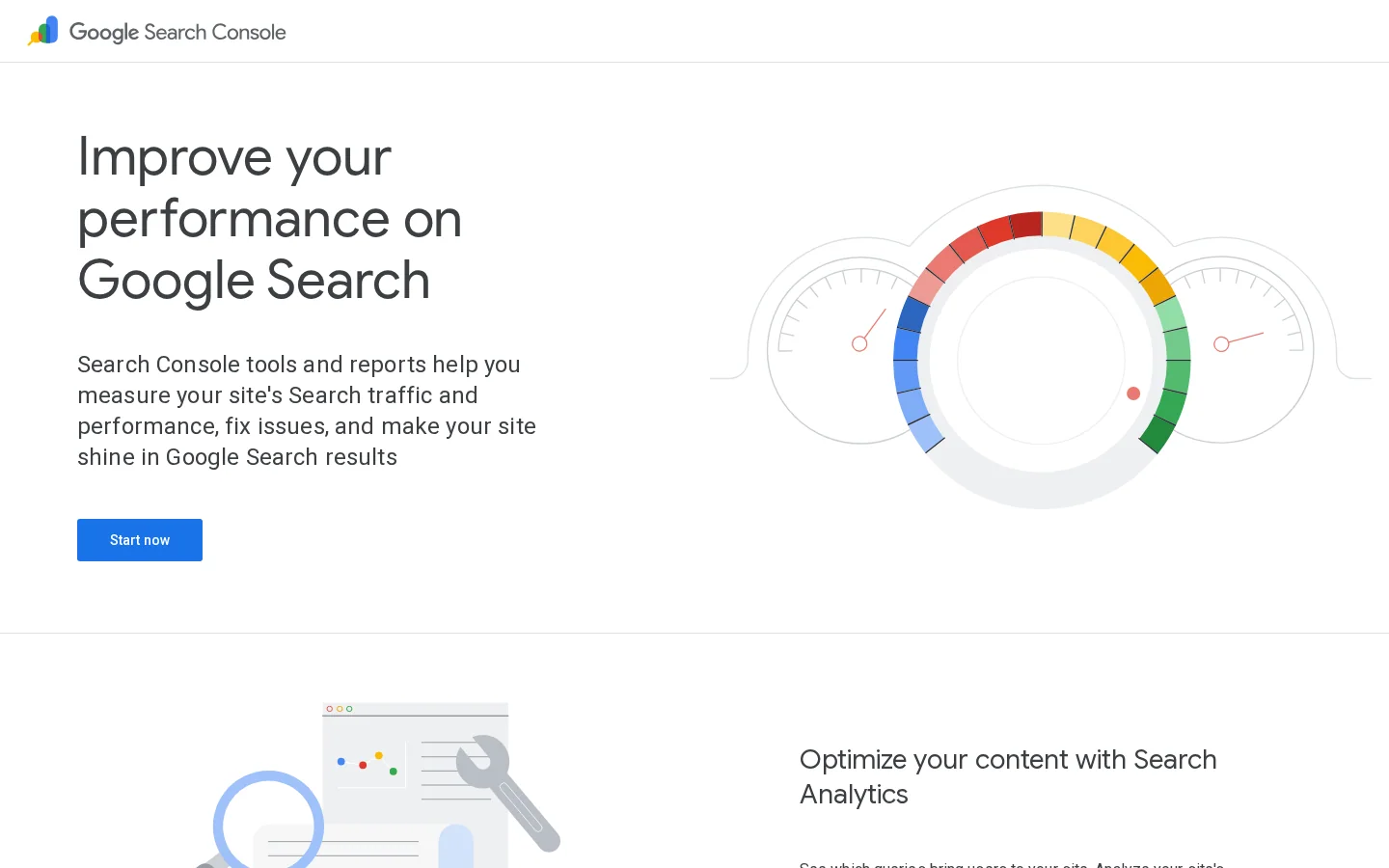
Open the performance report in Google Search Console. Set the comparison to the two weeks before the start date and the two weeks after the completion date. Filter by page first, then by query. Sort by the largest drop in clicks, and keep only the pages with a meaningful number of impressions before the rollout, so that a page with three visits does not drive your decision. Search Console is free and shows your own clicks by page and query.
Note the pages that lost impressions too. A page that kept its position but lost impressions may have lost queries, not rank. That is a different pattern from a page that fell in position, and the fix differs. Keep the two signals apart in your notes.
Once you have the list, sort it by URL folder and by page template. If one folder accounts for most of the loss, you have a pattern to investigate. If the losses are spread across unrelated pages, the cause is more likely a site-wide quality or link issue, or a different update entirely. Both situations need a different response, so do not assume the first one you find is the answer.
Your server logs show how often Googlebot requests each page. A sharp drop in crawls for one folder can point to a quality signal, a robots.txt change or a broken template. Count Googlebot requests per day in your access log with this command:
grep "Googlebot" access.log | awk '{print $4}' | cut -c2-12 | sort | uniq -cThe output gives one line per day with the count of requests. Anyone can copy the Googlebot user agent, so confirm the requests with a reverse DNS lookup before you trust them. Google documents how to do that. If a robots.txt change coincides with the drop, read our guide to the Blocked by robots.txt status before you change anything else.
Before you blame a policy, check the boring explanations. A site migration, a change to canonical tags, a broken sitemap, a server outage or a seasonal drop in demand can all move your traffic on the same days. A spam update is a good explanation only when the losses follow a pattern that a policy describes. Check the calendar, the server status and your own change log first.
Tip
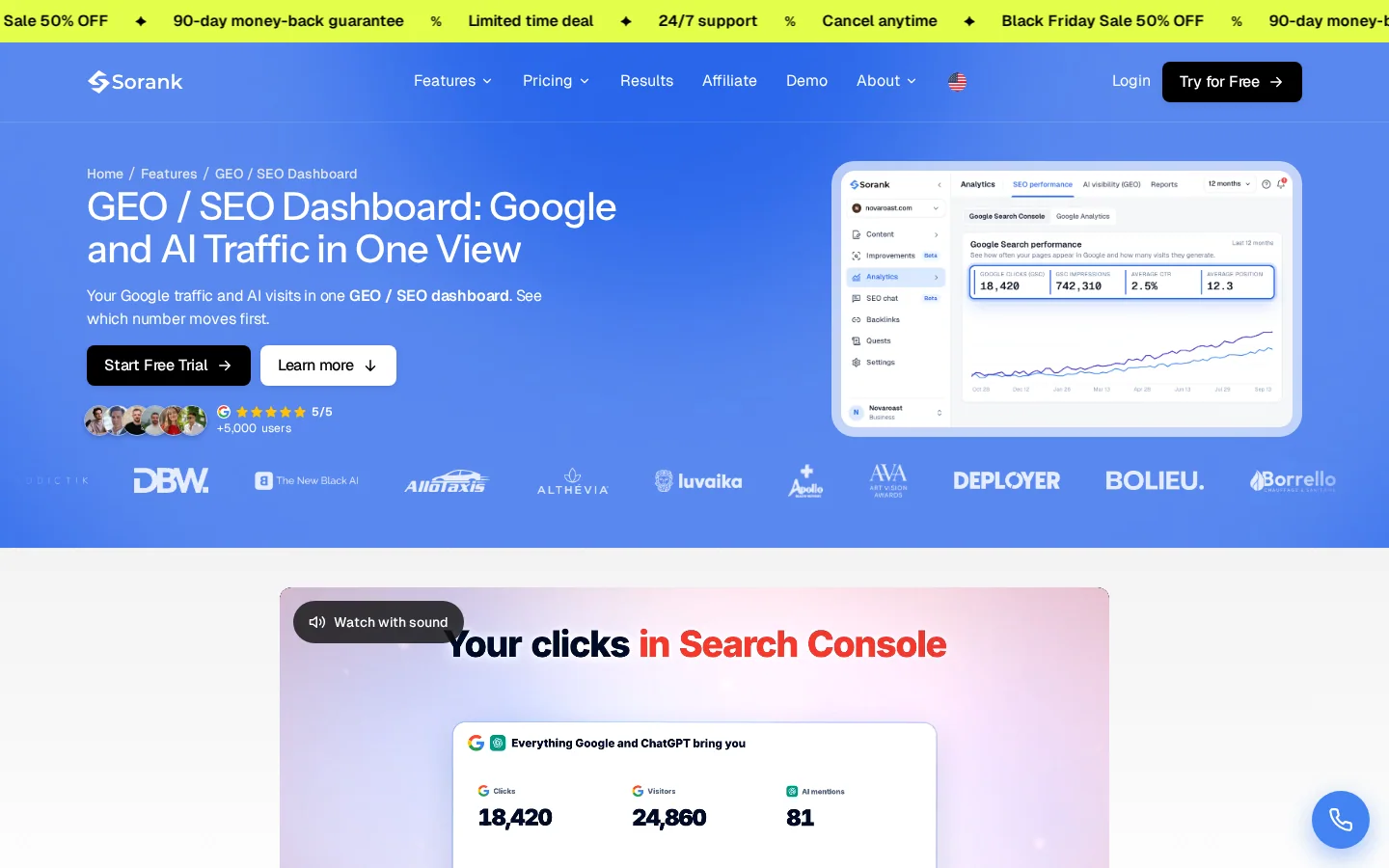
If you use Sorank, the GEO / SEO dashboard reads clicks, impressions, CTR and position from Google Search Console. It also marks pages as Popular, Growing, Declining or Lost, for Google traffic and for AI traffic. A page in the Lost group after a rollout date is a quick first filter. Confirm it against a pattern before you act.
This is the method we recommend when a rollout coincides with a drop. It takes an afternoon for a small site and a few days for a large one. The steps are in order, and each one narrows the problem before the next.
The five-step audit
Do not edit anything in the first pass. Copy the pages that lost the most clicks into a sheet, with their URLs, their clicks before and after, and their impressions. Add a column for the folder and one for the template name if your CMS uses one. A clean list is more useful than a fast opinion.
Sorting by folder is the fastest grouping, but it is not always the right one. Two pages in different folders can share a template, and two pages in one folder can have nothing in common. Sort by the template first if your CMS shows it, then by topic, then by folder. The groups that lost together are your working units.
Take a group of pages and read five of them side by side. If they share a structure and differ only in one variable, you have a scaled pattern. If they have a real author, real sources and real reasons to exist, the group is probably not a spam problem, even if it lost traffic. Be honest about this step. Calling every loss spam makes you rewrite pages that were fine.
Rewriting one page of a bad template does not fix the template. Change the template, or merge the pages into fewer pages that each answer a real question. For AI-written text, the rule is simple: a person who knows the subject checks every claim, and every number has a source. Our guide to AI content for SEO covers that review in detail, and Google's helpful content standard describes the test a reader applies.
If you have many existing pages to fix, the content optimization feature in Sorank is built for rewriting old pages. The review still belongs to you. A tool can rewrite a page, but it cannot confirm that a claim is true.
Warning
Do not delete pages in a panic. A page that has real links or real visits loses both when you remove it. Fix first. Delete only what has no value to a reader, and redirect with a 301 only when the new page is the best match, as our guide to 301 and 302 redirects explains.
Once you have fixed a group, leave it alone and measure it. Google's spam updates page says improvements can come when its automated systems learn over a period of months that a site complies with the policies. Reverting a fix to see if traffic comes back only resets that signal. Keep a dated log of each change so that you can read the results later.
Most of the damage after a spam update comes from the response, not the update. These six mistakes show up again and again. For each one, you will find what it is, how to spot it and how to fix it.
What it is: A set of pages built from the same template, where only a city, a product or a keyword changes. The pages look different to a search engine but say the same thing to a reader.
How to spot it: Put two pages side by side and compare them with a diff tool. If only one or two words differ, you have the pattern. Check how many pages come out of the template, not just the first two.
How to fix it: Give each page facts that a reader in that city or about that product can use, such as delivery rules, local examples or specific specifications. If a page cannot get those facts, merge it into a stronger page.
One template, two states
Example
A tour operator has one page per destination. Each page has the same intro, the same list of benefits and the same booking paragraph, with the destination name swapped in. A rewrite that adds the real departure points, the season and the group sizes for each destination turns the set into pages a reader would bookmark.
What it is: Published text with claims, figures or sources that no one verified. The problem is not the tool. It is the missing review.
How to spot it: List the pages with no named author or reviewer. Pick ten random claims from them and check each one against a source. Pay special attention to health and money topics, where an unsupported claim does the most harm.
How to fix it: Assign a reviewer who knows the subject. Remove any claim that you cannot source. Add the source next to the claim, with its date. Pages that repeat each other are a related risk, and our guide to duplicate content covers how to handle them.
What it is: Guest pages, partner listings, coupon pages or sponsored blocks that sit on your domain with no owner. They borrow your ranking signals without your oversight.
How to spot it: Crawl the site and list each folder with the author or owner of its pages. Flag the folders where you cannot name an owner.
How to fix it: Assign an editor to each third-party section, check the content, and remove or noindex what has no first-party value. If a section is a paid placement, label it clearly and keep it out of your main navigation.
What it is: Buying an expired domain or redirecting an old one to your main site without checking what it hosted before.
How to spot it: Look up the domain in archive tools and read what it published across its history. Look for spam sections, unrelated topics and sudden changes of owner.
How to fix it: Do not redirect a history you would not publish yourself. If you already did, remove the redirect, keep only the content that fits your site, and redirect that content to its closest match.
What it is: Anchor text that promises one thing while the link goes somewhere else, or links that come from exchange schemes with unrelated sites.
How to spot it: Sample twenty links from your backlink profile. Click each one. Check that the anchor and the destination match, and that the linking site is relevant to yours.
How to fix it: Remove the links you cannot defend, and ask for changes where the source is legitimate. Our guide to anchor text optimization shows how to audit and rebalance anchors once the bad links are gone.
What it is: Looking for a spam policy to explain a drop that came from a broad ranking change.
How to spot it: Check the dates on the Search Status Dashboard. A core update has its own entry, and its losses rarely map to one folder or one policy.
How to fix it: Read the Google core update guide and treat the drop as a quality question across the whole site. The response is a broad review, not a clean-up of one template.
Recovery depends on what you changed and on the kind of pages involved. Google does not publish a timeline for recovery after a spam update. The table below summarizes what you can reasonably expect in each case, based on what the spam updates page says.
| Situation | What to expect |
|---|---|
| Pages you fixed and kept on your site | Improvement is possible. Google's systems need time to learn that the site complies with the policies, and no date is promised. |
| Pages you removed | Their traffic does not return on its own. Redirect only where the new page is the best match for the old one. |
| Ranking that came from links Google discounts | For link spam, Google says the lost benefit cannot be regained. Work on new, legitimate links instead. |
| Pages you left unchanged | No improvement should be expected. If the pattern is still on the site, the next rollout can repeat the loss. |
The honest answer to "how long will it take?" is that it depends on the fix. A group of pages with a clear, checked rewrite and no links to lose is in a far better position than a site with a large unreviewed section and a bad link profile. Plan for months of observation, and do not confuse a bounce with a recovery.
The three events look alike in your traffic chart, but they call for different responses. Use this table to decide which one you are looking at before you change anything.
| Question | Spam update | Core update | Manual action |
|---|---|---|---|
| What changes | Google's automated spam systems | Broad ranking systems | A reviewer's finding of a policy violation |
| Where you see it | Search Status Dashboard | Search Status Dashboard | Manual actions report in Search Console |
| Typical pattern | A group of pages or a section that matches a policy | Losses spread across topics and sections | A specific violation named in the report |
| Response | Fix the pattern behind the policy match | Improve overall quality and usefulness across the site | Fix the violation, then request reconsideration |
If the report in Search Console shows a manual action, that is a different path entirely, and the spam update dates do not matter. If there is no manual action, the spam update and the core update question is about the pattern in your data. Our guide to Google's guidelines for SEO sets out the spam policies and the Search Essentials that apply to both.
If you suspect a rollout hit you, you can make real progress in one working session. Do not try to fix everything at once. Pick the group with the largest loss and work through it. The list below is the order we recommend.
Your first working session
A spam update is not a verdict on your whole business. It is a signal about specific pages and patterns. Find the pattern, fix it honestly, and keep a record. That is the work Google's systems reward over time, and it is the work that makes a site worth reading.
A Google spam update is a notable improvement to Google's automated spam systems, which run all the time. Unlike a manual action, it is not a message from a reviewer, and Google's spam updates page does not mention a reconsideration request. You see its effect in your search data, not in a notice.
Start from the rollout dates on Google's Search Status Dashboard. Compare the two weeks before the start with the two weeks after completion in Search Console, then look for groups of pages that lost clicks together. A loss that follows one template or one folder points to a policy problem.
Google does not give a fixed timeline. Its spam updates page says improvements can come when its automated systems learn over months that a site complies with the policies. For link spam, Google says the ranking benefit from links it removes cannot be regained, so fix the link profile first.
We analyse your competitors, your website and your AI visibility to create a tailored content plan for free.
 AI Content Brief Generator
 FAQ Schema Generator
 AI Blog Post Ideas Generator
 Structured Data Validator (Schema Validator)
 Alt Text Checker
 Internal Link Analyzer
 Backlink Challenge
 AI Meta Description Generator
 AI Blog Title Generator
 Google Indexability Checker
 AI Blog Outline Generator
 UTM Link Builder
 Keyword Clustering Tool
 Canonical Tag Checker
 XML Sitemap Generator
 Broken Link Checker
 AI SEO Title Generator
 Headline Analyzer
 SERP Preview Tool
 Redirect Checker
 Hreflang Tag Generator
 Heading Structure Analyzer
 HTTP Headers Checker
 Favicon Extractor
 SERP CTR Calculator
 SEO vs Paid Search Savings Calculator
 SEO Share of Voice Calculator
 SEO ROI Calculator
 SEO Traffic and Revenue Forecast Calculator
 SEO Budget Calculator
 SEO Break-Even Calculator
 SaaS SEO ROI Calculator
 ROAS Calculator
 Reading Time Calculator
 Ranking Gain Simulator
 Organic Traffic Value Calculator
 Organic Traffic Estimator and Website Traffic Checker
 LTV to CAC Ratio Calculator
 Local SEO ROI Calculator
 Link Building Cost Calculator
 Keyword Value Calculator
 Keyword Opportunity Score Calculator
 Keyword Density Calculator
 GEO ROI Calculator
 GEO Content Investment Calculator
 Ecommerce SEO ROI Calculator
 Customer Lifetime Value Calculator
 Customer Acquisition Cost Calculator
 CTR Calculator
 Cost Per Article Calculator
 Conversion Rate Calculator
 Content Marketing ROI Calculator
 ChatGPT Referral Traffic Estimator
 Bounce Rate Calculator
 Backlink ROI Calculator
 AI Visibility Score Calculator
 AI Traffic Value Calculator
 AI Share of Voice Calculator
 Cost of AI Invisibility Calculator
 AI Citation Rate Calculator
 llms.txt Validator
 AI Overview Checker and AI Overviews Rank Checker
 Robots.txt Checker
 AI SEO Audit
 LLM Readability Checker
 SearchGPT Readiness Checker
 Structured Data LLM Audit
 Website Crawlability AI Audit
 Why ChatGPT Is Not Recommending My Website
 Gemini Ranking Tool
 Perplexity Ranking Checker
 LLM Citation Checker
 Answer Engine Optimization Audit
 GEO Audit
 AI Search Visibility Test
 ChatGPT Visibility Checker
 llms.txt Generator
 URL Extractor
 Webpage to Markdown
 Sitemap Checker
 SERP Volatility Sensor
 Page Size Checker
 Word Counter
 Slug Generator
 Schema Generator
 Robots Generator
 OG Preview
 Meta Tags Generator
 Image Compressor
 Favicon Generator
 On-Page SEO Audit: SEO Checker and SEO Analyzer
 Backlink Analysis Tool
 Keyword Research Tool
 Domain Authority Checker
 “I tested Sorank on a real client site and it's insane. It does everything an agency would bill you $1500 a month for. It's going into production on that client now.”

 Guillaume Guersanguersanguillaume.com“We are an Ads agency and we wanted to get our SEO back on track once and for all. Sorank gave us a clear view of our site, helped us prioritize optimizations, and properly structure our content. The tool is easy to use, well designed for a team, and very practical for centralizing tracking without having to juggle multiple platforms. A very solid foundation to start fresh with our SEO.”
 Gaspard MadouiAds Agency
 “I just let the Sorank software do its thing, and now my DR is 25 and my page is ranking higher.”
 Lucas Flandrefoundertrace.fr“I specialized in GEO thanks to Sorank. The GEO Leaderboard allows me to show my clients their position vs competitors on ChatGPT. It’s a real commercial differentiator.”
 MélanieSEO Freelance“Great service, works well for our website and helps us understand how to improve it to rank better on Google and elsewhere. Congrats, keep going, I recommend it.”
 Hugo T.E-commerce merchant