Preferences
Privacy is important to us, so you have the option of disabling certain types of storage that may not be necessary for the basic functioning of the website. Blocking categories may impact your experience on the website. More information

Privacy is important to us, so you have the option of disabling certain types of storage that may not be necessary for the basic functioning of the website. Blocking categories may impact your experience on the website. More information

Crawled - currently not indexed means Google fetched your page but left it out of the index. Find the cause (quality, duplicates, rendering) and fix it.

Tools

In short
"Crawled - currently not indexed" is a status in the Page indexing report of Google Search Console. It means Googlebot fetched the page, then decided not to add it to the index, so the URL cannot appear in search results for now. The usual causes are content Google judges not useful or distinct enough, near-duplicates, content that only appears after JavaScript runs, and pages with few internal links. Fix the cause on the page, strengthen its internal links, then wait for a recrawl: resubmitting the URL alone changes nothing.
Want to go further? Ask
Quick quiz
Who should fix the technical side of your site?
Our advice for you
The content adds too little is the right solution for you
Number 1 in this ranking, the best match for your answers.
Our advice for you
The page is too close to another one is the right solution for you
Number 2 in this ranking, the best match for your answers.
Our advice for you
The content only exists after JavaScript runs is the right solution for you
Number 3 in this ranking, the best match for your answers.
Our advice for you
The site signals that the page is unimportant is the right solution for you
Number 4 in this ranking, the best match for your answers.
Crawled - currently not indexed is one of the reasons listed under "Why pages aren't indexed" in Search Console, and often the largest one on content sites and online stores. Google's Page indexing report documentation describes it in two sentences: "The page was crawled by Google but not indexed. It may or may not be indexed in the future; no need to resubmit this URL for crawling." This guide explains what Google decided, which URLs you can leave in this status, how to find the real cause for the ones that matter, and which fix fits each cause.
Google handles a URL in three stages: discovery and crawling, then indexing, then ranking (our glossary entry on crawling and indexing details each one). A page in this status passed the first stage: Googlebot requested it and received a response. It stopped at the second stage: after processing the content, Google chose not to store it in its index.
That choice is deliberate and documented. Google's guide to how Search works states that "indexing isn't guaranteed; not every page that Google processes will be indexed." It names three common reasons: low content quality, robots meta rules that disallow indexing, and a site design that makes indexing difficult. Since a noindex rule produces its own status ("Excluded by 'noindex' tag"), a page listed as crawled but not indexed points mostly to the first and third reasons.
Three points are worth keeping in mind:
For the whole indexing pipeline and the levers that speed it up, see our guide to Google indexing.
The two statuses look alike but stop at different stages, so they call for different fixes.
| Status | Stage reached | What Google says | Main lever |
|---|---|---|---|
| Discovered - currently not indexed | URL known, not crawled | "The page was found by Google, but not crawled yet", often because crawling "was expected to overload the site" | Server capacity, crawl budget, fewer low-value URLs |
| Crawled - currently not indexed | Crawled, not indexed | "Crawled by Google but not indexed" | Page quality, uniqueness, rendering, internal links |
| Duplicate without user-selected canonical | Crawled, grouped with another URL | Google chose another URL as canonical | Canonical signals (see our guide to this status) |
In short, "Discovered" is mainly a crawl problem and "Crawled" is mainly an indexing decision. Improving server speed rarely moves a crawled page into the index; improving the page itself does.
Every site of some size has URLs in this status, and many of them should never rank. Before fixing anything, sort the list by URL type. A stable number of low-value URLs is no cause for concern; a sudden rise, or important pages in the list, is.
| URL type | Typical verdict | Action |
|---|---|---|
| RSS feeds, /feed/ URLs | Normal | None |
| Paginated pages (page 2, 3...) | Usually normal | None, as long as the items they list are indexed |
| URLs with parameters (sort, filter, tracking) | Normal | Check that the clean URL is indexed; limit internal links to parameter versions |
| Tag and thin archive pages | Often deserved | Improve, merge or noindex |
| Out-of-stock or expired product pages | Often deserved | Redirect, update or let them go |
| Blog articles, service pages, category pages | Problem | Diagnose and fix (next sections) |
| Recently published pages | Often temporary | Check again after a few weeks |
Tip
Export the list from the report, then group URLs by folder or pattern in a spreadsheet. Ten URL patterns are easier to judge than 3,000 single URLs, and the pattern often reveals the cause.
This is the most frequent cause. Pages with a few lines of text, generic content that repeats what dozens of indexed pages already say, or pages built from a template with only a name changed are typical thin content. Google's guidance on creating helpful content asks whether a page provides "substantial value when compared to other pages in search results". A page that fails that test can be crawled again and again without being indexed.
Near-duplicates (product variants with the same description, city pages that only swap the city name, printer-friendly versions) are often grouped and left out. When Google clearly identifies the duplicate, you usually see a canonical status instead; when the similarity is partial, the page can land here. A consistent canonical tag and genuinely distinct content settle the question.
Google's JavaScript SEO basics describe three phases, crawling, rendering and indexing, and note that a page waiting for rendering "may stay on this queue for a few seconds, but it can take longer than that." If the raw HTML is almost empty and the text appears only after rendering (or rendering fails because a script or API call is blocked), Google may evaluate a nearly blank page. Server-side rendering or pre-rendering removes the risk; our guide to JavaScript SEO covers the options.
A page reachable only from the sitemap, or buried five clicks deep with a single link from a paginated archive, tells Google it matters little to you. Internal links from indexed, visited pages are one of the strongest signals you control.
Some URLs appear here for reasons outside the page: the report lags behind (the URL may already be indexed), a redirect target was crawled through the old URL, or soft error pages (empty search results, "no products found") return a 200 status code. These need a check, not a rewrite.
Watch out
Google states there is "no need to resubmit this URL for crawling." Requesting indexing on an unchanged page does not change Google's decision. Request it once, after a meaningful change to the page.
| Cause found | Fix |
|---|---|
| Thin or generic content | Rewrite with original information: data, examples, steps, comparisons, a clear answer to the query |
| Several weak pages on one topic | Merge them into one strong page and redirect the others with a 301 |
| Near-duplicate of another page | Make it distinct, or point a canonical tag to the main version |
| Content rendered by JavaScript | Server-side rendering or pre-rendering; check that scripts and APIs are not blocked |
| Few or no internal links | Add contextual links from related, indexed pages; link it from hubs and menus if important |
| Search intent mismatch | Adapt the format to what ranks (guide, list, tool, product page) |
| Page with no reason to rank | Noindex it, redirect it or delete it, and remove it from the sitemap |
Two habits make the fixes stick. First, run a regular content audit: pruning or merging weak pages raises the average quality of what Google crawls. Second, keep the XML sitemap clean, with only canonical, indexable URLs you want ranked, and submit it to Google again after a large clean-up.
Nothing happens until Googlebot recrawls the page, which can take from a few days to several weeks depending on how often Google visits your site. Once several URLs are fixed, you can click "Validate fix" in the report; Google says validation "typically takes up to about two weeks, but in some cases can take much longer." Validation is optional: the report updates on its own as pages are recrawled.
For a large site, checking URLs one by one is slow. The URL Inspection API allows 2,000 queries per day and 600 per minute for each site, according to the Search Console API usage limits, enough to track a few hundred priority pages over time. If a page stays in the status after two or three recrawls, the fix was not enough: look again at quality and intent before anything else.
A page outside Google's index brings no organic clicks, whatever its quality. On a content site, a large share of articles in this status also wastes production effort and signals to Google that the site publishes pages it does not need, which can slow down the indexing of new ones.
AI assistants add a second reason. ChatGPT, Perplexity and Gemini answer many questions by retrieving pages from web search indexes, then citing the sources they used. A page that is not indexed is much less likely to be retrieved, so it is much less likely to be cited. Our study of the platforms AIs cite most shows which sources they favour when they answer.
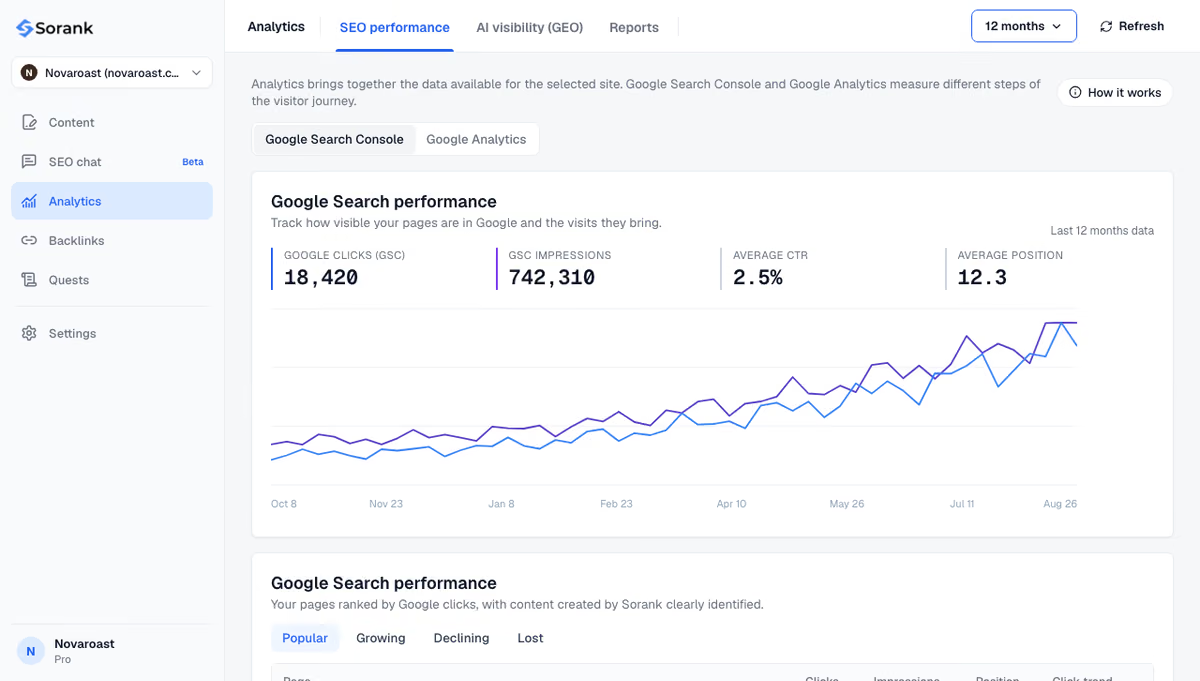
Sorank is our product: an autopilot SEO and GEO software. Its GEO and SEO dashboard shows clicks, impressions and positions from Search Console, so you can see when fixed pages start receiving impressions, and its article generator writes sourced articles with internal links already in place, the two elements this status punishes most often.
The short version: sort the URLs, ignore those that should not rank, and fix the cause on the pages that matter (content, duplication, rendering, internal links) before asking Google to look again. To publish pages that get indexed and cited from the start, see Sorank's plans, from $49 per month with a 3-day free trial.

No penalty is applied to the site, and indexed pages keep their rankings. The status only means the listed URLs are not in the index. A very large share of pages in this status can still signal a quality problem across the site, which is worth fixing through content clean-up and consolidation.
No. Google says there is no need to resubmit these URLs, and a request on an unchanged page does not change its decision. Improve the page first, then request indexing once in the URL Inspection tool for important URLs, and let the others be recrawled naturally.
Google reassesses indexed pages over time and can drop those it no longer considers useful, for example when newer and more complete pages cover the same topic. Updating the article with current information, adding internal links from related pages, or merging it with a stronger page usually brings it back.
We analyse your competitors, your website and your AI visibility to create a tailored content plan for free.
 AI Content Brief Generator
 FAQ Schema Generator
 AI Blog Post Ideas Generator
 Structured Data Validator (Schema Validator)
 Alt Text Checker
 Internal Link Analyzer
 Backlink Challenge
 AI Meta Description Generator
 AI Blog Title Generator
 Google Indexability Checker
 AI Blog Outline Generator
 UTM Link Builder
 Keyword Clustering Tool
 Canonical Tag Checker
 XML Sitemap Generator
 Broken Link Checker
 AI SEO Title Generator
 Headline Analyzer
 SERP Preview Tool
 Redirect Checker
 Hreflang Tag Generator
 Heading Structure Analyzer
 HTTP Headers Checker
 Favicon Extractor
 SERP CTR Calculator
 SEO vs Paid Search Savings Calculator
 SEO Share of Voice Calculator
 SEO ROI Calculator
 SEO Traffic and Revenue Forecast Calculator
 SEO Budget Calculator
 SEO Break-Even Calculator
 SaaS SEO ROI Calculator
 ROAS Calculator
 Reading Time Calculator
 Ranking Gain Simulator
 Organic Traffic Value Calculator
 Organic Traffic Estimator and Website Traffic Checker
 LTV to CAC Ratio Calculator
 Local SEO ROI Calculator
 Link Building Cost Calculator
 Keyword Value Calculator
 Keyword Opportunity Score Calculator
 Keyword Density Calculator
 GEO ROI Calculator
 GEO Content Investment Calculator
 Ecommerce SEO ROI Calculator
 Customer Lifetime Value Calculator
 Customer Acquisition Cost Calculator
 CTR Calculator
 Cost Per Article Calculator
 Conversion Rate Calculator
 Content Marketing ROI Calculator
 ChatGPT Referral Traffic Estimator
 Bounce Rate Calculator
 Backlink ROI Calculator
 AI Visibility Score Calculator
 AI Traffic Value Calculator
 AI Share of Voice Calculator
 Cost of AI Invisibility Calculator
 AI Citation Rate Calculator
 llms.txt Validator
 AI Overview Checker and AI Overviews Rank Checker
 Robots.txt Checker
 AI SEO Audit
 LLM Readability Checker
 SearchGPT Readiness Checker
 Structured Data LLM Audit
 Website Crawlability AI Audit
 Why ChatGPT Is Not Recommending My Website
 Gemini Ranking Tool
 Perplexity Ranking Checker
 LLM Citation Checker
 Answer Engine Optimization Audit
 GEO Audit
 AI Search Visibility Test
 ChatGPT Visibility Checker
 llms.txt Generator
 URL Extractor
 Webpage to Markdown
 Sitemap Checker
 SERP Volatility Sensor
 Page Size Checker
 Word Counter
 Slug Generator
 Schema Generator
 Robots Generator
 OG Preview
 Meta Tags Generator
 Image Compressor
 Favicon Generator
 On-Page SEO Audit: SEO Checker and SEO Analyzer
 Backlink Analysis Tool
 Keyword Research Tool
 Domain Authority Checker
THEY TRIED SORANK BEFORE YOU
 “I tested Sorank on a real client site and it's insane. It does everything an agency would bill you $1500 a month for. It's going into production on that client now.”

 Guillaume Guersanguersanguillaume.com“We are an Ads agency and we wanted to get our SEO back on track once and for all. Sorank gave us a clear view of our site, helped us prioritize optimizations, and properly structure our content. The tool is easy to use, well designed for a team, and very practical for centralizing tracking without having to juggle multiple platforms. A very solid foundation to start fresh with our SEO.”
 Gaspard MadouiAds Agency
 “I just let the Sorank software do its thing, and now my DR is 25 and my page is ranking higher.”
 Lucas Flandrefoundertrace.fr“I specialized in GEO thanks to Sorank. The GEO Leaderboard allows me to show my clients their position vs competitors on ChatGPT. It’s a real commercial differentiator.”
 MélanieSEO Freelance“Great service, works well for our website and helps us understand how to improve it to rank better on Google and elsewhere. Congrats, keep going, I recommend it.”
 Hugo T.E-commerce merchant