Preferences
Privacy is important to us, so you have the option of disabling certain types of storage that may not be necessary for the basic functioning of the website. Blocking categories may impact your experience on the website. More information

Privacy is important to us, so you have the option of disabling certain types of storage that may not be necessary for the basic functioning of the website. Blocking categories may impact your experience on the website. More information

Shopify vs Square for selling online and in store: verified prices, card fees, POS, SEO settings, AI visibility and the right choice for each business.

Tools

In short
choose Shopify if the online store is your main growth channel: it gives more control over SEO, a real blog, multilingual stores and thousands of apps, and its POS handles one or more shops. Choose Square if your business lives in a physical location (shop, café, salon) and the website is a second channel: the POS is excellent, the website comes free with it and stock is shared automatically. For visibility on Google and in AI assistants, Shopify starts with a clear advantage, because Square Online product pages load their content with JavaScript.
Want to go further? Ask
Quick quiz
Where should your online shop find its next customers?
Sorank matches your answers


Test it for 3 days on your own site and see where you stand on Google, ChatGPT and the other AIs.
Start 3-day free trial3 days free, then stop whenever you want. 90-day results-or-refund guarantee.
The Shopify vs Square question is really about where you sell most. Physical stores still dominate: according to the U.S. Census Bureau, e-commerce accounted for 17.1% of total retail sales in the second quarter of 2026, which means more than 80% of retail spending still happens offline. Both platforms sell in both worlds, but they were built from opposite ends: Shopify started as an online store and added a point of sale, Square started as a card reader and added a website. This comparison checks what each platform costs, how its POS works and, above all, how easily your products can be found on Google and quoted by ChatGPT, Gemini or Perplexity.
Shopify is an e-commerce platform with a POS; Square is a payments and POS company with a website builder. That origin shapes everything: Shopify puts the online store, its themes, its apps and its SEO settings first, while Square puts the counter, the card reader, staff management and in-person payments first.
Shopify includes Shopify POS with every plan (the free POS Lite level) and sells a POS Pro add-on per location for real shops. Square includes Square Online with every plan: the website reads the same item library as the counter, so a product sold in the shop disappears from the website when stock runs out. Square also covers restaurants, appointments and services with dedicated tools, where Shopify stays focused on selling products.
For the owner of a local business, the practical difference is the starting point. With Square, the shop works on day one and the website is an extra. With Shopify, the online store is the core and the shop is plugged into it. Our guide to the best POS software compares other systems if neither fits.
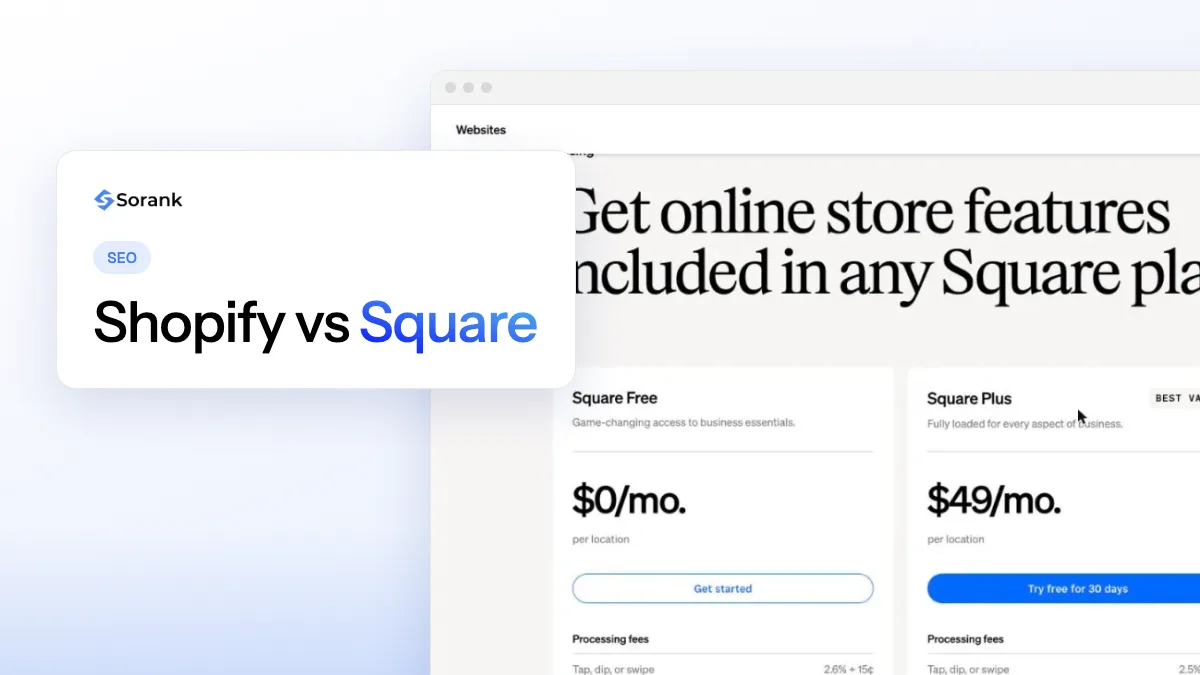
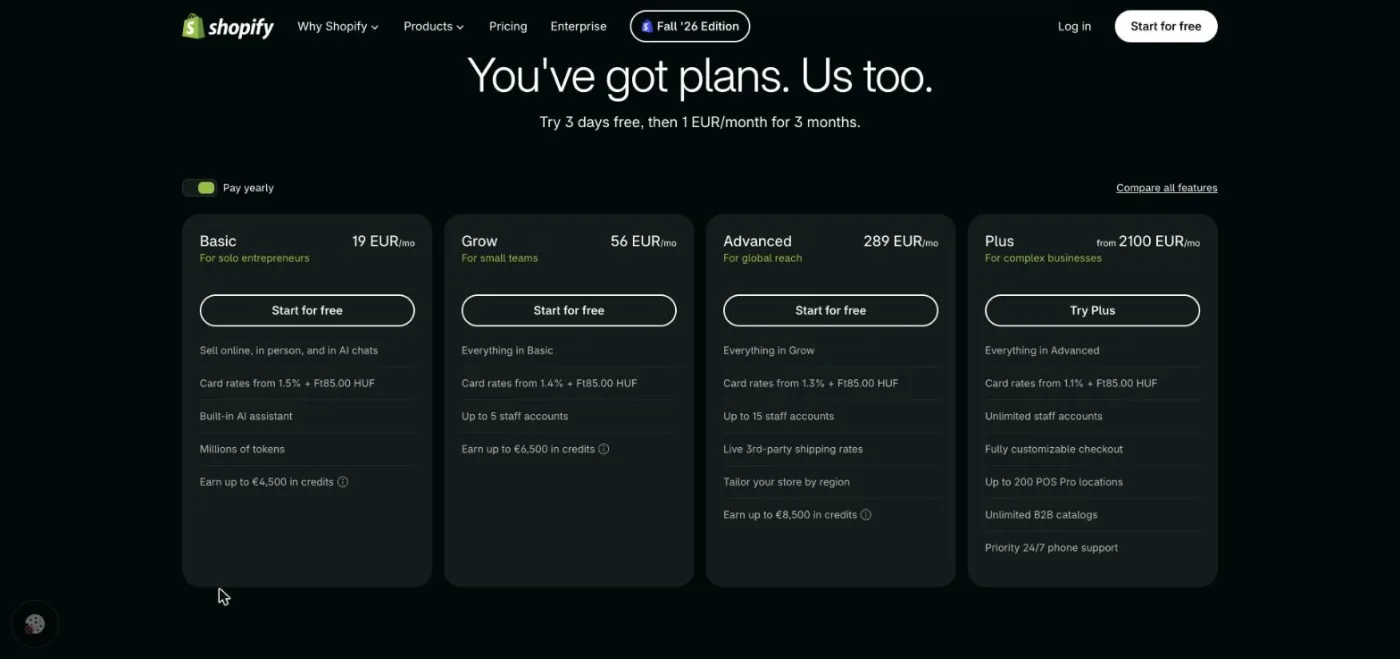
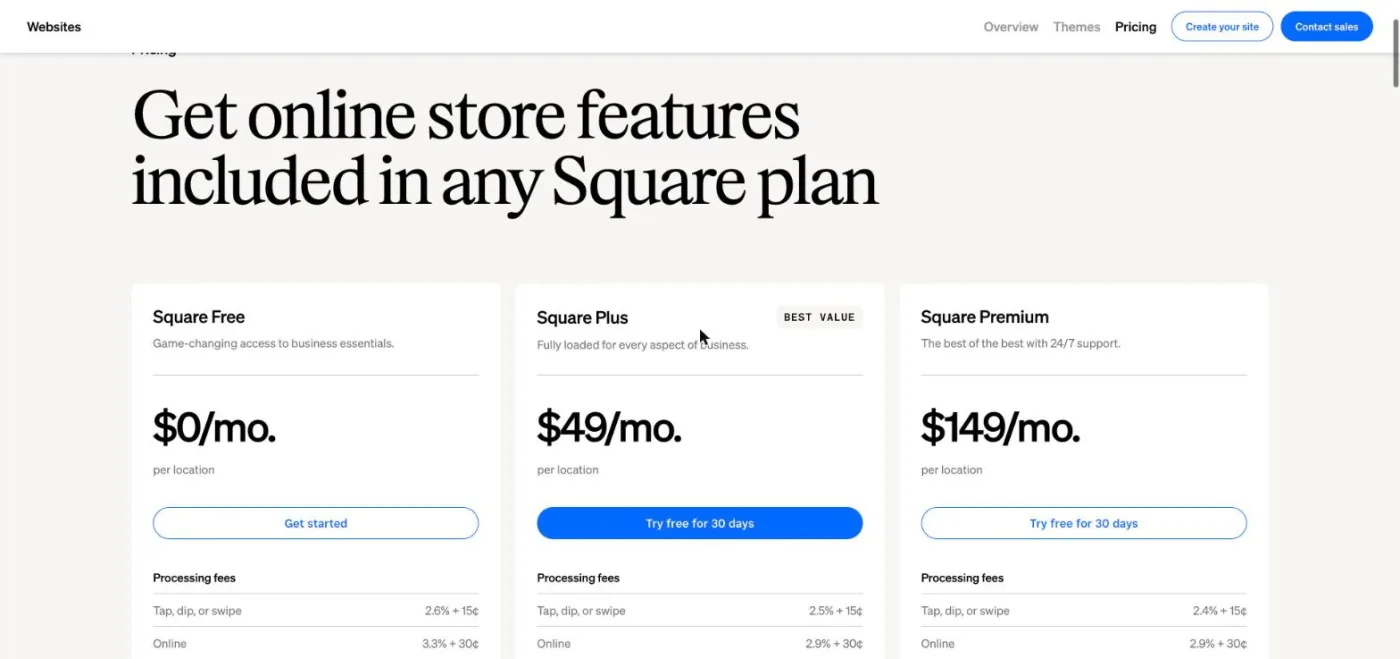
Square is cheaper to start, Shopify is cheaper to grow online. Square has a real free plan with paid plans at $49 and $149 per month per location; Shopify starts at $39 per month ($29 on yearly billing) and charges lower online card fees as you move up. All prices below are US prices from the official pricing pages, checked October 2026.
| Cost item | Shopify | Square |
|---|---|---|
| Entry plan | Basic: $39/month, or $29/month billed yearly | Free: $0/month |
| Mid plan | Grow: $105/month, or $89/month billed yearly | Plus: $49/month per location |
| Top standard plan | Advanced: $399/month, or $359/month billed yearly | Premium: $149/month per location |
| Large businesses | Plus: from $2,300/month | Square Pro: custom pricing above $250,000 in yearly sales |
| Online card payments | 2.9% + 30¢ (Basic) down to 2.25% + 30¢ (Plus) | 3.3% + 30¢ (Free), 2.9% + 30¢ (Plus and Premium) |
| In-person card payments | 2.6% + 10¢ (Basic) down to 2.3% + 10¢ (Plus) | 2.6% + 15¢ (Free), 2.5% + 15¢ (Plus), 2.4% + 15¢ (Premium) |
| POS software | POS Lite included; POS Pro +$89/month per location | Included in every plan |
| Third-party payment provider | Extra fee of 2%, 1%, 0.6% or 0.2% depending on the plan | Not applicable, Square processes the payments |
| Custom domain | All plans | Plus and Premium only |
Sources: Shopify pricing and Square Online plans, checked October 2026. Hardware (card readers, terminals, registers) comes on top for both and is not included in the monthly price.
Example
A shop selling $5,000 a month online in 100 orders of $50 pays about $204 on Shopify Basic billed yearly ($29 plus 100 × $1.75 in card fees), $195 on Square Free (100 × $1.95) and $224 on Square Plus ($49 plus 100 × $1.75). At this size, the gap is small: the choice depends on features, not on price.
The real cost difference appears at the edges. A business with several shops pays Square Plus or Premium for each location, and Shopify POS Pro for each location too. A store selling mostly online gains from Shopify's lower online rates on Grow and Advanced. A Shopify store that uses an outside payment provider pays an extra fee on every order, which Square never charges.
Square has the stronger POS for businesses that live at the counter; Shopify POS is better for shops whose catalog and customers are managed online first. Both handle card payments, receipts, refunds, discounts, customer profiles and offline mode, and both sell their own card readers and terminals.
Square's strength is breadth. The same account runs a retail shop, a restaurant with table service, a salon with appointments or a market stall, and its free plan already includes a full POS. Staff management, payroll (from $35 per month plus $6 per person paid, checked October 2026) and banking sit in the same dashboard. For a café or a service business, nothing in Shopify comes close.
Shopify's strength is the single catalog for big assortments. Products, variants, collections, stock across shops and warehouses, and customer histories are shared between the website and the till. With POS Pro, staff roles, in-store inventory management, in-store pickup and flexible delivery are added per location. Shopify's president describes the shift this way:
"We have evolved from an online store to a comprehensive unified operating system for commerce anywhere, anytime."
Harley Finkelstein, President of Shopify, Shopify News
A simple rule: if you would describe your business as "a shop that also sells online", start with Square. If you would describe it as "a brand that also has a shop", start with Shopify. Retail owners can read our page on SEO for retail businesses for the local side of that choice.
Square is easier to start with, Shopify is easier to grow with. A Square seller who already uses the POS can publish a website in an afternoon: the builder offers a few site styles, imports the item library and turns on pickup or delivery in a few clicks. There is little to configure, which also means little to get wrong.
Shopify asks for more decisions on day one: a theme, collections, shipping zones, taxes, payment settings and, often, a few apps. In exchange, almost everything can be changed later. The theme editor works by sections, the App Store offers thousands of extensions (reviews, subscriptions, translations, product feeds, loyalty) and the admin gives detailed reports on sales, stock and traffic. Square's own app marketplace is much smaller and centered on accounting, staff and payments.
For a non-technical owner, the honest answer depends on the next two years. If the website will stay a small showcase with pickup orders, Square's simplicity is an advantage. If you plan to add content, campaigns, new markets or a larger catalog, the time spent learning Shopify at the start is quickly paid back, because you will not have to rebuild the store on another platform later.
Shopify is better for SEO, especially for stores with many products or several languages. Square Online covers the basics (editable titles, descriptions and URLs, automatic sitemap, 301 redirects), but gives less control and serves its product pages through JavaScript. The table compares each setting point by point.
| SEO setting | Shopify | Square Online |
|---|---|---|
| URLs | Editable handle inside fixed folders: /products/, /collections/, /pages/, /blogs/ | Editable permalink inside /product/name/ID and /shop/category/ID, the ID stays in the address |
| Title and meta description | Editable on every product, collection, page and article | Editable on every page, item and category, plus site-wide defaults |
| 301 redirects | Redirect manager, bulk CSV import, automatic redirect offered when a URL changes | Supported, one redirect per page, only on the same domain as the old site |
| XML sitemap | Generated automatically | Generated automatically |
| robots.txt | Generated automatically, editable with the robots.txt.liquid template | Generated automatically, no editor documented in Square's help center |
| Structured data | Product data output by most themes, extendable with apps | No JSON-LD found in the raw HTML of the product pages we tested; custom code requires Plus |
| Canonical tag | Output by themes, product URLs inside collections point to /products/ | No canonical tag found in the raw HTML of the pages we tested |
| Speed and rendering | Server-rendered HTML, global CDN, Core Web Vitals report in the admin | Hosted on Square's CDN, product content loaded with JavaScript |
| Multilingual | Shopify Markets and Translate & Adapt: language folders with hreflang tags | No native multilingual store; third-party translation tools |
| Blog | Built-in blog with tags, authors and RSS feed | "Stories", a basic blog with few layout options |
Two settings deserve attention. The first is the domain: on Square Free, the store lives on a square.site subdomain, so every link and every ranking you earn belongs to an address you cannot take with you. If Google visibility matters, budget for Square Plus from day one. The second is 301 redirects: Square accepts one redirect per page and only on the same domain, which makes migrations from another domain more fragile than on Shopify.
Shopify's main SEO limit is its fixed folders: a product always lives under /products/ and a category under /collections/. Google does not penalize this, and the rest of the controls (redirects, robots.txt, structured data through the theme) are more complete. Our ranking of the best e-commerce platforms for SEO places both platforms among eight other options.
Google can, because it renders JavaScript; most AI crawlers cannot, which puts Square Online stores at a disadvantage in ChatGPT and Claude. This is the least-known difference between the two platforms and the one that matters most for AI visibility.
We tested public Square Online stores on October 29, 2026. On their product pages, the HTML sent by the server contained the title tag and the meta description, but only 6 to 24 words of visible text, no canonical tag and no JSON-LD: the product name, price and description are loaded by JavaScript in the browser. The robots.txt files also contained a "Crawl-delay: 5" line, which Googlebot ignores. On a theme-based Shopify store, the same product page arrives with its text, its price and its Product structured data already in the HTML.
Google renders JavaScript before indexing, so Square product pages can rank, with some delay. AI crawlers are another story. A study by Vercel (December 2024) found that "none of the major AI crawlers currently render JavaScript", while OpenAI's GPTBot and Anthropic's Claude crawler made 569 million and 370 million requests on Vercel's network in one month, about 20% of Googlebot's 4.5 billion requests. A product page that is empty without JavaScript is, for those bots, a page with nothing to quote.
Tip
To check what AI crawlers see, open a product page, display the page source (Ctrl+U or Cmd+Option+U) and search for the product description. If it is missing from the source, ChatGPT's crawler will not read it either. Our guide to robots.txt for AI crawlers explains which bots to let in.
Square sellers have ways around it. The homepage, the "about" page and Stories articles can carry the key information as text: what you sell, where, opening hours, delivery area. A Google Business Profile that is complete and consistent with the website also feeds Gemini and Google's AI answers. On Shopify, the work is about content quality rather than access: our study of Shopify stores cited by AI assistants shows which pages get quoted.
Square is better for local visibility out of the box, Shopify for local visibility combined with a strong online catalog. Both support in-store pickup and local delivery, which helps searches like "buy [product] near me" turn into visits.
Square links the website to the physical location naturally: opening hours, address, pickup times and stock come from the same account that runs the shop. For a bakery, a florist or a bike shop, that is often enough to show up in local results when combined with a Google Business Profile and real reviews. Product reviews on the website, however, require Square Plus.
Shopify handles several shops and warehouses with per-location stock, local pickup and local delivery zones, and its themes can show availability in each shop. What it lacks is the local data layer: the address, opening hours and LocalBusiness schema must be added through the theme or an app. Once added, they can be checked with a structured data validator.
Note
Google ranks local businesses on relevance, distance and prominence. The platform does not change distance, but it changes how easily your pages prove relevance: clear product pages, an address in text, reviews and consistent opening hours everywhere.
Shopify is clearly better for content: its blog, its themes and its apps let you build the guides, category texts and rich product pages that attract organic traffic. Square Online's Stories feature is fine for news and announcements, but it offers few layouts, limited ways to organize articles and little control over their structure.
Content matters more than the platform for rankings. A product page that ranks and converts needs a unique description, answers to real questions, real photos, reviews and clear delivery information. On Shopify, every one of these elements has a place in the theme, and metafields let you add structured details (materials, sizes, care). On Square, you work within a smaller set of sections.
The same goes for the blog. Guides such as "how to choose a road bike" or "which coffee beans for an espresso machine" bring in visitors months before they buy, and they are the pages AI assistants quote most. Shopify gives these articles a proper home, with authors, tags and an RSS feed, and links them to collections. Teams short on time can draft them with an article generator for Google and AI and review them before publishing.
Export the catalog to CSV, rebuild the store, then redirect every old URL to its new address with 301 redirects before switching the domain. Products move easily between the two platforms with CSV files; rankings only move if every URL is redirected.
Watch out
Square only accepts redirects on the same domain as the old site. If you move a store to Square and change domain at the same time, the old links cannot be redirected from Square: keep the old domain, or set up the redirects at your domain provider.
Hardware is the other switching cost. Square readers do not work with Shopify POS, and the reverse is also true, so a move with several shops means replacing every reader and terminal.
The right platform depends on where most of your revenue comes from and how much you count on Google. The table sums up the verdict by profile.
| Your business | Best choice | Why |
|---|---|---|
| Shop, café or salon starting a website | Square (Plus) | Free POS, shared stock, website in a few hours; Plus adds the custom domain |
| Restaurant or service business | Square | Tools for tables, orders and appointments that Shopify does not offer |
| Online brand opening its first shop | Shopify (with POS Pro) | Online catalog, SEO and content first, shop plugged into the same stock |
| Store with a large catalog | Shopify | Collections, variants, apps, structured data and lower online card fees on higher plans |
| Store selling in several countries | Shopify | Shopify Markets: languages, currencies and hreflang without extra tools |
| Market stall or occasional seller | Square (Free) | No monthly fee; the website on square.site is enough for pickup orders |
For an online store that wants to be found on Google and quoted by AI assistants, Shopify is the safer base. Our page on SEO for e-commerce covers the rest of the work.
On either platform, organic traffic comes from content that answers real questions, product pages that stand alone and a site that machines can read. The platform sets the ceiling; the work fills it.
Sorank is our product: it is SEO and GEO software that finds the keywords of your store, writes and publishes optimized articles, and tracks whether ChatGPT, Gemini or Claude cite your brand. It connects to Shopify in a few minutes (see our Shopify integration) and works with Square Online through a managed blog linked from your store (see the Square Online integration). Its AI mention tracking shows which competitors are quoted in your place.
The short version: Square for businesses that sell mostly at the counter, Shopify for businesses that want to grow online and on Google. Check the real fees for your volume with the table above, keep your own domain from day one, and make sure your product pages can be read without JavaScript.

Not as one unified system. Shopify Payments and Square each process their own payments, so most businesses pick one platform for both the online store and the counter. Some merchants keep Square at the till and Shopify online, but then stock, customers and reports live in two places and must be synced with a connector or CSV files.
Yes, the Square Free plan costs $0 per month and only charges processing fees (3.3% + 30¢ per online card payment, checked October 2026). The limits matter for visibility: no custom domain, so the store lives on a square.site address, no custom code and no product reviews. A business that wants to build a brand on Google usually needs Square Plus at $49 per month per location.
Not if your online sales are a side channel: Square Online already syncs your POS catalog and stock, and is enough for click and collect or local delivery. Shopify becomes worth it when online sales grow, when you need a real blog, several languages, more themes and apps, or finer SEO control on product pages.
We analyse your competitors, your website and your AI visibility to create a tailored content plan for free.
 AI Content Brief Generator
 FAQ Schema Generator
 AI Blog Post Ideas Generator
 Structured Data Validator (Schema Validator)
 Alt Text Checker
 Internal Link Analyzer
 Backlink Challenge
 AI Meta Description Generator
 AI Blog Title Generator
 Google Indexability Checker
 AI Blog Outline Generator
 UTM Link Builder
 Keyword Clustering Tool
 Canonical Tag Checker
 XML Sitemap Generator
 Broken Link Checker
 AI SEO Title Generator
 Headline Analyzer
 SERP Preview Tool
 Redirect Checker
 Hreflang Tag Generator
 Heading Structure Analyzer
 HTTP Headers Checker
 Favicon Extractor
 SERP CTR Calculator
 SEO vs Paid Search Savings Calculator
 SEO Share of Voice Calculator
 SEO ROI Calculator
 SEO Traffic and Revenue Forecast Calculator
 SEO Budget Calculator
 SEO Break-Even Calculator
 SaaS SEO ROI Calculator
 ROAS Calculator
 Reading Time Calculator
 Ranking Gain Simulator
 Organic Traffic Value Calculator
 Organic Traffic Estimator and Website Traffic Checker
 LTV to CAC Ratio Calculator
 Local SEO ROI Calculator
 Link Building Cost Calculator
 Keyword Value Calculator
 Keyword Opportunity Score Calculator
 Keyword Density Calculator
 GEO ROI Calculator
 GEO Content Investment Calculator
 Ecommerce SEO ROI Calculator
 Customer Lifetime Value Calculator
 Customer Acquisition Cost Calculator
 CTR Calculator
 Cost Per Article Calculator
 Conversion Rate Calculator
 Content Marketing ROI Calculator
 ChatGPT Referral Traffic Estimator
 Bounce Rate Calculator
 Backlink ROI Calculator
 AI Visibility Score Calculator
 AI Traffic Value Calculator
 AI Share of Voice Calculator
 Cost of AI Invisibility Calculator
 AI Citation Rate Calculator
 llms.txt Validator
 AI Overview Checker and AI Overviews Rank Checker
 Robots.txt Checker
 AI SEO Audit
 LLM Readability Checker
 SearchGPT Readiness Checker
 Structured Data LLM Audit
 Website Crawlability AI Audit
 Why ChatGPT Is Not Recommending My Website
 Gemini Ranking Tool
 Perplexity Ranking Checker
 LLM Citation Checker
 Answer Engine Optimization Audit
 GEO Audit
 AI Search Visibility Test
 ChatGPT Visibility Checker
 llms.txt Generator
 URL Extractor
 Webpage to Markdown
 Sitemap Checker
 SERP Volatility Sensor
 Page Size Checker
 Word Counter
 Slug Generator
 Schema Generator
 Robots Generator
 OG Preview
 Meta Tags Generator
 Image Compressor
 Favicon Generator
 On-Page SEO Audit: SEO Checker and SEO Analyzer
 Backlink Analysis Tool
 Keyword Research Tool
 Domain Authority Checker
THEY TRIED SORANK BEFORE YOU
 “I tested Sorank on a real client site and it's insane. It does everything an agency would bill you $1500 a month for. It's going into production on that client now.”

 Guillaume Guersanguersanguillaume.com“We are an Ads agency and we wanted to get our SEO back on track once and for all. Sorank gave us a clear view of our site, helped us prioritize optimizations, and properly structure our content. The tool is easy to use, well designed for a team, and very practical for centralizing tracking without having to juggle multiple platforms. A very solid foundation to start fresh with our SEO.”
 Gaspard MadouiAds Agency
 “I just let the Sorank software do its thing, and now my DR is 25 and my page is ranking higher.”
 Lucas Flandrefoundertrace.fr“I specialized in GEO thanks to Sorank. The GEO Leaderboard allows me to show my clients their position vs competitors on ChatGPT. It’s a real commercial differentiator.”
 MélanieSEO Freelance“Great service, works well for our website and helps us understand how to improve it to rank better on Google and elsewhere. Congrats, keep going, I recommend it.”
 Hugo T.E-commerce merchant