Preferences
Privacy is important to us, so you have the option of disabling certain types of storage that may not be necessary for the basic functioning of the website. Blocking categories may impact your experience on the website. More information

Privacy is important to us, so you have the option of disabling certain types of storage that may not be necessary for the basic functioning of the website. Blocking categories may impact your experience on the website. More information

Ghost vs WordPress in 2026: SEO settings point by point, speed, newsletters, AI visibility, prices checked October 2026 and the right pick for each profile.
Tools

In short
Ghost and WordPress can both rank on Google and be cited by AI assistants, because both send complete, server-rendered HTML to crawlers. Ghost ships the SEO basics, memberships and email newsletters out of the box on a lean, fast stack, with almost nothing to configure. WordPress gives far more control (URLs, structured data, multilingual, ecommerce) through plugins, at the cost of more setup and maintenance. Choose Ghost for a newsletter-led publication or a focused blog, WordPress for a large content site, a business site with many page types or a store.
Want to go further? Ask
Quick quiz
Which kind of software is right for your business?
Our advice for you
A free or very simple tool
You are alone or just starting: a free plan or a simple tool covers the basics. Switch when you feel limited.
Our advice for you
An all-in-one tool for small businesses
You want one tool that does a bit of everything, is easy to learn and has support in your language.
Our advice for you
A specialised tool, the best in its field
This task is central to your business: pay for the most complete tool and connect it to the rest.
Our advice for you
An enterprise solution
Many users, strict security and integrations: ask for demos and compare the total cost, setup included.
The Ghost vs WordPress question usually comes up when a writer, a media brand or a company blog decides to publish seriously. Both platforms are open source, but they were built for different jobs. According to W3Techs (data of 28 October 2026), WordPress runs 39.5% of all websites, which is 58.3% of the sites whose CMS is known, while Ghost runs 0.1%. Market share does not decide rankings, though. This comparison for 2026 looks at what does: each SEO setting, speed, blogging and newsletters, visibility in ChatGPT, Gemini and Perplexity, verified costs, migration and security. For a wider view of the market, see our ranking of the best blogging platforms.
WordPress is a general content management system: with themes, page builders and plugins it can run a law firm site, a WooCommerce store or a 50,000-page magazine. Ghost is a publishing platform, kept narrow on purpose: a clean editor, built-in member accounts, paid subscriptions through Stripe and email newsletters sent from the same place as the blog. Ghost is developed by a non-profit foundation, and both platforms can be self-hosted for free or used as a managed service (Ghost(Pro) for Ghost, WordPress.com or a managed host for WordPress).
The practical consequence: Ghost is a finished product, WordPress is a toolkit. Ghost decides many things for you (structure, features, markup), which saves time and limits mistakes. WordPress lets you decide everything, which gives more reach and more ways to break the site. Ghost runs on Node.js, WordPress on PHP; both store content in MySQL. If you are still at the starting line, our guide on how to start a blog covers the decisions that come before the platform.
The table below sums up the differences that matter most for a publication that wants search traffic.
| Criterion | Ghost | WordPress (self-hosted) |
|---|---|---|
| Built for | Publishing: blog, newsletter, paid memberships | Any website: blog, business site, store, directory |
| Technology | Node.js and MySQL, open source | PHP and MySQL, open source |
| SEO basics | Built in, no plugin needed | Partly in core, completed by an SEO plugin |
| Memberships and newsletters | Built in, 0% Ghost fee on paid subscriptions | Plugins or external email tools |
| Extensions | Themes and integrations, no plugin system | Tens of thousands of plugins |
| Ecommerce | No native product catalog or cart | WooCommerce and many store plugins |
| Maintenance | Light, none on Ghost(Pro) | Core, theme and plugin updates are your job |
| Managed price | From $15 a month billed yearly | WordPress.com from $4 a month billed yearly |
Google ranks pages whatever platform serves them, so neither has a built-in ranking advantage. Ghost has better SEO defaults, WordPress has more SEO levers. The difference is how much work it takes to get the foundations right and how far you can go beyond them.
Ghost's SEO documentation lists what is included by default: editable meta titles and descriptions with automatic fallbacks, Open Graph and X (Twitter) cards, an XML sitemap created and updated automatically, canonical tags across the site and structured data in all posts and pages. You can also set a custom canonical URL per post, useful when you republish an article first published elsewhere. A fresh Ghost install is technically sound with zero plugins, which removes a whole class of mistakes for small teams.
WordPress core handles permalinks, a basic XML sitemap (since version 5.5), a virtual robots.txt and canonical tags on single posts, then relies on an SEO plugin for meta descriptions, rich structured data and redirects. Once Yoast SEO, Rank Math or a similar plugin is set up, WordPress matches Ghost and adds content analysis, bulk editing, redirect managers and schema types Ghost does not offer. Our comparison of the best WordPress SEO plugins covers the options.
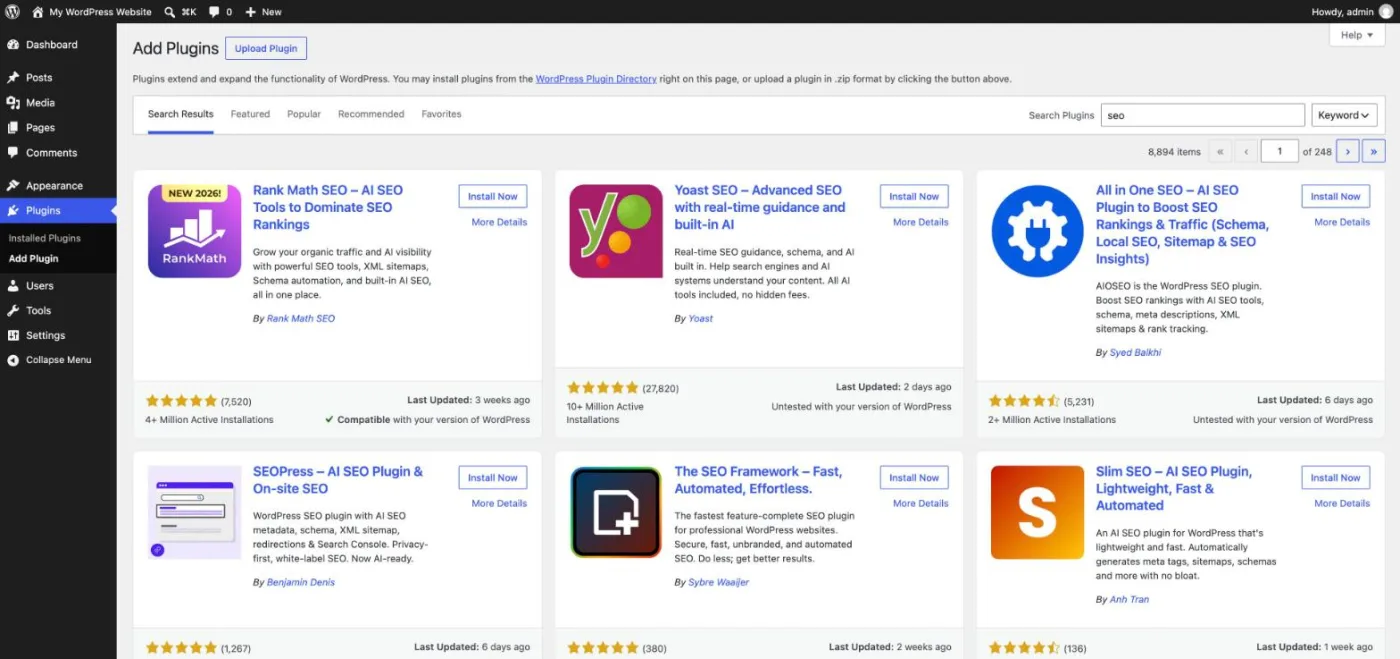
Schema markup helps Google and AI assistants understand a page. Ghost adds article markup automatically but gives little control over it without editing the theme. WordPress plugins generate Article, FAQ, Product, Breadcrumb or LocalBusiness markup and let you adjust each type. URLs follow the same pattern: Ghost publishes posts at /post-slug/ and changes the structure only through a routes.yaml file, while WordPress offers categories, tags, custom post types and permalinks configurable from the admin.
Tip
On Ghost, leave the meta description empty only if your post excerpt reads as a real summary: Ghost uses the excerpt as the fallback, and a weak excerpt becomes a weak snippet in Google.
The table below lists each setting as described in the official documentation of both platforms (checked October 2026). WordPress here means a self-hosted install with one SEO plugin.
| SEO setting | Ghost | WordPress |
|---|---|---|
| URL structure | /post-slug/ by default, custom routes in routes.yaml | Permalinks set from the admin, categories and custom post types |
| Title and meta description | Fields on every post and page, automatic fallbacks | Title in core, meta description through an SEO plugin |
| 301 redirects | redirects.yaml file uploaded in the settings | Redirect plugin or server rules; changed post slugs redirected by core |
| XML sitemap | Automatic, updated on every publish | Basic sitemap in core, finer control with a plugin |
| robots.txt | Default file, overridden by a robots.txt in the theme | Virtual file in core, edited through a plugin or the server |
| Structured data | Automatic on posts and pages, limited control | Many schema types through plugins or custom code |
| Canonical tags | Automatic, custom canonical per post | Core on single posts, full control with a plugin |
| Speed | Fast by default, few scripts | Depends on hosting, theme, caching and plugins |
| Multilingual | No built-in feature: one site per language or custom routing | Translation plugins with hreflang tags |
| Blog | The core of the product, with newsletters | Native posts, categories, tags and editorial roles |
Google measures speed through the Core Web Vitals (loading, interactivity and visual stability). Ghost has an edge by design: a single Node.js application, few third-party scripts, themes that load little JavaScript and, on Ghost(Pro), managed hosting behind a content delivery network. Most Ghost sites start fast and stay fast because there are no plugins to pile up.
WordPress speed varies widely with hosting, theme and plugins. The HTTP Archive Web Almanac 2025 reports that WordPress, which powers roughly 64% of CMS-driven sites in its dataset, "remains among the lowest-ranked" for Core Web Vitals, with a mobile pass rate of 45%; Ghost is not measured in that chapter. Ghost's own comparison page claims Ghost is up to 1,900% faster than WordPress without naming the tests, so treat that figure as marketing. A WordPress site on good hosting with caching and a light theme can be as fast as Ghost; a cheap shared host with a heavy page builder rarely is.
This is where Ghost wins clearly. Every Ghost site includes sign-up forms, member accounts, free and paid tiers, Stripe payments and email newsletters, with 0% Ghost fee on subscription revenue on the Publisher plan and above (Stripe's processing fees still apply). The editor is fast and distraction-free, and each post can go to the website, the inbox or both.
"I've been a blog minimalist from the start, and finding a truly open source platform which reflects that minimalism and focus is incredibly refreshing."
Jeff Atwood, co-founder of Stack Overflow and author of Coding Horror, on moving his blog to Ghost, Coding Horror
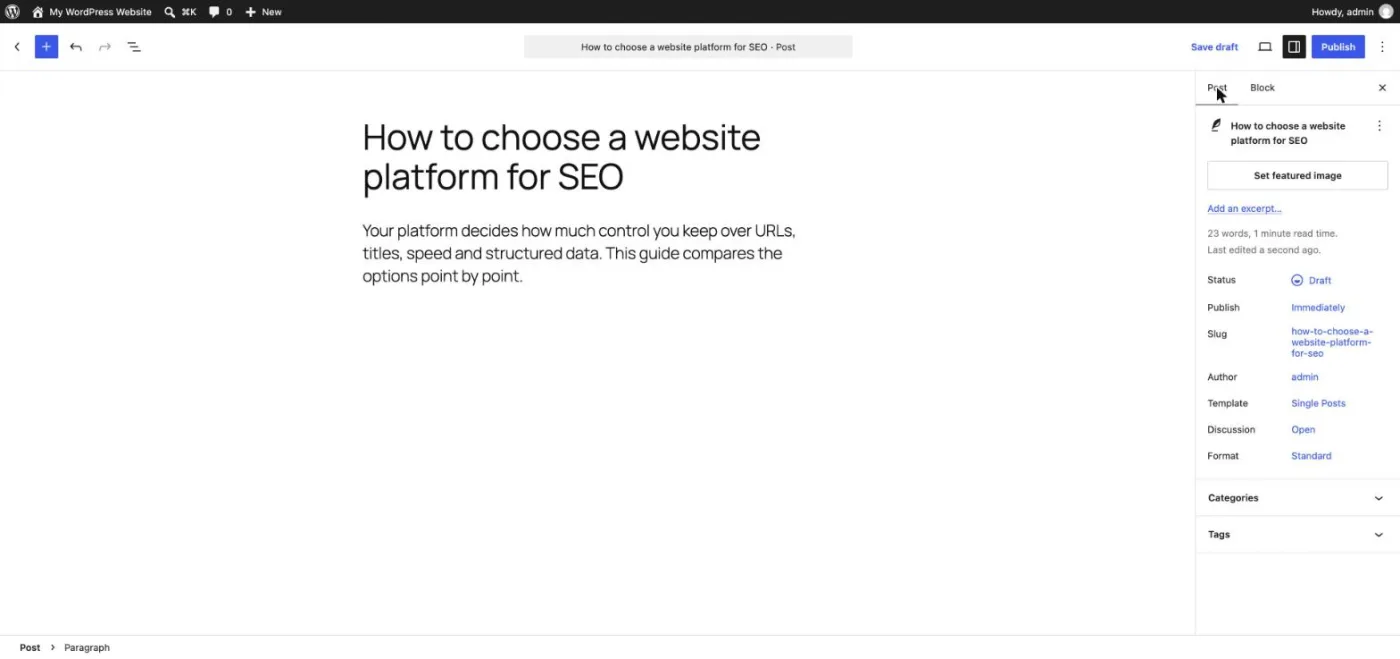
WordPress can do the same with a membership plugin, a payment plugin and an email service, often paid and maintained separately. It wins on everything else: editorial roles, scheduling, revisions, custom fields, reusable blocks and an unlimited number of post types. Its block editor lets you build rich layouts inside a post, with the slug, excerpt and featured image managed in the side panel.
If your business model is subscriptions, compare the dedicated tools in our guide to the best newsletter platforms and the revenue models in content monetization.
Note
Newsletters bring readers back, but they do not bring new ones from Google. A members-only post is invisible to search engines and AI crawlers: keep your best search content public and gate the extras.
Visibility in AI answers (GEO, generative engine optimization) depends far more on the content than on the CMS, but the platform affects three points:
Our study of the sources ChatGPT cites shows which kinds of pages win, and AI mention tracking tells you whether your publication appears in the answers, and who is cited instead.
Both are free to self-host. Self-hosted Ghost needs a server you manage (Ubuntu, Node.js, MySQL, at least 1 GB of memory) and a bulk email service for newsletters; WordPress runs on almost any shared host. Managed prices below come from the official Ghost(Pro) pricing page and the WordPress.com pricing page (checked October 2026).
| Option | Price | What you get |
|---|---|---|
| Ghost(Pro) Starter | $15/month billed yearly ($18 billed monthly) | 1 staff user, 1 newsletter, no custom theme, no paid subscriptions |
| Ghost(Pro) Publisher | $29/month billed yearly | 3 staff users, custom themes, paid subscriptions, integrations |
| Ghost(Pro) Business | $199/month billed yearly | 15 staff users, 10 newsletters, higher limits |
| Ghost(Pro) Custom | On quote | Unlimited members and staff, dedicated IP, uptime commitment |
| WordPress.org | Free software | Plus hosting, domain, theme and plugins, from a few dollars to tens of dollars a month |
| WordPress.com | Personal $4, Premium $8, Business $25, Commerce $45 a month billed yearly | Hosted WordPress, Enterprise on quote |
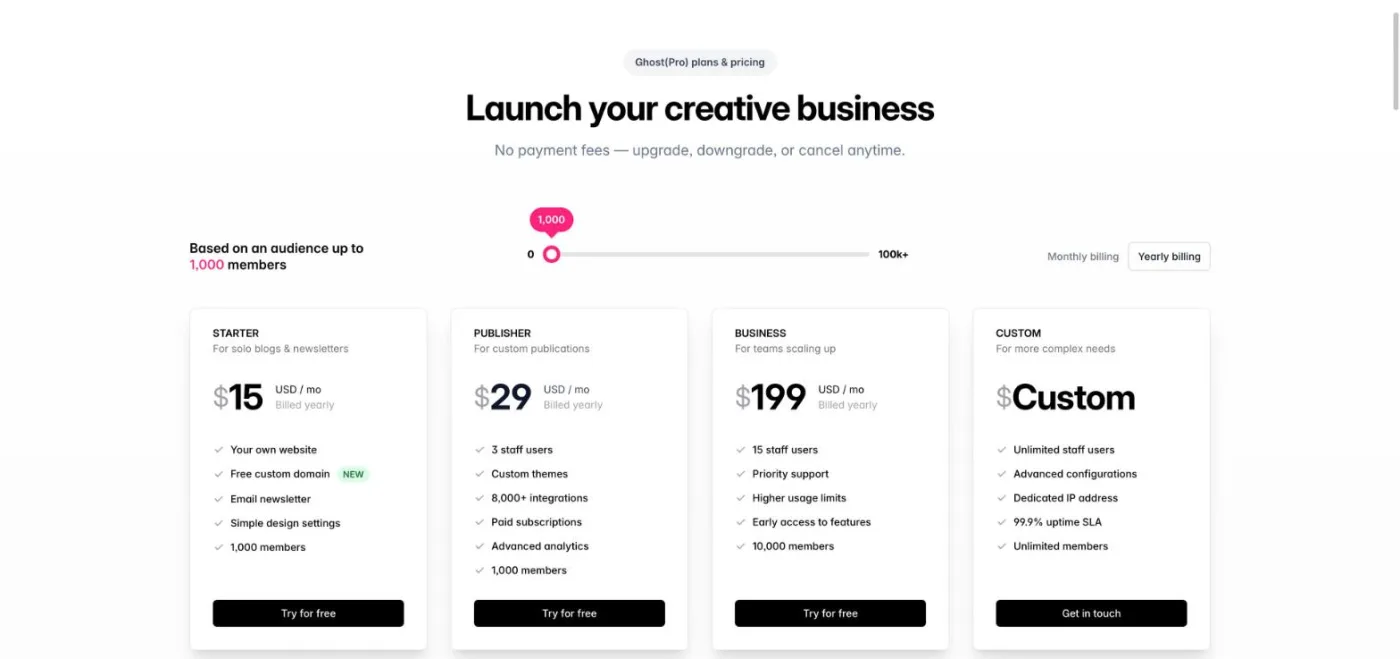
Ghost(Pro) prices are set for 1,000 members and rise as your list grows, so a large free newsletter costs more on Ghost than the same blog on WordPress. On WordPress, the hidden costs are premium plugins (SEO, membership, email, backups) and maintenance time. For a small blog, WordPress is usually cheaper; for a paid newsletter, Ghost often costs less once you add up the plugins and email service WordPress needs.
Ghost includes a WordPress migrator that imports posts and pages from the WordPress XML export, with categories converted into tags. The official migration guide lists its limits: XML files up to 100 MB and 2,500 posts, uncommon shortcodes not converted, no custom post types, and no redirects created for you. The method that protects rankings:
Our SEO migration checklist details each step, from the URL inventory to post-launch monitoring. The same method works in the other direction, from Ghost to WordPress, using Ghost's JSON export.
Watch out
Paid members do not move with the XML export. Migrating a WordPress membership site to Ghost means importing members and Stripe subscriptions separately; test it on a few accounts before switching.
Ghost has a smaller attack surface: no third-party plugins, one codebase maintained by the Ghost team and, on Ghost(Pro), updates, backups and security handled for you. Self-hosted Ghost still needs server updates, but there is far less to patch. WordPress core is well maintained, and most WordPress security incidents come from outdated or abandoned plugins and themes. A WordPress site stays safe when you keep the plugin list short, update weekly, use a reputable host and keep backups. For a team without a developer, maintenance time is often the real deciding cost.
The verdict depends on what the site has to do in two or three years, not only today.
| Your profile | Best choice | Why |
|---|---|---|
| Independent writer or newsletter with paid tiers | Ghost | Memberships, payments and email built in, 0% Ghost fee |
| Creator starting a free blog on a tight budget | WordPress | Cheap hosting, free SEO plugins, room to grow |
| Media brand publishing daily | Ghost or WordPress | Ghost for speed and simplicity, WordPress for complex sections and roles |
| Company blog next to a business site | WordPress | One CMS for landing pages, blog and forms |
| Agency managing many client sites | WordPress | Familiar to clients, huge pool of themes, plugins and developers |
| Multilingual site | WordPress | Mature translation plugins and hreflang control |
| Online store | WordPress with WooCommerce | Ghost has no native ecommerce |
| Team without a developer | Ghost(Pro) | Fast and secure by default, nothing to maintain |
Whatever you pick, traffic depends on publishing useful articles regularly. Sorank, our product, connects natively to WordPress and to Ghost through a webhook, finds the keywords and publishes articles built for Google and AI assistants with its blog article generator, directly or as drafts for review.
Ghost is the better tool for publishing and newsletters; WordPress is the better tool for building any kind of site. Pick the one your team will keep feeding with useful articles, then compare the plans and the 3-day free trial if you want that publishing on autopilot.

The Ghost software is open source and free to self-host on your own server, which needs Node.js, MySQL and a bulk email service for newsletters. The managed version, Ghost(Pro), is paid: from $15 a month billed yearly for the Starter plan, priced for 1,000 members (checked October 2026).
Ghost is easier for a beginner who only wants to write and send a newsletter: the editor, SEO basics and member sign-ups work from day one, with nothing to install. WordPress asks you to choose a host, a theme and plugins, but its huge community means an answer exists for almost every question.
Ghost sells paid subscriptions to your content through Stripe, but it has no product catalog, cart or shipping. To sell physical or digital products, link to an external shop or payment page, or choose WordPress with WooCommerce.
We analyse your competitors, your website and your AI visibility to create a tailored content plan for free.
 AI Content Brief Generator
 FAQ Schema Generator
 AI Blog Post Ideas Generator
 Structured Data Validator (Schema Validator)
 Alt Text Checker
 Internal Link Analyzer
 Backlink Challenge
 AI Meta Description Generator
 AI Blog Title Generator
 Google Indexability Checker
 AI Blog Outline Generator
 UTM Link Builder
 Keyword Clustering Tool
 Canonical Tag Checker
 XML Sitemap Generator
 Broken Link Checker
 AI SEO Title Generator
 Headline Analyzer
 SERP Preview Tool
 Redirect Checker
 Hreflang Tag Generator
 Heading Structure Analyzer
 HTTP Headers Checker
 Favicon Extractor
 SERP CTR Calculator
 SEO vs Paid Search Savings Calculator
 SEO Share of Voice Calculator
 SEO ROI Calculator
 SEO Traffic and Revenue Forecast Calculator
 SEO Budget Calculator
 SEO Break-Even Calculator
 SaaS SEO ROI Calculator
 ROAS Calculator
 Reading Time Calculator
 Ranking Gain Simulator
 Organic Traffic Value Calculator
 Organic Traffic Estimator and Website Traffic Checker
 LTV to CAC Ratio Calculator
 Local SEO ROI Calculator
 Link Building Cost Calculator
 Keyword Value Calculator
 Keyword Opportunity Score Calculator
 Keyword Density Calculator
 GEO ROI Calculator
 GEO Content Investment Calculator
 Ecommerce SEO ROI Calculator
 Customer Lifetime Value Calculator
 Customer Acquisition Cost Calculator
 CTR Calculator
 Cost Per Article Calculator
 Conversion Rate Calculator
 Content Marketing ROI Calculator
 ChatGPT Referral Traffic Estimator
 Bounce Rate Calculator
 Backlink ROI Calculator
 AI Visibility Score Calculator
 AI Traffic Value Calculator
 AI Share of Voice Calculator
 Cost of AI Invisibility Calculator
 AI Citation Rate Calculator
 llms.txt Validator
 AI Overview Checker and AI Overviews Rank Checker
 Robots.txt Checker
 AI SEO Audit
 LLM Readability Checker
 SearchGPT Readiness Checker
 Structured Data LLM Audit
 Website Crawlability AI Audit
 Why ChatGPT Is Not Recommending My Website
 Gemini Ranking Tool
 Perplexity Ranking Checker
 LLM Citation Checker
 Answer Engine Optimization Audit
 GEO Audit
 AI Search Visibility Test
 ChatGPT Visibility Checker
 llms.txt Generator
 URL Extractor
 Webpage to Markdown
 Sitemap Checker
 SERP Volatility Sensor
 Page Size Checker
 Word Counter
 Slug Generator
 Schema Generator
 Robots Generator
 OG Preview
 Meta Tags Generator
 Image Compressor
 Favicon Generator
 On-Page SEO Audit: SEO Checker and SEO Analyzer
 Backlink Analysis Tool
 Keyword Research Tool
 Domain Authority Checker
THEY TRIED SORANK BEFORE YOU
 “I tested Sorank on a real client site and it's insane. It does everything an agency would bill you $1500 a month for. It's going into production on that client now.”
 Guillaume Guersanguersanguillaume.com“We are an Ads agency and we wanted to get our SEO back on track once and for all. Sorank gave us a clear view of our site, helped us prioritize optimizations, and properly structure our content. The tool is easy to use, well designed for a team, and very practical for centralizing tracking without having to juggle multiple platforms. A very solid foundation to start fresh with our SEO.”
 Gaspard MadouiAds Agency
 “I just let the Sorank software do its thing, and now my DR is 25 and my page is ranking higher.”
 Lucas Flandrefoundertrace.fr“I specialized in GEO thanks to Sorank. The GEO Leaderboard allows me to show my clients their position vs competitors on ChatGPT. It’s a real commercial differentiator.”
 MélanieSEO Freelance“Great service, works well for our website and helps us understand how to improve it to rank better on Google and elsewhere. Congrats, keep going, I recommend it.”
 Hugo T.E-commerce merchant