Preferences
Privacy is important to us, so you have the option of disabling certain types of storage that may not be necessary for the basic functioning of the website. Blocking categories may impact your experience on the website. More information
Privacy is important to us, so you have the option of disabling certain types of storage that may not be necessary for the basic functioning of the website. Blocking categories may impact your experience on the website. More information

Learn how to write SEO friendly content that answers the search, reads well and gets cited. Structure, keywords, internal links and common mistakes.

In short
SEO friendly content is a page that answers the question behind a search and is easy for people and search engines to read. It is not a page built around a keyword count. Google asks whether a page is written for people first, whether it covers its topic completely, and whether it is clear who made it and how.
Want to go further? Ask
Quick quiz
Is SEO right for you, and how should you start?
Sorank matches your answers


Test it for 3 days on your own site and see where you stand on Google, ChatGPT and the other AIs.
Start 3-day free trial3 days free, then stop whenever you want. 90-day results guarantee, conditions apply.
SEO friendly content is writing that answers a real search need and that search engines can crawl, understand and rank. A page is friendly to search when its topic is clear, its answer comes early, and its structure lets a reader find the part they need in seconds.
That definition leaves out a keyword count, a word target and a list of tricks. Those were the core of early SEO writing, and many guides still lead with them. They are not what makes a page work today.
Every page has two readers. The first is a person who arrived with a question, often on a phone and often with little patience. The second is a system that has to decide whether your page is the best answer. Those systems now include Google's ranking systems and AI assistants such as ChatGPT, Gemini, Claude and Perplexity, which pull passages from pages to build their answers (for how AI-written pages fit into this, see AI content for SEO).
Both readers want the same thing: a clear answer from a source that knows the subject. If you write for the person, the system has an easier job. If you write only for the system, you lose the reader before any ranking question matters.
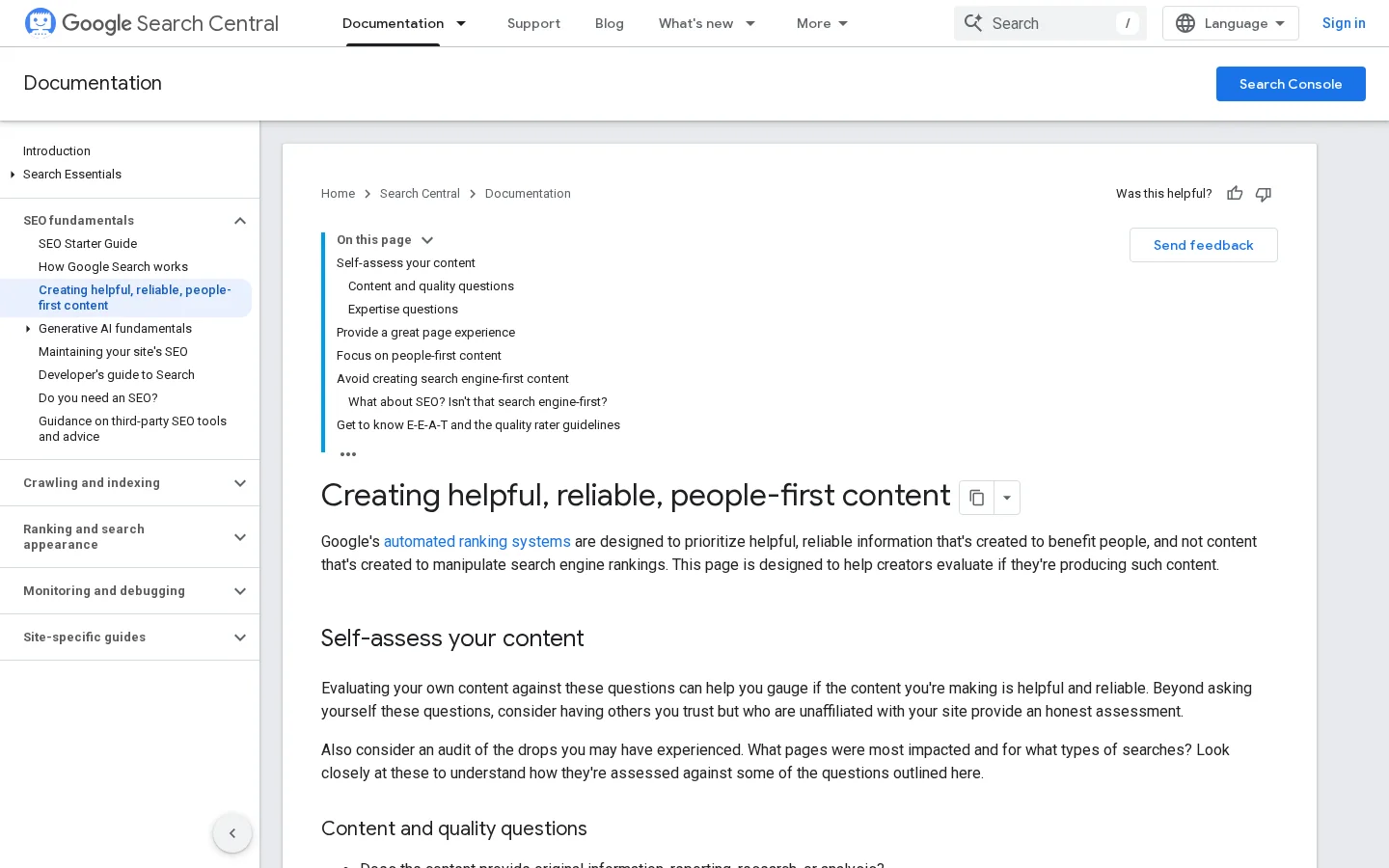
Google's "Creating helpful, reliable, people-first content" page lists warning signs of search-engine-first content. Among them: pages made mainly to attract search engine visits, writing about things because they seem trending, mainly summarizing what others say without adding value, and writing to a particular word count because you heard Google prefers one. It also asks whether your content promises to answer a question that has no answer.
None of this rules out SEO. The same page says SEO is still useful when it is applied to people-first content. The order of the work is what matters: the reader first, then the search engine.
Note
The self-assessment on that page has about 16 questions. Ask them of your draft before you publish, and be honest about the answers, especially the ones about depth and expertise.
The site-level side of this topic, which covers the technical base a page needs, is in the SEO-friendly website checklist. This article stays with the content itself.
The current view of helpful content comes from two dated announcements. On August 18, 2022, Google's helpful content update launched as "a new site-wide signal" that Google considers among many other signals for ranking pages. The post also said that a site with a lot of unhelpful content overall is less likely to perform well, even on pages that are not unhelpful in themselves. One weak section can drag down the rest of the site.
On March 5, 2024, Google said it had enhanced its core ranking systems to show more helpful results using a variety of innovative signals and approaches, and it described the update as an evolution in how it identifies the helpfulness of content. The practical reading is simple: you do not optimize for one update. You optimize for what all of them try to measure.
Two Google announcements on helpful content
Sources: Google Search Central blog, August 18, 2022 and March 5, 2024
Search engines and AI assistants read a page in layers. They check the topic, the structure, the entities (the named tools, people, places and concepts), and the evidence behind the claims. You cannot control how each system weighs these layers, but you can make each one easy to read.
The table below shows what each layer looks for and what you can do about it. For the signals behind quality assessment, see content quality signals. For the page-level side, see on-page SEO.
| Layer | What the system looks for | What you do |
|---|---|---|
| Topic | A page that covers the question completely | List the sub-questions in the results and answer each one |
| Structure | A clear H2 and H3 hierarchy with short paragraphs | Make every heading say what its section answers |
| Entities | Named tools, standards, people and places used correctly | Use the official name of each thing, with its version when it matters |
| Evidence | Claims that link to a primary source | Link to the documentation or study, with its date or author |
| Access | Real HTML links and key text that can be read without scripts | Give every link a real destination and keep the key text in the page HTML |
The layer most often ignored is access. If a key section exists only inside an image, or a link has no real destination, a crawler may never see it. Google's guidance on crawlable links is direct about this: Google can only crawl a link that is an a element with a real URL in its href.

Search intent is the goal behind a query. Someone who types a phrase wants to learn something, compare options, buy something or find a place, and the page that ranks is usually the one that matches that goal. Two pages can target the same keyword and still need different structures, because one serves a learner and the other serves a buyer.
Before you write a word, search your keyword in a private browser window and open the top five organic results. Do not copy them. Read them as a brief. For each result, note four things: the format (guide, list, tool or product page), the H2 list, the questions it answers in its first 200 words, and what it leaves out.
The gap is usually where your article comes from. If all five explain what a term means and none explains how to check a live page, a section on checking is what sets you apart. If all five are long and generic, a shorter article with exact steps can win.
Finish this sentence before you outline: "The reader wants to ___ so that they can ___." If you cannot finish it, you do not yet know which page this should be. A reader who wants to understand a term and a reader who wants to fix a site need different pages, even when they type the same words.
Use the format the results already reward. A "how to" query tends to reward numbered steps. A "what is" query rewards a definition in the first sentence. A comparison rewards a table. When the results are mixed, put the most common sub-question first and the others below it.
Keep a running list of the sub-questions you find in the results, in their search suggestions and in the questions customers send you. That list becomes your H2 and H3 headings. The keyword research guide explains how to collect and sort those questions.
Write the page in six steps: define the reader, build the outline from questions, draft the answer first, add the evidence, place the keyword naturally, then add links and metadata. Each step has a check, so you know when to move on.
The six-step method
Write the reader in one line: "A marketing lead at a 20-person company who has to explain SEO to the CEO by Friday." That is more useful than "marketers". Then turn each question you collected into a heading. Keep the headings specific. "How to check a page for keyword placement" is a better heading than "Keywords", because the reader knows what they will get from the section.
Open each H2 with the answer in one or two sentences, then develop it. Readers who only skim still get the point, and AI systems that extract passages get a self-contained answer. After the answer, add the detail that proves it: a worked example, a threshold, a command or a link to the source.
Compare two versions of one sentence. "Keep your paragraphs short" tells the reader nothing they can check. "Keep paragraphs to two to four sentences, and split any paragraph that holds two separate ideas" tells them what to do and how to tell whether they did it.
Use the main keyword in the title, the first paragraph, one H2 and the URL slug. Then let the rest of the page use the related terms your research found. The next section covers this in detail.
If you publish often, the outline and first draft take most of the time. Sorank's AI blog article generator builds articles for Google and AI search, and content optimization rewrites older pages on autopilot. Either way, check the output against the six steps. A generated draft still needs your facts, your examples and your sources.
Structure does two jobs. It lets a reader jump to the part they need, and it tells a system what each part covers. Headings do the first job and paragraphs do the second. A heading that says "More details" fails both.
A heading that says nothing vs a heading that answers
Your template sets the single H1, which is the page title. Use H2 for the main sections and H3 for the sub-questions under them. Do not skip levels to change the size of a heading. A heading is structure, not decoration. Keep each heading short enough to read in a list, and make it name the answer it leads to.
Tip
Once the page is live, or in staging with a public URL, run it through the free heading structure analyzer to see the full H1 to H6 outline. A skipped level or a second H1 is easy to miss by eye.
The title is the first thing a reader sees in the results. Write it so that the keyword and the outcome both appear, and avoid shocking words. Google's self-assessment asks whether the main heading or title "avoid exaggerating or being shocking in nature". A title that promises less and delivers more earns the click that matters.
The meta description is the snippet under the title. Many guides still give a hard character limit for it. Google's snippet documentation says there is no limit on how long a meta description can be, and that the snippet is truncated as needed, typically to fit the device width. Google also says it sometimes uses the meta description when that gives a more accurate description than the page content. So the description has to match what the page really says.
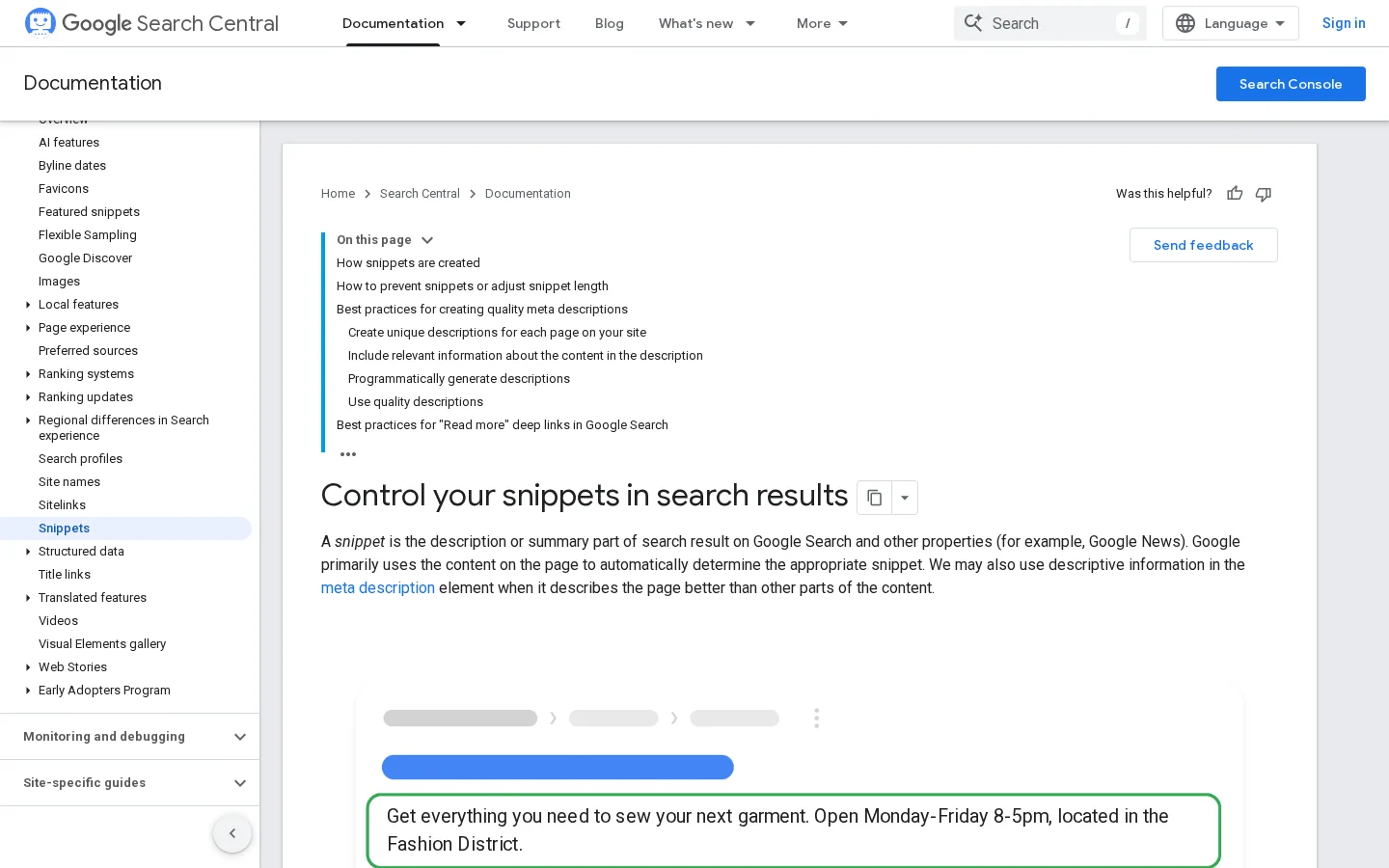
Write a description of about 140 to 160 characters, which fits most devices. Treat that as a writing target you choose, not a rule from Google. The example below shows the two tags together.
<title>SEO Friendly Content: How to Write Pages That Rank</title>
<meta name="description" content="Learn how to write SEO friendly content that answers the search, reads well and gets cited. Structure, keywords, internal links and common mistakes.">Keep paragraphs short enough to read on a phone, usually two to four sentences. Use a list when the items are parallel, and a table when each item has several attributes. Five steps with nothing else attached form a list. Five options with cost, time and risk belong in a table.
Use your main keyword in the title, the first paragraph, one H2 and the URL, then let the rest of the page use related terms. The density percentage that many guides quote is not a target that Google documents, so writing to a percentage is a guess, not a method.
The table shows where the main keyword belongs and why.
| Location | Use the main keyword? | Why |
|---|---|---|
| Title tag | Yes, once, near the start | Tells the reader and the search system what the page covers |
| First paragraph | Yes, once | Confirms the topic and matches the query |
| One H2 | Yes, if it reads naturally | Gives one section the subject name |
| URL slug | Yes, kept short | Shows the topic in the address |
| Body text | Use variants and related terms | Covers the topic without repeating one phrase |
| Image alt text | Only if it describes the image | Says what the image shows, not what you want to rank for |
Repeating a phrase thirty times does not make a page more relevant. It makes the sentences worse, and readers notice. Google's self-assessment asks whether the content is "produced well, or does it appear sloppy or hastily produced". A stuffed page fails that question on the first read.
Warning
If a sentence still reads well after you remove the keyword, keep it. If it only works with the keyword in it, rewrite it with a clearer noun that names the thing.
Search systems also look for the entities around a topic. An article on SEO friendly content that never mentions headings, internal links, search intent or metadata looks thin, even with the right keyword in every paragraph. List ten related terms from the top results, check which ones your draft covers, and use each one where it fits.
The keyword density entry explains why the percentage myth is fading. If you still want to see the count in your own text, the keyword density calculator gives it in a few seconds, and you can then judge whether the count reads as natural.
Internal linking methods differ in how they organize a site. The three you will meet most are the networked method, the topic cluster and the URL silo. None is the only correct choice. Each spreads context and attention through the site in a different way, and each has a cost in maintenance.
Principle. A page links to other pages wherever a term is explained, so the site works like an encyclopedia. A reader who meets an unfamiliar term clicks into its definition and comes back to the page they were reading.
When to use it. Use it when your content is a reference library, with many definitions that point to each other, such as a glossary.
Advantages. Discovery is easy, because almost every page links to several others, and readers find related pages without a menu.
Limits. It is hard to maintain past a few hundred pages. Without a rule for where links go, it produces random links that dilute the topic.
Example. On a page about crawl budget, the word "crawlability" links to its own definition, and "XML sitemap" links to the sitemap guide. Each link appears at the point where the reader needs the term explained, not in a block at the bottom.
Principle. One pillar page covers a broad topic. Spoke pages cover each sub-question in depth. Every spoke links up to the pillar, the pillar links out to every spoke, and the spokes link to their closest siblings. The loop of links around one subject is why SEO practitioners call it a semantic cocoon.
When to use it. Use it when you have a clear core topic and a set of questions around it, for example a course business with twelve questions about the same subject.
Advantages. It shows search systems which page should rank for which query. Because each spoke owns one intent, it also reduces keyword cannibalization. The content clusters entry goes deeper on the structure.
Limits. Each spoke needs real depth, not three hundred words of filler. The cluster also needs upkeep, because a new spoke that the pillar does not link to becomes an orphan.
Example. The pillar is a guide to SEO content strategy. Its spokes cover keyword mapping, content pruning and internal linking. Each spoke links back to the pillar in its first third, and the pillar lists every spoke in its own section with a short description.
Principle. The URL structure defines the groups. Every page under the same folder belongs to one silo. Pages inside a silo link to each other, and links across silos are kept rare and deliberate.
When to use it. Use it when your site has clear departments, such as products, categories or regions, and when the folder structure already reflects them.
Advantages. It is easy to explain to a team and to enforce, because the folder shows the group. A new page inherits its group from its address.
Limits. A silo can trap a page that belongs to two topics. It also breaks down when the folders were built for navigation and not for topics. Changing URLs later means redirects, so plan them carefully, starting with the difference between 301 and 302 redirects.
Example. A store has /shoes/running/ and /shoes/hiking/. Running shoe pages link to each other and to the shoes hub. They do not send their links into the hiking folder, unless a page genuinely serves both.
| Method | Organizes by | Best for | Main risk | Effort |
|---|---|---|---|---|
| Networked | Term definitions | Glossaries and reference libraries | Random links that dilute the topic | Low to start, high to maintain |
| Topic cluster | Topic and intent | Blogs that want topical depth | Thin spokes and orphan pages | Medium |
| URL silo | Folder structure | Sites with clear departments | Pages trapped in one folder | High if URLs must change |
Most mature sites combine them: a silo for the overall structure, a cluster inside each silo, and contextual links for definitions. The internal linking strategy guide covers the order of work. The topic cluster generator builds a cluster and checks it for overlapping pages.
A page earns trust when a reader can check it. Name the author, source each figure, and use images that show something real. Google's self-assessment asks whether the content is written or reviewed by an expert who demonstrably knows the topic, and whether it contains easily verified factual errors.
Put the source in the sentence that uses the information, with its author and date. For example: "Google's helpful content update launched on August 18, 2022." A list of references at the end does not help a reader who wants to check one claim. Prefer the primary source, meaning the documentation, the study or the tool's own page, over a blog that summarizes it.
Use images that add information, such as a real screenshot, a diagram or a chart. A decorative stock photo adds weight and no meaning. Write alt text that describes what the image shows. The word "screenshot" tells a screen reader nothing. Keep the alt text to one sentence, and do not fill it with keywords.
Alt text that helps vs alt text that does not
Put the author's name and role on the page, with a line about their experience with the topic. If an expert reviewed the article, say so and name the reviewer. Google asks whether an expert wrote or reviewed the content, so make that visible instead of assumed.
Most weak pages fail in the same six ways: writing for the keyword first, answering vaguely, using generic anchors, leaving pages orphaned, faking freshness, and making claims nobody can check. For each mistake, the fix starts with spotting it.
| Mistake | Quick signal | Fix |
|---|---|---|
| Keyword-first outline | The H2 list reads like a keyword report | Rebuild the outline from sub-questions |
| Vague opening | More than two sentences before the answer | Move the answer to the first sentence |
| Generic anchors | Links that say "click here" or "read more" | Name the destination in the anchor |
| Orphan pages | No internal link points to the page | Add links from a hub and a sibling page |
| Fake freshness | New date, same content | Update the content first, then the date |
| Unsourced claims | A figure with no link to its origin | Source it, or remove it |
What it is. The draft is organized around a list of keywords. Headings are keyword variants, and paragraphs repeat them.
How to spot it. Read only the H2 list. If it reads like a keyword report and not like a table of contents a reader would scan, the draft is keyword-first. Then ask whether each section answers a question a person would ask out loud.
How to fix it. Rebuild the outline from the sub-questions in your research, then assign keywords to the sections where they fit. Drop any variant that adds no meaning.
What it is. The page opens with background, a history lesson or a line such as "in today's world", and the answer arrives after several paragraphs.
How to spot it. Count the sentences before the first concrete answer. More than two is a problem for a skimming reader and for an AI system that extracts passages.
How to fix it. Move the answer to the first sentence and put the background below it. Google's self-assessment asks whether the content provides "substantial value when compared to other pages in search results", and a buried answer makes that harder to see.
What it is. Links that say "click here", "read more" or "this article", so the link text carries no meaning.
How to spot it. Read only the anchor text, out of context. Google's guidance on crawlable links suggests the same test: is the anchor specific enough to make sense by itself? It names "Click here" and "Read more" as poor choices.
How to fix it. Name the destination. "Internal linking strategy guide" is better than "read more". To find generic anchors across a folder of HTML files, run this search:
grep -rniE ">(click here|read more|this article)<" ./publicWhat it is. A page that no other page links to. A reader can reach it only through the sitemap or a direct search, and it passes no context to the rest of the site.
How to spot it. Compare your list of published URLs with the URLs that appear as the target of at least one internal link. Anything missing is an orphan. A crawler that starts from the home page will miss it too.
How to fix it. Add at least two links from relevant pages, one from a hub and one from a sibling. The internal link analyzer lists the internal links of any page, so you can see where it sits.
What it is. Changing the date on a page without changing its content, or writing "updated for this year" over an article that still describes old features or rules.
How to spot it. Check every claim that depends on a version, a price or a rule. If the claim would be wrong today, the date is wrong too.
How to fix it. Update the content first, then the date. Google's self-assessment lists "changing the date of pages to make them seem fresh when the content has not substantially changed" as a warning sign, and the reason is clear: readers check, and so do the systems.
What it is. Figures, rules and "best practices" with no origin, often copied from one article to the next.
How to spot it. Mark every number and every "Google says" sentence. If you cannot link to the page where it appears, it does not belong in the article.
How to fix it. Replace the claim with a source, or remove it. Google's snippet documentation sets no character limit for meta descriptions, so a "155 characters" rule cannot be a Google rule. Say what you tested, or say that the figure is a convention you chose.
Before you publish, check the intent, the answer, the structure, the links, the sources and the metadata. The checklist below should take about ten minutes for a page of this length, and it catches most of the mistakes in the previous section.
Pre-publish checklist
Tip
After publishing, run the live URL through the free on-page SEO audit to catch missing titles, duplicate headings and thin sections. Then check how easily an AI system can extract its passages with the LLM readability checker.
To finish today, take one page you already have, run it through this checklist and fix the first three problems you find. One page fixed well teaches more than a new article written in a hurry.
It is writing that answers a real search need and is easy for search engines and people to read. It has a clear topic, answer-first sections, descriptive headings, real links and sourced claims. It is not defined by a keyword count.
Google's documentation does not set a keyword density target, so no percentage is a rule. Use the main keyword where it reads naturally, in the title, the first paragraph, one H2 and the URL, and use related terms so the page covers the topic.
Google does not give a word count. Its self-assessment asks whether a page provides a substantial, complete or comprehensive description of its topic. Let the sub-questions set the length, and cut any section that repeats another.
It is writing that answers a real search need and is easy for search engines and people to read. It has a clear topic, answer-first sections, descriptive headings, real links and sourced claims. It is not defined by a keyword count.
Google's documentation does not set a keyword density target, so no percentage is a rule. Use the main keyword where it reads naturally, in the title, the first paragraph, one H2 and the URL, and use related terms so the page covers the topic.
Google does not give a word count. Its self-assessment asks whether a page provides a substantial, complete or comprehensive description of its topic. Let the sub-questions set the length, and cut any section that repeats another.
We analyse your competitors, your website and your AI visibility to create a tailored content plan for free.
 AI Content Brief Generator
 FAQ Schema Generator
 AI Blog Post Ideas Generator
 Structured Data Validator (Schema Validator)
 Alt Text Checker
 Internal Link Analyzer
 Backlink Challenge
 AI Meta Description Generator
 AI Blog Title Generator
 Google Indexability Checker
 AI Blog Outline Generator
 UTM Link Builder
 Keyword Clustering Tool
 Canonical Tag Checker
 XML Sitemap Generator
 Broken Link Checker
 AI SEO Title Generator
 Headline Analyzer
 SERP Preview Tool
 Redirect Checker
 Hreflang Tag Generator
 Heading Structure Analyzer
 HTTP Headers Checker
 Favicon Extractor
 SERP CTR Calculator
 SEO vs Paid Search Savings Calculator
 SEO Share of Voice Calculator
 SEO ROI Calculator
 SEO Traffic and Revenue Forecast Calculator
 SEO Budget Calculator
 SEO Break-Even Calculator
 SaaS SEO ROI Calculator
 ROAS Calculator
 Reading Time Calculator
 Ranking Gain Simulator
 Organic Traffic Value Calculator
 Organic Traffic Estimator and Website Traffic Checker
 LTV to CAC Ratio Calculator
 Local SEO ROI Calculator
 Link Building Cost Calculator
 Keyword Value Calculator
 Keyword Opportunity Score Calculator
 Keyword Density Calculator
 GEO ROI Calculator
 GEO Content Investment Calculator
 Ecommerce SEO ROI Calculator
 Customer Lifetime Value Calculator
 Customer Acquisition Cost Calculator
 CTR Calculator
 Cost Per Article Calculator
 Conversion Rate Calculator
 Content Marketing ROI Calculator
 ChatGPT Referral Traffic Estimator
 Bounce Rate Calculator
 Backlink ROI Calculator
 AI Visibility Score Calculator
 AI Traffic Value Calculator
 AI Share of Voice Calculator
 Cost of AI Invisibility Calculator
 AI Citation Rate Calculator
 llms.txt Validator
 AI Overview Checker and AI Overviews Rank Checker
 Robots.txt Checker
 AI SEO Audit
 LLM Readability Checker
 SearchGPT Readiness Checker
 Structured Data LLM Audit
 Website Crawlability AI Audit
 Why ChatGPT Is Not Recommending My Website
 Gemini Ranking Tool
 Perplexity Ranking Checker
 LLM Citation Checker
 Answer Engine Optimization Audit
 GEO Audit
 AI Search Visibility Test
 ChatGPT Visibility Checker
 llms.txt Generator
 URL Extractor
 Webpage to Markdown
 Sitemap Checker
 SERP Volatility Sensor
 Page Size Checker
 Word Counter
 Slug Generator
 Schema Generator
 Robots Generator
 OG Preview
 Meta Tags Generator
 Image Compressor
 Favicon Generator
 On-Page SEO Audit: SEO Checker and SEO Analyzer
 Backlink Analysis Tool
 Keyword Research Tool
 Domain Authority Checker
 “I tested Sorank on a real client site and it's insane. It does everything an agency would bill you $1500 a month for. It's going into production on that client now.”

 Guillaume Guersanguersanguillaume.com“We are an Ads agency and we wanted to get our SEO back on track once and for all. Sorank gave us a clear view of our site, helped us prioritize optimizations, and properly structure our content. The tool is easy to use, well designed for a team, and very practical for centralizing tracking without having to juggle multiple platforms. A very solid foundation to start fresh with our SEO.”
 Gaspard MadouiAds Agency
 “I just let the Sorank software do its thing, and now my DR is 25 and my page is ranking higher.”
 Lucas Flandrefoundertrace.fr“I specialized in GEO thanks to Sorank. The GEO Leaderboard allows me to show my clients their position vs competitors on ChatGPT. It’s a real commercial differentiator.”
 MélanieSEO Freelance“Great service, works well for our website and helps us understand how to improve it to rank better on Google and elsewhere. Congrats, keep going, I recommend it.”
 Hugo T.E-commerce merchant