Preferences
Privacy is important to us, so you have the option of disabling certain types of storage that may not be necessary for the basic functioning of the website. Blocking categories may impact your experience on the website. More information
Privacy is important to us, so you have the option of disabling certain types of storage that may not be necessary for the basic functioning of the website. Blocking categories may impact your experience on the website. More information

No fixed post count makes a blog rank. Learn how topic coverage, clusters and steady publishing decide it, and how to size your first batch of posts.

In short
No number of posts makes a blog rank. Google does not set one, and Ahrefs data shows that most new pages never reach the top 10. What works is coverage: a clear set of pages on one topic, linked to each other and kept up for several months. Size each batch by the questions your buyers ask, not by a target like 30 or 50 posts.
Want to go further? Ask
Quick quiz
How should you run your blog?
Sorank matches your answers


Test it for 3 days on your own site and see where you stand on Google, ChatGPT and the other AIs.
Start 3-day free trial3 days free, then stop whenever you want. 90-day results guarantee, conditions apply.
Google does not publish a number of pages or posts. Its guidance on helpful, people-first content asks whether each page serves a real purpose, and it lists a warning sign that applies here: "Are you producing lots of content on many different topics in hopes that some of it might perform well in search results?" A post count cannot answer that question. Topic depth can.
The data points the same way. In a study published on May 15, 2025, Patrick Stox at Ahrefs looked at 1M random URLs seen by Ahrefs' crawler in September 2023. Ahrefs' study found that 1.74% of them reached the top 10 within a year, down from 5.7% in 2017. A second sample of 2M random URLs with English content, from October 2023, gave 6.11%, which Ahrefs calls the fairer number. Whichever figure you use, most new pages stay out of the top 10.
New pages against old pages
Source: Ahrefs, Patrick Stox, May 15, 2025
Older pages hold the top spots too. The average #1 result is about 5 years old, and 72.9% of top 10 pages are more than three years old, up from 59% in 2017. A new post competes with pages that have had years to collect links, clicks and history. That is not a reason to skip writing. It is a reason to write several related pages, so that each one supports the others.
One post on a topic is a weak signal. Google has little to judge it by. Several posts on the same topic, each answering a different question and linked to the rest, give Google a clearer picture of what your site covers. That picture is what you are building. It has little to do with the total number of posts on your blog.
You will find a rule that says 30 articles are enough to rank. It circulates on forums and in vendor blogs. The sources above do not give any threshold, so treat it as a habit people repeat, not as a measurement. Thirty posts spread across ten unrelated topics give you ten weak groups. Thirty posts on one topic give you one strong group.
Topical authority is how strongly search engines treat your site as a reliable source on a subject. The full definition is in our topical authority glossary entry. The short version: a site that covers a topic in depth tends to get its new pages seen sooner.
Graphite, an SEO platform, published a white paper on topical authority and time to visibility, dated January 24, 2024. It covers 332 URLs from 12 domains, all articles published between June 1 and July 31, 2023. Graphite scored each domain's topical authority from 0 to 100 and split the URLs into three buckets: above 80, from 68 to 80, and below 68. The metric was time to visibility, the gap between a page's first impression and its first click.
The conclusion is that higher topical authority "significantly decreases time to visibility." Graphite also says that prioritizing topics by topical authority "can be a powerful way to accelerate time to impact." Read it with two cautions. The study comes from a vendor and its own clients, and the key values sit in charts that the text does not restate. Use it as a direction for your planning, not as a forecast for your site.
Coverage means that for each topic, a page answers the main question, the sub-questions, and the comparisons a buyer makes before deciding. You can check this in one pass. List the questions for a topic, then mark which ones have a page that answers each question directly. A gap is a missing page, and you fill it with a page, not with a higher count.
Two ways to set the goal

Coverage needs a structure, and there is more than one way to build one. Four methods come up often. Each fits a different situation, and none of them needs a particular post count to start. The sections below explain each method, and the table at the end compares them.
Principle. A pillar page covers the broad topic and targets the main query. Spoke posts answer the sub-questions, each with its own query, and link to the pillar. The pillar links back to every spoke. Together they form one cluster that Google can read as a whole.
When to use it. Use it when you have a clear set of topics and plan to keep the site for years. It is the right default for most blogs.
Advantages. The cluster builds coverage in one place. Internal links pass context from each spoke to the pillar, and from the pillar to the spokes. You can also see the whole cluster in one view when you report on it.
Limits. You need a topic map before you start. If two spokes target the same intent, they compete with each other, and sometimes with the pillar.
Example. A pillar on email marketing could have spokes on how to write a subject line, how to set up a welcome sequence, and how to measure unsubscribes. Each spoke has its own query and links to the pillar and to the spokes that share its question.
Note
Two spokes that target the same query work against each other. Give every post one main query. If you cannot name that query, the post is not ready to publish.
Principle. One post per keyword, with no structure between them. Each post stands alone. You pick the next keyword from the list, write the post, and publish it.
When to use it. Use it when you are testing a new market and do not yet know which topics matter. It is also what happens by default when a tool exports a long list and nobody groups it.
Advantages. It starts fast. There is nothing to plan beyond the list, and each post can go out as soon as it is ready.
Limits. The posts do not reinforce each other. Keyword lists often hold near-duplicate queries, so cannibalization is common. Internal links end up random, if they exist at all.
Example. You export a long keyword list, turn each line into a post, and publish them in alphabetical order. Months later, several posts fight over the same query, and none of them links to the others.
Principle. The URL path shows the topic. Every post in a topic lives in one folder, such as /blog/email-marketing/, and links to the folder's hub page and to the other posts in that folder. Links stay inside the silo, and the structure is visible in the address bar.
When to use it. Use it on large sites with several separate product lines or markets, and on a CMS that lets you set folders for posts.
Advantages. The structure is clear to readers and crawlers. In Search Console, you can filter performance by folder and see how each topic does.
Limits. Moving a post to another folder changes its URL. A post that belongs to two topics does not fit in one folder, and forcing it there weakens both silos.
Example. A software site creates /blog/seo/ and /blog/geo/ as silos. A post on AI search that also covers classic SEO has to pick one folder. Put it in the folder where most of its readers belong, then link to it from the other folder instead of copying the post.
Warning
When you move a post to another folder, add a 301 redirect from the old address. Without it, the page loses the links and history it had. Our 301 vs 302 redirect guide explains the difference.
Principle. You finish one topic completely, with its pillar and all its spokes, before you start the next. The work moves in one block, and the topic is published as a whole.
When to use it. Use it around a launch, a deadline or a campaign, or when the team is small and cannot run several topics at once.
Advantages. The cluster arrives in one window, so Google sees a complete topic early. Measurement is cleaner because only one topic changes at a time.
Limits. Other topics wait. If the topic turns out to matter less than you thought, the time is spent, and some pages may need a rewrite before they help.
Example. You spend the first months on one topic, such as invoicing for freelancers, and only then start the pricing pages or the next cluster.
| Method | Principle | Best when | Main limit |
|---|---|---|---|
| Topic cluster | One pillar page, spokes linked to it and back | Clear topics and a long-term site | Needs a topic map before you start |
| Flat keyword list | One post per keyword, no structure | Testing a new market | Posts do not reinforce each other |
| URL silo | Folders by topic, links kept inside each folder | Large sites with separate product lines | Moving posts changes their URLs |
| Depth-first sprint | One topic finished before the next starts | Launches, deadlines, small teams | Other topics wait |
Once you have picked a method, the cluster map is the hard part. Tools can build the map from keyword data and warn you about overlaps before you write.
Tip
Sorank's Topical Cluster Generator groups keyword ideas into clusters and flags pages that would overlap. You can do the same grouping by hand with the steps in the next section.
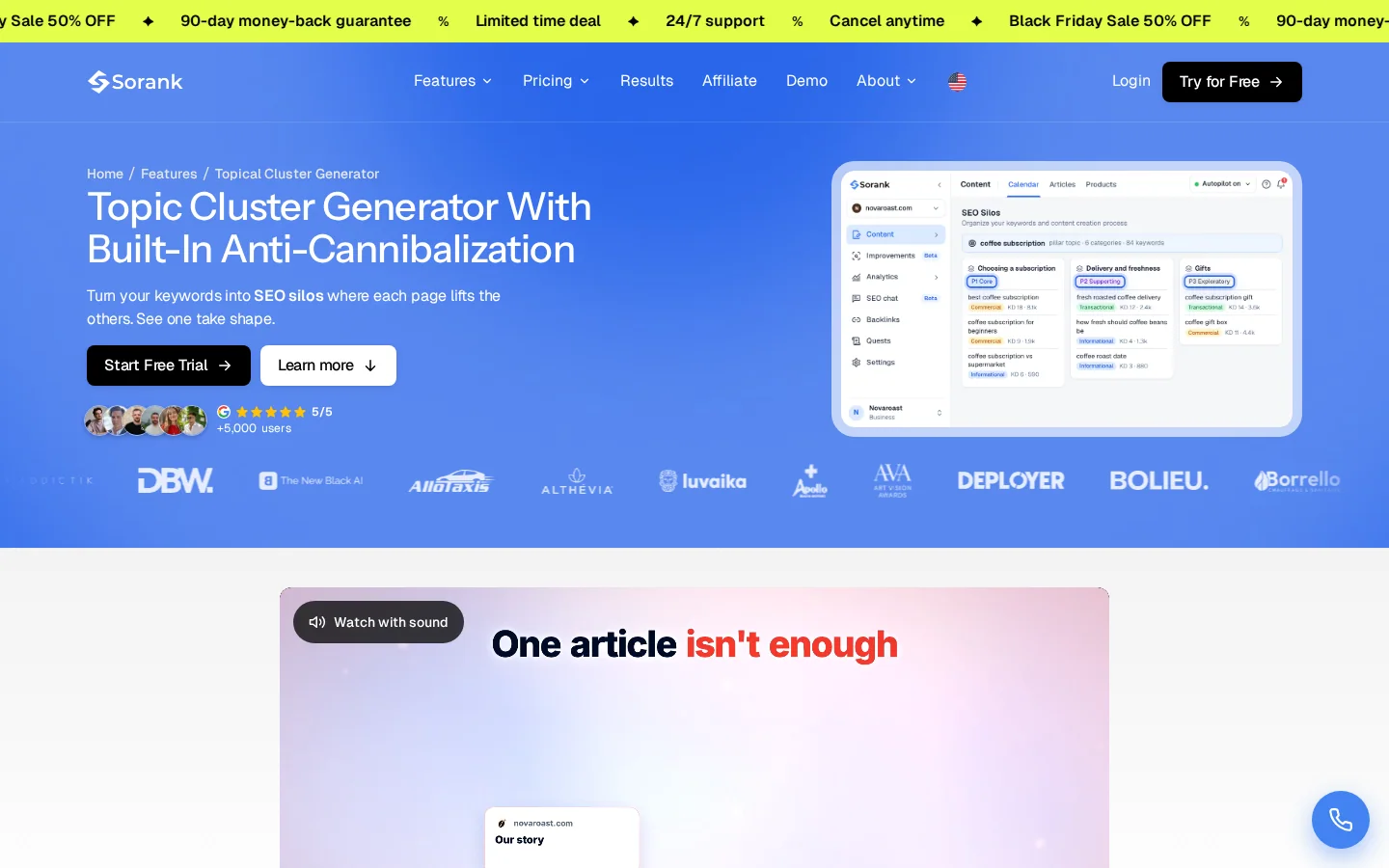
Instead of setting a post count, you set the size of each cluster. The method below takes an afternoon for one topic, and you repeat it for each cluster.
Five steps to size your first batch
Collect the questions your buyers ask, in their own words. Good sources are the Search Console queries for pages you already have, the search suggestions on Google, and the questions that come up in sales calls and support emails. Write each question the way a reader would type it. Drop the ones with no buyer behind them, such as trivia that no customer would ask.
Put together the questions that one page could answer completely. Two queries share an intent when a reader would be satisfied by the same page. "How often should I blog" and "how many posts per week" share an intent. "How often should I blog" and "how to write a blog post" do not. Be strict here. A group that is too broad produces a page that answers nothing well.
The batch for one cluster is the pillar plus one page for each distinct sub-question. Written as a formula:
batch size per cluster = 1 pillar + one spoke for each distinct sub-questionThen add the clusters together. The total is your first batch. If the total is larger than you can publish in the period you have, cut the lowest-value spokes. Do not cut the pillar, because the other pages depend on it.
Write the pillar first, since it sets the scope and the terms the spokes should use. Then write the spokes, all in one publishing window, so that each one can link to the pillar on the day it goes live. A pillar that goes out alone links to nothing useful.
Link each spoke to the pillar, and the pillar to each spoke. Add links between spokes that share a sub-topic. Our internal linking strategy guide covers the link rules in depth. Then review the cluster after about six months, using the signals in the next section.
For the grouping in step 2, the keyword clustering guide explains how to split one list into pages. The content clusters entry defines the pillar and spoke model.
Count and frequency are different questions. How often to publish has its own trade-offs, and our guide to blogging frequency covers it. Here the question is when a batch is done and when to start the next one.
Publish the pillar and the first spokes, then let them run for several months before you add another cluster. A steady pace gives you a site that grows gradually and stays active. A burst of posts on several topics at once spreads your attention thin, and no cluster gets the time it needs to be judged.
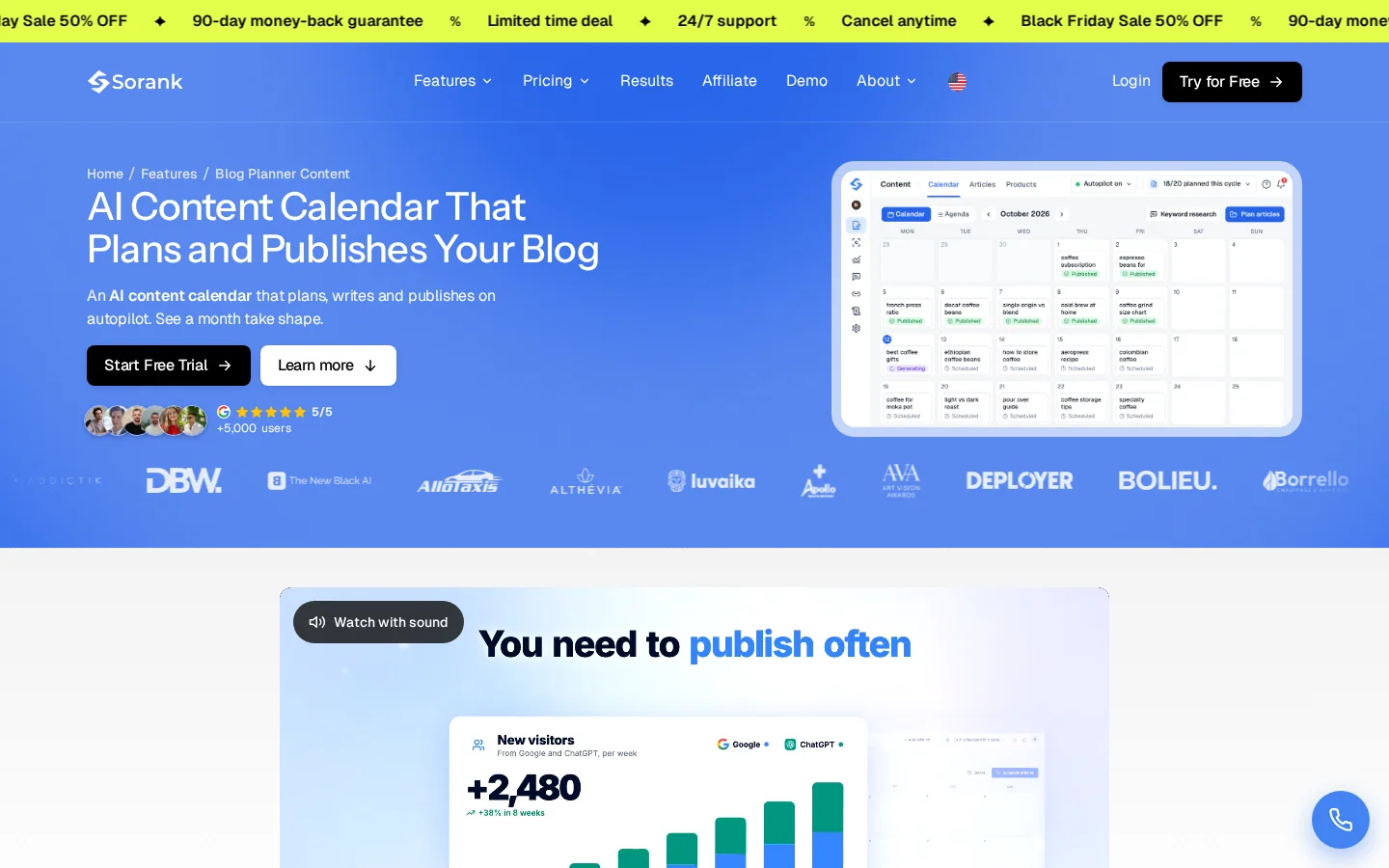
If you want the calendar and the publishing handled in one place, Sorank's Blog Planner Content keeps your blog calendar filled and publishes the posts on it.
Ranking takes time, and the timing varies by site and topic. The Ahrefs data points to a slow process for new pages. Do not judge a cluster after a few weeks. Give it several months, and look at the trend in Search Console rather than a single day's position.
Two signals help you decide what to do next. Pages in positions 5 to 20 for a query are close, and they usually need a clearer answer near the top, better content, or more internal links. Pages with no impressions after several months usually have an indexing problem or a mismatch with what people search for. Check both before you write more.
Example
A cluster has a pillar and several spokes. After a few months, one spoke has impressions and a position near 12, while two others have none. The near one gets a stronger answer near the top and more internal links. The other two get checked for indexing and search intent. If they cannot be fixed, you merge them into a stronger page.
These are the errors that show up most often when a team plans by count. Each one has a sign you can see in your data and a fix you can make in a day.
What it is. The goal is a number, such as 30 or 50 posts, and topics are picked to fill the count. Posts get written because they are easy, not because a buyer needs them.
How to spot it. Open the post list. If the posts share no subject, if some have no internal links, and if many get no impressions after several months, the quota drove the plan.
How to fix it. Replace the count with the coverage check from the second section. Pause any post that does not belong to a cluster, and use the time to finish the pillar.
What it is. Two or more of your URLs target the same query, so they compete for the same spot in the results.
How to spot it. In Search Console, filter performance by query. If two of your URLs appear for the same query, and their positions move back and forth, the posts are competing.
How to fix it. Merge the weaker post into the stronger one, keep its best sections, and redirect the old URL with a 301 to the page you keep. The keyword clustering guide shows how to assign one query to one page before the conflict starts.
What it is. Posts that repeat the same structure and paragraphs with a different keyword in the title. Google's guidance asks whether you are "using extensive automation to produce content on many topics," and this pattern is exactly that.
How to spot it. Read two posts side by side. If the second could be the first with the keyword swapped, the post is thin. Search Console often shows these pages with few impressions and no clicks.
How to fix it. Rewrite the post so that it answers its one intent in full, with examples and specifics that the other posts lack. If you cannot add anything that is not already in another post, merge it instead.
What it is. Posts in the same cluster do not link to each other. The pillar lists no spokes, and the spokes do not point back.
How to spot it. Check the links on each page. The internal link analyzer shows the links on a single page, which is enough for a small cluster.
How to fix it. Add the links in the body text, where the reader needs the next step. A list of links at the bottom of the page does less. Link the pillar to each spoke, and each spoke back to the pillar.
What it is. You stop a cluster after a few weeks because the positions have not moved.
How to spot it. Look at the publication dates. If the cluster is younger than several months, the data is too early to act on.
How to fix it. Set a review date at about six months, and use the two signals from the pace section in the meantime. Change only what the data points to.
What it is. A post goes live and is never updated, even when its facts, tools or prices change.
How to spot it. Sort your posts by last update. The oldest ones that still get impressions are often the most valuable, and the most out of date.
How to fix it. Schedule a review of each cluster on a regular cycle, and update the sections that have gone stale. Keep the URL the same, so the page keeps its history.
Quota mindset against coverage mindset
There is no fixed number. Google does not publish one, and the Ahrefs study gives no threshold. What you need is a cluster that covers the main question and the sub-questions of a topic, with internal links and several months of time.
Most new pages take months, not weeks. In the September 2023 sample, Ahrefs found that only 1.74% of new URLs reached Google's top 10 within a year. Judge a cluster after about six months, and use Search Console to read the trend.
No. The 30-article rule is a habit repeated on forums, not a finding. Thirty posts on one topic, linked together, are more useful than thirty spread across unrelated topics.
Before you judge a batch
The method works with a spreadsheet and a crawler. Sorank takes over the parts that take the most time: the keyword research, the clusters and the blog calendar. The table shows what each product does for the plan in this article.
| Step | Sorank feature | What it does |
|---|---|---|
| List the questions | Automated Keyword Research | Finds keywords for Google and AI search |
| Group and size clusters | Topical Cluster Generator | Builds clusters and avoids overlapping pages |
| Keep the calendar moving | Blog Planner Content | Fills the blog calendar and publishes the posts |
For the same logic applied to links, read our method to find your backlink number. For the wider approach to writing posts that fit a cluster, see blogging for SEO.
There is no fixed number. Google does not publish one, and the Ahrefs study gives no threshold. What you need is a cluster that covers the main question and the sub-questions of a topic, with internal links and several months of time.
Most new pages take months, not weeks. In its September 2023 sample, Ahrefs found that only 1.74% of new URLs reached Google's top 10 within a year. Judge a cluster after about six months, and read the trend in Search Console.
No. The 30-article rule is a habit repeated on forums, not a finding. Thirty posts on one topic, linked together, are more useful than thirty spread across unrelated topics.
We analyse your competitors, your website and your AI visibility to create a tailored content plan for free.
 AI Content Brief Generator
 FAQ Schema Generator
 AI Blog Post Ideas Generator
 Structured Data Validator (Schema Validator)
 Alt Text Checker
 Internal Link Analyzer
 Backlink Challenge
 AI Meta Description Generator
 AI Blog Title Generator
 Google Indexability Checker
 AI Blog Outline Generator
 UTM Link Builder
 Keyword Clustering Tool
 Canonical Tag Checker
 XML Sitemap Generator
 Broken Link Checker
 AI SEO Title Generator
 Headline Analyzer
 SERP Preview Tool
 Redirect Checker
 Hreflang Tag Generator
 Heading Structure Analyzer
 HTTP Headers Checker
 Favicon Extractor
 SERP CTR Calculator
 SEO vs Paid Search Savings Calculator
 SEO Share of Voice Calculator
 SEO ROI Calculator
 SEO Traffic and Revenue Forecast Calculator
 SEO Budget Calculator
 SEO Break-Even Calculator
 SaaS SEO ROI Calculator
 ROAS Calculator
 Reading Time Calculator
 Ranking Gain Simulator
 Organic Traffic Value Calculator
 Organic Traffic Estimator and Website Traffic Checker
 LTV to CAC Ratio Calculator
 Local SEO ROI Calculator
 Link Building Cost Calculator
 Keyword Value Calculator
 Keyword Opportunity Score Calculator
 Keyword Density Calculator
 GEO ROI Calculator
 GEO Content Investment Calculator
 Ecommerce SEO ROI Calculator
 Customer Lifetime Value Calculator
 Customer Acquisition Cost Calculator
 CTR Calculator
 Cost Per Article Calculator
 Conversion Rate Calculator
 Content Marketing ROI Calculator
 ChatGPT Referral Traffic Estimator
 Bounce Rate Calculator
 Backlink ROI Calculator
 AI Visibility Score Calculator
 AI Traffic Value Calculator
 AI Share of Voice Calculator
 Cost of AI Invisibility Calculator
 AI Citation Rate Calculator
 llms.txt Validator
 AI Overview Checker and AI Overviews Rank Checker
 Robots.txt Checker
 AI SEO Audit
 LLM Readability Checker
 SearchGPT Readiness Checker
 Structured Data LLM Audit
 Website Crawlability AI Audit
 Why ChatGPT Is Not Recommending My Website
 Gemini Ranking Tool
 Perplexity Ranking Checker
 LLM Citation Checker
 Answer Engine Optimization Audit
 GEO Audit
 AI Search Visibility Test
 ChatGPT Visibility Checker
 llms.txt Generator
 URL Extractor
 Webpage to Markdown
 Sitemap Checker
 SERP Volatility Sensor
 Page Size Checker
 Word Counter
 Slug Generator
 Schema Generator
 Robots Generator
 OG Preview
 Meta Tags Generator
 Image Compressor
 Favicon Generator
 On-Page SEO Audit: SEO Checker and SEO Analyzer
 Backlink Analysis Tool
 Keyword Research Tool
 Domain Authority Checker
 “I tested Sorank on a real client site and it's insane. It does everything an agency would bill you $1500 a month for. It's going into production on that client now.”

 Guillaume Guersanguersanguillaume.com“We are an Ads agency and we wanted to get our SEO back on track once and for all. Sorank gave us a clear view of our site, helped us prioritize optimizations, and properly structure our content. The tool is easy to use, well designed for a team, and very practical for centralizing tracking without having to juggle multiple platforms. A very solid foundation to start fresh with our SEO.”
 Gaspard MadouiAds Agency
 “I just let the Sorank software do its thing, and now my DR is 25 and my page is ranking higher.”
 Lucas Flandrefoundertrace.fr“I specialized in GEO thanks to Sorank. The GEO Leaderboard allows me to show my clients their position vs competitors on ChatGPT. It’s a real commercial differentiator.”
 MélanieSEO Freelance“Great service, works well for our website and helps us understand how to improve it to rank better on Google and elsewhere. Congrats, keep going, I recommend it.”
 Hugo T.E-commerce merchant