Preferences
Privacy is important to us, so you have the option of disabling certain types of storage that may not be necessary for the basic functioning of the website. Blocking categories may impact your experience on the website. More information
Privacy is important to us, so you have the option of disabling certain types of storage that may not be necessary for the basic functioning of the website. Blocking categories may impact your experience on the website. More information

Where AI search is heading, what the data says about clicks, and a step-by-step plan to get your brand named and cited by  ChatGPT,
 Gemini and
 Perplexity.

Tools

In short
AI search is moving from a list of links to one written answer that names a few sources. It now runs across Google AI Mode, ChatGPT, Gemini, Claude and Perplexity, not in one place. Clicks still matter, but they arrive after the answer has already shaped the buyer's choice. To prepare, make each page answer one question in its first paragraph, measure mentions and citations as well as sessions, and keep the crawlers that feed AI answers allowed on your site.
Want to go further? Ask
Quick quiz
How should you get mentioned by ChatGPT and other AI assistants?
Sorank matches your answers


Test it for 3 days on your own site and see where you stand on Google, ChatGPT and the other AIs.
Start 3-day free trial3 days free, then stop whenever you want. 90-day results guarantee, conditions apply.
For twenty-five years, search gave you a list. You scanned it, clicked a result, and the ranking decided who got the visit. In AI search, the engine reads many pages, writes one answer, and cites a handful of sources. Your page can shape that answer without ever receiving the click. That is the core shift, and every other change in this guide follows from it.
In the classic model, the unit of competition is the position. The first result takes the largest share of clicks, and the tenth takes very little. You measure rankings, impressions and clicks in Search Console, and the reporting is simple: move up, get more visits. The logic is easy to plan around, which is why most SEO playbooks were built on it.
An AI answer is built in steps. The engine interprets the question, runs several related searches, reads the pages it retrieves, and writes a text that combines them. The list of citations is much shorter than a results page. So the competition is no longer about position 3 against position 4. It is about being one of the few sources the engine chooses to use at all.
The interface decides what the user sees first. When the answer sits above the links, the user may never scroll to your result. The table below compares the two models on the points that change your daily work.
| Question | Classic search | AI search |
|---|---|---|
| Output | Ten blue links | One answer with citations |
| Unit of competition | Position in the list | Being named or cited |
| Main success metric | Rankings and clicks | Mentions, citations and clicks |
| Where the decision happens | On your page, after the click | Often inside the answer, before any click |
| Typical query | Short keyword | Full question, often with context |
The most useful public study on this question comes from Pew Research Center, July 22, 2025. Its authors followed 900 U.S. adults who agreed to share their browsing data in March 2025. They then analyzed 68879 Google searches collected in April 2025. Of those searches, 12593 produced an AI summary. The study compares what users did on pages with and without the summary.
Users who saw an AI summary clicked a traditional result in 8% of visits. Users who did not see one clicked in 15% of visits, nearly twice as often. Visits that ended the browsing session were 26% with the summary and 16% without it. Users who read the summary were more likely to stop there.
What the AI summary changed in the Pew panel
Source: Pew Research Center, July 22, 2025 (U.S. panel, March and April 2025)
A high position is no longer enough on its own. If a query triggers an AI summary, a page can rank well and still lose the click. Open Search Console and filter by query. Look for queries where you rank in the top three, impressions are high, and clicks have dropped over the last few months. Those are your first candidates for an answer-led rewrite, because the page already has the relevance and only lacks the direct answer.
Many users are satisfied by the summary, and that is the intended behavior of the product. The effect is not only negative. A user who reads a summary about your category may later search for your brand name directly. You can see part of this in branded queries, which you should track separately from generic ones. If branded impressions rise while generic clicks fall, the answer layer may be sending you demand you cannot see in a single report.
The Pew study uses a U.S. panel from 2025. Click shares vary by query type, country, device and the design of each interface, and Google changes its layout often. Use the study as a direction, not as a forecast for your site. Then measure your own pages before you change your plan.

Nobody knows the exact shape of the next years. Still, four shifts are visible in what the engines ship and what Google reports about its own tools. For a wider list of shifts across the whole discipline, read our guide to SEO trends. This section looks only at where the search interface itself is going.
Several SEO commentators predict that presence in AI answers will become a key performance indicator, sometimes ahead of clicks. Treat that as a forecast, not a fact. What you can measure today is narrower: impressions inside AI features, citations and brand mentions in answers. Google began reporting impressions for generative AI features in June 2026, which is a sign that the measurement layer is catching up with the product.
Google's AI features, ChatGPT, Gemini, Claude and Perplexity each retrieve and cite sources in their own way. A page can be cited by one engine and absent from another. So a single "AI optimization" plan may miss traffic that goes to a different product. Plan for at least two or three engines, choose the ones your buyers use, and track them separately. The AI search glossary entry defines the main interfaces side by side.
Assistants increasingly run tasks: compare products, check availability, book or buy. A page then needs to be readable by a machine as well as a person. Price, stock status, delivery terms and specifications need to be clear and consistent across the page and the product feed. The first version of this is already visible in shopping and feed-based visibility. Our guide to agentic SEO covers how to design pages for these agents.
The timeline below lists the dated facts used in this guide. Each one is a fixed point you can check in the original source.
Dated facts behind this guide
Sources: Pew Research Center; Google Search Central blog
To earn a citation, you need a working model of the mechanics. Most AI search products follow the same pattern: they interpret the question, retrieve candidate pages, read them, and synthesize an answer with links. The details differ by engine and change often, but the pattern is stable enough to plan around. Our guide on how AI assistants choose their sources goes deeper into retrieval and citation criteria.
The engine first retrieves candidate pages, either from a search index or from a live crawl, depending on the product. If your page is never retrieved, nothing else in this guide matters. That is why indexing, crawl access, clear titles and a stable URL still come first. Writing a perfect answer on a page the engine cannot reach is wasted effort.
A question such as "best accounting software for a 10-person agency" may be split into several sub-queries: pricing, integrations, reviews, agency use cases, and so on. The engine retrieves for each sub-query and then merges the results. A page that answers one of these sub-questions very well can be cited even when it does not rank for the main query. This is why coverage of sub-questions matters more than the head term. For the keyword side, read our guide to keyword research for AI search. Sorank's Query Fan-Out Tracker shows which sub-queries an AI engine runs for a given question, so you can see the gaps before you write.
Test instead of guessing. Pick ten prompts your buyers would type. Ask each engine and note which sources it cites. Then compare the cited pages with your own. Ask four plain questions: Does the page answer the question in its first paragraph? Does it state figures and name the source of each one? Does it name the product, method or company without vague wording? Does it show a date, so the engine can tell whether the claim is current? The pages that pass these checks are the ones engines tend to reuse.
Ranking for a click vs being cited in an answer
Google's official guidance on AI features in Search is short, and that is useful. It tells you what to do and, just as important, what you can skip. Many vendors sell extra files and markup for AI visibility, so the official baseline is worth reading in full before you spend time or money on them.
Google's documentation says that a page must be indexed and eligible to be shown in Google Search with a snippet to appear in AI Overviews or AI Mode. It adds that there are no additional technical requirements and no special optimizations needed for these features. Read the full page in Google's documentation on AI features and your website.
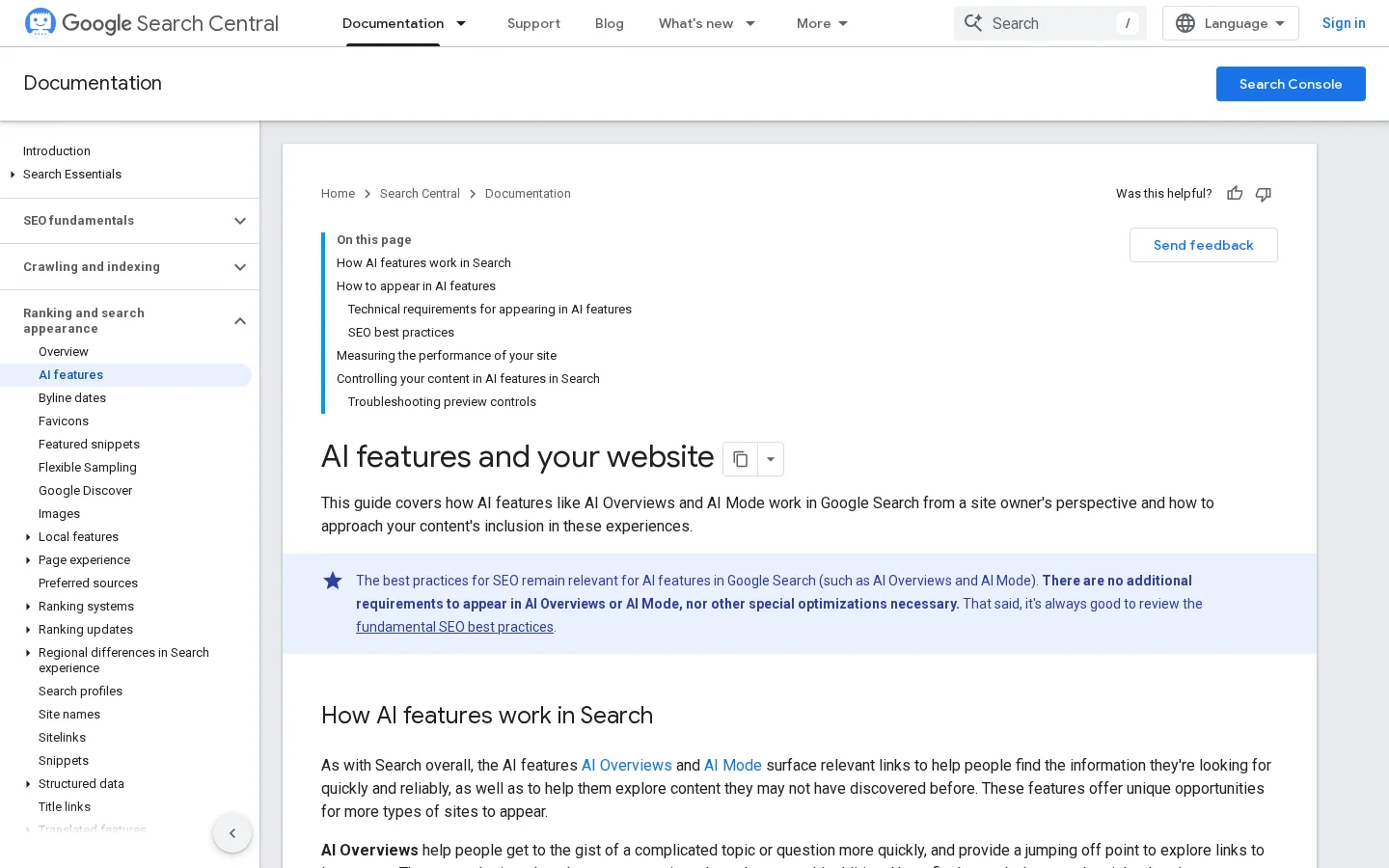
The same page says you do not need to create new machine-readable files, AI text files or markup to appear in these features. It also says there is no special schema.org structured data to add for AI features. Structured data still helps Search when it matches the visible text, so keep it accurate. But it is not a switch for AI answers. Our guide to structured data for AI search separates what helps from what does not, page type by page type.
Because eligibility depends on showing a snippet, a directive that blocks snippets also blocks your page from these features. The directive is a single line in the head of the page, and it often appears through an SEO plugin or a shared template that someone set up for another purpose. Check the rendered HTML of your most important pages, not only the settings screen of your CMS.
<meta name="robots" content="nosnippet">Warning
A nosnippet directive is easy to add by accident. Search your templates and plugin settings for it, then check a sample of live pages. If the line is there, remove it on the pages you want to appear in AI features, and test a few URLs after the change.
Google's guidance also recommends making sure that important content is available in textual form. Facts stored only in images, in tabs that load after the page renders, or in scripts that fail for some visitors give the engine less to read. Put the key figures, definitions and steps in normal HTML text, and use images to support them.
Measurement is the weak point for most teams. Use three layers: what the platform reports, what you see when you ask the engines yourself, and which visits arrive from AI tools. Each layer answers a different question, and none of them is complete on its own.
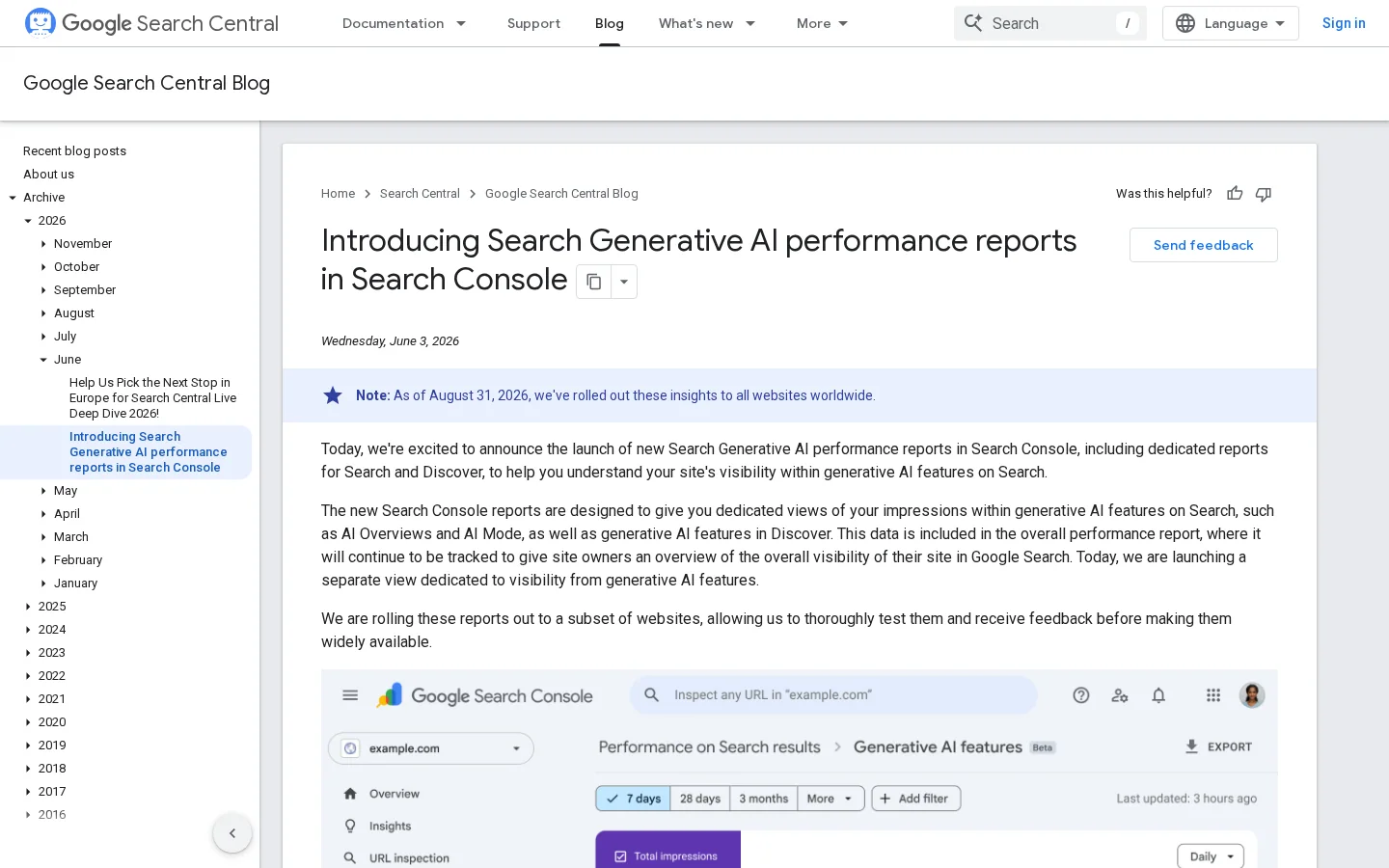
Google published its generative AI performance reports for Search Console on June 3, 2026, in a post by Hillel Maoz and Moshe Samet. The reports show how often your URLs appeared in AI Overviews, AI Mode and Discover. You can break the data down by page, country, device and time, with hourly, daily, weekly or monthly granularity. The reports count impressions, not clicks, so pair them with your regular performance report.
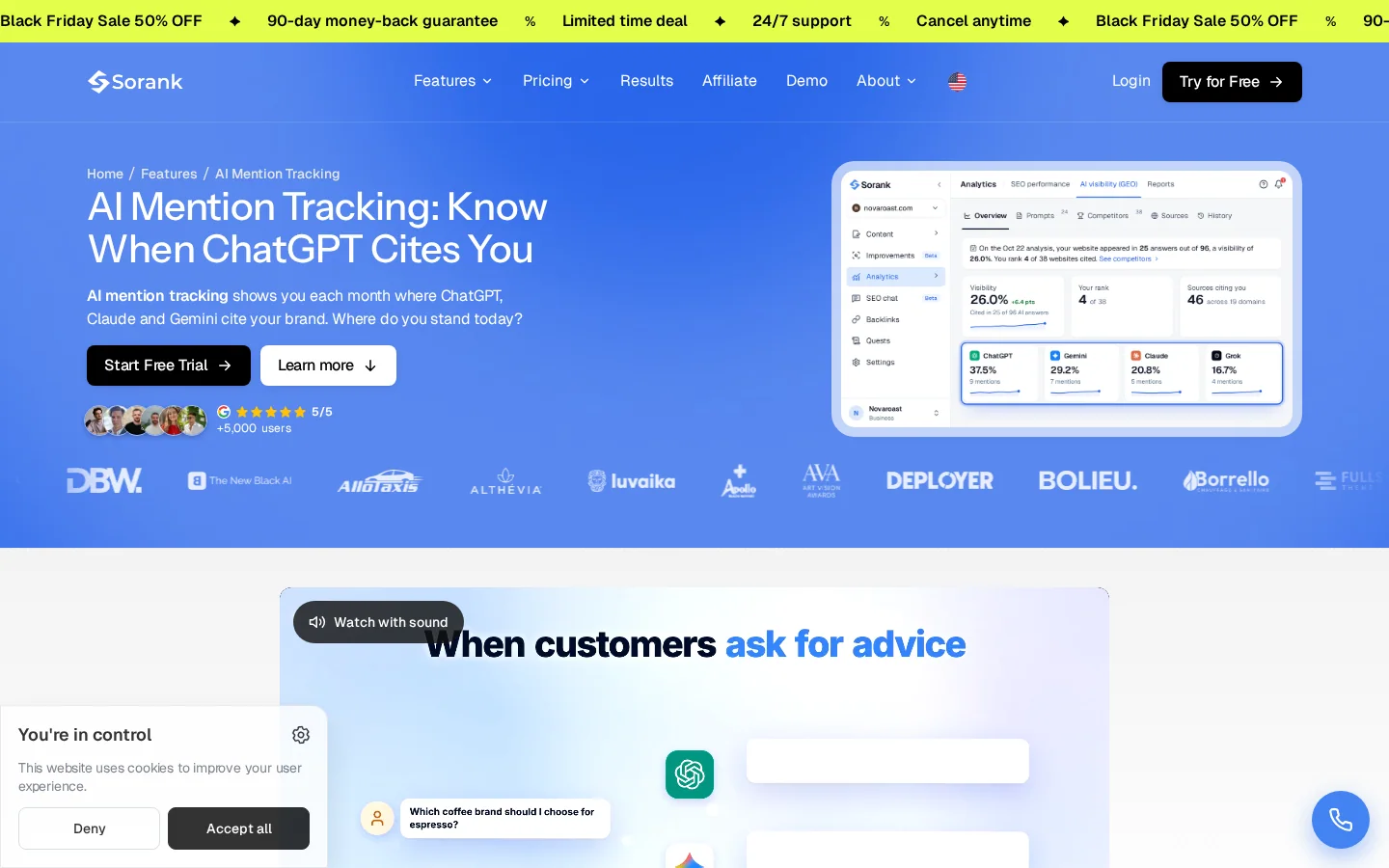
Measure what the engines say about your brand. Choose a fixed set of prompts that buyers actually ask, run them on a schedule, and record three things for each answer: whether your brand is named, where it appears in the answer, and whether your domain is cited. The same prompt can give different answers on different days, so read trends over several weeks instead of one result. Sorank's AI Mention Tracking runs a fixed prompt set on ChatGPT, Claude and Gemini, and on Grok depending on the plan.
Tip
Want a first reading before you set up tracking? The free AI Search Visibility Test sends one buying question to ChatGPT, Perplexity, Gemini or Claude, with web search on, and scores whether your domain is cited and your brand named. It asks for an email address and a 6-digit code the first time, then allows a few free runs per day.
The table below shows what each source tells you and where it stops. Use all four, and be clear in your reports about which number comes from which source.
| Source | What it tells you | Main limit |
|---|---|---|
| Search Console generative AI reports | Impressions in AI features, by page and country | No clicks in that report |
| Prompt tracking | Whether your brand is named and cited for the prompts you chose | A sample of prompts, not all user questions |
| Analytics referral data | Visits from AI tools that pass a referrer | Some AI visits lose the referrer and show as direct |
| Manual checks | The tone and context of each answer | Slow, and hard to repeat exactly |
Here is a plan you can start this week. Each step ends with a result you can check, so you know when to move on. The overview is below, and the details follow.
The 5-step method
Pick 20 prompts that a buyer would type before purchasing your category. Include comparison prompts, price prompts and "best for" prompts. Run each one in the engines your buyers use, and save the answers in a sheet. Mark whether your brand is named, which competitors appear, and which URLs are cited. This is your baseline. Leave your site unchanged for a month, so that later changes are measured against a stable reference.
Prompt: best CRM for a 10-person agency in Lyon
Engine: ChatGPT, Gemini, Perplexity
Runs per week: 3
Brand named: yes or no, and its position in the list
Domain cited: yes or no, with the URL
Competitors named: list themEach prompt should have one page that answers it. If two of your pages answer the same prompt, the engine has to choose between them, and it may choose neither. Merge the overlapping pages, or split one page that covers two prompts. A topic cluster with built-in anti-cannibalization rules makes this mapping easier to keep up to date as the site grows.
Open each section with the direct answer in one or two sentences, then add the detail. The first paragraph is what the engine reads most closely when it decides whether a page answers the question. Put the figure, the name of the method or the recommendation there. After that, add context: the conditions, the exceptions, the sources and the dates. Keep the answer and the detail visibly separate, so a reader and an engine can both find the claim quickly.
AI engines decide whom to name partly by how the rest of the web talks about you. Reviews, directories, editorial mentions, forum discussions and reference pages all feed that picture. You cannot control them directly, but you can earn some of them through useful work: data studies, expert quotes, accurate listings and honest product comparisons. Our guide on brand authority explains which signals matter and how to build them without shortcuts.
Once a month, check your robots.txt for rules that block AI crawlers, look for nosnippet on key pages, and rerun the baseline. Compare the results with the previous month and change one variable at a time. If you change five pages and the answers move, you will not know which change caused it.
Before you publish an AI-ready page
Most problems in AI visibility are not exotic. They are basic errors that spread because teams copy each other or follow an unverified tip. For each mistake below, you will see what it is, how to spot it on your own site, and how to fix it.
What it is: A page gets a neat answer block and a question heading, but the title is vague, the URL changes often, and the page is thin below the answer. The engine may read the block, yet it cannot rely on a page that is not stable or not indexed.
How to spot it: In Search Console, open the page inspection tool for the URL. Look for statuses such as "Crawled, currently not indexed" or a canonical that points somewhere else. Compare the title with the query in your baseline sheet. If the title does not name the main topic, the page is weak before any AI logic applies.
How to fix it: Restore the basics first. Use a clear title that names the topic, keep the URL stable, make sure the canonical tag is correct, and add enough body content to cover the sub-questions. Then add the answer-first structure described above.
What it is: A rule written to stop scrapers or to protect bandwidth also blocks the crawlers that feed AI answers. The rule often sits in a robots.txt file that nobody has opened for a year.
How to spot it: Open your robots.txt and search for user-agent lines that name AI crawlers, such as GPTBot, OAI-SearchBot, ChatGPT-User, ClaudeBot or PerplexityBot. A rule like the one below blocks the whole site for that crawler.
User-agent: GPTBot
Disallow: /
How to fix it: Decide, crawler by crawler, whether you want that engine to read and cite your pages. If you do, remove the rule or narrow it to private folders. Then test a few URLs, and check your server logs for the crawler in the following days. If you do not want a crawler on some sections, block those folders only.
What it is: The team judges AI visibility by sessions alone. A page that is named in every answer for its main prompt looks like a failure if its clicks fall, while a page that loses its citations looks fine until the traffic drops later.
How to spot it: Check whether your dashboards include impressions in AI features, prompt results and branded queries. If the only chart is organic sessions, you are missing most of the signal.
How to fix it: Add one line for each layer to the monthly report: AI-feature impressions from Search Console, the share of tracked prompts that name your brand, and branded query trends. Read the three together. A rise in mentions with flat clicks can be a success, not a problem.
What it is: A vendor sells a machine-readable text file or a markup pack as the key to AI visibility. The pitch sounds technical, so teams accept it without checking.
How to spot it: Ask what the file changes. Google's documentation says you do not need new machine-readable files or special markup to appear in AI features. If the vendor cannot name a measurable effect, the file is a cost with no evidence behind it.
How to fix it: Spend the same time on the answer, the sources and the prompt map. Those are the parts that change what an engine can read and reuse.
What it is: A team publishes dozens of near-identical pages, with the city, product or segment swapped in the template. The pages look different, but they say the same thing, so the engine has no reason to prefer any one of them.
How to spot it: Compare two pages side by side. If they differ only in one noun and one number, they are the same page for the engine. Check whether each page has a fact, example or source that the others lack.
How to fix it: Merge the pages that cover one prompt, and keep the strongest. For the pages you keep, add facts that are specific to the variant: a local case, a price range you have checked, a limit of the product in that market. Remove the pages that have nothing new to say.
Note
Scale is not the problem here. Repetition is. A smaller set of pages, each with new evidence, usually gets cited more often than a large set that repeats one template.
Teams usually choose one of four approaches to AI visibility. The approaches are not exclusive, and most sites use two or three at once. The sections below give the principle, when to use each one, the advantages, the limits and an example. The table at the end compares them side by side.
Principle: Every section starts with the direct answer, then gives the detail. The page is built so that an engine can lift one paragraph and still be accurate.
When to use it: For informational queries, definitions, comparisons and how-to pages, where the user wants one clear answer.
Advantages: It is easy to produce and easy to check. It also helps human readers, who scan the same way.
Limits: It does not create demand on its own. A page with a perfect answer and no authority can still be ignored in favor of a better-known source.
Example: A page on "how to check robots.txt" opens with the three lines to look for, then explains each rule and its effect.
Principle: Cover the questions around a topic, not only the head term. Each sub-query that a fan-out search may produce gets a clear section, a page or a link to one.
When to use it: For complex topics where buyers ask several questions in one session, such as software selection or local services.
Advantages: It matches how engines retrieve. It also builds a network of internal links that helps both readers and crawlers.
Limits: It takes time, and the map must be kept current. Coverage without quality makes the site look broad but shallow.
Example: A software category page links to sub-pages on pricing, integrations, migration and reviews, and each sub-page answers one question directly.
Principle: Earn mentions on sites that the engines already trust for the category, such as reviews, directories, forums, editorial articles and reference pages. The engine uses these mentions to decide whether a brand is known.
When to use it: When the engine names your competitors but not you, even though your own site is well written.
Advantages: It improves visibility across engines at once, and it also helps the brand offline.
Limits: It is slow and hard to control. Paid placements that look like editorial mentions can damage trust and may break platform rules.
Example: A company publishes an original dataset, a journalist cites it, and a review site compares the product with its peers using the same figures.
Principle: Make sure the engines can crawl, index and read the page. Keep robots rules, snippet directives, canonical tags and visible text consistent.
When to use it: At the start of any project, and after each redesign or migration.
Advantages: It is the cheapest strategy with the clearest checks. Without it, the other three do not work.
Limits: It does not guarantee citations. A page that is accessible but generic is still ignored.
Example: After a redesign, a team finds that a template adds nosnippet to all product pages. Removing it restores eligibility for AI features on the pages that matter.
| Strategy | Main effect | Effort | Time to see results | Main limit |
|---|---|---|---|---|
| Answer-first content | Makes each section quotable | Low to medium | Short | No authority alone |
| Topical depth | Covers sub-queries that engines run | High | Medium | Breadth without quality |
| Off-site mentions | Makes the brand known in the category | High | Long | Hard to control |
| Technical access | Keeps pages eligible and readable | Low | Short | Not enough on its own |
Not in the short term. AI answers appear inside Google next to the regular results, and other engines such as ChatGPT, Gemini, Claude and Perplexity grow beside it. Plan for several places, not a single replacement, and measure each one.
No. Google says you do not need new machine-readable files, AI text files or markup to appear in AI Overviews or AI Mode. The page must be indexed and eligible to be shown in Search with a snippet.
Start with the generative AI performance reports in Search Console, which show impressions in AI features by page and country. Then track a fixed set of prompts in the engines your buyers use, and check whether your brand is named. Clicks from AI tools can also appear in your analytics, but some visits lose their referrer, so treat the count as a floor.
The most useful next step is the baseline. Record twenty prompts this week, save the answers, and compare them next month.
Not in the short term. AI answers appear inside Google next to the regular results, and ChatGPT, Gemini, Claude and Perplexity grow beside it. Plan for several places, not a single replacement, and measure each one.
No. Google says you do not need new machine-readable files, AI text files or markup to appear in AI Overviews or AI Mode. The page must be indexed and eligible to be shown in Search with a snippet.
Start with the generative AI performance reports in Search Console, which show impressions in AI features by page and country. Then track a fixed set of prompts in the engines your buyers use and check whether your brand is named.
We analyse your competitors, your website and your AI visibility to create a tailored content plan for free.
 AI Content Brief Generator
 FAQ Schema Generator
 AI Blog Post Ideas Generator
 Structured Data Validator (Schema Validator)
 Alt Text Checker
 Internal Link Analyzer
 Backlink Challenge
 AI Meta Description Generator
 AI Blog Title Generator
 Google Indexability Checker
 AI Blog Outline Generator
 UTM Link Builder
 Keyword Clustering Tool
 Canonical Tag Checker
 XML Sitemap Generator
 Broken Link Checker
 AI SEO Title Generator
 Headline Analyzer
 SERP Preview Tool
 Redirect Checker
 Hreflang Tag Generator
 Heading Structure Analyzer
 HTTP Headers Checker
 Favicon Extractor
 SERP CTR Calculator
 SEO vs Paid Search Savings Calculator
 SEO Share of Voice Calculator
 SEO ROI Calculator
 SEO Traffic and Revenue Forecast Calculator
 SEO Budget Calculator
 SEO Break-Even Calculator
 SaaS SEO ROI Calculator
 ROAS Calculator
 Reading Time Calculator
 Ranking Gain Simulator
 Organic Traffic Value Calculator
 Organic Traffic Estimator and Website Traffic Checker
 LTV to CAC Ratio Calculator
 Local SEO ROI Calculator
 Link Building Cost Calculator
 Keyword Value Calculator
 Keyword Opportunity Score Calculator
 Keyword Density Calculator
 GEO ROI Calculator
 GEO Content Investment Calculator
 Ecommerce SEO ROI Calculator
 Customer Lifetime Value Calculator
 Customer Acquisition Cost Calculator
 CTR Calculator
 Cost Per Article Calculator
 Conversion Rate Calculator
 Content Marketing ROI Calculator
 ChatGPT Referral Traffic Estimator
 Bounce Rate Calculator
 Backlink ROI Calculator
 AI Visibility Score Calculator
 AI Traffic Value Calculator
 AI Share of Voice Calculator
 Cost of AI Invisibility Calculator
 AI Citation Rate Calculator
 llms.txt Validator
 AI Overview Checker and AI Overviews Rank Checker
 Robots.txt Checker
 AI SEO Audit
 LLM Readability Checker
 SearchGPT Readiness Checker
 Structured Data LLM Audit
 Website Crawlability AI Audit
 Why ChatGPT Is Not Recommending My Website
 Gemini Ranking Tool
 Perplexity Ranking Checker
 LLM Citation Checker
 Answer Engine Optimization Audit
 GEO Audit
 AI Search Visibility Test
 ChatGPT Visibility Checker
 llms.txt Generator
 URL Extractor
 Webpage to Markdown
 Sitemap Checker
 SERP Volatility Sensor
 Page Size Checker
 Word Counter
 Slug Generator
 Schema Generator
 Robots Generator
 OG Preview
 Meta Tags Generator
 Image Compressor
 Favicon Generator
 On-Page SEO Audit: SEO Checker and SEO Analyzer
 Backlink Analysis Tool
 Keyword Research Tool
 Domain Authority Checker
 “I tested Sorank on a real client site and it's insane. It does everything an agency would bill you $1500 a month for. It's going into production on that client now.”

 Guillaume Guersanguersanguillaume.com“We are an Ads agency and we wanted to get our SEO back on track once and for all. Sorank gave us a clear view of our site, helped us prioritize optimizations, and properly structure our content. The tool is easy to use, well designed for a team, and very practical for centralizing tracking without having to juggle multiple platforms. A very solid foundation to start fresh with our SEO.”
 Gaspard MadouiAds Agency
 “I just let the Sorank software do its thing, and now my DR is 25 and my page is ranking higher.”
 Lucas Flandrefoundertrace.fr“I specialized in GEO thanks to Sorank. The GEO Leaderboard allows me to show my clients their position vs competitors on ChatGPT. It’s a real commercial differentiator.”
 MélanieSEO Freelance“Great service, works well for our website and helps us understand how to improve it to rank better on Google and elsewhere. Congrats, keep going, I recommend it.”
 Hugo T.E-commerce merchant