Preferences
Privacy is important to us, so you have the option of disabling certain types of storage that may not be necessary for the basic functioning of the website. Blocking categories may impact your experience on the website. More information
Privacy is important to us, so you have the option of disabling certain types of storage that may not be necessary for the basic functioning of the website. Blocking categories may impact your experience on the website. More information

Third-party cookies in 2026: what Chrome and Safari on Mac really do, what breaks in your tracking, and how to replace them with first-party data.

In short
A third-party cookie is set by a domain other than the site you are visiting, usually an ad network, an analytics tool or an embedded widget. Safari on Mac has blocked them by default since 2020. Google dropped its plan to phase them out of Chrome in 2025, so Chrome still accepts them unless the user turns them off. Build your tracking so it works with first-party data, and treat third-party cookies as a signal that varies by browser, not a fixed input.
Want to go further? Ask
Quick quiz
Which way of finding customers online fits you best?
Sorank matches your answers


Test it for 3 days on your own site and see where you stand on Google, ChatGPT and the other AIs.
Start 3-day free trial3 days free, then stop whenever you want. 90-day results guarantee, conditions apply.
A cookie is a small piece of text that a server asks the browser to store. The browser then sends it back with every later request to the domain that set it. A cookie is first-party when its domain matches the site in the address bar. It is third-party when another domain sets it, and that happens when the page you read loads code from someone else.
Take a blog at blog.example.com that embeds an ad served from ads.network.com. The ad server's response includes a header like this one:
Set-Cookie: uid=8f2c91; Domain=ads.network.com; Path=/; Max-Age=31536000; Secure; SameSite=NoneEach attribute matters. Domain=ads.network.com means the cookie belongs to the ad network, not to the blog. Max-Age=31536000 keeps it for 365 days. Secure limits it to HTTPS. SameSite=None tells the browser to send it on cross-site requests. Without that last attribute, Chrome treats the cookie as SameSite=Lax, which blocks it in most embedded contexts. That default has applied since 2020. It is why ad cookies used to work across sites without any special setup.
The result is that the ad network can recognize the same uid on your blog, on a news site and on a shop, and link those visits into one profile. That is the whole mechanism behind cross-site retargeting, frequency caps and most cross-site attribution.
How a third-party cookie gets set and read
For years, the story was that Chrome would block third-party cookies and the rest of the web would follow. That is not what happened. Safari moved first, and Chrome moved in stages, then stopped.
In March 2020, WebKit engineer John Wilander announced that Safari would fully block third-party cookies by default. He called it the first mainstream browser to fully block third-party cookies by default and pointed sites that still needed cross-site cookie access to the Storage Access API. Safari 13.1 on macOS shipped that behavior, and it has stayed in place since.
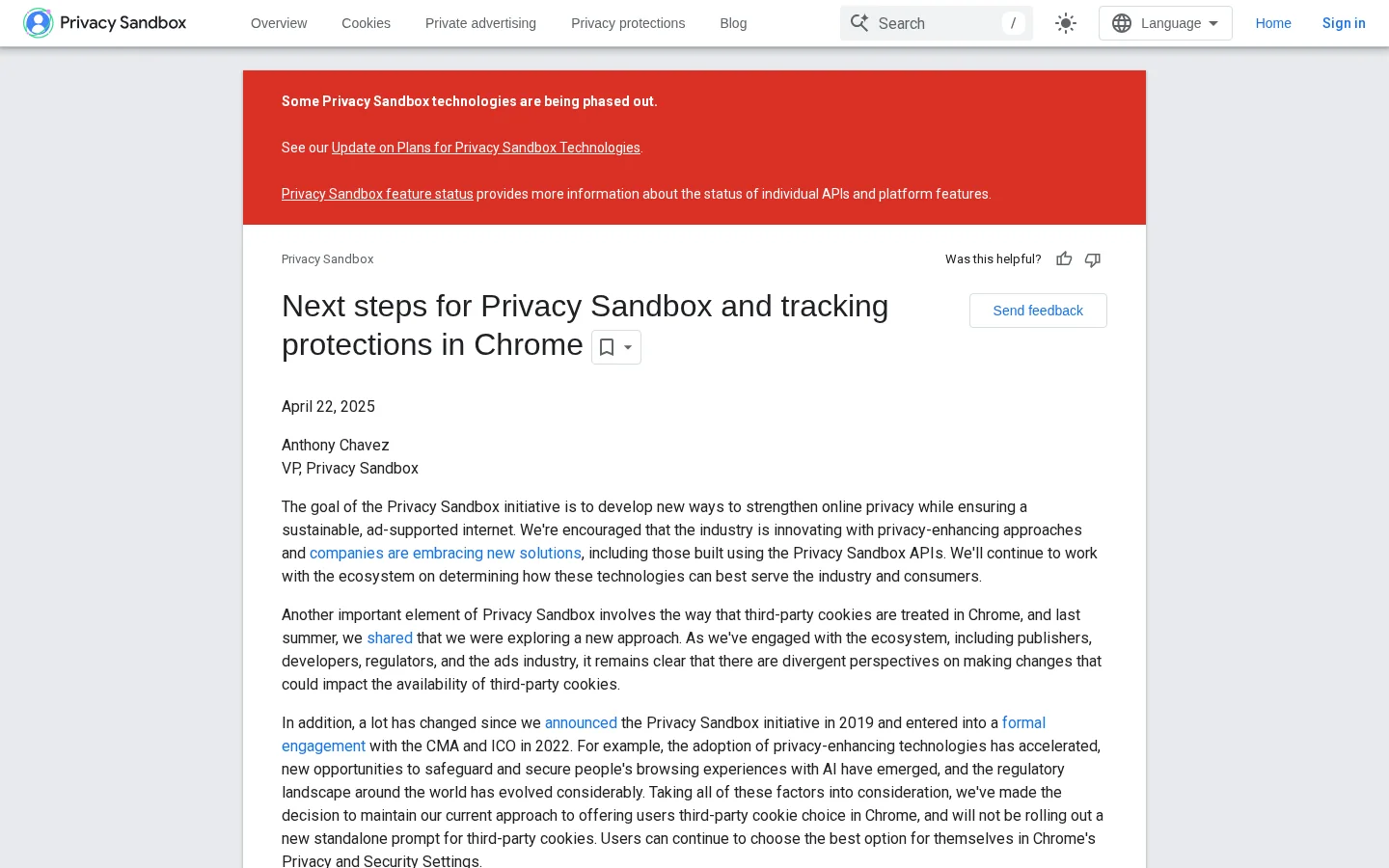
Chrome took a longer path. Google first planned to phase out third-party cookies in 2022, then pushed the date back several times. On April 22, 2025, Anthony Chavez, VP of Privacy Sandbox, wrote that Google would maintain its current approach to offering users third-party cookie choice in Chrome and would not roll out a new standalone prompt for third-party cookies. In the same post, the page says that some Privacy Sandbox technologies are being phased out.
In practice, Chrome still accepts third-party cookies by default, and each user can block them in settings. Google says some Privacy Sandbox technologies are being phased out, so do not plan new work on them. Marketing and consent vendors go further and describe the APIs as retired, but Google's own page is the text to rely on.
Some articles still say that Chrome will remove third-party cookies in 2024 or that a phase-out date is coming. Those claims are out of date.
Key dates in the third-party cookie story
Sources: WebKit blog, March 24, 2020; Google Privacy Sandbox blog, April 22, 2025

If your visitors are on a Mac, the two browsers that matter most behave differently by default. Your analytics and your ad tags will show that difference as a gap between numbers from Safari and numbers from Chrome. Knowing the defaults helps you read that gap correctly.
| Browser on Mac | Third-party cookies by default | Where the user changes it | What it means for you |
|---|---|---|---|
| Safari | Blocked for all cross-site contexts | Safari, then Settings, then Privacy, then Manage Website Data | Cookie-based retargeting and cross-site attribution mostly fail. Embedded widgets need the Storage Access API. |
| Chrome | Accepted, unless the user blocks them | More, then Settings, then Privacy and security, then Third-party cookies | Cookie-based tracking still works for most visitors. Expect the share of visitors who block them to vary by audience. |
The same visit, two browsers
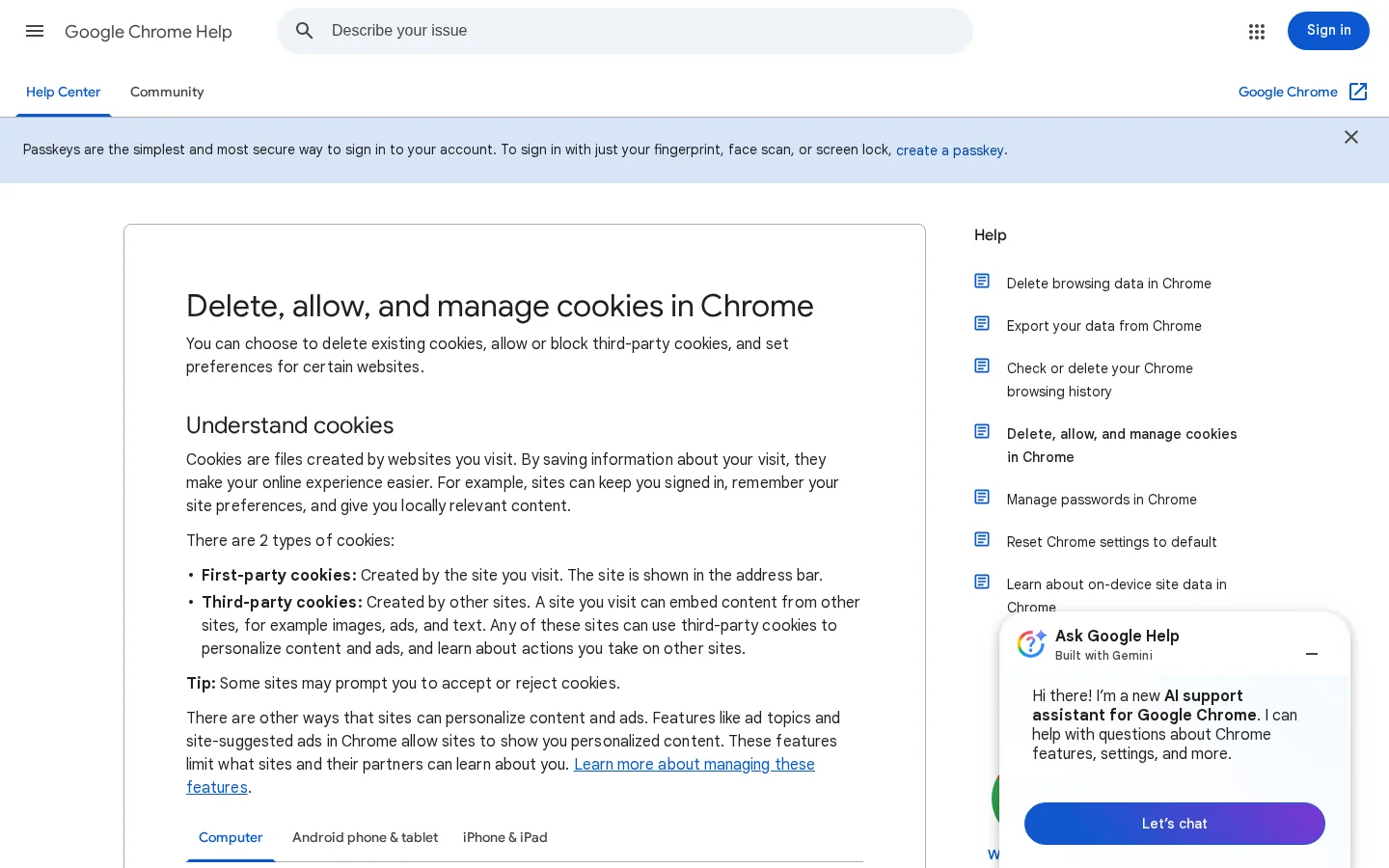
To check the Chrome setting, open More (the three-dot icon at the top right), then Settings, then Privacy and security, then Third-party cookies. The two options are Block third-party cookies and Allow third-party cookies, as Google's Chrome help page describes.
On Safari, go to Safari, then Settings, then Privacy. Apple's guide to managing cookies and website data on Mac covers the website data controls. Safari's full blocking is not a setting you turn on. It is the default, and it applies to cross-site cookies in every context.
Losing third-party cookies does not kill your analytics. It removes specific capabilities, and they are the ones that depended on one ID following a person across domains. Start by listing what your stack actually does with those cookies. Unused tags are common, and removing them is the cheapest fix.
What usually breaks: cross-site retargeting, where an ad platform shows an ad on one site because you visited another. Frequency caps across sites, which stop working when the ad network cannot tell whether the same person already saw the ad. Attribution that depends on a third-party cookie to link an ad click to a later purchase on another domain. Login or account state shared between your site and a widget on another domain.
What keeps working: first-party analytics on your own domain, where the cookie belongs to your site and survives in every browser that allows first-party cookies. Conversions recorded on your server from your own form or checkout. Contextual ads that match the page content rather than the visitor's history. Modeled conversions from platforms that use consent signals.
A bigger risk than the cookie itself is the gap in your reports. If Safari traffic looks like it converts worse than Chrome traffic, the cause may be measurement, not behavior. Compare sessions with first-party data against the platform numbers before you change any budget. For the mechanics of setting up measurement, the conversion tracking guide covers GA4, Google Ads and Meta, and marketing attribution explains how each model credits a sale.
What still works without third-party cookies
There is no single replacement for third-party cookies. Each method solves a different part of the problem, and most teams need two or three together. The methods below cover the whole range, from the simplest to the most technical. Each one has a principle, a good use case, advantages, limits and an example.
Principle: collect what people tell you or do on your own site, and store it under your own domain, with consent. Email sign-ups, account creation, purchase history and on-site behavior all count.
When to use it: always. It is the base of every other method. If you have a list of customers who bought in the last 12 months, you do not need a third-party ID to reach them.
Advantages: the data is yours, it does not depend on a browser, and it is the most accurate signal you have about a customer.
Limits: it only covers people who already interacted with you. It does not find new audiences.
Example: a shop sends a post-purchase email with a link to a product guide. The click lands on a page where the visitor creates an account. From then on, the first-party ID links their browsing to the order without any third-party cookie.
Principle: match ads to the content of the page, not to the visitor. A page about running shoes gets a running shoe ad, whoever is reading it.
When to use it: for awareness campaigns, and when you want an ad that does not depend on past visits.
Advantages: no personal data is needed to decide the placement, and it works the same in every browser.
Limits: you cannot cap frequency per person, and you cannot follow a visitor back to a retargeting campaign.
Example: a software company places ads on articles about project management software, and it measures the result with a campaign-level UTM tag rather than a visitor-level cookie.
Principle: instead of the browser sending events straight to each vendor, your own server receives them and forwards the ones you choose. The cookie is set by your domain, which the browser trusts.
When to use it: when you run several platforms and want one place to control what each one receives. It also helps when ad blockers or browser limits drop client-side tags.
Advantages: more control over the data and fewer scripts on the page, since the browser talks to one domain you control.
Limits: you run and pay for the server, and you must keep the consent rules inside your own pipeline. The full setup is in the server-side tracking guide.
Example: a checkout page sends the purchase event to your server, which then forwards it to Google Ads and Meta with the same order ID and only the fields each platform needs.
Principle: the tag runs in a reduced mode when consent is refused, and the platform fills the gap with modeling. Enhanced conversions send hashed first-party data, such as an email address, so that the platform can match the conversion to a click without a third-party cookie.
When to use it: for paid search and paid social campaigns that need conversion data after cookie loss.
Advantages: you keep more of the conversion signal, with the platform's own privacy rules applied.
Limits: the modeled numbers are estimates, and the setup needs a correct consent banner. Read the enhanced conversions guide before you switch it on.
Example: a lead form sends a hashed email with the conversion. The ad platform matches it to a logged-in account, without relying on a third-party cookie.
Principle: an embedded frame from a domain you own can ask the browser for access to its own third-party cookies. The browser shows the user a permission, and only then does the cookie come back.
When to use it: when your own widget, such as a support chat, a login frame or a booking tool, is embedded on other sites and needs state. It does not help with ad networks you do not control.
Advantages: it is a documented standard. Safari recommended it as the path for legitimate cross-site cookie needs in 2020.
Limits: the user must approve the request, and the request needs a user gesture such as a click. If your widget asks on page load, it will fail.
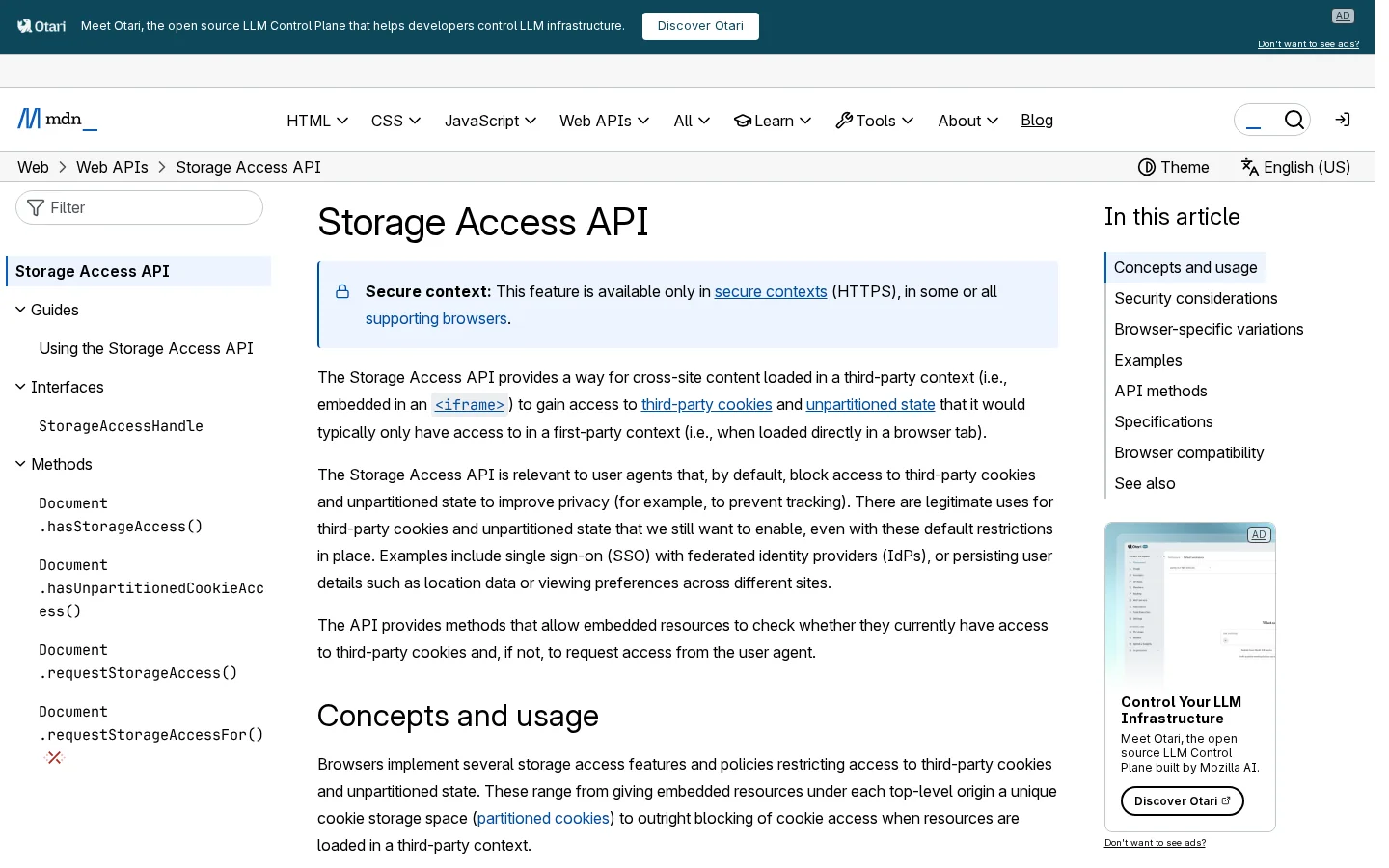
Example: a booking widget on a partner site asks for storage access when the visitor clicks Book. MDN describes the pattern: the frame checks with hasStorageAccess() first, then calls requestStorageAccess() only if needed.
// Inside the embedded iframe, run this from a click handler
const hasAccess = await document.hasStorageAccess();
if (!hasAccess) {
  await document.requestStorageAccess();
}
MDN's Storage Access API page explains the permission flow and the browsers that block third-party cookies by default.
Principle: Google's set of browser APIs for interest-based ads and measurement, such as Topics and Attribution Reporting, meant to replace third-party cookies in Chrome.
When to use it: not for new work. Google's own page says that some of these technologies are being phased out.
Advantages: none you can count on today.
Limits: an uncertain roadmap, and code that may stop working when a browser removes an API.
Example: an ad team that wrote a Topics integration in 2024 should check whether the calls still return data, then remove the code rather than maintain it.
Measurement before and after the move to first-party data
| Method | Works in Safari on Mac | Needs consent | Setup effort | Best for |
|---|---|---|---|---|
| First-party data | Yes | Yes, for marketing use | Low to medium | Every team, as the base |
| Contextual targeting | Yes | Often not for the placement itself | Low | Awareness and new audiences |
| Server-side tagging | Yes | Yes, enforced in your pipeline | High | Several platforms, one control point |
| Consent mode and enhanced conversions | Yes, with modeling | Yes | Medium | Paid search and paid social conversions |
| Storage Access API | Yes, after a user action | Yes | Medium | Your own embedded widgets |
| Privacy Sandbox APIs | Not applicable | Not applicable | Not recommended | Nothing new |
A tag audit answers one question: which domains set cookies on your visitors, and what do you use each one for? You can do it in an afternoon with Chrome DevTools on your Mac. The steps below assume you have access to the site's tag manager and a test browser profile.
Open the page in an incognito window, then press Command, Option, I to open DevTools. Use an incognito window so that old cookies do not add noise. Refuse the consent banner first, then run each step again after accepting, so you can see what the banner really controls.
A tag audit in five steps
You can also list the external hosts in the HTML of the page with a short script. It is not a full audit, because tags that load later will not appear, but it gives you a quick list to compare with the Network tab.
const hosts = new Set();
document.querySelectorAll("script[src], iframe[src], img[src]").forEach(function (el) {
  hosts.add(new URL(el.src).hostname);
});
console.log([...hosts].filter(function (h) { return h && h !== location.hostname; }));
Run it in the console on the page you want to check. The result is an array of domains. Any domain on that list should have an owner, a purpose and a consent rule in your tag plan. If one does not, that is your first candidate for removal.
Audit checklist
Most failures in cookie-related tracking come from a small number of errors. Each one below has a symptom you can see, and a fix you can apply without a rebuild.
What it is: you remove every cross-site tag because a 2024 article said Chrome would block them. Chrome still accepts them unless a user blocks them, so you lose data in Chrome for no good reason.
How to spot it: a sudden fall in Chrome retargeting audiences, with no matching change in your site traffic.
How to fix it: check the browser default and the platform's own status page before you cut anything. Keep the tags that work, and replace the ones that depend on a cookie you have lost.
What it is: a cookie with SameSite=None but no Secure flag. Browsers reject it, so the cookie never appears.
How to spot it: the cookie is missing from the Application tab, and the Console shows a warning about the attribute.
How to fix it: add Secure and serve the page over HTTPS. Then reload and check the cookie again.
What it is: the banner appears, but the tag manager loads the vendors on page load anyway. The visitor's refusal is recorded, and the data is sent regardless.
How to spot it: in the Network tab, the vendor requests appear before you click Accept. This is the most common finding in an audit.
How to fix it: gate each tag behind its consent category, and test with refusal before you ship. The cookie consent software guide lists the features that make this easier to test.
What it is: your reports credit a sale to a source only when a third-party cookie survives from the click to the order. Sales from Safari visitors fall into direct or unassigned traffic.
How to spot it: direct traffic rises while campaigns look flat, mostly from Safari on Mac.
How to fix it: add UTM parameters on every campaign link, send the order ID from your server, and compare against your first-party data. The Google Analytics for SEO guide shows how to read these reports.
What it is: the embedded widget calls requestStorageAccess() on load. The browser rejects it because there was no user gesture.
How to spot it: the call throws an error in the console, and the widget loses its state after every reload.
How to fix it: move the call inside a click handler, with a button the visitor understands, such as Continue with my account.
What it is: a new integration with Topics, Attribution Reporting or a similar API, started after the phase-out was announced.
How to spot it: the calls return empty results, or the API is marked as deprecated in the browser console.
How to fix it: remove the code and use first-party data instead. Google's own page says that some of these technologies are being phased out, and no replacement timeline is set.
Start with the audit, and keep the first changes small. Remove the tags nobody owns, move the important events to your own domain, and fix the consent order. Then decide which of the methods above your business needs, and measure the difference over four to six weeks before you change the budget.
Whether AI assistants name your brand is a different measurement problem. You answer it by checking AI answers, not visitor sessions. If that is what you need to track, see AI mention tracking in Sorank, which shows when ChatGPT cites you.
This week
Third-party cookies still matter in Chrome, but they no longer decide the whole plan. Build your measurement on what you own, and treat the browser's default as one input among several.
Yes. Google dropped its plan to phase them out and kept the choice in Chrome settings, so Chrome still accepts third-party cookies unless the user blocks them. Some Privacy Sandbox technologies are being phased out, so do not build new work on them.
Yes. Safari has blocked all third-party cookies by default since 2020. A site that needs cross-site cookie access has to use the Storage Access API and ask the user for permission, usually after a click.
Start with first-party data on your own domain, then add server-side tagging and consent mode for paid campaigns. Use contextual targeting for awareness, and check that no tag fires before the visitor makes a consent choice.
We analyse your competitors, your website and your AI visibility to create a tailored content plan for free.
 AI Content Brief Generator
 FAQ Schema Generator
 AI Blog Post Ideas Generator
 Structured Data Validator (Schema Validator)
 Alt Text Checker
 Internal Link Analyzer
 Backlink Challenge
 AI Meta Description Generator
 AI Blog Title Generator
 Google Indexability Checker
 AI Blog Outline Generator
 UTM Link Builder
 Keyword Clustering Tool
 Canonical Tag Checker
 XML Sitemap Generator
 Broken Link Checker
 AI SEO Title Generator
 Headline Analyzer
 SERP Preview Tool
 Redirect Checker
 Hreflang Tag Generator
 Heading Structure Analyzer
 HTTP Headers Checker
 Favicon Extractor
 SERP CTR Calculator
 SEO vs Paid Search Savings Calculator
 SEO Share of Voice Calculator
 SEO ROI Calculator
 SEO Traffic and Revenue Forecast Calculator
 SEO Budget Calculator
 SEO Break-Even Calculator
 SaaS SEO ROI Calculator
 ROAS Calculator
 Reading Time Calculator
 Ranking Gain Simulator
 Organic Traffic Value Calculator
 Organic Traffic Estimator and Website Traffic Checker
 LTV to CAC Ratio Calculator
 Local SEO ROI Calculator
 Link Building Cost Calculator
 Keyword Value Calculator
 Keyword Opportunity Score Calculator
 Keyword Density Calculator
 GEO ROI Calculator
 GEO Content Investment Calculator
 Ecommerce SEO ROI Calculator
 Customer Lifetime Value Calculator
 Customer Acquisition Cost Calculator
 CTR Calculator
 Cost Per Article Calculator
 Conversion Rate Calculator
 Content Marketing ROI Calculator
 ChatGPT Referral Traffic Estimator
 Bounce Rate Calculator
 Backlink ROI Calculator
 AI Visibility Score Calculator
 AI Traffic Value Calculator
 AI Share of Voice Calculator
 Cost of AI Invisibility Calculator
 AI Citation Rate Calculator
 llms.txt Validator
 AI Overview Checker and AI Overviews Rank Checker
 Robots.txt Checker
 AI SEO Audit
 LLM Readability Checker
 SearchGPT Readiness Checker
 Structured Data LLM Audit
 Website Crawlability AI Audit
 Why ChatGPT Is Not Recommending My Website
 Gemini Ranking Tool
 Perplexity Ranking Checker
 LLM Citation Checker
 Answer Engine Optimization Audit
 GEO Audit
 AI Search Visibility Test
 ChatGPT Visibility Checker
 llms.txt Generator
 URL Extractor
 Webpage to Markdown
 Sitemap Checker
 SERP Volatility Sensor
 Page Size Checker
 Word Counter
 Slug Generator
 Schema Generator
 Robots Generator
 OG Preview
 Meta Tags Generator
 Image Compressor
 Favicon Generator
 On-Page SEO Audit: SEO Checker and SEO Analyzer
 Backlink Analysis Tool
 Keyword Research Tool
 Domain Authority Checker
 “I tested Sorank on a real client site and it's insane. It does everything an agency would bill you $1500 a month for. It's going into production on that client now.”

 Guillaume Guersanguersanguillaume.com“We are an Ads agency and we wanted to get our SEO back on track once and for all. Sorank gave us a clear view of our site, helped us prioritize optimizations, and properly structure our content. The tool is easy to use, well designed for a team, and very practical for centralizing tracking without having to juggle multiple platforms. A very solid foundation to start fresh with our SEO.”
 Gaspard MadouiAds Agency
 “I just let the Sorank software do its thing, and now my DR is 25 and my page is ranking higher.”
 Lucas Flandrefoundertrace.fr“I specialized in GEO thanks to Sorank. The GEO Leaderboard allows me to show my clients their position vs competitors on ChatGPT. It’s a real commercial differentiator.”
 MélanieSEO Freelance“Great service, works well for our website and helps us understand how to improve it to rank better on Google and elsewhere. Congrats, keep going, I recommend it.”
 Hugo T.E-commerce merchant