Preferences
Privacy is important to us, so you have the option of disabling certain types of storage that may not be necessary for the basic functioning of the website. Blocking categories may impact your experience on the website. More information
Privacy is important to us, so you have the option of disabling certain types of storage that may not be necessary for the basic functioning of the website. Blocking categories may impact your experience on the website. More information

 Semrush vs Similarweb: Which One Fits Your SEO and Market Research
Semrush or Similarweb? Compare what each tool measures, how accurate its traffic numbers are, what each costs and a test to run before you buy.

In short
Semrush vs Similarweb comes down to two kinds of data. Semrush is an SEO suite: keyword rankings, site audits and content tools. Similarweb is a market intelligence tool: modeled traffic, channel mix and audience data for sites you do not own. For day-to-day SEO, choose Semrush. For sizing a market or tracking rivals' traffic trends, choose Similarweb.
Want to go further? Ask
Quick quiz
Which kind of SEO tool is right for you?
Sorank matches your answers


Test it for 3 days on your own site and see where you stand on Google, ChatGPT and the other AIs.
Start 3-day free trial3 days free, then stop whenever you want. 90-day results guarantee, conditions apply.
Semrush answers the question "where does this domain rank, and for which queries?" Similarweb answers "how many people visit this domain, and where do they come from?" Both produce estimates for sites you do not control. That is why both are popular: you cannot open a competitor's Google Analytics or Search Console, so you need a model of their traffic.
Semrush starts from the keywords a domain ranks for. For each keyword it knows the position, the monthly search volume and the features on the results page, such as ads or snippets. It combines those into an organic traffic estimate. That is why its numbers are most solid for search traffic and weaker for everything else. Its Site Audit works differently: it crawls your own site and reports broken links, redirect chains, missing H1 tags and slow pages.
Similarweb starts from what people do in browsers and apps. Its developer reference describes its Global Rank as "calculated based on a mix of our estimations of a site's monthly unique visitors", combined with monthly pageviews across desktop and mobile. The rank is aggregated over the last 28 days, with no daily split. The result is a monthly, modeled view of total traffic, with channel mix and audience profile on top.
A ranking estimate tells you how much search traffic a domain could win from the keywords it holds. A panel estimate tells you how many visits happen across the web, including direct, social and referral traffic. If a competitor lives on its brand, the panel view shows it and the keyword view misses it. If it wins a handful of high-volume queries, the keyword view exposes them and the panel view blurs them. Decide which question you are answering before you open either tool.
Two tools, two starting points
Semrush covers SEO work from research to content and audit. Similarweb covers market and competitor visibility. The overlap is smaller than the marketing on both sites suggests, so list the jobs you need done before you compare feature pages.
| Job | Semrush | Similarweb |
|---|---|---|
| Keyword research | Volume, difficulty, search intent, keyword lists and topic grouping | Keyword metrics for a domain and a keyword generator |
| Competitor analysis | Organic and paid competitors, keyword gap, top pages by traffic | Competitor benchmarking, similar sites and audience overlap |
| Site audit | Crawl of your own site: errors, speed, duplicate content | No SEO site audit |
| Content creation | SEO Writing Assistant and content templates | No content writing tools |
| Traffic estimates | Organic traffic from rankings, total traffic through Traffic Analytics on paid plans | Total visits, channel mix, countries and referring sites |
| Audience data | In add-on modules | Demographics, interests and session overlap with similar sites |
| AI visibility | AI visibility toolkit, sold as an add-on | AI Search Intelligence package |
| Free access | Free plan | Free trial and free lookups, no free plan |
When you plan a page, you need four things: the keyword's volume, how hard it is to rank for, what the results page looks like and which pages already win. Semrush shows all four in one workflow. Its Keyword Magic Tool expands a seed term into hundreds of related queries, and the keyword difficulty score helps you decide what you can realistically win. Once the page is live, the Site Audit tells you whether anything technical is holding it back.
Similarweb is useful at this stage only as a second opinion. Its keyword metrics help you see which terms a domain seems to rank for, but it does not give you the audit, the content tools or the same depth of SERP data. If your team writes and maintains pages every week, that gap matters.
Similarweb is built for the questions that come before a keyword list. How big is this market? Which channel drives the leader's visits? Which sites share its audience? Its channel mix is the strongest part of the product. A competitor with 70% direct traffic lives on its brand, while one with 70% organic search depends on Google rankings you can contest. That split changes what you publish. The Similarweb review on our blog goes deeper on the product itself, while this article focuses on the choice between the two.
Usability rarely decides this. Both tools have clean interfaces and tooltips on their reports. The data model decides it: a rankings model and a panel model will disagree on the same domain, and each one is right about a different part of its traffic.

Neither tool gives you a count you can quote as fact. Both are models. The independent comparison I could check against its original post is the SparkToro study, published in November 2022. It found that Semrush tracked Google Analytics user counts most closely of the four tools it tested. Correlation is not accuracy, though, and the study has limits you should know before you rely on it.
SparkToro compared the monthly figures from each tool with the users recorded in Google Analytics for the same sites. The test covered 641 websites over 12 months. The correlations were 0.790 for Semrush, 0.720 for Datos, 0.659 for Similarweb and 0.504 for Ahrefs. Ahrefs was measured on organic search only, so the comparison is not fair to it.
Scope of the 2022 test
Source: SparkToro, November 2022
A correlation of 0.79 means the tool rises and falls with real users most of the time. It does not mean the tool's number is close to the real number. A tool can follow the trend perfectly and still be off by a large factor, because it misses the level. For a decision about a rival, you need both: the trend tells you whether the site is growing, and the level tells you whether it is worth chasing. Use the correlations to choose which tool's trend to trust, then ignore the absolute figure unless you have checked it against your own data.
The study also has limits. It is from 2022, and both tools have changed since then. It does not split results by country or by niche, and it counts users rather than sessions or pageviews. Treat it as evidence that the tools track the broad shape of traffic, not as a current scorecard.
Panel models need data to work with. A site with few visits gives the model very little signal, so the estimate can jump, flatten or disappear from month to month. In our competitor traffic guide we use a rough threshold of 5000 to 10000 visits a month: below it, panel estimates can be off by several times. For a small local competitor or a young startup, trust the ranking keywords and the top pages more than the visit count. The seven methods to check competitor website traffic cover how to combine those signals.
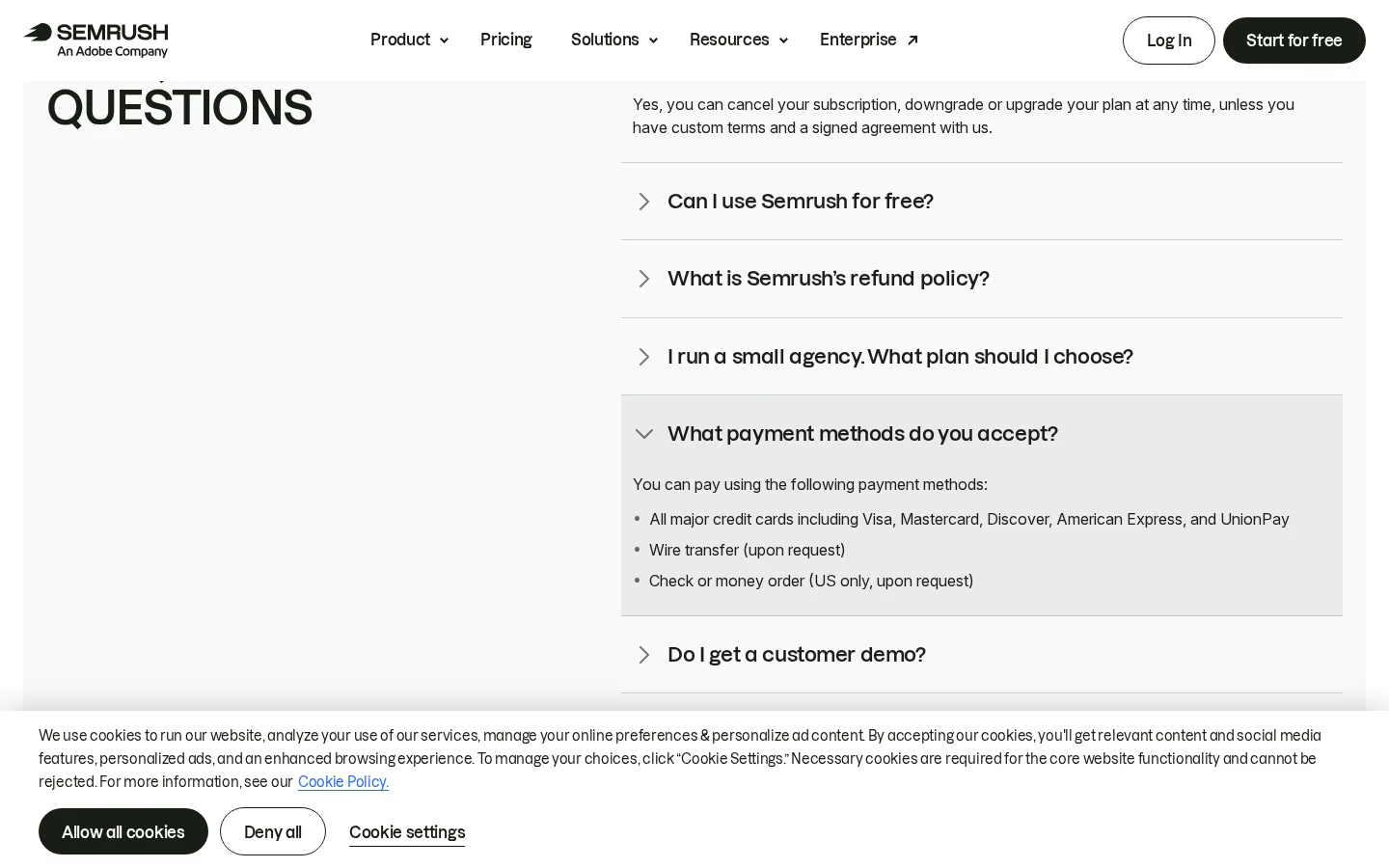
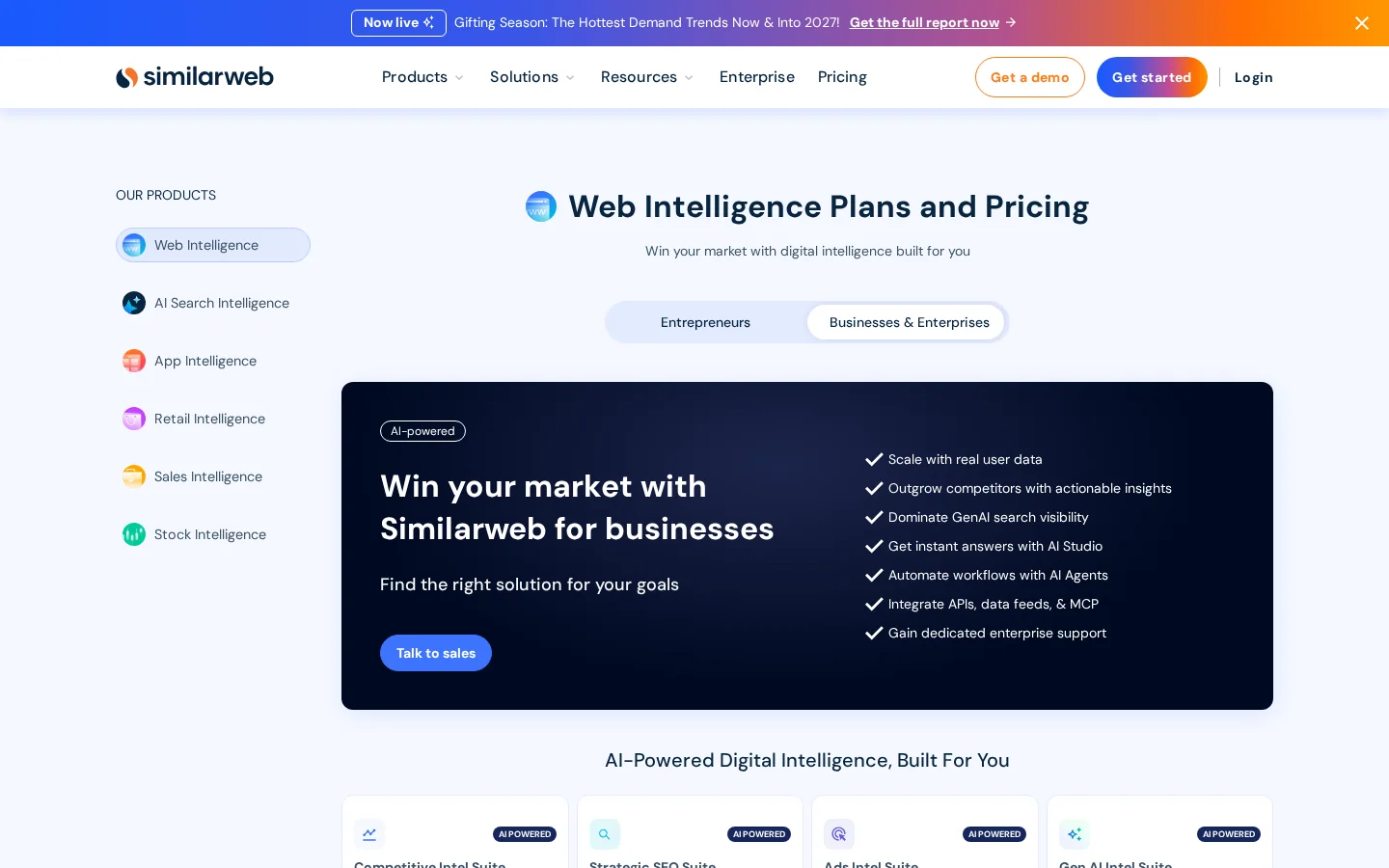
Semrush offers a free plan and publishes prices by plan. Similarweb publishes no prices for its packages and routes business and enterprise options to sales. Both offer trials. Test on your own domain before you commit, and get any price in writing.
On Semrush's pricing page, the free plan is listed at $0 a month, and paid plans are shown per month with annual billing. When we checked on 22 November 2026, the UK version of the page listed the SEO plan at £95.07 a month billed annually. Prices vary by country and change over time, so read the page for your own currency before you budget.
Similarweb's pricing page, as checked on the same day, shows no prices. It lists six product packages and a "Start free trial" link, and it sends business and enterprise options to "Talk to sales". That is normal for research platforms, but it means you cannot compare the cost of the two tools on paper before a sales call.
Before you buy either tool
The trial is where most people learn the most. Ask whether the trial includes the reports you will actually use each week, and whether you can keep the data after you cancel. Ask the vendor how support handles a wrong estimate on a site you know well. The answer to that last question tells you how the company treats its own numbers.
Run the same set of domains through both tools, compare each tool's organic figure with your own Search Console clicks, and keep the tool whose trend matches what you see. The whole test takes an afternoon if you prepare the domain list first.
A four-step test on your own market
Include the rivals you already know, because they are the ones your team will argue about. Add the domains AI models cite when your customers ask their questions. You find them by asking ChatGPT, Gemini or Perplexity the questions your buyers ask and noting every domain in the answers. Finish with four small sites, because that is where the estimates fail first and where you need to know it.
Your Search Console clicks are organic only, so compare them with the organic line of each tool, not its total traffic. Divide the tool's organic estimate by your real clicks over the same months. The result is a ratio, and it tells you how far the tool sits from your own reality on a site you understand.
estimate_ratio = tool_organic_visits / search_console_clicks   (3-month average)
corrected_visits = competitor_tool_visits / estimate_ratio
Apply the correction only if the ratio is stable across the months. If it swings from 0.5 to 2 in a year, the tool is not measuring your site consistently, and no correction will save the comparison. In that case, use the trend and the top pages, not the numbers.
Tip
For a quick organic estimate of any domain before you open either tool, use our free organic traffic estimator. Then check it against your own Search Console clicks, as in step 2.
Plot 12 months for each domain in both tools. A good tool shows the same spikes as your own data: the month you published a big guide, the month a core update hit, the month a competitor launched a campaign. If one tool shows a smooth line where your clicks show a sharp drop, it is smoothing away the information you need.
Keep the tool whose trend matches yours and whose reports you will open every week. Then write the rule down: which tool you use for which question, how you correct its numbers and which figures you never quote without the word "estimated" next to them. A rule on paper stops the next person from quoting a model as a count.
Four methods give you a view of a site's traffic, and each has a blind spot. Semrush and Similarweb represent two of them. Your own analytics and the official ad transparency data are measurements, though one covers only your site and the other shows ads, not clicks. Knowing the four lets you pick the right one for each question.
Principle: the tool combines browsing data from a sample of users and devices, then extrapolates to the whole web. When to use it: to size a market, compare the channel mix of several sites or see the trend of rivals you do not track closely. Advantage: it covers sites you do not own, including sites with no search presence. Limit: the figure is a model, and it weakens for small or new sites. Example: you compare three rivals over a year and see that one is gaining ground in a category you ignore, so you investigate that category first.
Principle: the tool takes the keywords a domain ranks for, multiplies each keyword's search volume by an expected click-through rate for its position, and sums the results. When to use it: to estimate the search traffic a rival gets from a topic, and which pages collect it. Advantage: it ties the estimate to specific queries you can write about. Limit: it sees nothing outside organic search, so brand, direct, social, email and AI traffic are missing. Example: a rival ranks for 40 queries in your topic, and the tool shows that three of them carry most of its organic estimate. Those three become your first briefs.
Principle: you read the sessions and clicks your own site records. When to use it: every decision about your own site comes first from these numbers. Advantage: it is a measurement, not a model. Limit: it tells you nothing about a competitor, which is why you need the other three methods. Example: you calibrate the Semrush or Similarweb ratio from step 2 using your own clicks, so the model is anchored to something you can see.
Principle: Google's Ads Transparency Center lists the advertisers that run ads, with the platforms and locations they target. When to use it: to see which offers a rival pushes and where it spends attention. Advantage: it is free, official and based on real ads. Limit: it shows no clicks, budgets or keywords. Paid suites estimate those, with even wider margins than organic traffic. Example: a rival runs the same offer on Search and YouTube for three months, which tells you the offer works and is worth testing.
| Method | Who measures | Best for | Blind spot |
|---|---|---|---|
| Panel and clickstream | Similarweb, Semrush Traffic Analytics | Market size and channel mix | Weak on small sites |
| Keyword rankings | Semrush, Ahrefs, free estimators | Search traffic by topic and page | Misses non-search traffic |
| Your analytics | GA4 and Search Console | Your own site, exactly | Says nothing about rivals |
| Ad transparency | Google Ads Transparency Center | Which offers a rival runs | No clicks, budgets or keywords |
Most bad decisions come from six habits: treating an estimate as a count, mixing numbers from two tools, trusting visit counts on small sites, counting branded traffic as an opening, trusting a vendor's comparison page and buying on a demo. Each one has a sign you can spot in a report and a fix you can apply in an afternoon.
| Mistake | How to spot it | How to fix it |
|---|---|---|
| Treating an estimate as a count | A deck says "their traffic" or "our traffic" next to a modeled number | Write "estimated" beside every figure and keep your real numbers in GA4 and Search Console |
| Mixing two tools | A chart puts one tool's competitor number next to another tool's figure for you | Use one tool per comparison and read trends, not levels |
| Trusting counts on small sites | A rival or your own site has very few visits, and the number moves wildly | Use top pages and ranking keywords for small domains |
| Counting branded traffic | A big brand shows large organic traffic that never moves with your content | Filter out branded queries and keep the non-branded remainder |
| Trusting a vendor comparison | The verdict arrives on a page written by one of the two vendors | Read it as the vendor's view, then run your own test |
| Buying on the demo | The trial shows the homepage examples and nothing from your work | Test on your own domains and ask about exports and data after you cancel |
What it is: you read a modeled visit number as if it were the sessions in your analytics. How to spot it: a client deck or a team meeting quotes the figure as "our traffic" or "their real traffic". How to fix it: write "estimated" next to every figure, and keep the real counts in your analytics. A model is good for ranking rivals against each other, and bad for reporting a number to a board.
What it is: you put Semrush's estimate for your site next to Similarweb's estimate for a rival, and conclude the rival is bigger. How to spot it: the chart uses two sources without saying so. How to fix it: pick one tool for the whole comparison. If you need both, run the calibration in step 2 for each tool and compare the corrected numbers, not the raw ones.
What it is: you read the exact monthly visits of a small domain and build a plan around them. How to spot it: the number doubles one month and halves the next, with no change on the site. How to fix it: move to the trend over six to twelve months, the top pages and the ranking keywords. Those change more slowly and say more about a small site than its visit total.
What it is: you see a rival with large organic traffic and assume the market is open to you. How to spot it: most of the traffic comes from the rival's name and its misspellings. How to fix it: filter out every branded query in the keyword report. The non-branded traffic that remains is the part of the market you can actually contest.
What it is: you accept the verdict of a comparison written by one of the two vendors, or by a publication that sells one of them. How to spot it: the page wins on the tool it sells, on the feature it markets or on the coverage it claims. How to fix it: read the page for its facts, check those facts on the vendor's own pricing and documentation pages, and then run your own test.
What it is: you decide on a sales demo built around the vendor's best examples. How to spot it: the demo never shows a domain you know, or a number you can check. How to fix it: ask for a trial on your own domains, and run the calibration from the test section during it. If the trial is too short to finish the test, the sales call is not the place to learn the tool.
Sorank does not replace a market research platform. It answers a narrower question: which competitors AI cites in your market, and what they publish that you have not covered yet. Its SEO Spy Tool builds a competitor ranking from your monthly AI analyses, with AI citations, estimated monthly visitors, the number of keywords each domain ranks for and its Google position on your keyword. You can spy on up to five competitors, and each week the keywords from their new pages land in your editorial calendar after a check against your own pages.
That fits between the two tools in this article. Use Similarweb or Semrush to size the market and check the trend of a rival. Use Sorank to watch the competitors AI names and to turn their new keywords into articles without a weekly manual review. For the definition of the workflow, see competitor analysis.
| Task | Where to do it with Sorank |
|---|---|
| Find the domains AI cites in your market | Competitor ranking, sorted by AI citations |
| Follow what rivals publish each week | SEO Spy Tool, up to five competitors |
| Turn their keywords into articles | Blog Planner Content, with a cannibalization check first |
Warning
Every estimate in this article, from any tool, is a model. Before you put a figure in front of a client or a board, label it as estimated and check its trend against your own data.
Choose Semrush if your work is SEO or content, Similarweb if your work is market sizing or audience research, and both only if you have a budget and a clear reason to compare two data sets. Start from the question you need answered, not from the tool with the bigger feature list.
| Your situation | Start with | Why |
|---|---|---|
| In-house SEO team that writes and audits pages | Semrush | Keyword depth, site audit and content tools in one workflow |
| Agency reporting on many client sites | Semrush for SEO, Similarweb for market context | Each tool covers the job it was built for |
| Analyst, investor or market researcher | Similarweb | Channel mix, audience overlap and market-wide views |
| Small local business | Search Console and GA4 first | Both tools are weakest on small sites |
| Startup checking a new market | Similarweb trial, then Semrush | Size the market first, then plan the keywords |
Whichever you choose, run the test from this article before you sign. Then read the Semrush review or our notes on what Similarweb's data is worth for the features and limits of the one you picked, and keep the rule you wrote down in step 4 next to the report.
For keyword research, site audits and content work, Semrush is the better fit because it was built around SEO workflows. Similarweb is stronger for market size, audience data and comparing traffic trends across sites you do not own. If your job is SEO, start with Semrush and add Similarweb only when you need market context.
It is a model, not a count. Similarweb estimates visits from browsing panels and other data, so use it to compare sites and read trends, not to report exact numbers. Accuracy drops for small or new sites, where the model has little data to work with.
Semrush has a free plan with limited access, and paid plans unlock the full data. Similarweb has no public free plan, but it offers a free trial and some free lookups, and it sends business packages through sales. Check each pricing page for your currency, since prices change by country.
We analyse your competitors, your website and your AI visibility to create a tailored content plan for free.
 AI Content Brief Generator
 FAQ Schema Generator
 AI Blog Post Ideas Generator
 Structured Data Validator (Schema Validator)
 Alt Text Checker
 Internal Link Analyzer
 Backlink Challenge
 AI Meta Description Generator
 AI Blog Title Generator
 Google Indexability Checker
 AI Blog Outline Generator
 UTM Link Builder
 Keyword Clustering Tool
 Canonical Tag Checker
 XML Sitemap Generator
 Broken Link Checker
 AI SEO Title Generator
 Headline Analyzer
 SERP Preview Tool
 Redirect Checker
 Hreflang Tag Generator
 Heading Structure Analyzer
 HTTP Headers Checker
 Favicon Extractor
 SERP CTR Calculator
 SEO vs Paid Search Savings Calculator
 SEO Share of Voice Calculator
 SEO ROI Calculator
 SEO Traffic and Revenue Forecast Calculator
 SEO Budget Calculator
 SEO Break-Even Calculator
 SaaS SEO ROI Calculator
 ROAS Calculator
 Reading Time Calculator
 Ranking Gain Simulator
 Organic Traffic Value Calculator
 Organic Traffic Estimator and Website Traffic Checker
 LTV to CAC Ratio Calculator
 Local SEO ROI Calculator
 Link Building Cost Calculator
 Keyword Value Calculator
 Keyword Opportunity Score Calculator
 Keyword Density Calculator
 GEO ROI Calculator
 GEO Content Investment Calculator
 Ecommerce SEO ROI Calculator
 Customer Lifetime Value Calculator
 Customer Acquisition Cost Calculator
 CTR Calculator
 Cost Per Article Calculator
 Conversion Rate Calculator
 Content Marketing ROI Calculator
 ChatGPT Referral Traffic Estimator
 Bounce Rate Calculator
 Backlink ROI Calculator
 AI Visibility Score Calculator
 AI Traffic Value Calculator
 AI Share of Voice Calculator
 Cost of AI Invisibility Calculator
 AI Citation Rate Calculator
 llms.txt Validator
 AI Overview Checker and AI Overviews Rank Checker
 Robots.txt Checker
 AI SEO Audit
 LLM Readability Checker
 SearchGPT Readiness Checker
 Structured Data LLM Audit
 Website Crawlability AI Audit
 Why ChatGPT Is Not Recommending My Website
 Gemini Ranking Tool
 Perplexity Ranking Checker
 LLM Citation Checker
 Answer Engine Optimization Audit
 GEO Audit
 AI Search Visibility Test
 ChatGPT Visibility Checker
 llms.txt Generator
 URL Extractor
 Webpage to Markdown
 Sitemap Checker
 SERP Volatility Sensor
 Page Size Checker
 Word Counter
 Slug Generator
 Schema Generator
 Robots Generator
 OG Preview
 Meta Tags Generator
 Image Compressor
 Favicon Generator
 On-Page SEO Audit: SEO Checker and SEO Analyzer
 Backlink Analysis Tool
 Keyword Research Tool
 Domain Authority Checker
 “I tested Sorank on a real client site and it's insane. It does everything an agency would bill you $1500 a month for. It's going into production on that client now.”

 Guillaume Guersanguersanguillaume.com“We are an Ads agency and we wanted to get our SEO back on track once and for all. Sorank gave us a clear view of our site, helped us prioritize optimizations, and properly structure our content. The tool is easy to use, well designed for a team, and very practical for centralizing tracking without having to juggle multiple platforms. A very solid foundation to start fresh with our SEO.”
 Gaspard MadouiAds Agency
 “I just let the Sorank software do its thing, and now my DR is 25 and my page is ranking higher.”
 Lucas Flandrefoundertrace.fr“I specialized in GEO thanks to Sorank. The GEO Leaderboard allows me to show my clients their position vs competitors on ChatGPT. It’s a real commercial differentiator.”
 MélanieSEO Freelance“Great service, works well for our website and helps us understand how to improve it to rank better on Google and elsewhere. Congrats, keep going, I recommend it.”
 Hugo T.E-commerce merchant