Preferences
Privacy is important to us, so you have the option of disabling certain types of storage that may not be necessary for the basic functioning of the website. Blocking categories may impact your experience on the website. More information
Privacy is important to us, so you have the option of disabling certain types of storage that may not be necessary for the basic functioning of the website. Blocking categories may impact your experience on the website. More information

 Ahrefs vs
 Semrush vs SpyFu: Which One to Choose and How to Test Them
Compare Ahrefs, Semrush and SpyFu on keywords, backlinks and plan limits, then run a one-week test on your own keywords to pick the right one.

In short
Ahrefs, Semrush and SpyFu are paid SEO platforms that show the keywords, backlinks and ads behind any domain, including your competitors'. They overlap on keyword research, but each one has its own database and its own strength. In most reviews, Ahrefs leads on backlinks, Semrush on all-in-one work, and SpyFu on paid search and a lower entry price.
Want to go further? Ask
Quick quiz
Which kind of SEO tool is right for you?
Sorank matches your answers


Test it for 3 days on your own site and see where you stand on Google, ChatGPT and the other AIs.
Start 3-day free trial3 days free, then stop whenever you want. 90-day results guarantee, conditions apply.
Each tool answers the same question, "what is working for my competitors?", from a different angle. Ahrefs is built around its link index and site audits. Semrush is built as one toolkit that also covers content, local SEO and social media. SpyFu focuses on competitor and paid search research.
Those focuses matter more than the feature lists, which look alike on every pricing page. Use the table below to see where each tool is strongest before you open a trial.
| Tool | Strongest for | Keyword research | Backlinks | Free access |
|---|---|---|---|---|
| Ahrefs | Backlink research and site audits | Keyword Explorer with volume, difficulty and SERP views | Large link index, a core part of the product | A free plan is listed on its pricing page |
| Semrush | All-in-one work across SEO, content and local | Keyword Overview with difficulty scores and related terms | Backlink analytics, audits and link-building tools | Free plan with daily report limits (see section 8) |
| SpyFu | Competitor and paid search research | Keyword data with a strong paid search focus | Narrower backlink analysis than the two others in most reviews | Free views on the site, with limits that change often |
All three give you a search volume, a difficulty score and the pages that rank for a term. The difficulty score is an estimate, not a probability that you will rank, which is why keyword difficulty needs a check in the results before you write. If you only read one number, you will pick the wrong keyword more often than you think.
Ahrefs is the usual first pick when the job is to see who links to a rival and why. Semrush covers the same ground with more tools around it, such as link building and audit reports. SpyFu shows fewer backlink details, so it works better as a second opinion than as the only source for link work.
SpyFu is built to show which keywords a domain buys on Google Ads and how long it has bought them. That is useful when you plan a paid campaign or a content gap, because a keyword that rivals pay for is often a keyword that converts. Semrush and Ahrefs also show paid data, but most reviews name SpyFu first for it.
Each tool estimates search volume and difficulty from its own data, so the same keyword can show three different volumes and three different difficulty scores. None of them is the search volume Google reports, and none of them is wrong by default. The gap is the reason to test the tools, not to trust one of them.
The difference comes from three sources: each tool's crawler and link index, its own clickstream or panel data, and its own model for turning that data into a volume. Two tools can agree on the top keyword and still disagree on the long tail, where the estimates are weakest. Read the numbers as ranking signals, not as traffic forecasts.
Trusting one tool or cross-checking
A useful rule: when two tools disagree by a wide margin on a keyword, check the top ten results in Google before you decide. The page types you see there tell you more than either number. A list of forums and product pages means the keyword is easier than a list of large brands, whatever the score says.

You can pull competitor keywords in three ways: a tool report, a manual reading of the results, or a weekly watch on what rivals publish. Each one answers a different question, and the best setup uses at least two of them. Most teams start with the tool report and skip the other two, which is where they miss the newest topics.
Principle: you enter a rival domain and export the keywords it ranks for. Use it when you need a full list fast. Advantages: it is quick, it gives volume and difficulty in one file, and it works for any domain. Limits: it shows the past, so a page that ranked last year may already be gone, and each tool's list will differ.
Example: enter a rival blog, export the organic keywords, sort by estimated traffic, then remove the brand name and the terms that only match its product names. The list left over is a first set of topic ideas, not a plan.
Principle: you search your seed keyword in a private window and read the top ten results, with attention to who ranks and what kind of page it is. Use it when you need intent and format, for example whether Google wants a comparison table, a tool or a guide. Advantages: it is free and it shows what Google shows today. Limits: it is slow and gives you no volume.
Example: for "keyword tool comparison", note whether the top results are review sites, vendor pages or forums. If three of the top five are vendor pages, a neutral guide with a clear method has a real gap to fill.
Principle: you track the new pages of a fixed list of rivals each week and read the keywords behind them. Use it when you want the topics before they rank. Advantages: it catches what rivals start, not just what they already rank for. Limits: it only covers the rivals you watch, and it needs a routine, or it fades after a month.
| Method | Question it answers | Best when | Main limit |
|---|---|---|---|
| Tool report | What does this rival rank for? | You need a full list today | It shows the past and differs by tool |
| Manual reading of results | What kind of page wins this query? | You are choosing format and intent | Slow, with no volume data |
| Weekly monitoring | What are rivals publishing now? | You want topics before they rank | Only covers the rivals you add |
Pick the tool by the job you do most often, not by the length of the feature list. Treat the table below as a starting point, then test your own keywords as described in section 6. The right tool for a solo writer is rarely the right one for an agency with twenty client sites.
| Job | Start with | Why |
|---|---|---|
| Backlinks to a rival | Ahrefs | Its link index is the common reference in reviews, so check the same links in a second tool |
| Keyword research for a new site | Semrush or Ahrefs | Both have large databases, filters for intent and related term lists |
| Paid search and ad keywords | SpyFu | Its paid data is the focus of the product |
| Several client sites under one login | Semrush | Its higher plans include more projects |
If you want a wider list of options before you compare these three, read our roundup of the 8 best keyword research tools. It puts them next to tools that do one job well and cost less.
The monthly price tells you little on its own. Compare what each plan includes, such as tracked keywords, projects, crawl credits and seats, then divide the price by the number you need. Ahrefs lists its Lite plan at 119 euros a month, excluding tax, with 750 tracked keywords, 5 non-verified projects and 100000 crawl credits, according to its Ahrefs pricing page, checked November 21, 2026.
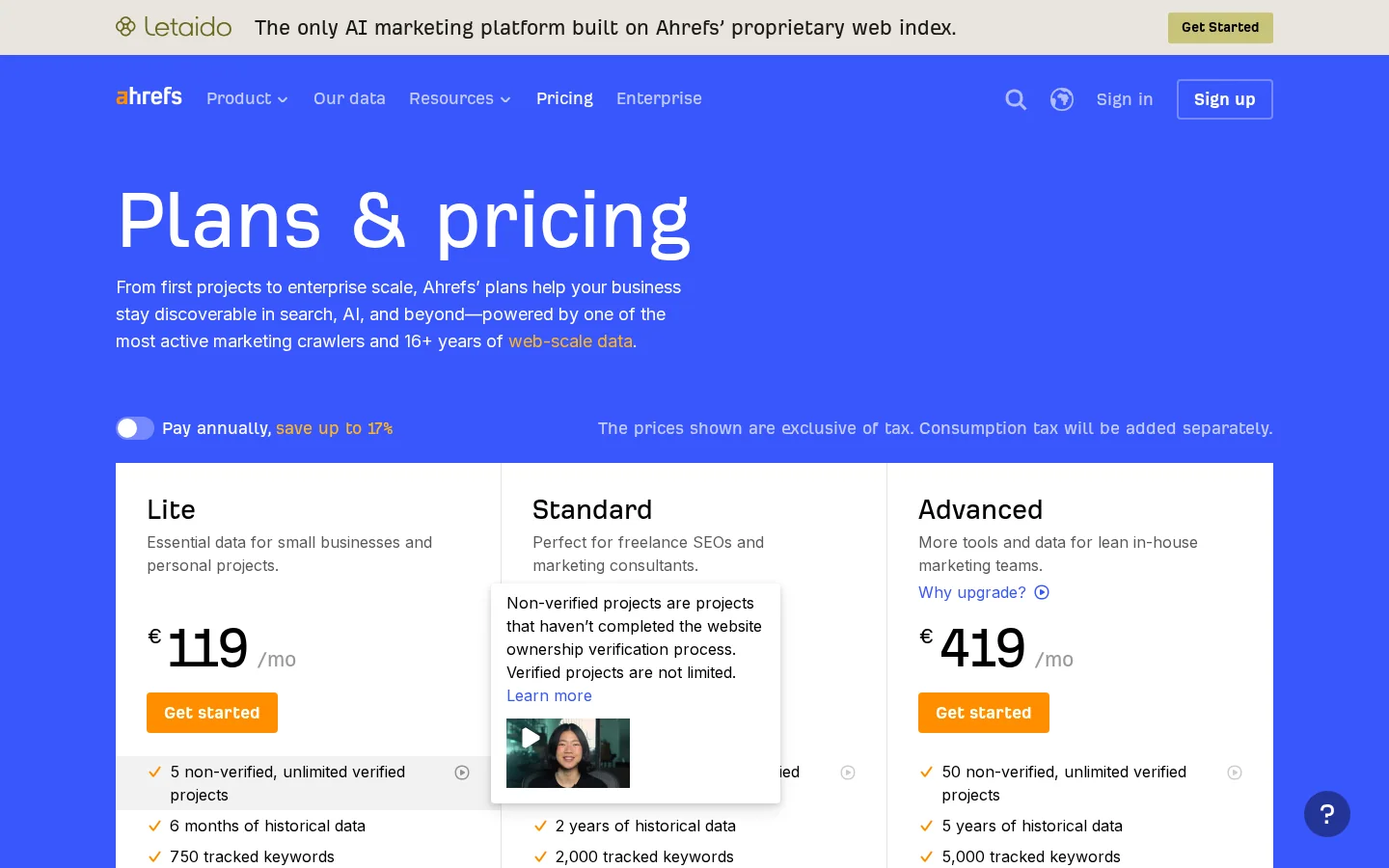
Prices on that page are shown in euros and change by region, so read the figures you see when you open it. Crawl credits matter when you audit a large site, because a single full crawl can use a big share of a monthly allowance. Check the crawl limit before you schedule a recurring audit.
Here is the calculation on the three Ahrefs plans, using the prices above:
cost per tracked keyword = monthly price / tracked keywords

Lite:      119 / 750   = 0.16 per keyword
Standard:  229 / 2000  = 0.11 per keyword
Advanced:  419 / 5000  = 0.08 per keyword
The number helps you compare plans inside one tool. Do not use it to compare tools directly, because a tracked keyword in one product may refresh less often than in another. For Semrush, the Semrush pricing page sets its plans by daily tracked keywords, projects and daily AI prompts, so run the same calculation on the plan you would buy.
Run the same list through each tool for one week, then check the results against what Google shows. This is the test that most buyers skip, and it is the only one that tells you which tool matches your market. You need no budget beyond the trials and a spreadsheet.
Tip
Build the seed list with the free Keyword Research and Suggestions Tool, then paste the same terms into each trial. That way the test starts from one list, not three.
The one-week test in five steps
Read the difficulty score with care. Keyword difficulty is a relative estimate, so a score of 30 in one tool can sit next to a score of 40 in another for the same page. Compare the ranking of your terms inside each tool, not the raw numbers across tools.
For the full method behind a list like this, our guide to keyword gap analysis shows how to compare your terms with a rival's and sort the gaps by value.
Compare backlinks by the number of referring domains, their relevance to your topic and whether the link was earned. A high count of links from unrelated sites adds little, and a short list from strong, relevant sites often does more. Ahrefs is the usual pick for this work, but any tool can list links that Google does not count.
Metrics such as Domain Rating summarize a site's link profile in one number. Treat them as a sorting tool, then open the linking pages and read them. A link from a page that answers the same question as yours is worth more than a link from a directory with a high score.
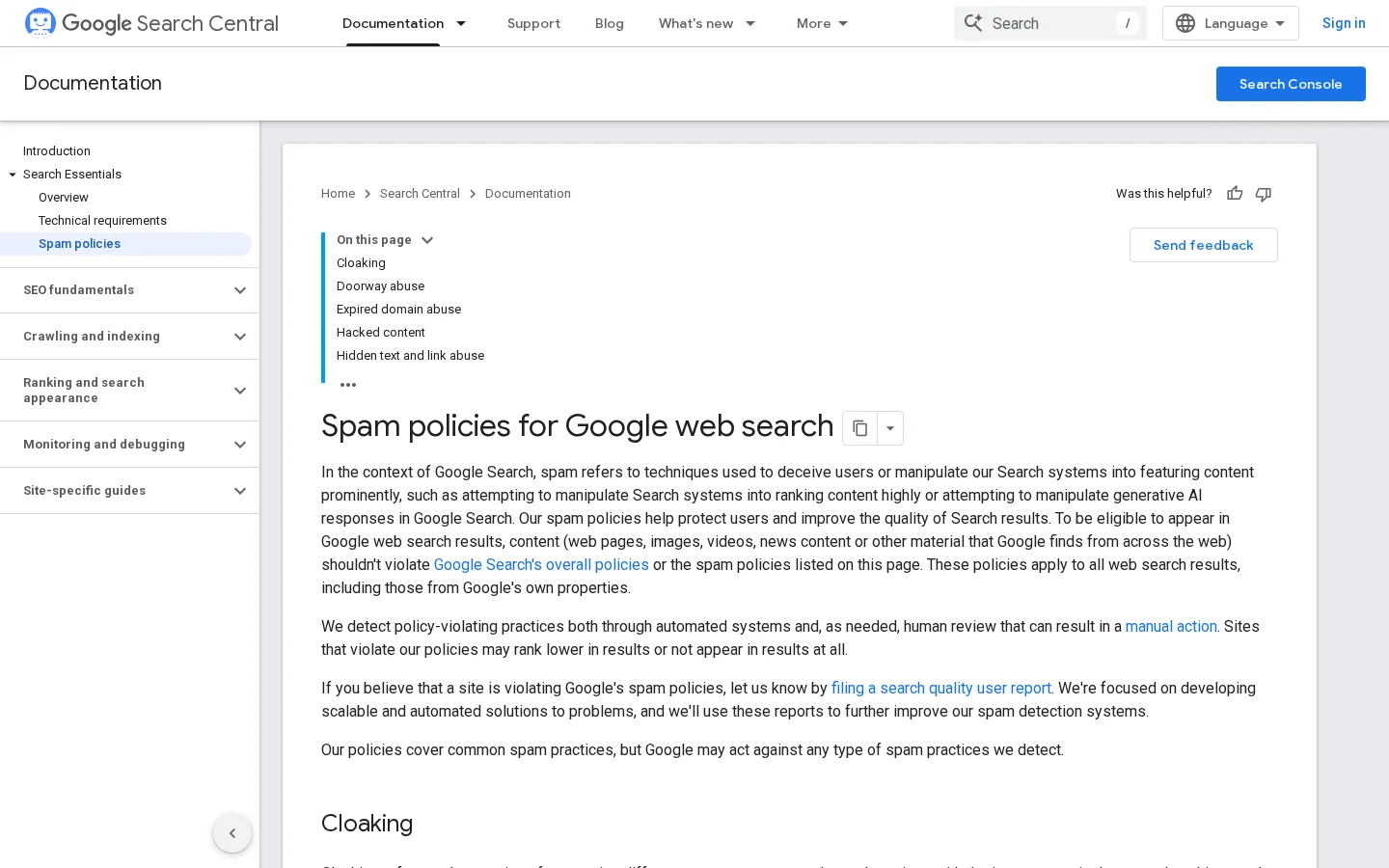
The line between a healthy link and a risky one is set by Google. Its spam policies, checked November 21, 2026, define link spam as "the practice of creating links to or from a site primarily for the purpose of manipulating search rankings", and list "buying or selling links for ranking purposes" among the examples.
Earned links or bought links
A rival's link list is a starting point for outreach, not a shopping list. Start with how to find your competitors' backlinks and win them, and keep the backlink exchange rules in mind before you ask anyone to link to you. Most of the risk in link work hides in reciprocal deals.
Free plans are enough to check a site or a few keywords, but none of them covers a full competitor study. Semrush's free plan is the most explicit about its limits on its pricing page, which makes it the easiest to plan around. Read each free plan's limits before you build a process on it.
| Option | What is free | Limit listed |
|---|---|---|
| Ahrefs | A free plan on its pricing page | No report limits shown on that page, so check the plan details |
| Semrush | A free plan with daily reports | 10 reports per day and one demo project, as listed on its pricing page |
| Sorank | Free tools for keyword suggestions and backlink checks | Limits are shown on each tool page, such as the backlink checker |
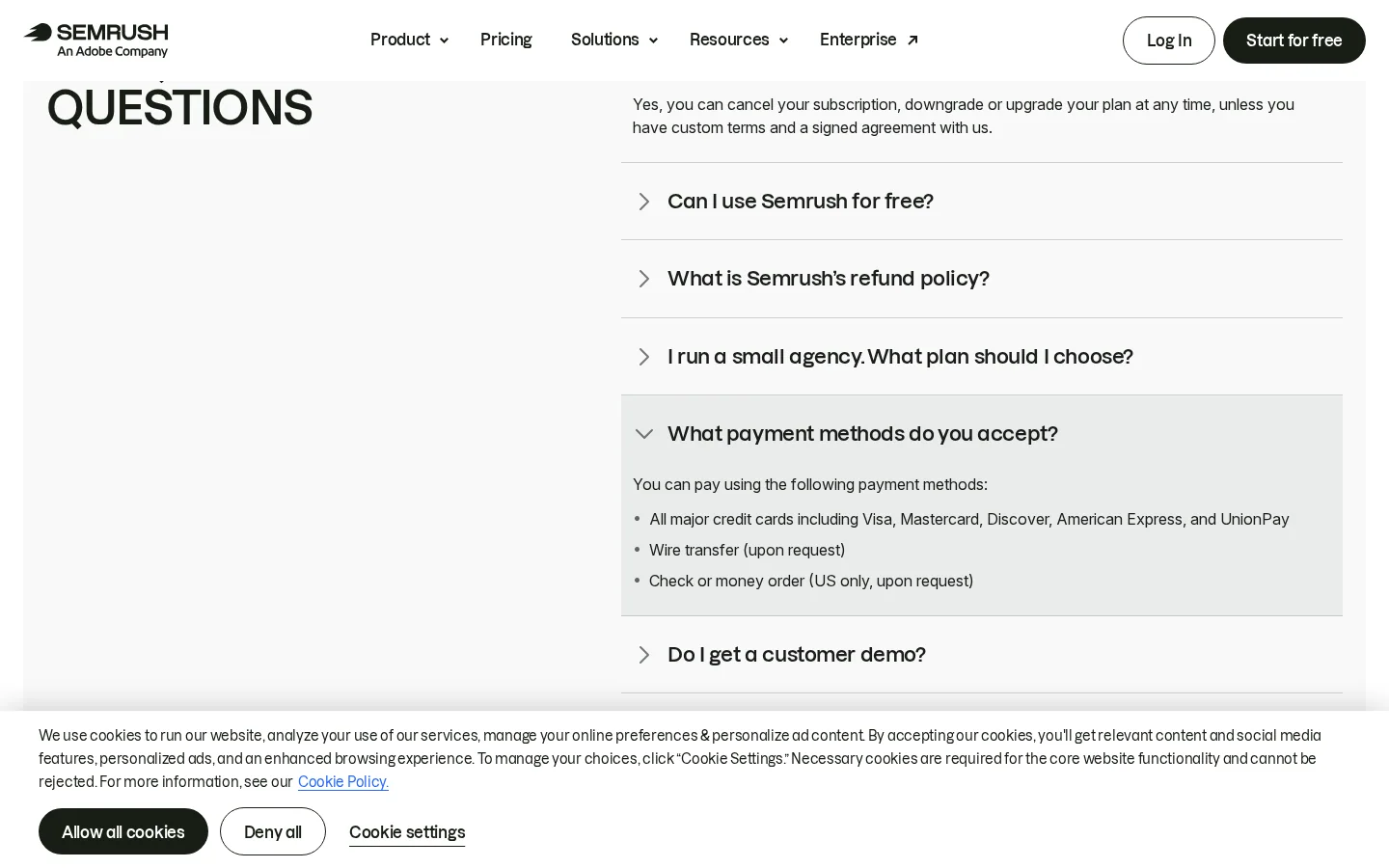
Use free access for the checks that do not need a full history, such as a quick view of a rival's top pages. Keep the paid trial for the work that needs exports, history and recurring reports. Check SpyFu's free views on its site before you plan around them, because those limits change often.
Most bad tool choices come from four mistakes: judging by the feature list, trusting one number, counting links without checking their quality and buying a plan before the test. Each one is easy to spot once you know what to look for, and each one has a fix you can apply in an afternoon.
Before and after a tool decision
What it is: choosing a tool because it has more reports, more filters or more data types. How to spot it: you cannot name the three reports you will use each week. How to fix it: write down the two or three jobs you do most often, then test only the tools that do those jobs well. A long feature list is a cost, because you pay for the modules you never open.
What it is: writing a page for a keyword because one tool shows a high volume and a low difficulty. How to spot it: the page you planned looks like the weakest result on the first page, or the volume does not match the traffic in your own analytics after a month. How to fix it: compare the same term in two tools, check the top ten results by hand, and write only when the page types leave room for yours.
What it is: measuring link building by the number of links on a report. How to spot it: the link list includes directories, widgets or sites with no real audience, and the count rises fast in a month. How to fix it: sort by relevance, open the linking pages, and drop any link that exists only to pass ranking credit. Google's spam policy describes the same pattern as a risk, so a weak link can cost more than it brings.
What it is: committing to a year before you have checked the data on your own keywords. How to spot it: you cannot say which keyword the tool got wrong. How to fix it: run the one-week test, then buy the cheapest plan that covers the export you need. Our Semrush review goes through its plans and their limits in more detail, which helps you decide whether the plan you are looking at fits your volume.
Choose a tool that matches your main job, test it on your own keywords, then keep watching rivals every week. Sorank is an SEO and GEO platform that runs on autopilot, and it covers the watching part, so the work does not stop after the first export.
The SEO Spy Tool follows up to five competitors. Each week, it reads what they publish and adds the keywords behind their new pages to your content calendar, which is method 3 from section 3 without a manual setup. You still decide which topics to write, but you start from a list that is already sorted.
Your checklist for this week
If you do one thing today, export the same list from two tools and check the top results yourself. The tool that matches what you see in Google is the right one for your market, whatever the feature list says.
Not in every case. Ahrefs is usually the first choice for backlink research, Semrush for an all-in-one workflow, and SpyFu for paid search on a smaller budget. The only reliable answer comes from running the same keyword list through each tool.
They are estimates from each tool's own database, so they differ from one tool to another and from Google's own tools. Use them to rank keywords against each other, then check the top candidates in Google before you write.
You can run basic checks for free, but free plans cap reports and tracked keywords. Semrush's free plan lists 10 reports per day, which covers a few checks but not a full competitor study.
We analyse your competitors, your website and your AI visibility to create a tailored content plan for free.
 AI Content Brief Generator
 FAQ Schema Generator
 AI Blog Post Ideas Generator
 Structured Data Validator (Schema Validator)
 Alt Text Checker
 Internal Link Analyzer
 Backlink Challenge
 AI Meta Description Generator
 AI Blog Title Generator
 Google Indexability Checker
 AI Blog Outline Generator
 UTM Link Builder
 Keyword Clustering Tool
 Canonical Tag Checker
 XML Sitemap Generator
 Broken Link Checker
 AI SEO Title Generator
 Headline Analyzer
 SERP Preview Tool
 Redirect Checker
 Hreflang Tag Generator
 Heading Structure Analyzer
 HTTP Headers Checker
 Favicon Extractor
 SERP CTR Calculator
 SEO vs Paid Search Savings Calculator
 SEO Share of Voice Calculator
 SEO ROI Calculator
 SEO Traffic and Revenue Forecast Calculator
 SEO Budget Calculator
 SEO Break-Even Calculator
 SaaS SEO ROI Calculator
 ROAS Calculator
 Reading Time Calculator
 Ranking Gain Simulator
 Organic Traffic Value Calculator
 Organic Traffic Estimator and Website Traffic Checker
 LTV to CAC Ratio Calculator
 Local SEO ROI Calculator
 Link Building Cost Calculator
 Keyword Value Calculator
 Keyword Opportunity Score Calculator
 Keyword Density Calculator
 GEO ROI Calculator
 GEO Content Investment Calculator
 Ecommerce SEO ROI Calculator
 Customer Lifetime Value Calculator
 Customer Acquisition Cost Calculator
 CTR Calculator
 Cost Per Article Calculator
 Conversion Rate Calculator
 Content Marketing ROI Calculator
 ChatGPT Referral Traffic Estimator
 Bounce Rate Calculator
 Backlink ROI Calculator
 AI Visibility Score Calculator
 AI Traffic Value Calculator
 AI Share of Voice Calculator
 Cost of AI Invisibility Calculator
 AI Citation Rate Calculator
 llms.txt Validator
 AI Overview Checker and AI Overviews Rank Checker
 Robots.txt Checker
 AI SEO Audit
 LLM Readability Checker
 SearchGPT Readiness Checker
 Structured Data LLM Audit
 Website Crawlability AI Audit
 Why ChatGPT Is Not Recommending My Website
 Gemini Ranking Tool
 Perplexity Ranking Checker
 LLM Citation Checker
 Answer Engine Optimization Audit
 GEO Audit
 AI Search Visibility Test
 ChatGPT Visibility Checker
 llms.txt Generator
 URL Extractor
 Webpage to Markdown
 Sitemap Checker
 SERP Volatility Sensor
 Page Size Checker
 Word Counter
 Slug Generator
 Schema Generator
 Robots Generator
 OG Preview
 Meta Tags Generator
 Image Compressor
 Favicon Generator
 On-Page SEO Audit: SEO Checker and SEO Analyzer
 Backlink Analysis Tool
 Keyword Research Tool
 Domain Authority Checker
 “I tested Sorank on a real client site and it's insane. It does everything an agency would bill you $1500 a month for. It's going into production on that client now.”

 Guillaume Guersanguersanguillaume.com“We are an Ads agency and we wanted to get our SEO back on track once and for all. Sorank gave us a clear view of our site, helped us prioritize optimizations, and properly structure our content. The tool is easy to use, well designed for a team, and very practical for centralizing tracking without having to juggle multiple platforms. A very solid foundation to start fresh with our SEO.”
 Gaspard MadouiAds Agency
 “I just let the Sorank software do its thing, and now my DR is 25 and my page is ranking higher.”
 Lucas Flandrefoundertrace.fr“I specialized in GEO thanks to Sorank. The GEO Leaderboard allows me to show my clients their position vs competitors on ChatGPT. It’s a real commercial differentiator.”
 MélanieSEO Freelance“Great service, works well for our website and helps us understand how to improve it to rank better on Google and elsewhere. Congrats, keep going, I recommend it.”
 Hugo T.E-commerce merchant