Preferences
Privacy is important to us, so you have the option of disabling certain types of storage that may not be necessary for the basic functioning of the website. Blocking categories may impact your experience on the website. More information
Privacy is important to us, so you have the option of disabling certain types of storage that may not be necessary for the basic functioning of the website. Blocking categories may impact your experience on the website. More information

Scale SEO with a repeatable system: an audit, page templates, topic clusters, a refresh cycle and the metrics that prove it works, step by step.
In short
Scaling SEO means growing organic traffic without growing your workload in step with it. It works when one-off tasks become a repeatable system: an audit, page templates and briefs, topic clusters linked on purpose, a refresh cycle for existing pages, and a short list of metrics you check every month.
Want to go further? Ask
Quick quiz
Is SEO right for you, and how should you start?
Sorank matches your answers


Test it for 3 days on your own site and see where you stand on Google, ChatGPT and the other AIs.
Start 3-day free trial3 days free, then stop whenever you want. 90-day results guarantee, conditions apply.
Scaling SEO means producing and maintaining more search-optimized pages without quality, indexing or internal linking falling apart. It usually breaks in three places: production (too few pages get finished), quality (pages turn thin or repetitive) and maintenance (old pages decay and nobody notices until traffic drops). A scaling system covers all three, not only the first.
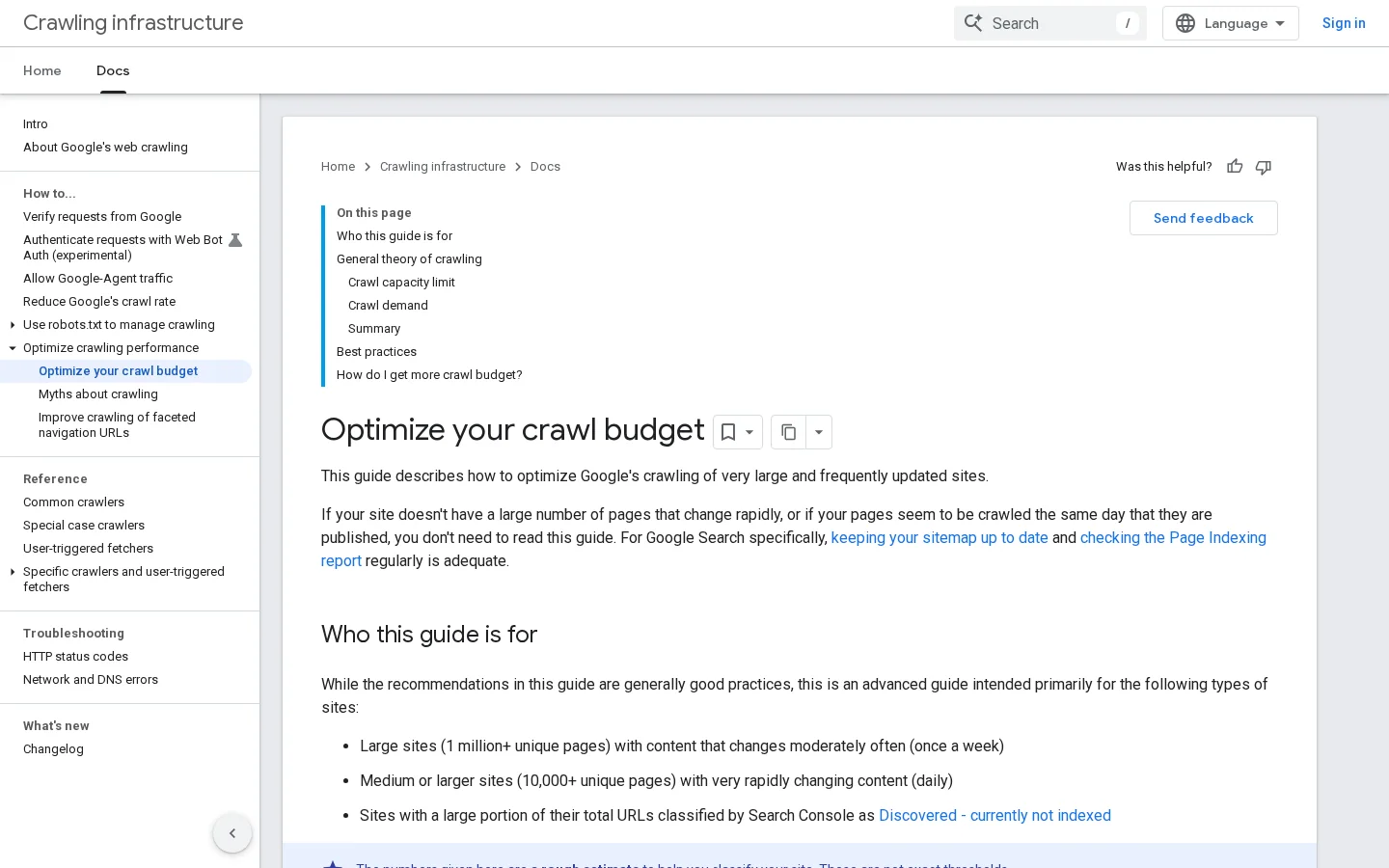
Size changes what you need to worry about. Google's guide to managing crawl budget for large sites calls the topic advanced and gives two rough thresholds: sites with 1000000 or more unique pages whose content changes about once a week, and sites with 10000 or more unique pages whose content changes daily. The guide says these are not exact thresholds. If your site is smaller, keep the sitemap current and check the Page Indexing report. Most of the method below still applies to you.
Where Google says crawl budget starts to matter
Source: Google Search Central, Managing crawl budget for large sites
Large organizations have their own operating model, which we cover in our guide to enterprise SEO. The steps below work for a team of three as well as for a site with thousands of URLs. What changes with size is the thresholds and the tooling, not the order of the work.
Start by measuring what you already have, because most scaling gains come from fixing pages that are already published. The audit takes four steps, and each one ends with a list you can act on.
The four-step audit
In Search Console, open the Performance report, switch to the Pages tab, and export the table for the last 3 months. Compare it with the list of URLs in your CMS. Any page that exists in the CMS but never appears in the export is a suspect: it is either not indexed or not linked from anywhere.
A short script does the first filter. This example assumes a CSV with the URL in the first column, clicks in the second and a header row:
awk -F',' 'NR>1 && $2 < 10 {print $1}' pages.csv > flagged.txtEvery flagged URL then gets one decision: keep and improve it, merge it into a stronger page, refresh it, or remove it. A removed page with no replacement should return a 404 or 410. When a page moves or merges into another, a 301 is the usual choice. Google's redirect documentation says to use a permanent redirect when you are sure it will not be reverted, so do not redirect pages you may bring back next quarter.
Open the Page Indexing report and read the two groups that matter most for scaling: "Discovered, currently not indexed" and "Crawled, currently not indexed". Compare them with your flagged list. A large discovered-but-unindexed group often points to thin content, duplication or a weak internal link path, so check those three before you publish more. Then crawl a sample of URLs for redirect chains, which should stay short, and for soft 404s, which are pages that return a normal response but show "not found" content.
Build a sheet with one row per URL and these columns: URL, primary query, cluster, decision, owner. Two rows with the same primary query are a cannibalization case, and you should merge them or split the queries between them. This sheet is the input for the system in the next section. It is also the step most teams skip, which is why clusters built later start to compete with each other.

A system means output does not depend on someone remembering the rules. Three assets do most of the work: one template per page type, one brief per piece, and a workflow where every stage has an owner and a deadline.
Start with the page types you publish. Each type gets a template that fixes its structure, so writers and tools fill in the variables rather than rebuilding the page each time.
| Page type | What the template fixes | Typical query |
|---|---|---|
| Pillar guide | Direct answer at the top, one H2 per subtopic, links to every cluster page | Broad topic term |
| Cluster article | One specific question, a how-to section, two links up to the pillar | Long-tail question |
| Comparison | The same criteria table in every comparison, and a verdict section | "X vs Y" |
| Glossary entry | A two-sentence definition, a short example, related terms | Term or acronym |
A brief stops drift before a writer starts. Keep it to six fields: the primary query and its intent, two or three secondary queries, the H2 outline, the pages the article must link to with the anchor text to use, the sources that must be checked, and the owner who signs it off. If a field is empty, the brief is not ready and the draft should not start.
Tip
If you have no keyword list yet, the free keyword clustering tool groups a list of keywords into candidate pages. Use its output as a first draft, then check each group by hand against your URL map.
Split production into stages: research, brief, draft, edit, publish and refresh. Each stage needs one owner and a time limit. A piece that sits in the same stage for more than a week should show up in the weekly review. Without that rule, the backlog grows quietly and the output you planned never arrives.
Three structures are common for linking a set of related pages: hub and spoke, which links every article to one overview page; the semantic cocoon, which links tightly inside one theme and keeps other themes apart; and URL silos, where the folder path defines the topic. Each one scales, and each one fails in a specific way, so pick the one that matches how your site is built.
Principle: one overview page, the hub, links to every article in the topic, and each article links back to the hub and to two or three neighbours. The result looks like an encyclopedia's topic page, which is why many people call it the Wikipedia model.
When to use it: the topic is broad and new pages arrive often, so the hub can take them in one at a time.
Advantages: fast to build, easy to audit, and the hub gathers the relevance that its spokes pass to it.
Limits: a hub that links to 80 pages dilutes its own focus, and neighbours with different search intent pull each other off topic. Keep the hub to the subtopics it truly covers.
Example: a hub titled "technical SEO" links to one page for each of its 30 subtopics, from crawl errors to Core Web Vitals, and each subtopic page links back to the hub.
Principle: every page in one theme links to the others in a dense mesh, and links to pages outside the theme are kept to a minimum. The theme becomes a self-contained cluster, and its boundary is what signals topical depth.
When to use it: the site covers several distinct themes and you want each one to look deep and self-contained. Our semantic cocoon guide explains how to build one.
Advantages: clear relevance signals for each theme, and a structure editors can follow without a diagram.
Limits: dense linking is hard to maintain once a theme passes a few dozen pages, and a mesh built by rule rather than by reader need looks mechanical in a crawl.
Example: a theme on invoicing software has 12 articles. Each one links to the other 11 where a reader would naturally go next, and none links to the unrelated payroll theme.
Principle: the folder path is the topic boundary, such as /seo/ or /ecommerce/, and internal links stay inside a folder except for links to the shared parent. Read the site architecture guide before you rebuild a structure this way.
When to use it: the site is already organized by category, or you are rebuilding it and can choose the folder names.
Advantages: simple to explain to developers, and easy to check in a crawl because the boundaries show in every URL.
Limits: a page that sits between two categories has no clean home, and changing URLs to fit a silo means redirects, which take time to settle.
Example: /seo/technical/ holds every crawling and indexing article. A link from /seo/technical/crawl-errors to /seo/ fits the rule, while a link to /ecommerce/ breaks it.
| Method | Core rule | Best for | Main risk | Cost to maintain |
|---|---|---|---|---|
| Hub and spoke | One hub links to every spoke, and each spoke links back | Broad topics with frequent new pages | The hub dilutes when it covers too much | Low |
| Semantic cocoon | Dense links inside a theme, few links outside it | Sites with several distinct themes | Mechanical linking that grows hard to maintain | Medium to high |
| URL silos | The folder path defines the topic boundary | Category-based sites and rebuilds | Pages that fit two folders, and costly URL changes | High when URLs must change |
In practice, most scaled sites combine hub and spoke with a folder structure. Whatever you choose, check the result in a crawl: count the internal links that point to each page, and list the pages with none. The internal link analyzer audits the links of any single page, which is useful for checking a hub before you publish its spokes.
Sorank's topic cluster generator builds the silo structure from your Search Console data, the competitors you follow and the questions AI models search. It runs the cannibalization check while each cluster is built, not after publishing, which is the step most spreadsheets skip.
Refreshing an existing page is usually cheaper than publishing a new one, because the URL already has links, index history and a position you can defend. Make the refresh cycle a fixed part of the weekly work, not something you start after a traffic drop.
What a refresh changes on a page
Start with pages that rank between positions 5 and 20 for a query you care about, because they have the most to gain from a better answer. Then add pages that lost clicks over the last quarter. Pages already at position 1 usually need protecting, not rewriting: changing a page that works is one of the most common ways to lose a position.
Compare the same number of weeks before and after the update, and check the same queries, so that seasonality does not look like progress. The formula is simple:
refresh gain = clicks in the weeks after the update - clicks in the same number of weeks beforeDivide the gain by the hours the refresh took, and you get a return per hour that you can compare across pages and against new articles.
Templates are the fastest way to produce many pages, and also the fastest way to produce pages search engines will not want. Google's spam policies describe scaled content abuse as many pages made mainly to manipulate rankings, with little original value for the reader. The tool or method used is not the test. The purpose and the value of each page are.
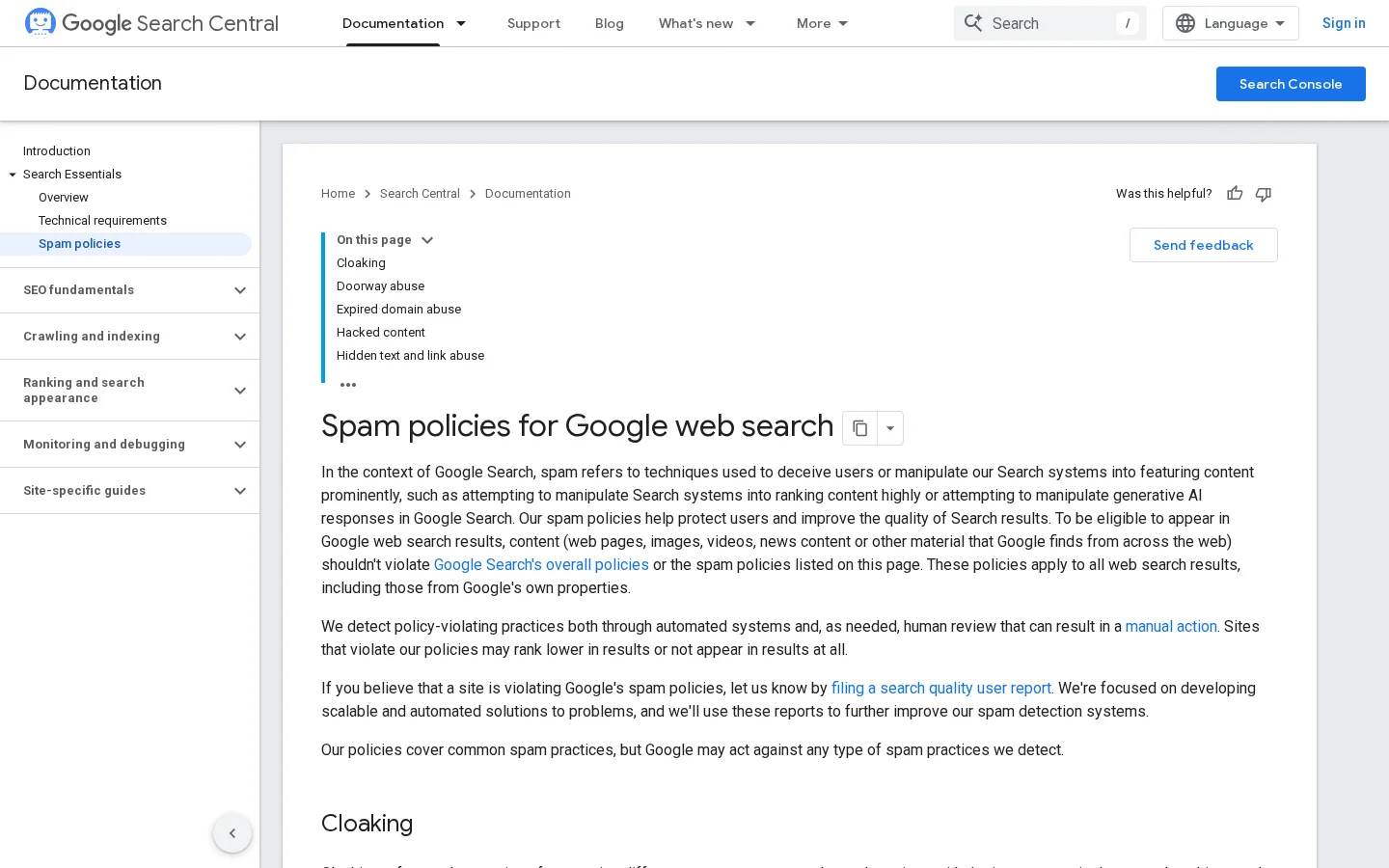
The policy gives generative AI tools used to create many pages as one example. A template built on data you own, that answers a question a reader really has, is a different thing from the same template with one noun swapped out. Check your template against that difference before you generate a batch.
Publish 10 to 20 pages from a new template before you generate the rest. Read them as a stranger would: does each page answer something the others do not? Track their indexing and clicks for several weeks before you scale. The SaaS programmatic SEO playbook walks through the data model and the pruning step in detail, and the programmatic SEO glossary entry defines the term.
A template page should differ from its siblings in something that matters to a reader: a different city, product, feature or price range, backed by data you actually have. If two generated pages differ only by a keyword, merge them into one page with a section for each variant.
Warning
A template with no data behind it produces thin pages at volume. Read a random sample of 20 pages by eye before you index the batch, and stop the batch if the pages read as copies of each other.
Crawl budget matters when the URLs Google could visit outnumber the URLs it will crawl in a reasonable time. Google's guide lists what wastes it: duplicate URLs, pages you do not want crawled (sorted or infinite-scroll variants of the same content), soft 404 pages, removed pages that still return a normal response, long redirect chains, and noindex pages that Google still has to request before it drops them. The crawl budget glossary entry defines the term, and log file analysis shows what Googlebot actually requests on your server.
Block URL patterns that create endless variants in robots.txt. Robots.txt controls crawling, not indexing, and Google advises against using it to free up budget for other pages. A rule that is too broad removes pages you need, so test every pattern in a robots.txt checker before you deploy it. For a site with sorted listings, a starting point can be as small as this:
User-agent: *
Disallow: /*?sort=If a page is permanently gone and has no replacement, return 404 or 410. If it has a close replacement, use a 301 to that page, and point each old URL directly at the final destination, because chains waste crawl and slow the signal down. Google's redirect documentation describes permanent redirects as the right signal when you are sure they will not be reverted.
A scaled system keeps running when a second person can run it. Each stage needs one named owner, a written process and a backup who has done the job at least once. Sorank can run the repetitive parts on autopilot, but someone still has to decide what gets published.
Who owns the work
Automate the repetitive production steps, and keep a person on facts, claims, brand voice and the decision to publish. Our content automation guide explains which steps are safe to hand to software and which ones need a reviewer.
Keep a one-page document per stage: the input, the output, the checklist and the time limit. Review it every quarter. When someone leaves, the backup uses it to take over the stage the same week.
Run the work in four phases: audit, system, production and measurement. The phases overlap in practice, but the order matters, because production on a site with broken indexing creates more problems to fix later.
A starting plan, to adjust to your site size
These durations are a starting point, not a promise. A site with a few hundred pages can move faster through the audit, and a large site may need longer in each phase. In production, a burst of five to ten cluster pages around one pillar is easier to link and measure than a slow trickle spread across ten topics, because you can see which cluster moved.
Measure the system as well as the traffic. Traffic is the result, and the system metrics tell you whether that result will keep growing. Check the five metrics below each month, and compare each one with the same period a year earlier where you have the data.
| Metric | Where to get it | What it tells you |
|---|---|---|
| Indexed pages | Page Indexing report | Whether your templates produce pages Google keeps |
| Share of pages with clicks | Performance report, Pages tab | How many of your URLs earn any traffic at all |
| Clicks per cluster | Export grouped by your URL map | Whether linking and topics work together |
| Refresh gain | Performance report, before and after | Whether updates pay back |
| Conversions per cluster | Your analytics tool | Whether the traffic reaches commercial pages |
Ignore total traffic in the first weeks after a launch. It moves with crawling, seasonality and small ranking swings, so one month tells you very little. Look at the trend across at least three months before you change the plan.
A case study is useful evidence only when it gives a baseline, dates and a method. Most published cases are written by the agency or vendor that did the work, so read them for the method, then check the numbers against the questions below. Our AI SEO case study guide shows how to run your own test and read the results the same way.
| Question | A good answer looks like | Red flag |
|---|---|---|
| Is there a baseline? | Starting traffic or revenue, with the date it was measured | Only the end figure |
| Are the dates clear? | Calendar start and end dates | "Over three years" with no dates |
| What else changed? | Mentions links, algorithm updates, migrations or seasonality | All growth credited to one tactic |
| Do the numbers agree? | The headline and the body use the same metric | The headline gives one growth rate and the body another |
| Are there failures? | Explains what did not work and why | Only winners, with no pages that stalled |
| Who is selling? | The author's business and offer are disclosed | A sales pitch presented as neutral advice |
A case with weak answers to these questions can still teach you a method, but its results should not be treated as a forecast for your site.
Most scaling projects fail in a small set of ways. Each mistake below has a sign you can check and a fix you can start the same week.
What it is: new pages go live while the existing site still has indexing errors, redirect chains and pages that nobody links to.
How to spot it: the Page Indexing report shows a growing group of discovered or crawled URLs that are not indexed, while the publishing count keeps rising.
How to fix it: pause new production for a short sprint, clear the blockers from the audit list, then restart. Set a rule that a stage does not start until its blockers are cleared.
What it is: the same template fills in different keywords, but the body text and the data stay the same across pages.
How to spot it: compare ten pages side by side. If the paragraphs differ only in one noun, the batch is thin.
How to fix it: add a data field the reader cares about, such as a price range, a feature list or a local detail. If you do not have the data, merge the pages instead of publishing them.
What it is: two articles target the same query, so each one splits the clicks and neither ranks well.
How to spot it: in Search Console, a query returns two different URLs over the same period, or the ranking URL changes from week to week.
How to fix it: pick the stronger page as the owner of the query, merge the weaker one into it, and redirect the old URL with a 301. Update the internal links so they point to the new owner.
What it is: pages get updated, but nobody recorded their clicks, their positions or the date of the change.
How to spot it: when someone asks whether refreshes work, the only answer is a feeling.
How to fix it: log the date and the page for every refresh, then compare the same number of weeks before and after with the formula in the refresh section.
What it is: links get added wherever an editor remembers, so related pages miss links while unrelated pages link to each other.
How to spot it: crawl the site and list the pages with no internal links pointing to them, and the pages that link across several unrelated themes.
How to fix it: link each new page to its pillar and its two closest neighbours at publishing time, and add links from older pages during the refresh cycle.
What it is: the team reports total traffic as the only measure of success, which hides pages that stopped earning clicks.
How to spot it: total traffic rises while the share of pages with clicks falls, which means the growth comes from a handful of pages.
How to fix it: add the system metrics from the measurement section to the monthly report, and review the share of pages with clicks before you add new ones.
Before you publish a batch
Scaling SEO means growing organic traffic and leads without growing the workload in step with them. It depends on repeatable work: an audit, templates, topic clusters, a refresh cycle and clear owners. Without a system, every new page costs as much effort as the first one.
Google's spam policies target scaled content abuse, meaning many pages made mainly to manipulate rankings, with little original value. The method is not the test: a batch of template pages can be fine when each page answers a real question with real data. Test a small batch before you publish the rest.
There is no fixed timeline, because it depends on the size of the site, how many pages need fixes and how competitive the queries are. Measure a baseline first, then read Search Console over several months rather than a few weeks. Indexing and technical fixes usually show first, while content and links take longer.
We analyse your competitors, your website and your AI visibility to create a tailored content plan for free.
 AI Content Brief Generator
 FAQ Schema Generator
 AI Blog Post Ideas Generator
 Structured Data Validator (Schema Validator)
 Alt Text Checker
 Internal Link Analyzer
 Backlink Challenge
 AI Meta Description Generator
 AI Blog Title Generator
 Google Indexability Checker
 AI Blog Outline Generator
 UTM Link Builder
 Keyword Clustering Tool
 Canonical Tag Checker
 XML Sitemap Generator
 Broken Link Checker
 AI SEO Title Generator
 Headline Analyzer
 SERP Preview Tool
 Redirect Checker
 Hreflang Tag Generator
 Heading Structure Analyzer
 HTTP Headers Checker
 Favicon Extractor
 SERP CTR Calculator
 SEO vs Paid Search Savings Calculator
 SEO Share of Voice Calculator
 SEO ROI Calculator
 SEO Traffic and Revenue Forecast Calculator
 SEO Budget Calculator
 SEO Break-Even Calculator
 SaaS SEO ROI Calculator
 ROAS Calculator
 Reading Time Calculator
 Ranking Gain Simulator
 Organic Traffic Value Calculator
 Organic Traffic Estimator and Website Traffic Checker
 LTV to CAC Ratio Calculator
 Local SEO ROI Calculator
 Link Building Cost Calculator
 Keyword Value Calculator
 Keyword Opportunity Score Calculator
 Keyword Density Calculator
 GEO ROI Calculator
 GEO Content Investment Calculator
 Ecommerce SEO ROI Calculator
 Customer Lifetime Value Calculator
 Customer Acquisition Cost Calculator
 CTR Calculator
 Cost Per Article Calculator
 Conversion Rate Calculator
 Content Marketing ROI Calculator
 ChatGPT Referral Traffic Estimator
 Bounce Rate Calculator
 Backlink ROI Calculator
 AI Visibility Score Calculator
 AI Traffic Value Calculator
 AI Share of Voice Calculator
 Cost of AI Invisibility Calculator
 AI Citation Rate Calculator
 llms.txt Validator
 AI Overview Checker and AI Overviews Rank Checker
 Robots.txt Checker
 AI SEO Audit
 LLM Readability Checker
 SearchGPT Readiness Checker
 Structured Data LLM Audit
 Website Crawlability AI Audit
 Why ChatGPT Is Not Recommending My Website
 Gemini Ranking Tool
 Perplexity Ranking Checker
 LLM Citation Checker
 Answer Engine Optimization Audit
 GEO Audit
 AI Search Visibility Test
 ChatGPT Visibility Checker
 llms.txt Generator
 URL Extractor
 Webpage to Markdown
 Sitemap Checker
 SERP Volatility Sensor
 Page Size Checker
 Word Counter
 Slug Generator
 Schema Generator
 Robots Generator
 OG Preview
 Meta Tags Generator
 Image Compressor
 Favicon Generator
 On-Page SEO Audit: SEO Checker and SEO Analyzer
 Backlink Analysis Tool
 Keyword Research Tool
 Domain Authority Checker
 “I tested Sorank on a real client site and it's insane. It does everything an agency would bill you $1500 a month for. It's going into production on that client now.”

 Guillaume Guersanguersanguillaume.com“We are an Ads agency and we wanted to get our SEO back on track once and for all. Sorank gave us a clear view of our site, helped us prioritize optimizations, and properly structure our content. The tool is easy to use, well designed for a team, and very practical for centralizing tracking without having to juggle multiple platforms. A very solid foundation to start fresh with our SEO.”
 Gaspard MadouiAds Agency
 “I just let the Sorank software do its thing, and now my DR is 25 and my page is ranking higher.”
 Lucas Flandrefoundertrace.fr“I specialized in GEO thanks to Sorank. The GEO Leaderboard allows me to show my clients their position vs competitors on ChatGPT. It’s a real commercial differentiator.”
 MélanieSEO Freelance“Great service, works well for our website and helps us understand how to improve it to rank better on Google and elsewhere. Congrats, keep going, I recommend it.”
 Hugo T.E-commerce merchant