Preferences
Privacy is important to us, so you have the option of disabling certain types of storage that may not be necessary for the basic functioning of the website. Blocking categories may impact your experience on the website. More information
Privacy is important to us, so you have the option of disabling certain types of storage that may not be necessary for the basic functioning of the website. Blocking categories may impact your experience on the website. More information

Bing opens its index to AI agents with Web IQ. Check the 8 settings that decide if they see your pages: Bingbot, noindex, AI Grounding, NoArchive.

In short
to stay visible to the AI agents that now search through Bing, check 8 settings: Bingbot allowed in robots.txt, noindex only where you mean it, your site verified in Bing Webmaster Tools, AI Grounding left on Allow for key pages, AI Training set separately, NoArchive and NoCache replaced before March 1, 2027, consistent business details, and self-contained paragraphs.
Want to go further? Ask
Quick quiz
How should you use AI in your marketing?
Sorank matches your answers


Test it for 3 days on your own site and see where you stand on Google, ChatGPT and the other AIs.
Start 3-day free trial3 days free, then stop whenever you want. 90-day results guarantee, conditions apply.
Bing Web IQ is the service that connects companies' AI agents to the Bing index. On November 17, 2026, Microsoft announced that Web IQ is now available to all Azure customers, with new, lower pricing (Jordi Ribas, President, Search and AI, Microsoft). Two weeks earlier, on October 30, 2026, the Bing team published new publisher preferences for AI training and AI grounding (Krishna Madhavan, Principal Product Manager, Microsoft Bing). Together, these two posts decide whether your pages can reach the agents that businesses build on Azure. This guide turns them into a checklist, with nothing added beyond what Microsoft wrote.
Web IQ is a grounding service: it gives AI agents access to public web information and structured knowledge so they can answer questions and act with up-to-date facts. In practice, an agent built by a company on Azure asks Web IQ, and Web IQ answers from the Bing index. If your page is not in that index, the agent never sees it.
Three points of the November 17 announcement change how you should write and configure your pages:
Web IQ in numbers
Source: Microsoft, Bing blog, November 17, 2026
If you already work on your visibility in Microsoft's own assistant, our guide on how to rank in Microsoft Copilot covers the content side. The settings below come first: they decide whether your content can be used at all.
Microsoft separates three mechanisms, and each one blocks something different. Crawling is governed by robots.txt, indexing by the noindex tag, and grounding (the use of your content in AI answers) by the new page-level preference announced on October 30.
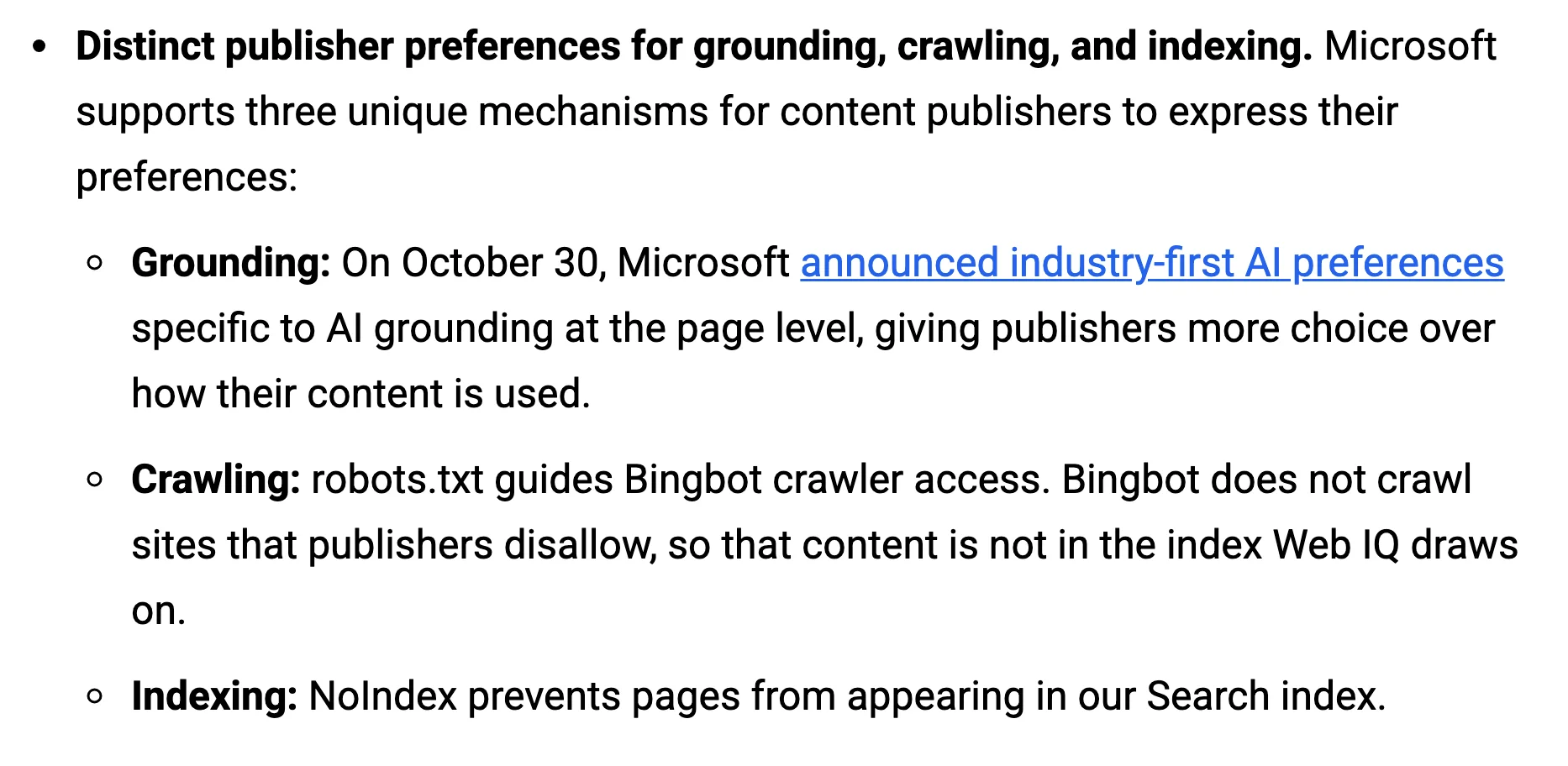
The sentence that matters most is this one, from the November 17 post: "Bingbot does not crawl sites that publishers disallow, so that content is not in the index Web IQ draws on." Blocking Bingbot does not only remove you from Bing search: it removes you from every agent that relies on Web IQ.
| Control | Where you set it | What it blocks |
|---|---|---|
| Crawling | robots.txt (Bingbot) | Bingbot does not visit the page, so it is not in the index Web IQ uses |
| Indexing | noindex tag | The page stays out of the Bing search index |
| AI Grounding | Meta tag or HTTP header, page by page | The use of the page in AI answers (Allow, DisallowExtended or Disallow) |
| AI Training | robots.txt or page by page | The use of the content to train models (Allow or Disallow) |
Here is the full list, in the order we recommend checking it. Each point comes from the two Bing blog posts of October 30 and November 17, 2026.
The 8 Bing settings to check for AI agents
Open your robots.txt and look for a User-agent: bingbot group or a global Disallow: /. If Bingbot is blocked, your content is not in the index Web IQ draws on. Note that the new AI preferences do not override this rule: Microsoft states that an Allow setting does not override a robots.txt rule blocking Bingbot. A free robots.txt checker shows in seconds which crawlers your file lets through, and our guide to robots.txt for AI crawlers explains what to allow and what to block.
Microsoft describes it simply: "NoIndex prevents pages from appearing in our Search index." A noindex tag left on a template, a category or a whole section after a redesign removes those pages from Bing, and with them from the agents. List the pages that carry it and keep only the ones you want hidden on purpose.
Bing Webmaster Tools is where you see how Bing crawls your site, and it is also where Microsoft will open the temporary grounding transition preferences on December 15, 2026, for sites that use NoArchive or NoCache on that date. If your site is not there yet, follow our Bing Webmaster Tools setup guide.
AI grounding is the use of your page to support an answer generated by an AI. The preference is set page by page only (there is no site-wide robots.txt setting for grounding), and it has three values:
<meta name="Bingbot" content="ai-grounding:disallow">
X-Robots-Tag: Bingbot: ai-grounding:disallow
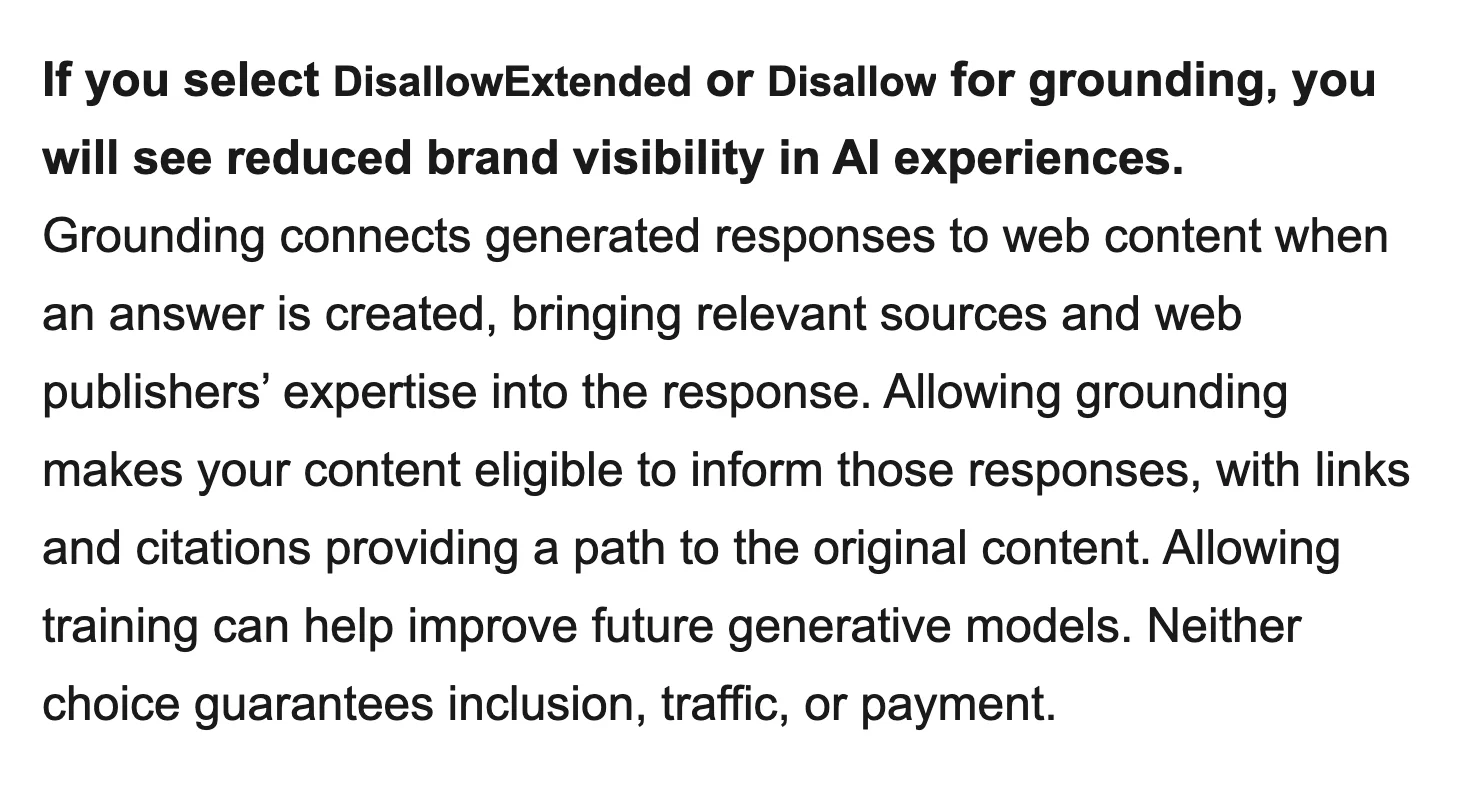
For the middle value, the content is ai-grounding:disallowextended. Microsoft is explicit about the cost of these two settings:
Warning
Microsoft writes: "If you select DisallowExtended or Disallow for grounding, you will see reduced brand visibility in AI experiences." It also adds that "neither choice guarantees inclusion, traffic, or payment."
Training is a different preference from grounding. You can refuse that your content trains future models and still let it be used in AI answers. It is set in robots.txt for the whole site or a folder, or page by page, and a page-level setting overrides robots.txt:
User-Agent: __usage_ai-training
Disallow: /

<meta name="Bingbot" content="ai-training:disallow">The new preferences replace NoArchive and NoCache for training and grounding. If your site uses one of these tags today, the calendar below is the one to follow.
The transition from NoArchive and NoCache
A published setting only applies once Microsoft has crawled the page again. IndexNow can prompt a recrawl, but Microsoft does not guarantee a date.
Web IQ Places serves addresses, phone numbers and opening hours for more than 207 million businesses and places to agents. If your details differ between your site, your listings and the directories, an agent can pick the wrong one. Check your NAP consistency and your listing in Bing Places for Business.
Since Auto mode returns "focused, ready-to-use evidence instead of whole pages", the agent carries away one passage, not your page. Write each paragraph so it is understood alone: one idea, the fact and the number inside, the name of the subject repeated rather than "it" or "as seen above". This is the principle of content chunking.
Tip
Once these settings are in place, measure the result: Sorank's AI mention tracking shows when ChatGPT, Copilot, Gemini or Perplexity cite your brand.
Blocking or allowing: what Microsoft says
Bing is no longer only a search engine: it is a source for agents you will never see. Let Bingbot in, keep AI Grounding on Allow for your key pages, replace NoArchive and NoCache before March 1, 2027, and write paragraphs that stand on their own. To turn that visibility into AI citations week after week, see how Sorank's GEO optimization works.
Web IQ is Microsoft's grounding service: it connects AI agents to the Bing index and to structured knowledge so they answer with up-to-date information. Since November 17, 2026, it is available to all Azure customers, with lower pricing and a default Auto mode that returns passages rather than whole pages.
Yes, for agents that rely on Web IQ. Microsoft writes that Bingbot does not crawl sites that publishers disallow, so that content is not in the index Web IQ draws on. The new AI preferences do not override a robots.txt rule that blocks Bingbot.
Disallow forbids any use of the page in AI answers. DisallowExtended keeps Microsoft-operated experiences such as Copilot, AI Overview, AI Mode and Microsoft 365, but excludes third-party services like Web IQ. Microsoft warns that both reduce brand visibility in AI experiences.
We analyse your competitors, your website and your AI visibility to create a tailored content plan for free.
 AI Content Brief Generator
 FAQ Schema Generator
 AI Blog Post Ideas Generator
 Structured Data Validator (Schema Validator)
 Alt Text Checker
 Internal Link Analyzer
 Backlink Challenge
 AI Meta Description Generator
 AI Blog Title Generator
 Google Indexability Checker
 AI Blog Outline Generator
 UTM Link Builder
 Keyword Clustering Tool
 Canonical Tag Checker
 XML Sitemap Generator
 Broken Link Checker
 AI SEO Title Generator
 Headline Analyzer
 SERP Preview Tool
 Redirect Checker
 Hreflang Tag Generator
 Heading Structure Analyzer
 HTTP Headers Checker
 Favicon Extractor
 SERP CTR Calculator
 SEO vs Paid Search Savings Calculator
 SEO Share of Voice Calculator
 SEO ROI Calculator
 SEO Traffic and Revenue Forecast Calculator
 SEO Budget Calculator
 SEO Break-Even Calculator
 SaaS SEO ROI Calculator
 ROAS Calculator
 Reading Time Calculator
 Ranking Gain Simulator
 Organic Traffic Value Calculator
 Organic Traffic Estimator and Website Traffic Checker
 LTV to CAC Ratio Calculator
 Local SEO ROI Calculator
 Link Building Cost Calculator
 Keyword Value Calculator
 Keyword Opportunity Score Calculator
 Keyword Density Calculator
 GEO ROI Calculator
 GEO Content Investment Calculator
 Ecommerce SEO ROI Calculator
 Customer Lifetime Value Calculator
 Customer Acquisition Cost Calculator
 CTR Calculator
 Cost Per Article Calculator
 Conversion Rate Calculator
 Content Marketing ROI Calculator
 ChatGPT Referral Traffic Estimator
 Bounce Rate Calculator
 Backlink ROI Calculator
 AI Visibility Score Calculator
 AI Traffic Value Calculator
 AI Share of Voice Calculator
 Cost of AI Invisibility Calculator
 AI Citation Rate Calculator
 llms.txt Validator
 AI Overview Checker and AI Overviews Rank Checker
 Robots.txt Checker
 AI SEO Audit
 LLM Readability Checker
 SearchGPT Readiness Checker
 Structured Data LLM Audit
 Website Crawlability AI Audit
 Why ChatGPT Is Not Recommending My Website
 Gemini Ranking Tool
 Perplexity Ranking Checker
 LLM Citation Checker
 Answer Engine Optimization Audit
 GEO Audit
 AI Search Visibility Test
 ChatGPT Visibility Checker
 llms.txt Generator
 URL Extractor
 Webpage to Markdown
 Sitemap Checker
 SERP Volatility Sensor
 Page Size Checker
 Word Counter
 Slug Generator
 Schema Generator
 Robots Generator
 OG Preview
 Meta Tags Generator
 Image Compressor
 Favicon Generator
 On-Page SEO Audit: SEO Checker and SEO Analyzer
 Backlink Analysis Tool
 Keyword Research Tool
 Domain Authority Checker
 “I tested Sorank on a real client site and it's insane. It does everything an agency would bill you $1500 a month for. It's going into production on that client now.”

 Guillaume Guersanguersanguillaume.com“We are an Ads agency and we wanted to get our SEO back on track once and for all. Sorank gave us a clear view of our site, helped us prioritize optimizations, and properly structure our content. The tool is easy to use, well designed for a team, and very practical for centralizing tracking without having to juggle multiple platforms. A very solid foundation to start fresh with our SEO.”
 Gaspard MadouiAds Agency
 “I just let the Sorank software do its thing, and now my DR is 25 and my page is ranking higher.”
 Lucas Flandrefoundertrace.fr“I specialized in GEO thanks to Sorank. The GEO Leaderboard allows me to show my clients their position vs competitors on ChatGPT. It’s a real commercial differentiator.”
 MélanieSEO Freelance“Great service, works well for our website and helps us understand how to improve it to rank better on Google and elsewhere. Congrats, keep going, I recommend it.”
 Hugo T.E-commerce merchant