Preferences
Privacy is important to us, so you have the option of disabling certain types of storage that may not be necessary for the basic functioning of the website. Blocking categories may impact your experience on the website. More information
Privacy is important to us, so you have the option of disabling certain types of storage that may not be necessary for the basic functioning of the website. Blocking categories may impact your experience on the website. More information

Online advertising explained: how auctions set your price, which channels fit your goal, the formulas behind CPC and ROAS, and how to measure what works.

In short
Online advertising is paying to show a message on the internet, in search results, social feeds, videos, websites or apps. Platforms sell each ad slot through an auction, and you usually pay per click, per thousand impressions or per action. Start with the channel where your buyers already look, then measure cost per conversion before you add budget.
Want to go further? Ask
Quick quiz
How should you get more local customers from Google?
Sorank matches your answers


Test it for 3 days on your own site and see where you stand on Google, ChatGPT and the other AIs.
Start 3-day free trial3 days free, then stop whenever you want. 90-day results guarantee, conditions apply.
Online advertising covers every paid placement that shows up on a screen connected to the internet. A sponsored result on Google, a video before a YouTube clip, a carousel in an Instagram feed and a banner on a news site are all online ads. What they share is the transaction: you pay a platform, the platform shows your message to a chosen audience, and you pay again only when the platform counts a result, such as a click, a view or a sale.
If you are new to the basics, our digital advertising basics article explains the vocabulary. This guide goes one level deeper. It covers how the auction decides who wins a slot, how to pick channels, which price model fits which goal, how attribution changes the numbers you see, and the mistakes that waste budget in the first month.
The market is large and still growing. According to the IAB and PwC Internet Advertising Revenue Report, published on April 16, 2026, digital advertising revenue reached $294.6B in 2025, up 13.9% from the year before. The same report puts social advertising at $117.7B (up 32.6%) and search at $114.2B (up 11%). The IAB page does not say which countries the figures cover, so check the report's scope before you quote the total to anyone. The totals tell you where the money goes, but not whether a given channel will work for your product. That depends on your buyer and your margin.
Digital ad revenue, full year 2025
Source: IAB and PwC, Internet Advertising Revenue Report, full year 2025 (April 16, 2026)
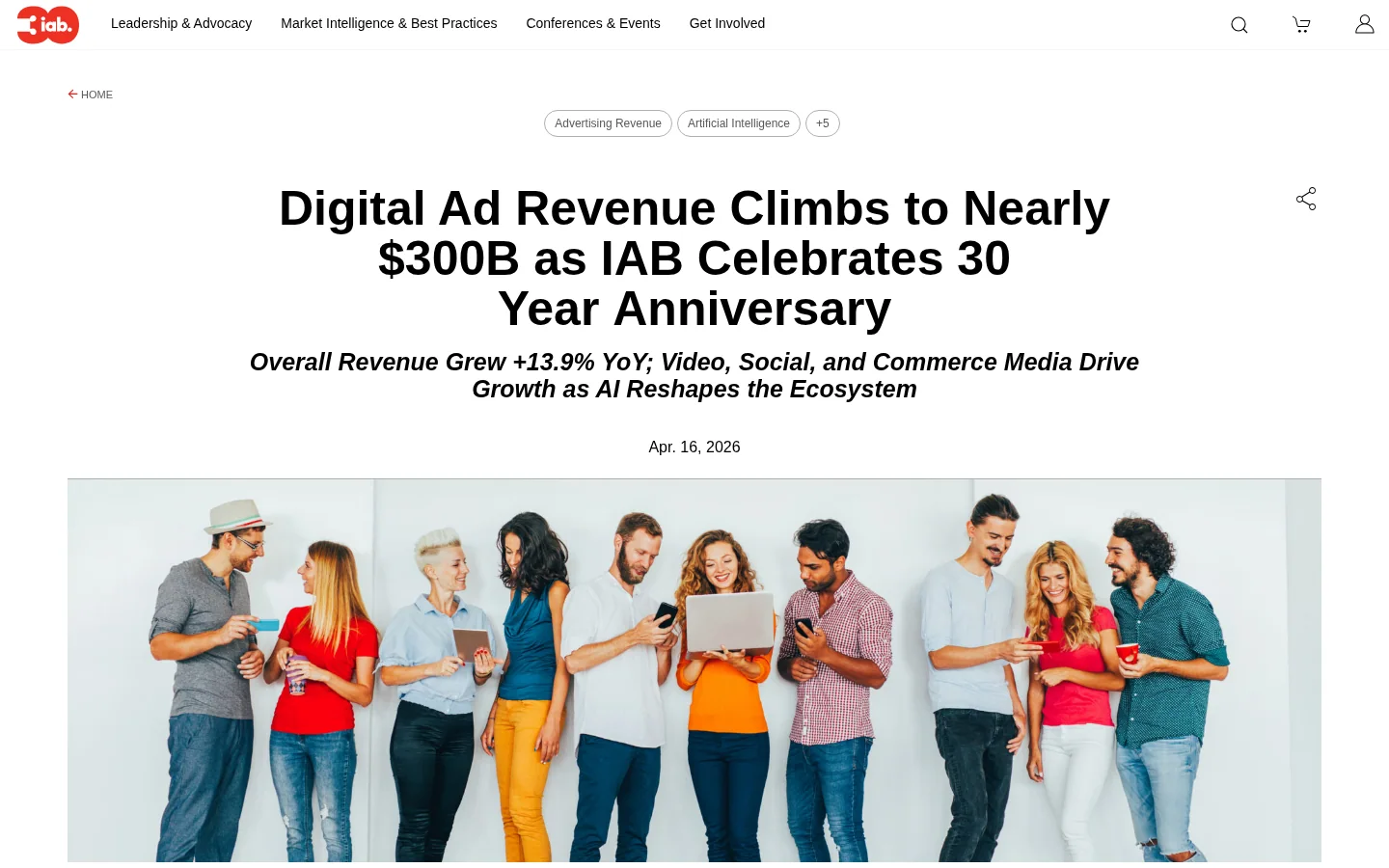
Notice that the three largest formats are not mutually exclusive. Social platforms also sell video, and search results mix ads with shopping panels and other formats. When someone says "we do online advertising," ask which format, which placement and which price model they mean. Those three answers decide almost everything else.
Every ad slot is sold in an auction. Google's help center says the auction takes place "every time someone searches on Google or visits a site that shows ads." You do not buy a fixed position. You set a maximum bid, and the platform decides whether your ad is eligible and where it appears. Because the auction runs for each search, the same keyword can produce a different result from one query to the next.
Google's page lists six considerations that feed into Ad Rank, and it gives no formula for Ad Rank. Treat the list as the inputs, not as a calculation:
Two things follow from this. First, a higher bid does not guarantee a better slot. Second, quality is a lever you control. Quality Score, which you can read in your account, estimates ad relevance, expected click-through rate and landing page experience. We explain how it feeds into Ad Rank in our how Quality Score feeds into Ad Rank guide.
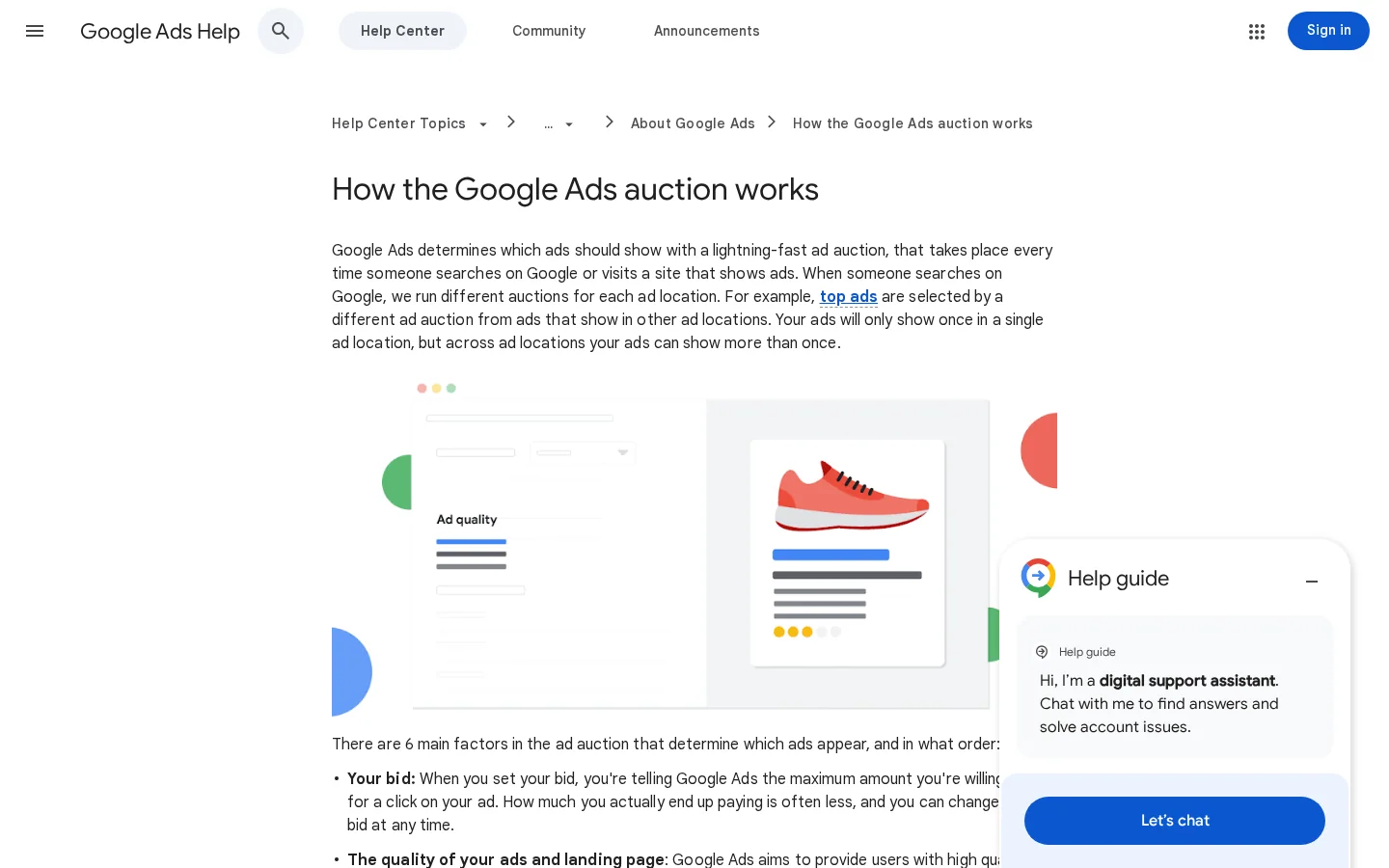
Google's page notes that you often pay less than your maximum bid, so the price you pay for a click can sit well below the number you typed in. The exact charge rule is set by each platform and can change, which is why you should look at the cost actually charged in your reports, not the bid you entered. If your average cost per click is far below your max bid, your bid is not the constraint. If it sits at the max, the auction is tight and quality is the cheaper fix.
Because the auction runs for every search, Ad Rank changes from one query to the next. The context inputs above mean the same keyword can be cheap on a Tuesday morning from a desktop in one city and expensive on a Friday evening from a phone in another. Do not judge a campaign on a single day. Compare at least two full weeks, and split the report by device and hour before you change a bid.

Channels differ in one way that matters most: whether the person is already looking for a solution or whether you have to interrupt them. Search ads catch demand that already exists. Social and display ads create demand by putting your product in front of people who had no plan to buy. Programmatic buying automates the placement of either kind. The table below compares the main families. Read the "best for" column first, because a channel that is cheap per click can still be a poor fit if your buyer never searches for your category.
| Channel | Where the ad appears | Best for | Usual price models | Main limit |
|---|---|---|---|---|
| Search (paid search) | Results above and beside organic listings | Buyers who already search for a solution | CPC, sometimes CPA targets | Expensive for broad, competitive terms |
| Shopping | Product panels with image, price and merchant name | Ecommerce with a clean product feed | CPC, ROAS targets | Depends on feed quality and prices |
| Display | Banners and images on partner sites and apps | Awareness and retargeting visitors | CPM, CPC | Low attention, easy to ignore |
| Social (Meta Ads setup guide) | Feeds, stories and reels on social networks | Products people discover, visual offers | CPM, CPC, CPA targets | Demand is created, not captured, so conversion is slower |
| Video | Before, during or inside video content | Brand recall and storytelling | CPM, cost per view | Needs good creative and a clear next step |
| Programmatic advertising | Any of the above, bought automatically in real time | Scale across many sites and audiences | CPM, CPA, deal-based fixed prices | Quality of inventory and fees can hide waste |
| Native | Placed inside editorial feeds, styled like content | Content-led campaigns and research | CPC, CPM | Must be labeled as an ad, see disclosure below |
| AI answers | Ads shown inside some AI assistants | Early tests and high-intent prompts | Varies by platform | New, with little public data; see AI ads explained |
No channel is the best one in general. A B2B software company can get its first qualified leads from search and LinkedIn. A consumer brand with a visual product may get more from social video. Your first decision is the funnel stage you need help with: capturing demand, creating demand or keeping customers coming back.
Pick channels by evidence, not by what your competitors appear to run. Start with the goal, then match it to a channel, then test one channel at a time with a fixed budget. The steps below are the sequence we would use for any new product.
Five steps to choose your first online ad channel
"More leads" is not a goal a platform can optimize for. "A demo request under 80 dollars" is. Before you open any ad manager, write the value of one conversion. For a subscription business, use the first-year gross margin per customer, not the list price. For a lead form, use the share of leads that become paying customers multiplied by the margin on one sale. Those are simple multiplications, and they tell you how much you can pay for a click.
You likely have more evidence than you think. Your site analytics show which referrers already convert. Your search console shows which queries bring impressions and clicks. Your sales calls show which problem prospects describe in their own words. If a query already sends traffic that converts, a search campaign on that query is the cheapest test you can run. If prospects mention a specific social community or newsletter, that is a signal for a targeted social or native test.
This is the step most teams skip, and it is the one that prevents bad campaigns. A maximum cost per action is the number above which a conversion loses money. If one sale yields 150 dollars of gross profit, a cost per sale above 150 dollars loses money on that sale. A lead that closes 1 time in 10 at the same margin is worth 15 dollars, so your maximum cost per lead is 15 dollars. Write it at the top of your campaign plan and check against it every week.
Testing is cheap only when you do not spread the money across five channels. One channel with one offer and two or three ad variants will teach you more in a month than a scattered test of many. Set the budget so that you reach the conversion volume you need for a decision. If your conversion rate is low, you need more clicks before the data means anything. A low budget can make the test look like a failure when it only lacked volume.
Clicks are the easiest number to inflate and the least useful one on its own. A cheap click from the wrong audience is not progress. Compare cost per conversion against the maximum you wrote in step 3. If the channel is under your maximum after enough data, scale it slowly. If it is well above, fix the offer, the landing page or the audience before you spend more.
Before you launch any online ad campaign
A price model defines what counts as a billable event. The four you will meet most are cost per click, cost per thousand impressions, cost per action and return on ad spend. Each one answers a different question. CPC asks what it costs to get a visit. CPM asks what it costs to be seen. CPA asks what it costs to get a result. ROAS asks what the ads return in revenue. The table compares them, and the formulas go right after it.
| Model | Full name | You pay when | Use it to judge |
|---|---|---|---|
| CPC | Cost per click | Someone clicks your ad | Cost of traffic, mainly in search |
| CPM | Cost per mille (thousand impressions) | Your ad is shown 1000 times | Cost of reach, for awareness and video |
| CPA | Cost per action | A conversion happens | Cost of a lead, sale or signup |
| ROAS | Return on ad spend | Not a price, a ratio of revenue to spend | Whether the campaign pays back in revenue |
CPC  = Total cost / Clicks
CPM  = (Total cost / Impressions) x 1000
CTR  = Clicks / Impressions x 100
CPA  = Total cost / Conversions
ROAS = Revenue from ads / Ad spend
Keep these formulas in one spreadsheet, and compute them from the same date range. A common error is to compare a CPC from last month with a CPA from last week. Use one window for all of them. Our guide to PPC metrics and their formulas goes further on the warning signs for each one.
Once you pick a price model, you choose how the platform should bid. Each strategy below trades control for automation, and each needs a different amount of conversion data.
| Strategy | What you set | Use it when | Main risk |
|---|---|---|---|
| Manual CPC | A bid for each keyword or ad group | A new account that needs control while you learn what works | Slow to manage, and easy to over-edit |
| Target CPA | A cost per conversion you can afford | Steady conversion volume, not a handful of sales a month | Starved of data, it can stall or bid unpredictably |
| Target ROAS | A return on ad spend you want | Ecommerce with reliable order values | Favors large orders and can ignore small profitable sales |
| Maximize conversions | Only the budget | Early tests that need volume quickly | Can drift toward cheap, low-value leads |
Pick the strategy after you have collected enough conversions to trust the signal. Switching to automated bidding with almost no data usually makes the campaign less predictable, not more efficient.
Most buyers touch several ads before they convert. They see a video, click a search ad a week later, then buy after a retargeting message. Attribution is the rule that assigns the sale to one or more of those touches. The rule you choose changes which channel looks profitable, so the same campaign can look like a winner or a loser depending on the model. No model is correct. Each one hides something.
The table lists the common attribution models, which platforms offer them, and the blind spot of each. Read it before you decide which channel to cut.
| Model | How it assigns credit | Good for | Blind spot |
|---|---|---|---|
| Last click | All credit to the last click before the conversion | Quick checks and simple reporting | Ignores the ads that started the journey |
| First click | All credit to the first touch | Seeing which channels start journeys | Ignores the ads that closed the sale |
| Linear | Equal credit to every touch | Long B2B journeys with many contacts | Treats a passing impression as a strong touch |
| Time decay | More credit to touches closer to the conversion | Short sales cycles with urgent offers | Undervalues early awareness |
| Position based | Most credit to the first and last touch, the rest shared | Balancing discovery and closing | The split is a rule, not a measurement |
| Data driven | Credit set by a model learned from your own conversion paths | Accounts with enough conversion volume | Opaque, and weak with few conversions |
In practice, compare two models side by side for a month. If a channel looks strong under last click and weak under first click, it probably closes sales that other channels started, and it deserves budget. If a channel is strong under first click and invisible under last click, it creates demand that is captured elsewhere. Cutting it would reduce the sales that the closing channel gets credit for. Our article on marketing attribution models explains how to credit traffic from AI assistants, which is a growing gap.
Last click vs data driven: what each one tells you
Attribution is only as good as the conversion events feeding it. Track the outcome that pays you, not a page view, and fire it once per real conversion. Use the same definition in your ad platform and in your analytics, or the two will disagree and you will not know which one to believe. Our conversion tracking guide covers the GA4, Google Ads and Meta setup step by step.
Tag every ad destination with UTM parameters so that analytics can separate campaigns. A tagged link looks like this. The ampersands are escaped because the link sits in HTML:
https://www.example.com/pricing?utm_source=google&utm_medium=cpc&utm_campaign=spring_pricing&utm_content=headline_bUse lowercase names, pick one naming convention, and write it down. A campaign named "Spring_Pricing" and another named "spring pricing" show up as two campaigns in most reports, and the totals split for no reason.
In the US, the Federal Trade Commission treats deceptive advertising as unlawful, and its guidance applies that rule to native ads, which are paid placements styled like editorial content. In its guide Native Advertising: A Guide for Businesses, dated December 2015, the FTC says some native ads "are unlikely to mislead consumers even without a specific disclosure." In other cases, "a disclosure may be necessary to ensure that consumers understand that the content is advertising." The more an ad looks like the articles around it, the more likely it needs a clear label.
The FTC lists terms likely to be understood, including "Ad," "Advertisement," "Paid Advertisement" and "Sponsored Advertising Content." It advises against "Promoted," which it calls "at best ambiguous," and it says advertisers should not use terms such as "Promoted Stories." A label should be clear and prominent, not buried in a footer or a long disclaimer.
Warning
A label that sits far from the ad, uses a small grey font or says only "Promoted" falls short of the FTC's advice. Check every native and sponsored placement on mobile, where labels are easy to miss.
The same caution applies to influencer posts and creator deals. The disclosure should appear where the audience sees the claim, and it should not depend on the platform's own label alone. If you use AI-generated creatives, the same test applies: the ad must not mislead about who is speaking or about what the product does. Our guide to sponsored content and how to disclose it explains the disclosure side in more detail.
Most wasted budget comes from a short list of mistakes. Each one below has three parts: what it is, how to spot it in your account, and how to fix it. Check the list once a month, even on campaigns that look healthy.
What it is. The campaign is judged on clicks or click-through rate. It looks busy, and the clicks are cheap, but the visitors do not buy or sign up.
How to spot it. Your cost per click is low and falling, while your cost per conversion is flat or rising. The conversion rate of the traffic is below the rate you see on your site from other sources.
How to fix it. Make the conversion the optimization target, set a maximum cost per conversion from your value calculation, and pause ad groups that cost more than that maximum for two weeks.
What it is. Every ad goes to the homepage, which has to serve every visitor at once. The visitor came for one offer and sees a menu, a long product list and three calls to action.
How to spot it. Bounce rate on paid visits is high, time on page is short, and the conversion rate of paid visitors is far below the rate of visitors who arrive from the same query through a targeted page.
How to fix it. Send each ad group to a page that repeats the promise in the ad, names the offer and has one primary action. Keep the headline, the price and the form on the same screen.
The same offer, before and after the fix
What it is. A broad keyword matches thousands of queries, and some of them have nothing to do with buying. The budget goes to students, job seekers and people looking for a free alternative.
How to spot it. Open the search terms report in your search campaign and sort by cost. Look for queries that never convert and contain words like "free," "jobs," "salary" or "course" when you sell a paid product.
How to fix it. Add those queries as negative keywords at the campaign or account level, and review the report every week during the first two months. Use exact and phrase match for the terms that already convert.
What it is. The advertiser edits a bid or budget every day, based on yesterday's result. Each change pushes the campaign back into a learning phase, and the results never settle.
How to spot it. The change history shows edits every day or two, and the cost per conversion swings widely from week to week without any clear cause.
How to fix it. Set a rule: change a bid or budget at most once a week, and only after a full review window. Make changes in small steps, about 10 to 20 percent at a time, so you can see what each one did.
What it is. Two platforms, for example Google Ads and Meta, both claim credit for the same sale, and the sum of their conversions is larger than the real number of sales.
How to spot it. Add up the conversions reported by each platform and compare the total with the orders in your payment or CRM system. If the platforms report more sales than you made, the overlap is the problem.
How to fix it. Use one source of truth for revenue, such as your CRM or order system. Use platform numbers for optimization inside each channel, and read the cross-channel totals from the single source.
Numbers make the method concrete. The example below uses assumed values, not benchmarks. Replace them with your own figures from the last 90 days before you plan a real budget.
Example
A software company counts each trial signup as one conversion. Each trial that becomes a paying customer brings in 40 dollars of gross margin, and you want a cost per trial of 25 dollars or less. You test a search campaign with a 1000 dollar budget.
| Line | Calculation | Result |
|---|---|---|
| Budget | Given | 1000 dollars |
| Average cost per click | Given | 2 dollars |
| Clicks | 1000 / 2 | 500 clicks |
| Trial rate on the landing page | Given | 5 percent |
| Conversions | 500 x 0.05 | 25 trials |
| Cost per conversion | 1000 / 25 | 40 dollars |
| Verdict against the 25 dollar target | 40 is above 25 | Fix before scaling |
The campaign looks acceptable on clicks, since 2 dollars is a fair price for a search click. It fails on the number that matters. The cost per trial is 40 dollars, above the 25 dollar target. You now have three levers: lower the cost per click by improving the ad and the query match, raise the trial rate by improving the landing page, or accept a lower target. Changing only the bid will not fix a page that converts at 5 percent when the target needs about 8 percent. Our PPC glossary entry defines the terms if you need a quick reference while you run the numbers.
Tip
Run the same test in a spreadsheet before you spend. The SEO vs PPC calculator on Sorank values your organic visits at what they would cost in ads, which helps when you decide how much budget to keep in paid search.
Sorank is an SEO and GEO tool. It works on the organic side of the same funnel: keyword research, articles, backlinks and tracking of your visibility in ChatGPT, Gemini, Claude and Perplexity. It does not replace paid placements, but it gives you the free half of the comparison. The GEO and SEO dashboard shows Google and AI traffic in one view, which is the number you need when you ask whether a paid campaign is buying something organic traffic already gives you.
If you do one thing this week, do the work that costs nothing. Write the value of one conversion, check that your tracking counts it once, and send your paid traffic to a page built for the offer. Those three steps decide most of the results before you spend another dollar.
Your plan for the next seven days
Online advertising is paying to show a message on the internet, such as a search result, a video, a social feed or a website banner. Advertisers usually pay per click, per thousand impressions or per action. Most ad slots are sold through an auction that runs each time a placement is available.
The cost depends on the platform, the industry and how many advertisers compete for the same audience. Start from the cost per conversion you can afford, which you get from the value of one conversion and your margin, not from a fixed monthly guess. Then test one channel with a budget you can afford to lose.
Start with the channel where your buyers already look for a solution or spend time. Search ads suit people who are already searching, while social and video ads suit products people discover. Run one channel with one offer for several weeks before you add another.
We analyse your competitors, your website and your AI visibility to create a tailored content plan for free.
 AI Content Brief Generator
 FAQ Schema Generator
 AI Blog Post Ideas Generator
 Structured Data Validator (Schema Validator)
 Alt Text Checker
 Internal Link Analyzer
 Backlink Challenge
 AI Meta Description Generator
 AI Blog Title Generator
 Google Indexability Checker
 AI Blog Outline Generator
 UTM Link Builder
 Keyword Clustering Tool
 Canonical Tag Checker
 XML Sitemap Generator
 Broken Link Checker
 AI SEO Title Generator
 Headline Analyzer
 SERP Preview Tool
 Redirect Checker
 Hreflang Tag Generator
 Heading Structure Analyzer
 HTTP Headers Checker
 Favicon Extractor
 SERP CTR Calculator
 SEO vs Paid Search Savings Calculator
 SEO Share of Voice Calculator
 SEO ROI Calculator
 SEO Traffic and Revenue Forecast Calculator
 SEO Budget Calculator
 SEO Break-Even Calculator
 SaaS SEO ROI Calculator
 ROAS Calculator
 Reading Time Calculator
 Ranking Gain Simulator
 Organic Traffic Value Calculator
 Organic Traffic Estimator and Website Traffic Checker
 LTV to CAC Ratio Calculator
 Local SEO ROI Calculator
 Link Building Cost Calculator
 Keyword Value Calculator
 Keyword Opportunity Score Calculator
 Keyword Density Calculator
 GEO ROI Calculator
 GEO Content Investment Calculator
 Ecommerce SEO ROI Calculator
 Customer Lifetime Value Calculator
 Customer Acquisition Cost Calculator
 CTR Calculator
 Cost Per Article Calculator
 Conversion Rate Calculator
 Content Marketing ROI Calculator
 ChatGPT Referral Traffic Estimator
 Bounce Rate Calculator
 Backlink ROI Calculator
 AI Visibility Score Calculator
 AI Traffic Value Calculator
 AI Share of Voice Calculator
 Cost of AI Invisibility Calculator
 AI Citation Rate Calculator
 llms.txt Validator
 AI Overview Checker and AI Overviews Rank Checker
 Robots.txt Checker
 AI SEO Audit
 LLM Readability Checker
 SearchGPT Readiness Checker
 Structured Data LLM Audit
 Website Crawlability AI Audit
 Why ChatGPT Is Not Recommending My Website
 Gemini Ranking Tool
 Perplexity Ranking Checker
 LLM Citation Checker
 Answer Engine Optimization Audit
 GEO Audit
 AI Search Visibility Test
 ChatGPT Visibility Checker
 llms.txt Generator
 URL Extractor
 Webpage to Markdown
 Sitemap Checker
 SERP Volatility Sensor
 Page Size Checker
 Word Counter
 Slug Generator
 Schema Generator
 Robots Generator
 OG Preview
 Meta Tags Generator
 Image Compressor
 Favicon Generator
 On-Page SEO Audit: SEO Checker and SEO Analyzer
 Backlink Analysis Tool
 Keyword Research Tool
 Domain Authority Checker
 “I tested Sorank on a real client site and it's insane. It does everything an agency would bill you $1500 a month for. It's going into production on that client now.”

 Guillaume Guersanguersanguillaume.com“We are an Ads agency and we wanted to get our SEO back on track once and for all. Sorank gave us a clear view of our site, helped us prioritize optimizations, and properly structure our content. The tool is easy to use, well designed for a team, and very practical for centralizing tracking without having to juggle multiple platforms. A very solid foundation to start fresh with our SEO.”
 Gaspard MadouiAds Agency
 “I just let the Sorank software do its thing, and now my DR is 25 and my page is ranking higher.”
 Lucas Flandrefoundertrace.fr“I specialized in GEO thanks to Sorank. The GEO Leaderboard allows me to show my clients their position vs competitors on ChatGPT. It’s a real commercial differentiator.”
 MélanieSEO Freelance“Great service, works well for our website and helps us understand how to improve it to rank better on Google and elsewhere. Congrats, keep going, I recommend it.”
 Hugo T.E-commerce merchant