Preferences
Privacy is important to us, so you have the option of disabling certain types of storage that may not be necessary for the basic functioning of the website. Blocking categories may impact your experience on the website. More information
Privacy is important to us, so you have the option of disabling certain types of storage that may not be necessary for the basic functioning of the website. Blocking categories may impact your experience on the website. More information

Learn how to analyze Google Ads competitors with Auction insights, the Ads Transparency Center, landing pages and a monthly log, step by step.

In short
Google Ads competitor analysis means checking who you meet in the auction, what your rivals show in their ads, and where their clicks land. Your own account tells you which rivals compete with you and how often they beat you. The Ads Transparency Center shows the ads they have run, and their public landing pages show the offer behind them. Their budgets stay hidden.
Want to go further? Ask
Quick quiz
Ads, SEO or both: what is right for you now?
Sorank matches your answers


Test it for 3 days on your own site and see where you stand on Google, ChatGPT and the other AIs.
Start 3-day free trial3 days free, then stop whenever you want. 90-day results guarantee, conditions apply.
A competitor analysis on Google Ads answers three questions. Who do you really compete with in the auction? What do they promise in their ads? Where do they send the click? Each question has a different source, and only the first one lives inside Google Ads.
Start with the question you need answered this month. If your cost per click is climbing, you need the auction data first. If your click-through rate is falling, read the ads. If conversions are falling, read the landing pages.
| Question | Where the answer is | Cost |
|---|---|---|
| Who competes with me in the auction? | Auction insights, in your own account | Free |
| What do they put in their ads? | Google Ads Transparency Center | Free |
| Where do their clicks land? | Their public landing pages | Free |
| Which terms should I target? | Keyword Planner and keyword tools | Free to paid |
| How much do they spend? | No reliable public source | Not public |
Three sources cost nothing. The Auction insights report in your account shows the rivals you meet in auctions. The Ads Transparency Center shows the ads those rivals run. Their public websites show the offer, the form and the proof they use after the click. Add Keyword Planner for search demand, and you have a clear picture without paying for a tool.
You cannot see a competitor's budget, their bids, their click-through rate or their conversions. Auction insights only covers auctions you entered. If a rival never meets you in the auction, the report says nothing about them. Treat every spend figure from a third-party tool as an estimate.
Warning
A rival missing from Auction insights is not harmless. It only means you do not share auctions with them yet. Check again next month, and check the terms you plan to add.
Six methods work, and each answers a different question. Use them together. None gives you the full picture alone. The first two work from inside your account, the next three use public data, and the last one is a paid shortcut.
Principle. The report in your account compares your impression share, overlap rate and outranking share with the named advertisers who bid in the same auctions.
When to use it. First, before anything else. It tells you who is really in your auctions, and that list decides which rivals deserve a full review.
Advantages. The data comes from real auctions, it is free, and it removes guesswork about who your rivals are.
Limits. It covers only your own auctions. It only shows keywords, ad groups or campaigns with enough activity, and it shows nothing when your impression share is below 10%.
Example. A rival with a 60% overlap rate shows up in about 6 of your 10 auctions. That rival is a direct competitor, not a distant one.
Principle. You cannot read a rival's keyword list in Google Ads. You work from the search side instead. List the terms your market types, then check the volume, the cost per click and the advertiser competition for each one. The advertisers who appear on those terms are your rivals for them.
When to use it. Before you build or rebuild a campaign, and when a rival shows up on a term you never bid on.
Advantages. Free tools give you demand and cost per click. You learn the value of a term before you pay for it.
Limits. The figures are estimates, not what your rivals pay. Free tools show ranges, and the ranges can be wide.
Example. Take a seed term such as "crm software". Note its cost per click and its competition level. Then search it and list the advertisers that appear. Repeat for three terms and compare the lists.
Principle. You read the ads a competitor runs in the Ads Transparency Center. For each ad, you see the format, the regions it reached and the last date it ran.
When to use it. When you need the exact message, offer and format a rival uses today.
Advantages. It is free and public, and it shows real ads, not summaries. The last date an ad ran tells you whether it is still live.
Limits. It shows no spend and no performance. It shows the region an ad reached, not the bidding or targeting behind it.
Principle. You follow the ad link and study the page the click reaches: the offer, the form, the proof and the first screen.
When to use it. When a rival's ad gets clicked a lot, and you suspect their page converts better than yours.
Advantages. It costs nothing, and it shows the whole funnel, not only the ad.
Limits. You see the page, not its results. A good-looking page can still convert badly.
Principle. You record the same findings every month, so you see change instead of one snapshot.
When to use it. Always, once the first review is done. Auctions move, so a single snapshot misleads.
Advantages. You spot the rivals that enter, leave or change their offer.
Limits. It costs time every month. Keep the list short, with five to ten rivals, not forty.
Principle. Paid SEO suites estimate a rival's ad keywords and ad copy from their own data.
When to use it. When you manage many accounts, or when you need the keyword history of a rival over several months.
Advantages. They scale, and they keep history.
Limits. They are estimates. They are not the auction data Google gives you, and they cost money. Check their claims against Auction insights before you change a budget.
| Method | Data source | Cost | Question it answers | Main limit |
|---|---|---|---|---|
| Auction insights | Your own account | Free | Who is in my auctions? | Only auctions you entered |
| Keyword research | Keyword tools | Free to paid | Which terms are worth it? | Estimates, not real bids |
| Ad transparency review | Ads Transparency Center | Free | What do they say? | No spend, no results |
| Landing page review | Public websites | Free | What happens after the click? | No conversion data |
| Ongoing monitoring | Your own log | Your time | What changed? | Needs discipline every month |
| Third-party spy tools | Paid SEO suites | Paid | What do many rivals do? | Estimates, and a recurring cost |

Auction insights is the only official Google report on who you compete with. It sits in your campaign reports and covers Search, Shopping and Performance Max campaigns. The exact menu changes from time to time. If you cannot find it, search the help page for "Auction insights". In its Google Ads Help page on Auction insights, Google describes each metric in plain terms, and the page is worth reading before you open the report.
Three numbers to know before you read Auction insights
Source: Google Ads Help, Auction insights report
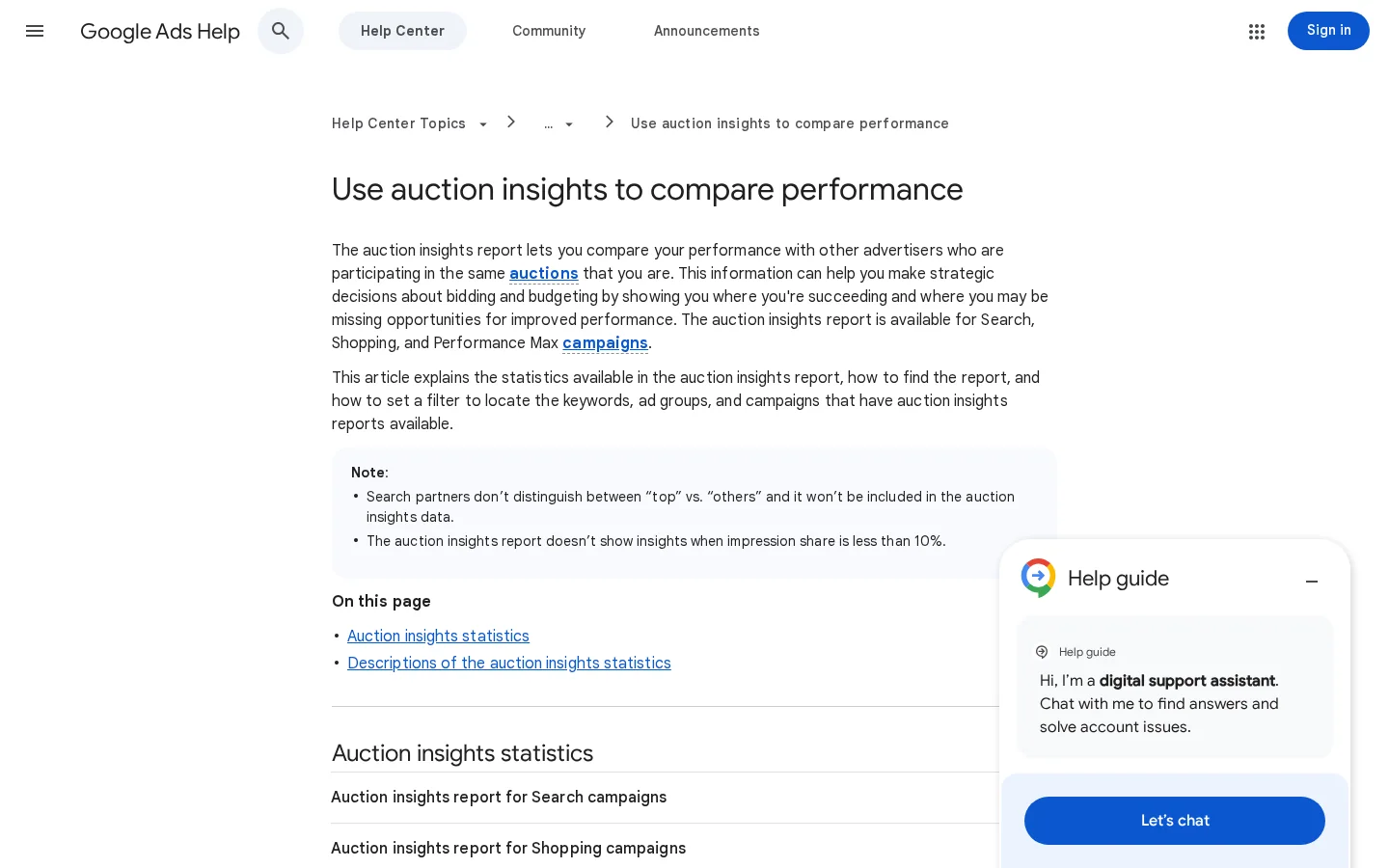
The report has up to six metrics. Three apply to every campaign type. The other three are position metrics for Search only. Here is what Google says each one measures.
| Metric | What it measures | Question it answers |
|---|---|---|
| Impression share | Your share of the impressions you were eligible to receive. For rivals, their share of the auctions they were eligible for. | Am I missing auctions I could win? |
| Overlap rate | How often another advertiser's ad got an impression when your ad also got one. | Who is really in my auctions? |
| Outranking share | How often your ad ranked higher than theirs, or showed when theirs did not. | Who do I beat? |
| Position above rate (Search only) | How often the rival's ad was shown in a higher position than yours, when both showed. | Who sits above me? |
| Top of page rate (Search only) | How often your ad appeared above the unpaid search results. | How often am I at the top? |
| Absolute top of page rate (Search only) | How often your ad was the very first ad above the organic results. | How often am I in first place? |
Outranking share alone misleads. It counts "your ad showed, theirs did not" as a win. If a rival rarely overlaps with you, you win most of those auctions by default, and the outranking share looks strong. The number tells you nothing about the rival.
Read overlap first, then outranking. A rival with 5% overlap and a high outranking share is a rare visitor. A rival with 60% overlap and a low outranking share is the one that matters. In Google's own example, a 20% outranking share means you win 2 of every 10 auctions you enter together. That rival beats you in most shared auctions, and it needs a plan.
Note
Check the date range before you compare two rivals. A rival that appeared in one week of a campaign with a long date range will look weaker than it is, and a rival that spiked during a sale will look stronger.
The method is simple: build the list, map the terms, read the ads, review the pages, then log it. Each step has a short rule and a technical detail that most reviews skip.
The five-step competitor review
Open Auction insights for the campaigns that carry most of your spend. Sort by overlap rate. Most accounts have three to ten rivals that matter. Ignore the advertisers that appear once. A rival seen in a single week may be running a test, a sale or a misconfigured ad.
Pull the report for at least four weeks before you decide anything. Use the same date range as your own performance report, or you will compare different markets. If a campaign is new, wait until it has enough impressions to show data.
Take the keywords where a rival's overlap is high. For each term, record the search volume, the cost per click and the competition level. High overlap on an expensive term means a costly fight. High overlap on a cheap term often means a crowded market where your copy matters more than your bid.
Tip
Need a quick read on cost per click and advertiser competition? Sorank's free keyword suggestions tool takes a seed keyword of one to three words and returns related terms with volume, difficulty, cost per click and advertiser competition.
For each rival, note the headline promise, the offer, the call to action, the format and the regions where the ad runs. The steps for searching the Ads Transparency Center come in the next section. Write the message in your own words, because you will reuse the insight, not the copy.
Follow the ad link and fill in the checklist in the landing page section below. Do it on a desktop and on a phone, because a page can load differently on each.
Write one row per rival per month. The log is what turns a one-time review into a monitoring habit. The template is in the last section of this guide.
The Ads Transparency Center is Google's searchable hub of ads from verified advertisers on Search, YouTube and Display. Google announced it on March 29, 2023, and you can open it directly.
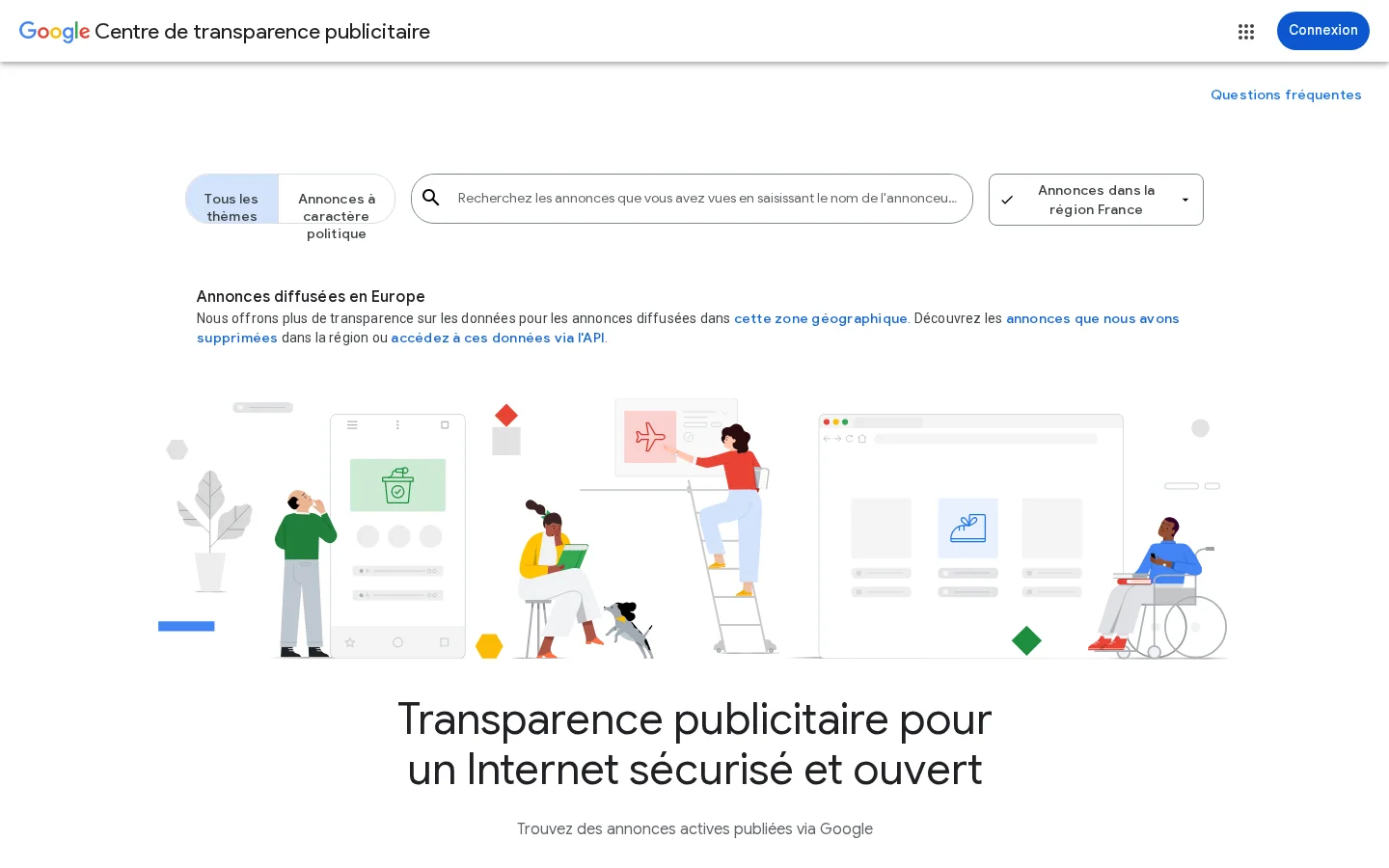
Start with the advertiser name as it appears on the rival's ads. Open the advertiser to see the ads it has run. Google shows which ads reached a given region, the last date each ad ran, and the format of each one. Filter by region when you care about one market. Compare the list with the rivals you found in Auction insights, because the two sources do not always name a company the same way.
Record five things. The first is the headline promise, for example a free trial or a price. The second is the offer, which may differ from the promise. The third is the format, such as text, image or video. The fourth is the region. The fifth is the last date the ad ran, which tells you if it is still live. Keep the list to the top three ads per rival, or the notes become noise.
Note
An ad that stopped running is not automatically a failed ad. It may have ended with a sale, or it may have been replaced by a better version. Ask what changed, not only what disappeared.
Two reports, two different questions
Run Auction insights first, so you know which rivals matter. Then use the Transparency Center to read what those rivals say. Reversing the order sends you to ads from companies you never meet in the auction.
An ad is a promise, and the landing page is the proof. When a rival's ad works, the page usually keeps the promise on the first screen. When the page fails, the ad may still have clicks, but the conversions drop. Your review should record both sides.
Landing page checklist for each rival
Ads often use tracking links that redirect before the page loads. The page that matters is the final one. You can check it from a terminal. The command below follows the redirects and prints each status line and each location header.
curl -sIL "https://example.com/landing-page?utm_source=google" | grep -iE "^(HTTP|location)"The last HTTP line is the page the visitor reaches. If you see a chain of three or four redirects, the rival may be sending traffic through an extra tracking layer. Run the check once per URL, not in a loop over many pages. You are reviewing a rival, not crawling their site.
Compare the ad with the first screen. If the ad says "free trial", the trial should appear before the reader scrolls. If the ad names a price, the page should show that price or a clear way to see it. A mismatch is one of the most common reasons a click does not convert. Note each mismatch you find, because it is also a gap in your own page.
The same company often competes in paid and organic results. A rival that ranks well for a term may also bid on it, and a rival that bids on a term may also publish a page about it. Check both sides, so you do not optimize your ads while a rival wins the organic results for the same question.
| Signal | Paid side (Google Ads) | Organic side (search results) |
|---|---|---|
| Terms | Auction insights, Keyword Planner | Rankings and pages that target the same terms |
| Message | Ads Transparency Center | Titles and descriptions in the results |
| Destination | Final URL of the ad | Page content, internal links and structure |
Sorank's SEO spy tool covers the organic side. It follows the new pages your competitors publish each week and turns their keywords into ideas for your editorial calendar, with intent, difficulty and volume. It does not read Google Ads data, so use the Google tools above for the paid auction. To find the gaps between you and your rivals in a structured way, read the keyword gap analysis guide.
An analysis without an action is wasted work. Each finding should lead to one change in one campaign, or to a decision to ignore it. Write the decision next to the finding, so the next review can check whether it worked.
Before and after a rival review
| Finding | Likely cause | Action |
|---|---|---|
| High overlap, low outranking share | The rival beats you on bids or ad quality | Review your Quality Score drivers, see the Quality Score guide |
| High position above rate on Search | The rival is placed higher on a shared term | Check your bid and the match between ad and keyword |
| A rival headline offers a free trial, and you do not | The rival tests an offer you have not tested | Test a matching offer in one ad group, then compare |
| A rival appears on a term you never bid on | A gap in your keyword list | Check the cost first, then add the term and review your negative keywords |
| A rival page shows proof you lack | A trust gap on your landing page | Add proof above the fold on the page the ad sends to |
Some shared terms are expensive, and an expensive term can cost you more than it earns. Before you raise a bid to fight a rival, check the context in the guide to the most expensive keywords on Google Ads, and check your conversion tracking. A bid decision without reliable conversion data is a guess.
Most failed competitor reviews fail in the same few ways. Each mistake below shows what it is, how to spot it in your own work, and how to fix it.
| Mistake | Sign in your data | First fix |
|---|---|---|
| Copying the rival's ad copy | Your ad reads like theirs | Keep the insight, write your own proof |
| Reading outranking share alone | Overlap is low, outranking is high | Read overlap first |
| Trusting third-party estimates | The estimate differs from your own cost per click | Use estimates for direction only |
| Deciding on one snapshot | Notes cover one week | Read four weeks before you act |
| Changing ads while the page loses the click | Clicks are healthy, conversions fall | Fix the landing page first |
| Tracking too many rivals | Log cells are blank | Keep five to ten rivals |
What it is. You take the rival's headlines and descriptions and rewrite them slightly. Your ads start to sound like theirs, and the message blurs.
How to spot it. Put your ad next to the rival's. If a reader cannot tell them apart, you copied. Your click-through rate stays flat even after you change the bids.
How to fix it. Keep the insight, not the wording. If the rival leads with a free trial, test a free trial line of your own, with your own proof. Change one element per test, and keep the test running for long enough to read a result.
What it is. You celebrate a high outranking share against a rival that overlaps with you on very few auctions.
How to spot it. Open the same row and check the overlap rate. If it is low, the high outranking share says little about the rival.
How to fix it. Read overlap first, then outranking, then position above rate. Decide only on the rivals with meaningful overlap.
Warning
Do not treat a rival's impression share as their real coverage. The report shows their share of the auctions they were eligible for, and their eligible auctions may overlap with only part of yours.
What it is. A spy tool says a rival spends a given amount on a term, and you move your budget on that figure.
How to spot it. The tool's estimate differs from what your own cost per click shows on the same term. The gap is often large.
How to fix it. Use estimates for direction only. Make budget decisions from Auction insights and your own conversion data.
What it is. You run the review in one week and build a plan on it. A campaign that ran a promotion that week will look very different the next.
How to spot it. Your notes have no dates, or they cover a single week.
How to fix it. Read at least four weeks of Auction insights before you act. Keep the monthly log so you can compare months, not just screenshots.
What it is. You rewrite the ad again and again, but the problem is the landing page. The clicks arrive, and they leave.
How to spot it. Click-through rate is healthy, but conversions fall. Your landing page checklist shows a mismatch or a missing proof point.
How to fix it. Fix the page first. Match the first screen to the ad promise, and shorten the form if it asks for more than the offer needs.
What it is. You list forty advertisers and review none of them properly.
How to spot it. Your log has blank cells, and the monthly review takes a full day.
How to fix it. Keep five to ten rivals on the list. Drop an advertiser that has not overlapped with you for three months. Add it back if it reappears in your auctions.
Set one fixed day each month. Run the five steps in order, write one row per rival, then decide what to change. Keep the log in a single shared sheet, so the next review starts from the last one. The header below works in any spreadsheet. Save it as a CSV file if you prefer.
month,competitor,campaign,overlap_rate,outranking_share,position_above_rate,ad_message,landing_page_note,action
2026-11,competitor-a.com,brand search,,,,free trial in headline,form has seven fields,test a trial line in our copy| Column | What goes in it | Source |
|---|---|---|
| month | The month you reviewed, in YYYY-MM format | Your calendar |
| competitor | The rival's domain or advertiser name, as it appears in the report | Auction insights |
| campaign | The campaign where the overlap appeared | Auction insights |
| overlap_rate, outranking_share, position_above_rate | The three figures, copied as shown, blank if the report shows nothing | Auction insights |
| ad_message, landing_page_note | Your notes on the ad promise and the page | Ads Transparency Center and the landing page |
| action | The one change you decided on, or "ignore" with the reason | Your decision |
Fill the numeric columns from Auction insights, and leave a cell blank when the report shows nothing. A blank is information too. It means the rival did not appear in that campaign's auctions during the period you checked.
Act when a rival shows up in several months of data, not in one. Act when the change is large enough to matter to your budget. Write the action in the log, and check the same row next month. If nothing changed, the action may have been the wrong one, so record that too.
Tip
Before you compare rivals, check your own account. The Google Ads audit guide gives a 12-point checklist. It helps you tell whether a gap comes from your setup or from the market.
If you want to start from the basics, the Google Ads explainer covers the auction, the campaign types and the costs. For measuring whether a change works, read the guide to conversion tracking first.
You cannot open a rival's account. You can read their ads in the Google Ads Transparency Center, and you can see which rivals share your auctions in the Auction insights report in your own account.
Not with Google's own tools. Auction insights shows their share of the auctions you both entered, not their budget. Third-party tools estimate spend, so treat those figures as rough orders of magnitude.
Monthly is enough for most accounts, with a deeper review each quarter. If your market moves fast, check your top three rivals every week.
We analyse your competitors, your website and your AI visibility to create a tailored content plan for free.
 AI Content Brief Generator
 FAQ Schema Generator
 AI Blog Post Ideas Generator
 Structured Data Validator (Schema Validator)
 Alt Text Checker
 Internal Link Analyzer
 Backlink Challenge
 AI Meta Description Generator
 AI Blog Title Generator
 Google Indexability Checker
 AI Blog Outline Generator
 UTM Link Builder
 Keyword Clustering Tool
 Canonical Tag Checker
 XML Sitemap Generator
 Broken Link Checker
 AI SEO Title Generator
 Headline Analyzer
 SERP Preview Tool
 Redirect Checker
 Hreflang Tag Generator
 Heading Structure Analyzer
 HTTP Headers Checker
 Favicon Extractor
 SERP CTR Calculator
 SEO vs Paid Search Savings Calculator
 SEO Share of Voice Calculator
 SEO ROI Calculator
 SEO Traffic and Revenue Forecast Calculator
 SEO Budget Calculator
 SEO Break-Even Calculator
 SaaS SEO ROI Calculator
 ROAS Calculator
 Reading Time Calculator
 Ranking Gain Simulator
 Organic Traffic Value Calculator
 Organic Traffic Estimator and Website Traffic Checker
 LTV to CAC Ratio Calculator
 Local SEO ROI Calculator
 Link Building Cost Calculator
 Keyword Value Calculator
 Keyword Opportunity Score Calculator
 Keyword Density Calculator
 GEO ROI Calculator
 GEO Content Investment Calculator
 Ecommerce SEO ROI Calculator
 Customer Lifetime Value Calculator
 Customer Acquisition Cost Calculator
 CTR Calculator
 Cost Per Article Calculator
 Conversion Rate Calculator
 Content Marketing ROI Calculator
 ChatGPT Referral Traffic Estimator
 Bounce Rate Calculator
 Backlink ROI Calculator
 AI Visibility Score Calculator
 AI Traffic Value Calculator
 AI Share of Voice Calculator
 Cost of AI Invisibility Calculator
 AI Citation Rate Calculator
 llms.txt Validator
 AI Overview Checker and AI Overviews Rank Checker
 Robots.txt Checker
 AI SEO Audit
 LLM Readability Checker
 SearchGPT Readiness Checker
 Structured Data LLM Audit
 Website Crawlability AI Audit
 Why ChatGPT Is Not Recommending My Website
 Gemini Ranking Tool
 Perplexity Ranking Checker
 LLM Citation Checker
 Answer Engine Optimization Audit
 GEO Audit
 AI Search Visibility Test
 ChatGPT Visibility Checker
 llms.txt Generator
 URL Extractor
 Webpage to Markdown
 Sitemap Checker
 SERP Volatility Sensor
 Page Size Checker
 Word Counter
 Slug Generator
 Schema Generator
 Robots Generator
 OG Preview
 Meta Tags Generator
 Image Compressor
 Favicon Generator
 On-Page SEO Audit: SEO Checker and SEO Analyzer
 Backlink Analysis Tool
 Keyword Research Tool
 Domain Authority Checker
 “I tested Sorank on a real client site and it's insane. It does everything an agency would bill you $1500 a month for. It's going into production on that client now.”

 Guillaume Guersanguersanguillaume.com“We are an Ads agency and we wanted to get our SEO back on track once and for all. Sorank gave us a clear view of our site, helped us prioritize optimizations, and properly structure our content. The tool is easy to use, well designed for a team, and very practical for centralizing tracking without having to juggle multiple platforms. A very solid foundation to start fresh with our SEO.”
 Gaspard MadouiAds Agency
 “I just let the Sorank software do its thing, and now my DR is 25 and my page is ranking higher.”
 Lucas Flandrefoundertrace.fr“I specialized in GEO thanks to Sorank. The GEO Leaderboard allows me to show my clients their position vs competitors on ChatGPT. It’s a real commercial differentiator.”
 MélanieSEO Freelance“Great service, works well for our website and helps us understand how to improve it to rank better on Google and elsewhere. Congrats, keep going, I recommend it.”
 Hugo T.E-commerce merchant