Preferences
Privacy is important to us, so you have the option of disabling certain types of storage that may not be necessary for the basic functioning of the website. Blocking categories may impact your experience on the website. More information

Privacy is important to us, so you have the option of disabling certain types of storage that may not be necessary for the basic functioning of the website. Blocking categories may impact your experience on the website. More information

A free SEO audit report template for agencies and freelancers: 9 sections, an impact and effort scoring grid, a findings table and an AI visibility part.

Tools

In short
A good SEO audit report template has nine parts: an executive summary, scope and method, a health snapshot, technical findings, on-page and content findings, links and authority, AI visibility, a prioritized action plan and an appendix. Every finding follows the same pattern (issue, evidence, impact, fix, owner, priority), and priorities come from a simple impact times effort score. The client should be able to read page one and know the three things to do first.
Want to go further? Ask
Quick quiz
Is SEO right for you, and how should you start?
Sorank matches your answers


Test it for 3 days on your own site and see where you stand on Google, ChatGPT and the other AIs.
Start 3-day free trial3 days free, then stop whenever you want. 90-day results-or-refund guarantee.
Most audits fail at the report stage, not the analysis stage. A crawler can list 4,000 issues in ten minutes, and a 60-page export of warnings is what many clients receive. An SEO audit report template fixes that by forcing the same structure on every audit: what was checked, what was found, what it costs, and what to do in which order. This guide gives agencies and freelancers a template you can copy section by section, a scoring grid to rank fixes, and a findings table ready to paste into Google Docs, Sheets or Slides. It is built on Google's own reference points, such as the Page indexing report in Search Console, so every finding can be checked by the client.
An SEO audit report is the document that turns the checks of a technical SEO audit and a content review into decisions. It is a one-time diagnosis of a site at a given date, with a list of fixes ranked by value.
It differs from two documents it is often confused with:
The audit report comes first, the monthly report then measures whether its action plan worked. Keeping them separate also keeps each one short.
The nine sections below cover what the most complete audit templates include, plus the AI visibility part most of them still miss. The order matters: decision makers read the first two pages, developers and writers read the detail.
| Section | What it contains | Main reader | Length |
|---|---|---|---|
| 1. Executive summary | Overall verdict, top 3 problems, top 3 actions, expected effect | Owner, marketing lead | 1 page |
| 2. Scope and method | Domain, pages crawled, date, tools, data period, what was excluded | Everyone | Half a page |
| 3. Health snapshot | Indexed pages, organic clicks and trend, Core Web Vitals status, issue counts by severity | Marketing lead | 1 page |
| 4. Technical findings | Crawling, indexing, redirects, canonicals, speed, mobile, structured data, security | Developer | 3 to 8 pages |
| 5. On-page and content | Titles, meta descriptions, headings, thin or duplicate pages, cannibalization, internal links | Content team | 3 to 6 pages |
| 6. Links and authority | Referring domains, lost links, toxic patterns, competitor gap | Marketing lead | 1 to 3 pages |
| 7. AI visibility | AI crawler access, citations in ChatGPT, Gemini and Perplexity, competitors cited instead | Marketing lead | 1 to 2 pages |
| 8. Action plan | Every fix with priority score, owner, deadline, status | Everyone | 1 to 2 pages |
| 9. Appendix | Full URL lists, crawl exports, screenshots | Developer | As needed |
For an online shop, add product and category checks (faceted URLs, out-of-stock pages, product schema) as described in our ecommerce SEO audit guide. For a local business, add a Google Business Profile section.
Write it last, on one page, without jargon. Give a verdict in one sentence ("The site is healthy technically but loses most of its potential to 40 pages competing for the same keywords"), then three problems and three actions with their expected effect. A manager who reads only this page must be able to approve the budget.
State the audit date, the number of URLs crawled, the data period (for example the last 3 months of Search Console), and the tools used. Name what was out of scope (a subdomain, the app, paid search). This protects you when the client asks why a problem was not flagged.
Show a handful of numbers with their source: valid indexed pages and excluded pages from Search Console, organic clicks and impressions with their trend, the share of URLs that pass Core Web Vitals, and the count of issues by severity. Google's thresholds for a good experience are an LCP within 2.5 seconds, an INP of 200 milliseconds or less and a CLS of 0.1 or less, measured at the 75th percentile of page loads, according to web.dev.
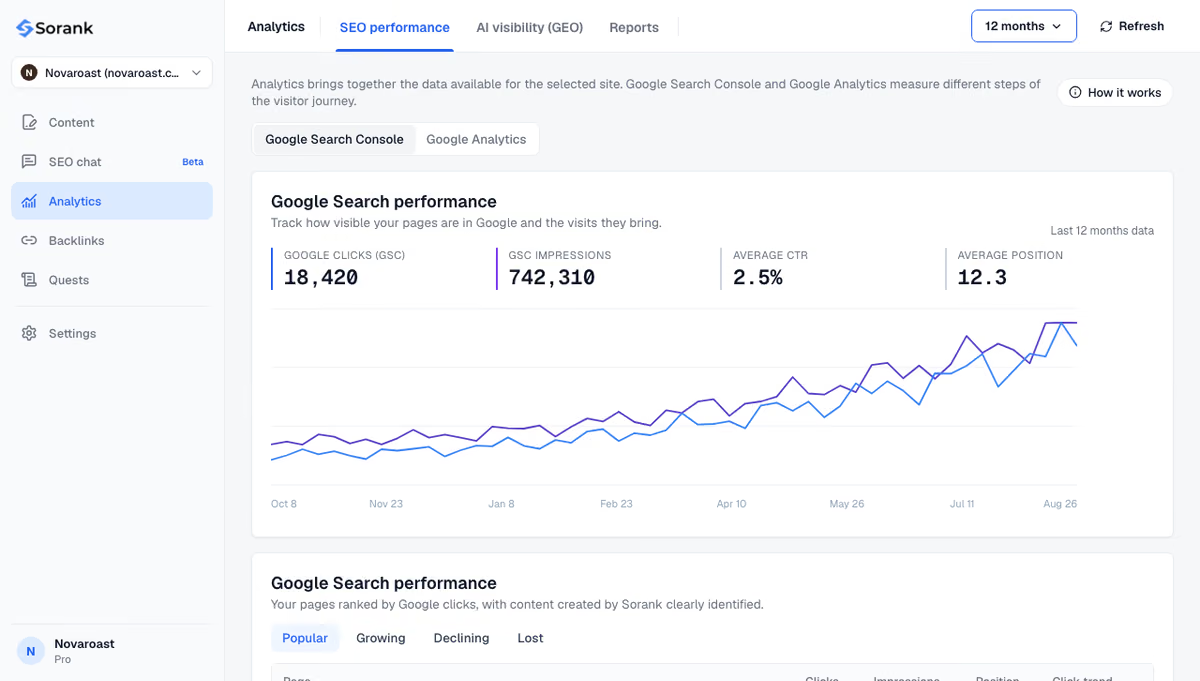
Group findings by theme: crawling (robots.txt, crawl errors, orphan pages), indexing (noindex, canonicals, duplicates), redirects and broken links, speed, mobile, structured data, HTTPS. A quick pass with a crawler or an on-page audit tool gives the raw list; your job is to filter it to what affects rankings.
Watch out
A common wrong fix in audit reports is to block a page in robots.txt to remove it from Google. Google's robots.txt documentation states that robots.txt is not a mechanism for keeping a web page out of Google; recommend a noindex tag or removal instead.
Check title tags, meta descriptions and H1s at scale, then move to the issues a crawler cannot judge: thin pages, outdated pages, pages that answer the wrong intent, and keyword cannibalization between pages. For large sites, run a separate content audit and summarize its decisions here (keep, update, merge, delete).
Report referring domains and their trend, lost links worth reclaiming, and the gap with two or three competitors. Keep the toxic links part factual: a backlink audit rarely justifies a disavow file, and a report that recommends one without evidence of a manual action worries clients for nothing.
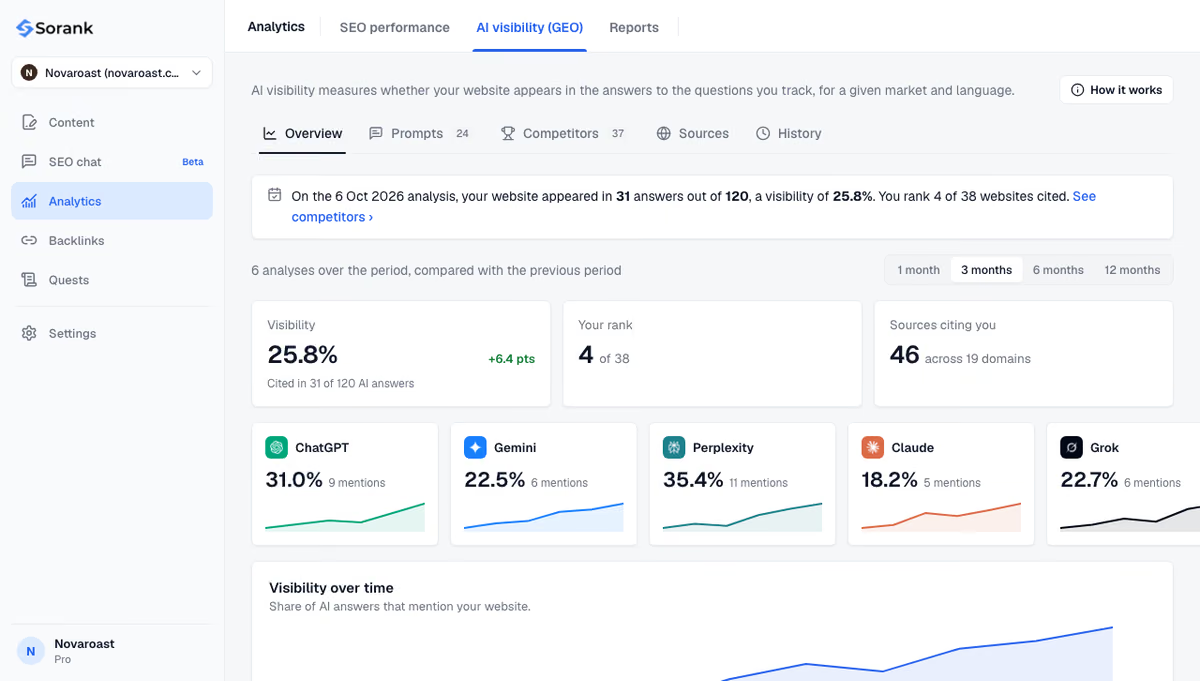
Clients now ask why a competitor is recommended by ChatGPT and they are not. This section answers three questions: can AI crawlers reach the site (robots.txt, firewall rules), is the brand cited for its key buying questions, and which sources are cited instead. Google states that there are no additional requirements to appear in AI Overviews or AI Mode beyond SEO fundamentals, so most fixes here reuse the technical and content findings. A free GEO audit gives a first reading; the method is detailed in our AI visibility audit guide.
A list of 80 fixes in crawl order is not a plan. Score every finding on two axes from 1 to 3, then sort by the result:
| Score | Label | Timing | Typical examples |
|---|---|---|---|
| 7 to 9 | Critical, quick win | This week | Noindex on key pages, robots.txt blocking a folder, broken redirects on top pages |
| 4 to 6 | High | This month | Cannibalized pages to merge, missing internal links to money pages, slow templates |
| 2 to 3 | Medium | This quarter | Structured data on secondary templates, image compression |
| 1 | Low | Backlog | Missing alt text on decorative images, meta descriptions of old pages |
This grid makes the order defensible. When a client asks why the redesign is not first, the score answers for you.
Tip
Cap the action plan at 15 to 25 fixes. Group the rest by theme in the appendix. A short plan gets done; a long one gets archived.
The findings table is the heart of the template. One row per issue, the same columns every time, so it can move into a project tool without rewriting:
| ID | Issue | Evidence | Impact | Fix | Owner | Score | Status |
|---|---|---|---|---|---|---|---|
| T-01 | 32 product pages excluded as "Duplicate, Google chose different canonical" | Search Console export, 3 URL examples | Products missing from results | Self-referencing canonicals on product template | Developer | 9 | To do |
| C-04 | Two guides target "pricing software" | Both rank between positions 11 and 20 | Neither reaches page one | Merge into one page, 301 the other | Content | 6 | To do |
| A-02 | GPTBot blocked by the firewall | 403 in server logs | Pages cannot be fetched by ChatGPT | Allow the bot in firewall rules | Developer | 9 | To do |
Example
Write findings as "32 product pages excluded, here are three, here is the fix", never as "canonical issues detected". The number, the proof and the fix in one row are what get a ticket opened.
Prefix IDs by section (T for technical, C for content, L for links, A for AI visibility). It keeps references short in emails and meetings.
The format follows the client. Slides work for a presentation meeting, a shared document for teams that comment, and a spreadsheet for the findings table in every case, since developers will filter and sort it. Agencies that resell audits often deliver them under their own brand; white-label SEO reports keep the client relationship on the agency side. Our guide to choosing an SEO audit agency lists what clients expect to receive.
Three habits make the difference:
Note
An audit describes a site at one date. Search Console data has a delay of a few days and Google needs time to recrawl, so judge most fixes on several weeks of data, not the day after deployment.
The report only creates value when the plan is executed and measured. After the critical fixes, the gains usually come from the content side: new pages for missing keywords, updated pages, and stronger internal links. That is also what decides citations in AI answers, since ChatGPT, Gemini and Perplexity quote pages that are crawlable, clear and specific.
Sorank, our product, automates that second half: it finds keywords, writes and publishes optimized articles, and tracks brand mentions in AI assistants so the AI visibility section of your next audit has real data. Its SEO and GEO dashboard brings Search Console and AI traffic together, and the Pro plan includes a monthly PDF performance report.
Copy the nine sections, score every finding, and keep the action plan short: that is what turns an SEO audit into results. Start with the free SEO tools on the site you are about to review.

For a small or medium site, 15 to 30 pages plus an appendix is enough. The executive summary should fit on one page and the action plan on one or two. Length should come from evidence and URL lists in the appendix, not from repeating crawl warnings in the body.
Yes. A template in Google Docs or Slides with the nine sections and a findings table in Google Sheets is enough for most client audits. What matters is that every finding has evidence, a fix, an owner and a priority score, whatever the tool used to lay it out.
Once a year is a common rhythm for a stable site, with a lighter technical check each quarter. Run a full audit before and after a redesign or migration, after a large traffic drop, and when taking over a new client. Between audits, monthly reporting tracks progress.
We analyse your competitors, your website and your AI visibility to create a tailored content plan for free.
 AI Content Brief Generator
 FAQ Schema Generator
 AI Blog Post Ideas Generator
 Structured Data Validator (Schema Validator)
 Alt Text Checker
 Internal Link Analyzer
 Backlink Challenge
 AI Meta Description Generator
 AI Blog Title Generator
 Google Indexability Checker
 AI Blog Outline Generator
 UTM Link Builder
 Keyword Clustering Tool
 Canonical Tag Checker
 XML Sitemap Generator
 Broken Link Checker
 AI SEO Title Generator
 Headline Analyzer
 SERP Preview Tool
 Redirect Checker
 Hreflang Tag Generator
 Heading Structure Analyzer
 HTTP Headers Checker
 Favicon Extractor
 SERP CTR Calculator
 SEO vs Paid Search Savings Calculator
 SEO Share of Voice Calculator
 SEO ROI Calculator
 SEO Traffic and Revenue Forecast Calculator
 SEO Budget Calculator
 SEO Break-Even Calculator
 SaaS SEO ROI Calculator
 ROAS Calculator
 Reading Time Calculator
 Ranking Gain Simulator
 Organic Traffic Value Calculator
 Organic Traffic Estimator and Website Traffic Checker
 LTV to CAC Ratio Calculator
 Local SEO ROI Calculator
 Link Building Cost Calculator
 Keyword Value Calculator
 Keyword Opportunity Score Calculator
 Keyword Density Calculator
 GEO ROI Calculator
 GEO Content Investment Calculator
 Ecommerce SEO ROI Calculator
 Customer Lifetime Value Calculator
 Customer Acquisition Cost Calculator
 CTR Calculator
 Cost Per Article Calculator
 Conversion Rate Calculator
 Content Marketing ROI Calculator
 ChatGPT Referral Traffic Estimator
 Bounce Rate Calculator
 Backlink ROI Calculator
 AI Visibility Score Calculator
 AI Traffic Value Calculator
 AI Share of Voice Calculator
 Cost of AI Invisibility Calculator
 AI Citation Rate Calculator
 llms.txt Validator
 AI Overview Checker and AI Overviews Rank Checker
 Robots.txt Checker
 AI SEO Audit
 LLM Readability Checker
 SearchGPT Readiness Checker
 Structured Data LLM Audit
 Website Crawlability AI Audit
 Why ChatGPT Is Not Recommending My Website
 Gemini Ranking Tool
 Perplexity Ranking Checker
 LLM Citation Checker
 Answer Engine Optimization Audit
 GEO Audit
 AI Search Visibility Test
 ChatGPT Visibility Checker
 llms.txt Generator
 URL Extractor
 Webpage to Markdown
 Sitemap Checker
 SERP Volatility Sensor
 Page Size Checker
 Word Counter
 Slug Generator
 Schema Generator
 Robots Generator
 OG Preview
 Meta Tags Generator
 Image Compressor
 Favicon Generator
 On-Page SEO Audit: SEO Checker and SEO Analyzer
 Backlink Analysis Tool
 Keyword Research Tool
 Domain Authority Checker
THEY TRIED SORANK BEFORE YOU
 “I tested Sorank on a real client site and it's insane. It does everything an agency would bill you $1500 a month for. It's going into production on that client now.”

 Guillaume Guersanguersanguillaume.com“We are an Ads agency and we wanted to get our SEO back on track once and for all. Sorank gave us a clear view of our site, helped us prioritize optimizations, and properly structure our content. The tool is easy to use, well designed for a team, and very practical for centralizing tracking without having to juggle multiple platforms. A very solid foundation to start fresh with our SEO.”
 Gaspard MadouiAds Agency
 “I just let the Sorank software do its thing, and now my DR is 25 and my page is ranking higher.”
 Lucas Flandrefoundertrace.fr“I specialized in GEO thanks to Sorank. The GEO Leaderboard allows me to show my clients their position vs competitors on ChatGPT. It’s a real commercial differentiator.”
 MélanieSEO Freelance“Great service, works well for our website and helps us understand how to improve it to rank better on Google and elsewhere. Congrats, keep going, I recommend it.”
 Hugo T.E-commerce merchant