Preferences
Privacy is important to us, so you have the option of disabling certain types of storage that may not be necessary for the basic functioning of the website. Blocking categories may impact your experience on the website. More information

Privacy is important to us, so you have the option of disabling certain types of storage that may not be necessary for the basic functioning of the website. Blocking categories may impact your experience on the website. More information

Seasonal SEO in 2026: find seasonal keywords, publish months ahead, keep one permanent URL per event and refresh it every year to rank on Google and in AI.

Tools

In short
seasonal SEO means preparing pages for searches that peak at the same time every year (Black Friday, Christmas, summer, back to school, tax season). The method fits in four moves: spot the peaks with Google Trends and Search Console, publish or refresh the page two to six months before the peak, keep one permanent URL per event instead of a new URL each year, and update that page every season rather than deleting it. Google itself recommends the recurring URL, and a page that has been live for years ranks faster than a page created a few weeks before the rush.
Want to go further? Ask
Quick quiz
Is SEO right for you, and how should you start?
Sorank matches your answers


Test it for 3 days on your own site and see where you stand on Google, ChatGPT and the other AIs.
Start 3-day free trial3 days free, then stop whenever you want. 90-day results-or-refund guarantee.
Seasonal SEO matters because demand is concentrated. Adobe measured $11.8 billion of US online spending on Black Friday 2025 and $14.25 billion on Cyber Monday, according to its Cyber Monday 2025 release. A store that ranks for its main gift queries in late November captures a large share of its yearly revenue in a few days; a store that publishes its gift guide on November 20 mostly watches. The same logic applies to a roofer before winter, an accountant before the tax deadline or a travel site before summer bookings. This guide covers how to find your seasonal peaks, when to publish, how to structure URLs, what to do after the season and how to get cited by AI assistants during the peak.
Seasonal SEO is the part of your SEO work that follows the calendar. Some queries exist all year with a peak ("air conditioning repair" in summer), others almost disappear outside a short window ("Black Friday laptop deals"). The goal is to have the right page indexed, linked and up to date before the curve starts rising, then to keep its authority from one year to the next.
Seasonality falls into four families, and each one calls for a different lead time:
| Type of seasonality | Examples | Shape of the curve | Typical lead time |
|---|---|---|---|
| Retail events | Black Friday, Cyber Monday, Christmas, Valentine's Day, Mother's Day | Sharp peak over a few days or weeks | Page live 2 to 3 months before |
| Weather and seasons | Heating repair, sunscreen, snow tires, pool cleaning | Wide bump over several months | Content ready 1 to 2 months before the first cold or hot spell |
| Administrative calendar | Tax returns, school enrollment, open enrollment for insurance | Peak before a fixed deadline | 2 to 3 months before the deadline |
| Industry cycles | Wedding planning, summer travel bookings, New Year fitness | Research phase long before the event | 4 to 6 months, because people plan early |
The last column is a working rule, not an official figure: a new page needs time to be discovered, indexed and to collect a few links, while a page that already ranks only needs a refresh.
Start with your own data, then widen to the market.
In the Performance report, compare the last 16 months and sort queries and pages by clicks per month. Queries that jump in the same month two years in a row are your seasonal keywords. Look at impressions too: they rise before clicks, which shows when Google starts testing your page for the seasonal query.
Google Trends shows relative interest, not search volume. Each data point is divided by the total searches of the area and period, then scaled from 0 to 100, as the Google Trends help center explains. Set the range to five years and your country: a repeating wave confirms seasonality, and the left edge of each wave tells you when people start searching. Our guide on using Google Trends for SEO details the other settings worth using.
Average monthly volume hides seasonality: a keyword at 1,000 searches a month may do 6,000 in December and 200 in June. Read the monthly breakdown, and group seasonal variants ("gift for dad", "Father's Day gift ideas", "Father's Day gifts under $50") on one page instead of one page per variant. An automated keyword research tool that groups keywords by topic saves most of this sorting.
Watch out
Before blaming an algorithm change for a traffic drop, check the same weeks of last year. Many "penalties" are just the end of a seasonal peak. A real Google core update shows up as a drop compared with the same period of the previous year, not compared with last month.
Earlier than most sites do. In its best practices for Black Friday and Cyber Monday pages (October 2020), Google asks merchants to create the page well before the sale so Googlebot has time to discover and index it, and to link to it from the home page to make it more prominent.
The calendar below is built for a store selling in the northern hemisphere. Shift it to your own peaks and plug it into your editorial calendar.
| Peak | Search peak | Existing page: refresh by | New page: publish by |
|---|---|---|---|
| Valentine's Day | Late January to February 14 | Early January | November |
| Mother's Day (US, UK, France differ) | 2 to 3 weeks before the date | 4 to 6 weeks before | 3 months before |
| Summer and travel | March to July (booking phase) | February | December to January |
| Back to school | July to early September | June | April |
| Halloween | October | Early September | July |
| Black Friday and Cyber Monday | November | Mid September to early October | August |
| Christmas gifts | November to mid December | October | August to September |
| New Year resolutions | Late December to January | Early December | October |
A content plan tool such as the Sorank blog content planner lets you place these articles months ahead, so the seasonal pieces go live on schedule instead of during the rush.
No. Google's recommendation is explicit: use a recurring URL, not a new URL for each occurrence of the event, for example /sale/black-friday and not /sale/2020/black-friday. The reasoning is simple: the page keeps its age, its links, its internal links and its history of clicks, so it starts every season from where it stopped the year before instead of from zero.
Rules for a permanent seasonal URL:
For the commercial side of the event (offers, email, ads), see our Black Friday marketing plan; this guide stays on the search side.
Keep them online. Deleting a seasonal page in January throws away a year of authority and forces you to start from scratch in September. Instead, switch the page to an off-season mode:
The only exception is a one-off page about something that will never come back (a single dated event, a one-time partnership). For those, Google supports the unavailable_after rule in the robots meta tag: after the date you set, the page stops appearing in results and Googlebot crawls it much less often, according to the robots meta tag documentation. Do not use it on pages that return every year.
Tip
Give each recurring event its own permanent page and link them all from one "Seasonal events" hub. The hub stays relevant all year and passes authority to whichever page is in season.
The strongest setup combines a stable base with a seasonal layer. Evergreen content (category pages, buying guides, how-to articles) ranks all year and holds most of your authority. Seasonal pages sit on top and borrow that authority through internal links during their window.
Build it as a topic cluster: the evergreen guide "How to choose a road bike" links to "Best road bike deals for Black Friday" and "Road bike gifts for Christmas", and both seasonal pages link back to the guide and to the product categories. When the season ends, the seasonal pages keep their links to the evergreen pages, so nothing is wasted.
Many seasonal pages can also be written as evergreen pieces with a seasonal angle: "How to prepare your garden for winter" works every year with a light update, while "Winter garden trends 2026" expires after one season.
Run the same routine two to three months before every peak. It takes an hour or two per page and protects the rankings you earned last year.
Visible updates also send a content freshness signal, which counts more for time-sensitive queries such as "best gifts this year" than for evergreen ones.
Shoppers increasingly ask ChatGPT, Gemini or Perplexity for gift ideas and deals before they open a store. Adobe reports that on Cyber Monday 2025, AI traffic to US retail sites rose 670% (measured as shoppers clicking a link from an AI assistant), in the same release cited above. During the peak, AI assistants look for recent, clearly dated, easy-to-quote information, which favors pages updated for the current season.
To be cited during the season:
Then check whether it works: AI mention tracking lets you follow seasonal prompts ("best Christmas gifts for runners") month by month and see which brands are cited in your place. The broader shifts in shopping behavior are summarized in our ecommerce trends report.
Seasonal SEO rewards patience more than speed: one permanent URL per event, published months ahead and refreshed every year, will outrank a new page rushed out each season. Put your peaks in a yearly calendar, schedule the refreshes two to three months ahead and keep the pages alive between seasons.
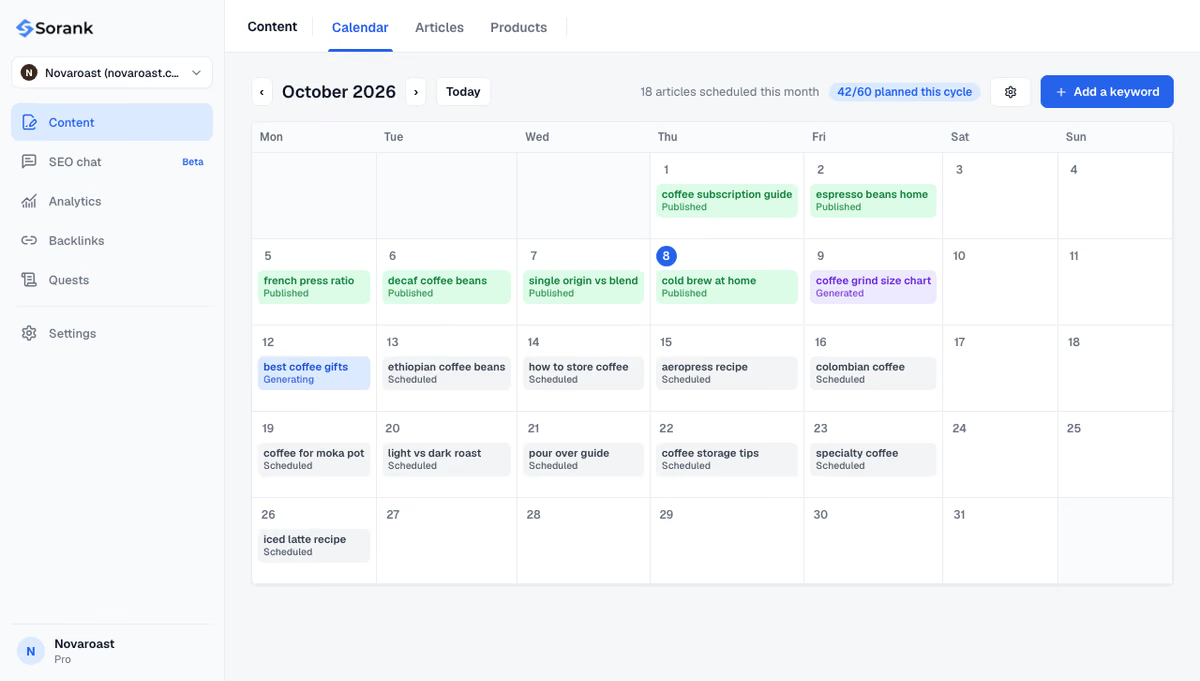
Sorank finds your keywords, plans the articles in a calendar and writes and publishes them in autopilot, for Google and for AI assistants. Plans start at $49 per month on annual billing, with a 3-day free trial and a 90-day money-back guarantee: see the pricing page.

For a page that already ranks, refresh it two to three months before the search peak. For a brand new page, publish four to six months ahead so Google can discover, index and test it before demand rises. Google Trends shows when searches start climbing for your topic, which tells you your real deadline.
You can put the year in the title and H1 and change it every season, because it signals fresh content to searchers. Keep the year out of the URL so the page keeps its links and history from one year to the next. Update the year only when you also update the content.
No. Any business with a yearly demand cycle benefits: heating and cooling companies, accountants before tax deadlines, travel agencies, wedding venues, schools and gyms. The method stays the same: find the peak, publish early, keep a permanent page and update it each year.
We analyse your competitors, your website and your AI visibility to create a tailored content plan for free.
 AI Content Brief Generator
 FAQ Schema Generator
 AI Blog Post Ideas Generator
 Structured Data Validator (Schema Validator)
 Alt Text Checker
 Internal Link Analyzer
 Backlink Challenge
 AI Meta Description Generator
 AI Blog Title Generator
 Google Indexability Checker
 AI Blog Outline Generator
 UTM Link Builder
 Keyword Clustering Tool
 Canonical Tag Checker
 XML Sitemap Generator
 Broken Link Checker
 AI SEO Title Generator
 Headline Analyzer
 SERP Preview Tool
 Redirect Checker
 Hreflang Tag Generator
 Heading Structure Analyzer
 HTTP Headers Checker
 Favicon Extractor
 SERP CTR Calculator
 SEO vs Paid Search Savings Calculator
 SEO Share of Voice Calculator
 SEO ROI Calculator
 SEO Traffic and Revenue Forecast Calculator
 SEO Budget Calculator
 SEO Break-Even Calculator
 SaaS SEO ROI Calculator
 ROAS Calculator
 Reading Time Calculator
 Ranking Gain Simulator
 Organic Traffic Value Calculator
 Organic Traffic Estimator and Website Traffic Checker
 LTV to CAC Ratio Calculator
 Local SEO ROI Calculator
 Link Building Cost Calculator
 Keyword Value Calculator
 Keyword Opportunity Score Calculator
 Keyword Density Calculator
 GEO ROI Calculator
 GEO Content Investment Calculator
 Ecommerce SEO ROI Calculator
 Customer Lifetime Value Calculator
 Customer Acquisition Cost Calculator
 CTR Calculator
 Cost Per Article Calculator
 Conversion Rate Calculator
 Content Marketing ROI Calculator
 ChatGPT Referral Traffic Estimator
 Bounce Rate Calculator
 Backlink ROI Calculator
 AI Visibility Score Calculator
 AI Traffic Value Calculator
 AI Share of Voice Calculator
 Cost of AI Invisibility Calculator
 AI Citation Rate Calculator
 llms.txt Validator
 AI Overview Checker and AI Overviews Rank Checker
 Robots.txt Checker
 AI SEO Audit
 LLM Readability Checker
 SearchGPT Readiness Checker
 Structured Data LLM Audit
 Website Crawlability AI Audit
 Why ChatGPT Is Not Recommending My Website
 Gemini Ranking Tool
 Perplexity Ranking Checker
 LLM Citation Checker
 Answer Engine Optimization Audit
 GEO Audit
 AI Search Visibility Test
 ChatGPT Visibility Checker
 llms.txt Generator
 URL Extractor
 Webpage to Markdown
 Sitemap Checker
 SERP Volatility Sensor
 Page Size Checker
 Word Counter
 Slug Generator
 Schema Generator
 Robots Generator
 OG Preview
 Meta Tags Generator
 Image Compressor
 Favicon Generator
 On-Page SEO Audit: SEO Checker and SEO Analyzer
 Backlink Analysis Tool
 Keyword Research Tool
 Domain Authority Checker
THEY TRIED SORANK BEFORE YOU
 “I tested Sorank on a real client site and it's insane. It does everything an agency would bill you $1500 a month for. It's going into production on that client now.”

 Guillaume Guersanguersanguillaume.com“We are an Ads agency and we wanted to get our SEO back on track once and for all. Sorank gave us a clear view of our site, helped us prioritize optimizations, and properly structure our content. The tool is easy to use, well designed for a team, and very practical for centralizing tracking without having to juggle multiple platforms. A very solid foundation to start fresh with our SEO.”
 Gaspard MadouiAds Agency
 “I just let the Sorank software do its thing, and now my DR is 25 and my page is ranking higher.”
 Lucas Flandrefoundertrace.fr“I specialized in GEO thanks to Sorank. The GEO Leaderboard allows me to show my clients their position vs competitors on ChatGPT. It’s a real commercial differentiator.”
 MélanieSEO Freelance“Great service, works well for our website and helps us understand how to improve it to rank better on Google and elsewhere. Congrats, keep going, I recommend it.”
 Hugo T.E-commerce merchant