Preferences
Privacy is important to us, so you have the option of disabling certain types of storage that may not be necessary for the basic functioning of the website. Blocking categories may impact your experience on the website. More information
Privacy is important to us, so you have the option of disabling certain types of storage that may not be necessary for the basic functioning of the website. Blocking categories may impact your experience on the website. More information

Short form video explained: platform specs, a one-message method, repurposing long content and the mistakes that cost viewers. Plan your clips today.
In short
Short form video is a vertical clip built to hold attention from the first second, on platforms like YouTube Shorts and TikTok. Each clip should carry one message, open on the result, and fit the platform's specs. Most clips can be cut from content you already have, and you should judge them by how long viewers stay, not by how many saw them.
Want to go further? Ask
Quick quiz
Which way of finding customers online fits you best?
Sorank matches your answers


Test it for 3 days on your own site and see where you stand on Google, ChatGPT and the other AIs.
Start 3-day free trial3 days free, then stop whenever you want. 90-day results guarantee, conditions apply.
Short form video is a vertical video, filmed or edited to be watched full screen on a phone, one clip after the next. The format is defined by how people watch it, not by one fixed length. Each platform sets its own limits, so the first practical step is to check them where you publish.
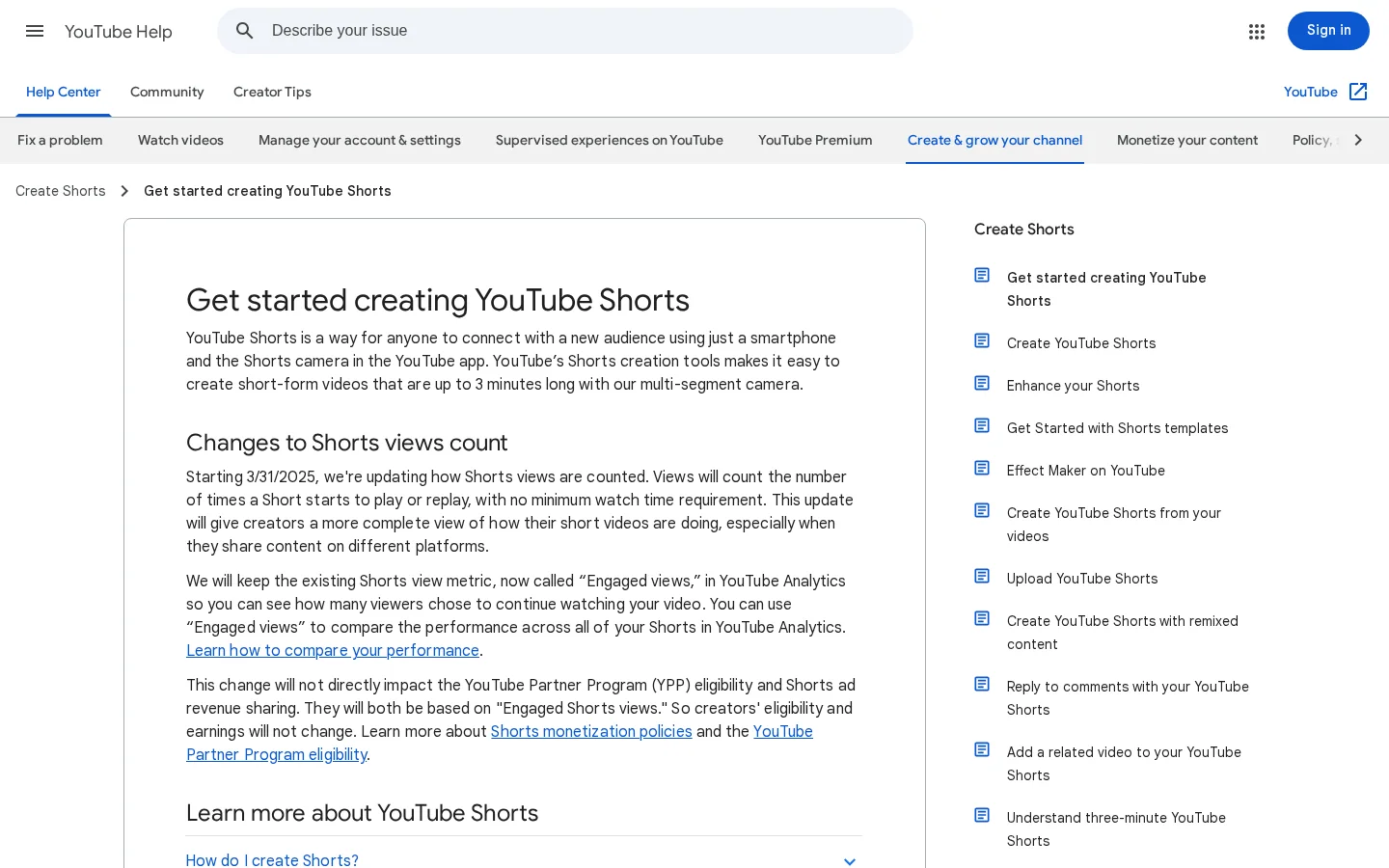
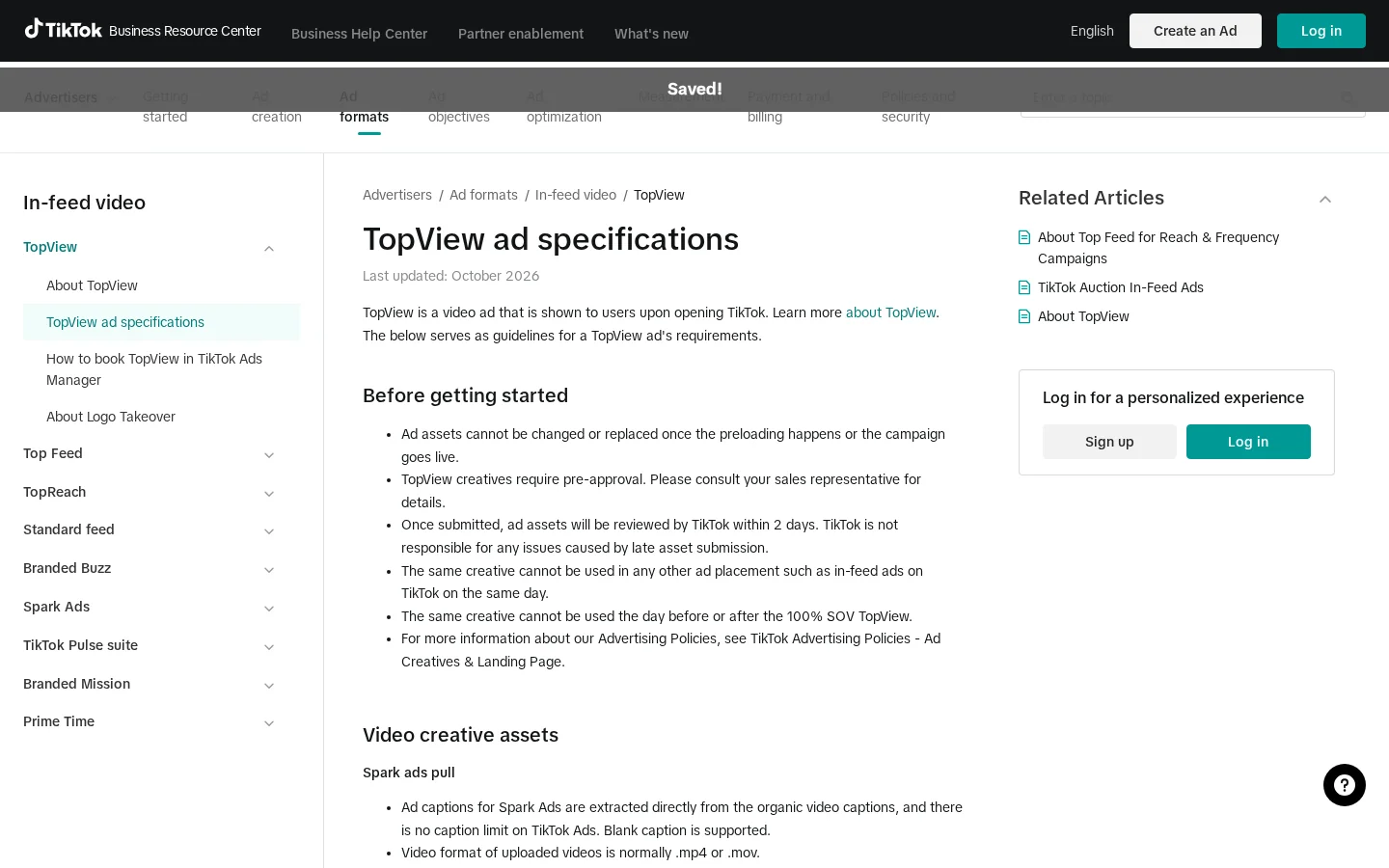
YouTube's Shorts help page says a Short can be up to 3 minutes long, that you upload Shorts as vertical videos, and that uploads can reach 1080p (checked November 2026). Ads follow stricter rules. The TopView specifications on TikTok for Business (checked November 2026) ask for a 9:16 video of at least 540x960 pixels, between 5 and 60 seconds long, with 9 to 15 seconds recommended, and a file of 500 MB or less.
| Where | Length | Frame and file | Source |
|---|---|---|---|
| YouTube Shorts (organic) | Up to 3 minutes | Vertical, up to 1080p | YouTube Help |
| TikTok TopView ad | 5 to 60 seconds, 9 to 15 recommended | 9:16, at least 540x960 px, 500 MB max | TikTok for Business |
Warning
Specs change. Read the current help page the day you export, and do not trust a number from an old blog post, this one included. Reels limits are not covered here, so check Instagram's help center before you export a Reel.
Short clips are not trimmed versions of long videos. A viewer who sees 60 seconds of a 10-minute webinar has no context, no chapters, and no reason to stay for the explanation. A clip works when it delivers one complete point: a hook, a short proof, and a clear next step. Cutting the first minute of a long video and calling it a short almost always gives you a weak clip.
TopView video ad rules on TikTok
Source: TikTok for Business, TopView specifications (checked November 2026)
HubSpot's marketing statistics page, which cites its State of Marketing Report 2026, says 49% of marketers rank short-form video among the formats that drive the most ROI. The same page gives 29% for long-form video and 25% for live-streaming video. Read these as what marketers report about their own results, not as proof that your next clip will bring revenue.
Short clips do three jobs well. They introduce your brand to people who have never heard of it, they show a small result before a bigger commitment, and they send the curious to a page where the real decision happens. They do a poor job of explaining a complex purchase on their own. For the wider plan, with goals, formats, and measurement, read our guide to video marketing.
YouTube says Shorts can appear in search results, in the Shorts feed, on the homepage and on channel pages, so one clip has more than one way to be discovered. For the search side of video, our video SEO guide explains how videos rank on Google, YouTube and AI search, and the YouTube marketing article covers the channel itself.

You can get clips in four main ways: post them natively, repurpose long content, pay for vertical ads, or commission creators. Each one fits a different budget and stage. Most teams combine two of them, and the table below shows where each one fits.
What it is: you post vertical videos for free, directly on a platform, and the platform decides who sees them.
When to use it: when you are building an audience and can post on a steady rhythm.
Advantages: no media cost, and every post teaches you what holds attention.
Limits: reach is uneven at first, and the algorithm decides more than you do. The mechanics of the For You feed are explained in our TikTok algorithm article.
Example: an accountant posts one 30-second answer a week to a question clients ask often. After a month, the clips that held viewers show which questions deserve a full article.
What it is: you cut clips from an article, webinar, podcast or customer call you already have.
When to use it: when your best ideas sit in long formats that few people finish.
Advantages: the thinking is already done, and one long asset can feed weeks of posts.
Limits: a clip cut from a lecture often feels like a lecture. The method in the sections below fixes that.
Example: a 40-minute webinar answers five separate questions. Each answer becomes one clip with its own hook.
What it is: you pay a platform to show a vertical video to an audience you choose.
When to use it: after a clip has held attention in organic posting. Paid reach then scales a message that already works.
Advantages: fast reach, precise targeting, and clear data on who watched.
Limits: results stop when the budget stops, and the file must meet the platform's specs, as the TikTok rules above show.
Example: you boost the clip that kept viewers to the end, not the one you liked best while editing.
What it is: you pay people who already make videos for an audience to make a clip about your product or service.
When to use it: when your buyers follow specific creators that you cannot reach on your own.
Advantages: the viewer already trusts the person speaking.
Limits: you control the message less. You need a clear brief and a clear disclosure that the video is a paid partnership.
Example: you send a creator one claim to test, two claims to avoid, and a deadline to review the cut before it goes live.
| Method | Main cost | Time to results | Main risk | Best for |
|---|---|---|---|---|
| Native clips | Your time | Slow, builds over weeks | Uneven reach at first | Building an audience |
| Repurposed clips | Your time | Fast to produce | Clips that feel like a lecture | Teams with existing content |
| Paid vertical ads | Ad budget | Fast reach | Stops when the budget stops | Scaling a proven clip |
| Creator videos | Fee per video | Medium | Less control of the message | Reaching a niche audience |
Native first or paid first?
Our advice: start native, and move a clip to paid only after it holds viewers to the end. That way the budget buys reach for a message you have already seen work.
Every clip needs one message, one hook and one next step. This section explains how to get each of them right before you film.
The hook is the first second or two: what the viewer sees and hears before they decide to stay. Write it before you film, because the hook decides the shot list. Read it out loud and ask whether it names a result, a problem or a surprise. If it starts with "Hi, I am" or "Today we will talk about", rewrite it.
Start with the outcome, then show how to get there. A viewer who sees the result first has a reason to watch the steps. Put the logo, the company history and the thanks at the end, or leave them out.
A clip with three ideas gives viewers three reasons to leave. Test it this way: write the clip's point in one sentence. If the sentence needs "and" twice, split the clip into two.
The format sets how much the hook has to do. A talking head, where the speaker looks at the camera, is the easiest to film, and it depends entirely on the first line. A voice-over with footage suits a process, because the viewer watches each step while you narrate. Text on screen over footage suits a list or a checklist, and it works well with the sound off. Choose one before you write, and keep it across a batch of clips so your audience learns the pattern.
End on one thing to do: follow for the next part, read the full article, or book a call. Two calls to action split attention, and the viewer does neither.
Build one clip in five steps
Long content is the cheapest source of clips, because the thinking is already done. Here is the method, from one long piece to a set of clips ready to film or edit.
An article with five H2 sections, a webinar with five questions, or a podcast with five tangents all work. A source with a single argument gives you one clip at most, so skip it for this purpose.
Read the transcript and mark each point with a start and an end. Begin a second before the claim, and end after the sentence that closes it. Mark the sentence a stranger would find useful with no context, not the whole answer.
Most good sentences in a long piece depend on what came before. A quote that needs the previous paragraph fails when it stands alone. Write a first line that states the result, and let the cut begin at the claim.
Put a link to the full piece in the caption or description, and write the link text as a promise: "the full checklist with templates" rather than "read more". Viewers who want the rest know exactly where to go.
If the long piece is an article on your own site, Sorank can write it for you. Our AI blog article generator writes articles for Google and AI search and publishes them on your site, so your clips can come from a page that already exists. For the full workflow, read our content repurposing guide.
Example
An article with five H2 sections gives you five candidate clips. Pick the three with the clearest claims, write a new first line for each, and link all three back to the article.
| Source | Clip potential | Effort to cut | Watch for |
|---|---|---|---|
| Article | High, if sections stand alone | Low | Sections that lean on earlier paragraphs |
| Webinar | High | Medium | Long silences and slides nobody can read |
| Podcast | Medium to high | Medium | Off-topic tangents |
| Customer call | High for proof | Medium | Written consent and personal data |
Most of the production work is framing. A clip that cuts off the speaker's head, or hides the subject behind a caption, loses viewers before the message lands. Start with the frame, then add captions, then mix the sound.
Film vertically when you can. If your source is landscape, crop it: keep the speaker's face in the upper half of the frame, and leave the lower part clear for captions. A center crop with ffmpeg gives a quick result from a 16:9 file, from the command line:
ffmpeg -i input.mp4 -vf "crop=ih*9/16:ih,scale=1080:1920" -c:a copy output.mp4This keeps the middle of the frame, cuts it to 9:16, and scales the result to 1080x1920. If the speaker sits off-center, crop by hand in your editor instead, because a center crop will cut them off. Then check the final file against the platform's spec page before you upload it.
Many people watch with the sound off. Burn the captions into the video, in the lower part of the frame, at a size you can read on a phone. Show a few words at a time, in step with the speaker. Auto-captions are a starting point, so correct every name, product and number before you publish.
Record the voice close to the microphone in a quiet room. Add music under the voice at a low level, and cut it when the speaker makes the key point. A clip with clear speech and plain images still works. A clip with noise and no speech loses people in seconds.
Small errors at publishing cost reach, and they are easy to avoid. Run this list before you post each clip.
Before you publish a clip
Choose a rhythm you can keep for three months, and post on it. Consistency teaches the platform who your audience is, and it teaches you which hooks work. A burst of ten clips in one week, followed by silence, gives you data you cannot read.
Upload natively where the viewers you want already watch. Adapt the title, the caption and the first line for each platform, rather than posting the same file with the same words everywhere. Our TikTok marketing article covers the account and content side in more detail.
Views count the people who started a clip. Retention shows what they did next. For a short form video, retention tells you more than the view count, because it points at the exact second where the message failed.
Before you rewrite anything, look at your last ten clips and note where each one lost viewers. Patterns show up quickly: the same second, the same kind of opening, the same slow setup. Those are the moments to test first.
Your platform analytics show how long viewers stayed. A sharp drop in the first seconds means the hook failed: the viewer saw nothing that made them stay. A drop in the middle usually means a slow setup, or a second idea that lost them. A viewer who reaches the end and then takes your call to action means the clip did its job.
When a clip loses viewers early, rewrite the hook and keep the body. Compare the new curve with the old one. If you change the hook, the title and the thumbnail at once, you will not know which change helped.
Hook rewrite: the same clip, two openings
Tip
Before you publish the title or caption of a short, score it with our free Headline Analyzer. It takes seconds and catches weak wording before your audience does.
Most weak clips fail in the same five ways. The table gives you a quick check, then each mistake gets its own section.
| Mistake | Quick check | Fix |
|---|---|---|
| Logo or greeting first | Nothing relevant in the first 3 seconds | Open on the result |
| Speaker cut off | A head or a hand touches the edge | Re-crop, or film vertical |
| Three ideas in one clip | The point needs "and" twice | Split the clip |
| Captions late or wrong | Unreadable with the sound off | Correct the transcript line by line |
| No next step | The clip ends with no action | End on one action and one link |
What it is: the clip opens with your logo, a title card, or "Hi, I am..." before any content.
How to spot it: play the first three seconds with the sound off. If nothing in them tells the viewer why to stay, the hook is missing.
How to fix it: move the result or the sharpest claim to the first second. Cut the logo to the last second, or drop it.
What it is: a landscape source is cropped badly, so heads are cut off or the subject drifts past the edge.
How to spot it: watch the clip at phone size. If a head touches the top or a side, or a hand leaves the frame, the framing is wrong.
How to fix it: re-crop around the face, or film again in vertical. Keep the face in the upper half, as described above.
What it is: one clip tries to answer three questions, so it answers none of them well.
How to spot it: you cannot state the clip's point in one sentence, or you need the word "and" twice to do it.
How to fix it: split the clip. Each idea gets its own hook and its own ending, and each one can link to the full piece.
What it is: auto-captions run behind the speech, misspell names, or sit on top of the speaker's face.
How to spot it: watch the clip on a phone with the sound off. If you cannot follow it, or a caption covers the face, the captions fail.
How to fix it: correct the transcript line by line, check every name and number, and move the captions to the lower part of the frame.
What it is: the clip ends when its point ends, and the viewer scrolls on with nothing to do.
How to spot it: the caption or description has no link or instruction, or the link does not match what the clip promised.
How to fix it: end on one action, and point to a page that continues the promise. A clip that says "full checklist below" needs the checklist on that page.
Your next step today: pick one long piece you already own, mark three points in its transcript, and film or cut one clip for each point this week.
It depends on the platform and on the message. YouTube Shorts can run up to 3 minutes, while TikTok TopView ads accept 5 to 60 seconds and recommend 9 to 15 seconds. Start with the shortest length that delivers one complete point, then test longer versions.
Yes. An article, webinar or podcast holds several separate points, and each point can become one clip with its own hook and a link back to the full piece. Check that each clip makes sense without the rest of the source.
The first seconds. Open on the result or the sharpest claim, not on a logo or an introduction. Then read the retention curve to see where viewers leave, and fix that moment first.
We analyse your competitors, your website and your AI visibility to create a tailored content plan for free.
 AI Content Brief Generator
 FAQ Schema Generator
 AI Blog Post Ideas Generator
 Structured Data Validator (Schema Validator)
 Alt Text Checker
 Internal Link Analyzer
 Backlink Challenge
 AI Meta Description Generator
 AI Blog Title Generator
 Google Indexability Checker
 AI Blog Outline Generator
 UTM Link Builder
 Keyword Clustering Tool
 Canonical Tag Checker
 XML Sitemap Generator
 Broken Link Checker
 AI SEO Title Generator
 Headline Analyzer
 SERP Preview Tool
 Redirect Checker
 Hreflang Tag Generator
 Heading Structure Analyzer
 HTTP Headers Checker
 Favicon Extractor
 SERP CTR Calculator
 SEO vs Paid Search Savings Calculator
 SEO Share of Voice Calculator
 SEO ROI Calculator
 SEO Traffic and Revenue Forecast Calculator
 SEO Budget Calculator
 SEO Break-Even Calculator
 SaaS SEO ROI Calculator
 ROAS Calculator
 Reading Time Calculator
 Ranking Gain Simulator
 Organic Traffic Value Calculator
 Organic Traffic Estimator and Website Traffic Checker
 LTV to CAC Ratio Calculator
 Local SEO ROI Calculator
 Link Building Cost Calculator
 Keyword Value Calculator
 Keyword Opportunity Score Calculator
 Keyword Density Calculator
 GEO ROI Calculator
 GEO Content Investment Calculator
 Ecommerce SEO ROI Calculator
 Customer Lifetime Value Calculator
 Customer Acquisition Cost Calculator
 CTR Calculator
 Cost Per Article Calculator
 Conversion Rate Calculator
 Content Marketing ROI Calculator
 ChatGPT Referral Traffic Estimator
 Bounce Rate Calculator
 Backlink ROI Calculator
 AI Visibility Score Calculator
 AI Traffic Value Calculator
 AI Share of Voice Calculator
 Cost of AI Invisibility Calculator
 AI Citation Rate Calculator
 llms.txt Validator
 AI Overview Checker and AI Overviews Rank Checker
 Robots.txt Checker
 AI SEO Audit
 LLM Readability Checker
 SearchGPT Readiness Checker
 Structured Data LLM Audit
 Website Crawlability AI Audit
 Why ChatGPT Is Not Recommending My Website
 Gemini Ranking Tool
 Perplexity Ranking Checker
 LLM Citation Checker
 Answer Engine Optimization Audit
 GEO Audit
 AI Search Visibility Test
 ChatGPT Visibility Checker
 llms.txt Generator
 URL Extractor
 Webpage to Markdown
 Sitemap Checker
 SERP Volatility Sensor
 Page Size Checker
 Word Counter
 Slug Generator
 Schema Generator
 Robots Generator
 OG Preview
 Meta Tags Generator
 Image Compressor
 Favicon Generator
 On-Page SEO Audit: SEO Checker and SEO Analyzer
 Backlink Analysis Tool
 Keyword Research Tool
 Domain Authority Checker
 “I tested Sorank on a real client site and it's insane. It does everything an agency would bill you $1500 a month for. It's going into production on that client now.”

 Guillaume Guersanguersanguillaume.com“We are an Ads agency and we wanted to get our SEO back on track once and for all. Sorank gave us a clear view of our site, helped us prioritize optimizations, and properly structure our content. The tool is easy to use, well designed for a team, and very practical for centralizing tracking without having to juggle multiple platforms. A very solid foundation to start fresh with our SEO.”
 Gaspard MadouiAds Agency
 “I just let the Sorank software do its thing, and now my DR is 25 and my page is ranking higher.”
 Lucas Flandrefoundertrace.fr“I specialized in GEO thanks to Sorank. The GEO Leaderboard allows me to show my clients their position vs competitors on ChatGPT. It’s a real commercial differentiator.”
 MélanieSEO Freelance“Great service, works well for our website and helps us understand how to improve it to rank better on Google and elsewhere. Congrats, keep going, I recommend it.”
 Hugo T.E-commerce merchant