Preferences
Privacy is important to us, so you have the option of disabling certain types of storage that may not be necessary for the basic functioning of the website. Blocking categories may impact your experience on the website. More information

Privacy is important to us, so you have the option of disabling certain types of storage that may not be necessary for the basic functioning of the website. Blocking categories may impact your experience on the website. More information

SEO maintenance checklist for 2026: what to check weekly, monthly and quarterly in Search Console, with thresholds that tell you when to act.

Tools

In short
SEO maintenance is the recurring work that keeps a site indexed, fast and ranking after the initial optimization. It follows a fixed rhythm: a 15-minute weekly check of Google Search Console (traffic drops, indexing errors, security alerts), a monthly pass on broken links, Core Web Vitals, cannibalization and content decay, a quarterly audit of content, backlinks and AI visibility, and immediate action after a migration, a redesign or a Google core update.
Want to go further? Ask
Quick quiz
Is SEO right for you, and how should you start?
Sorank matches your answers


Test it for 3 days on your own site and see where you stand on Google, ChatGPT and the other AIs.
Start 3-day free trial3 days free, then stop whenever you want. 90-day results-or-refund guarantee.
SEO maintenance exists because rankings decay on their own: competitors publish, pages break, plugins add noindex tags, statistics go out of date and Google ships several core updates a year. The common advice of checking "regularly" is too vague to act on. This guide gives a schedule with a source of truth for each task, a threshold that tells you when to act, and the tasks most checklists still miss, such as checking how ChatGPT, Gemini and Perplexity describe your brand. Google's Search Status Dashboard is the first bookmark to add: it lists confirmed ranking updates and crawling or indexing incidents, so you can tell a site problem from a Google-wide event.
SEO maintenance is the set of recurring checks and small fixes that protect results you already have. It differs from an SEO audit, which is a one-off deep review, and from an SEO campaign, which builds new rankings. A good maintenance routine has three properties:
The work also has a GEO side now. AI assistants answer many questions directly and cite a handful of sources. Keeping your pages accessible to AI crawlers, up to date and consistent across the web is part of the same routine, and it costs little once it is scheduled.
The table below is the full checklist. Times are estimates for a site of a few hundred pages run by one person; large e-commerce sites need more.
| Frequency | Task | Where to check | Act when |
|---|---|---|---|
| Weekly | Clicks and impressions trend | Search Console, Performance | A page or query loses more than 20 - 30% over 28 days |
| Weekly | Indexing errors and alerts | Search Console, Pages, Security and Manual actions | A new error reason appears or an error count jumps |
| Weekly | Uptime and server errors | Uptime monitor, Search Console Crawl stats | Any 5xx spike or downtime |
| Monthly | Broken links and redirect chains | Site crawler, broken link checker | Any internal 404 or chain of 2+ redirects |
| Monthly | Core Web Vitals | Search Console, Core Web Vitals report | URLs move to "Needs improvement" or "Poor" |
| Monthly | Titles, meta descriptions, low CTR | Search Console, Performance (pages) | High impressions, CTR well below site average |
| Monthly | Keyword cannibalization | Search Console, queries by page | Two URLs alternate on the same query |
| Monthly | Publish and refresh content | Editorial calendar | Plan slips or a key page loses traffic |
| Quarterly | Content audit (update, merge, delete) | Search Console + analytics export | Pages with no clicks for 6 - 12 months |
| Quarterly | Backlink review | Search Console Links, backlink tool | Lost links from strong sites, or a manual action |
| Quarterly | AI visibility and AI crawler access | Prompt tracking, robots.txt, server logs | Brand absent or misdescribed in AI answers |
| Quarterly | Structured data and sitemap | Search Console Enhancements and Sitemaps | Invalid items or sitemap errors |
| Yearly | Full technical audit and strategy review | Crawler, competitors, keyword research | Every year, and after any major business change |
The weekly pass is about catching accidents early. It needs no tool beyond Search Console.
Open the Performance report, compare the last 28 days with the previous period and sort pages by click difference. Look for a sudden drop on a single URL (often a technical cause: noindex, redirect, removed content) versus a gradual slide across many pages (often competition or a core update). A single weekly glance at a GEO and SEO dashboard makes this faster than rebuilding the comparison each time.
In the Pages report, watch the list of reasons under "Why pages aren't indexed". A new reason or a jump in a count is worth a look; a stable count of intended exclusions (redirects, canonicalized duplicates) is not. Google's Page indexing report documentation notes that after you fix an issue and click Validate, validation typically takes up to about two weeks. Also check Manual actions and Security issues: both should stay empty.
An uptime monitor that emails you on downtime covers this. In Search Console, the Crawl stats report (under Settings) shows server errors and response time as Googlebot sees them. Repeated 5xx responses slow crawling down.
Tip
Before reacting to a drop, check the Google Search Status Dashboard and the date of the last core update. If a confirmed update started that week, wait until it finishes rolling out before changing pages, then compare before and after.
The monthly pass fixes the slow erosion that weekly checks do not catch.
Crawl the site or run a broken link checker. Fix internal links that point to 404 pages at the source (edit the link) instead of piling up redirects, and collapse chains so every old URL points to its final destination in one hop. Pages that show a thin "not found" message with a 200 status appear in Search Console as a soft 404: return a real 404 or 410, or redirect to a relevant page.
Google's thresholds for a good experience, published on web.dev, are LCP of 2.5 seconds or less, INP of 200 milliseconds or less and CLS of 0.1 or less, measured at the 75th percentile of real visits. New images, scripts, chat widgets and tracking tags are the usual causes of a regression. The Core Web Vitals report groups affected URLs by template, so one fix often repairs hundreds of pages.
Filter pages with many impressions and an average position in the top 10, then sort by CTR. A page that ranks but gets few clicks usually has a vague title or a meta description that does not answer the query. Rewrite the title with the main query near the start and a concrete benefit, then compare after four weeks.
In the Performance report, filter one important query and open the Pages tab. If two URLs alternate, you have keyword cannibalization: merge them or differentiate their intent. Pages whose clicks fall a little every month show content decay; add them to the refresh list.
Maintenance includes new content: a site that stops publishing loses ground on fresh queries. Plan new articles and refreshes in the same calendar, and treat a content refresh as real work: new data, new sections, better answers. Google's guide to creating helpful content asks bluntly: "Are you changing the date of pages to make them seem fresh when the content has not substantially changed?" Only change the date when the content changes.
Export every indexable URL with its clicks, impressions and conversions over 12 months, then decide for each one: keep, update, merge or delete. A step-by-step method is in our content audit guide. Pages with no clicks for a year and no business purpose weaken the site; redirect them to the closest relevant page or return a 410.
Look at the Links report in Search Console and a backlink analysis tool for lost links from strong sites (ask for a fix when a page moved) and new linking domains worth thanking or building on. Do not disavow by reflex. Google's disavow documentation states that most sites will not need to use this tool and reserves it for a considerable number of spammy links that caused, or will likely cause, a manual action.
Ask ChatGPT, Gemini, Perplexity and Claude the 10 to 20 questions your buyers ask, and note whether your brand is cited, how it is described and who is cited instead. Then confirm that your robots.txt rules for AI crawlers still allow the bots you want: a security plugin or CDN rule can block them without warning. Correct outdated facts (prices, features, locations) on your own pages first, since AI answers often repeat them.
Open the Enhancements and Sitemaps reports. Invalid structured data usually follows a theme or plugin update; a sitemap that lists redirected or noindex URLs wastes crawling. Your XML sitemap should only contain canonical URLs that return 200.
Watch out
Some checks cannot wait for the calendar. After a migration, a redesign, a CMS or theme change, a change of domain or HTTPS settings, recrawl the site the same day and watch the Pages report daily for two weeks.
Once a year, step back: run a full technical crawl, compare your keyword map with what competitors now rank for, update your cornerstone pages and check that the site still matches what the business sells. Some events trigger the same depth of review at any time:
| Event | What to check first |
|---|---|
| Google core update | Pages that moved most, before and after the rollout dates |
| Site migration or redesign | Redirect map, noindex and robots.txt rules, canonical tags, internal links |
| New CMS plugin or theme | Titles, structured data, Core Web Vitals, accidental noindex |
| New product, price or address | Every page, profile and listing that mentions the old fact |
| Sudden drop on one page | URL Inspection: indexing status, canonical chosen by Google, rendering |
The tasks that take the most time are the recurring ones: reading the Search Console curve, keeping the publishing calendar full and checking AI answers. Sorank is an SEO and GEO software in autopilot that handles these. Its dashboard shows clicks, impressions and position from Search Console in one view, so the weekly check takes a minute.
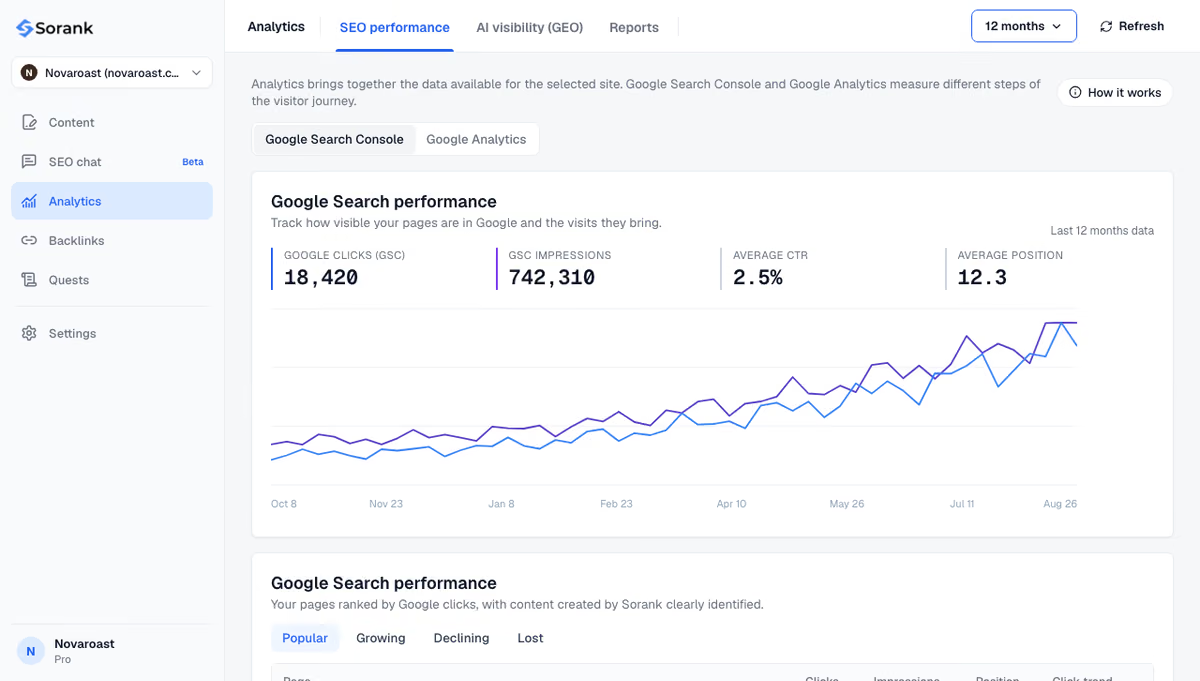
Sorank also writes and publishes optimized articles with the blog article generator, so publishing does not stop when you are busy, and AI mention tracking checks every month whether ChatGPT, Claude and Gemini cite your brand and who they cite instead. A study of what ChatGPT cites shows why this needs ongoing monitoring: the sources AI answers rely on keep changing.
SEO maintenance pays off when it is scheduled, measured and done every week, not when a crisis forces an audit. Put the table above in your calendar, set your thresholds, and automate what repeats. You can start with Sorank from $49 per month (billed annually) on the pricing page, with a 3-day free trial.

Done in-house, SEO maintenance mostly costs time: about 30 minutes a week, a few hours a month and one or two days a quarter for a site of a few hundred pages. Agencies usually bill it as a monthly retainer, and prices vary widely with site size and the amount of content included. Software can automate the recurring parts such as monitoring and publishing.
You can, but rankings tend to decline afterwards. Competitors publish new pages, content goes out of date, links break and Google ships core updates several times a year. A light maintenance routine is far cheaper than recovering traffic after months of neglect.
An SEO audit is a one-off, in-depth review of a site that produces a list of fixes. SEO maintenance is the recurring routine that follows: weekly, monthly and quarterly checks that catch new problems early and keep content current. Most sites need one full audit a year and maintenance in between.
We analyse your competitors, your website and your AI visibility to create a tailored content plan for free.
 AI Content Brief Generator
 FAQ Schema Generator
 AI Blog Post Ideas Generator
 Structured Data Validator (Schema Validator)
 Alt Text Checker
 Internal Link Analyzer
 Backlink Challenge
 AI Meta Description Generator
 AI Blog Title Generator
 Google Indexability Checker
 AI Blog Outline Generator
 UTM Link Builder
 Keyword Clustering Tool
 Canonical Tag Checker
 XML Sitemap Generator
 Broken Link Checker
 AI SEO Title Generator
 Headline Analyzer
 SERP Preview Tool
 Redirect Checker
 Hreflang Tag Generator
 Heading Structure Analyzer
 HTTP Headers Checker
 Favicon Extractor
 SERP CTR Calculator
 SEO vs Paid Search Savings Calculator
 SEO Share of Voice Calculator
 SEO ROI Calculator
 SEO Traffic and Revenue Forecast Calculator
 SEO Budget Calculator
 SEO Break-Even Calculator
 SaaS SEO ROI Calculator
 ROAS Calculator
 Reading Time Calculator
 Ranking Gain Simulator
 Organic Traffic Value Calculator
 Organic Traffic Estimator and Website Traffic Checker
 LTV to CAC Ratio Calculator
 Local SEO ROI Calculator
 Link Building Cost Calculator
 Keyword Value Calculator
 Keyword Opportunity Score Calculator
 Keyword Density Calculator
 GEO ROI Calculator
 GEO Content Investment Calculator
 Ecommerce SEO ROI Calculator
 Customer Lifetime Value Calculator
 Customer Acquisition Cost Calculator
 CTR Calculator
 Cost Per Article Calculator
 Conversion Rate Calculator
 Content Marketing ROI Calculator
 ChatGPT Referral Traffic Estimator
 Bounce Rate Calculator
 Backlink ROI Calculator
 AI Visibility Score Calculator
 AI Traffic Value Calculator
 AI Share of Voice Calculator
 Cost of AI Invisibility Calculator
 AI Citation Rate Calculator
 llms.txt Validator
 AI Overview Checker and AI Overviews Rank Checker
 Robots.txt Checker
 AI SEO Audit
 LLM Readability Checker
 SearchGPT Readiness Checker
 Structured Data LLM Audit
 Website Crawlability AI Audit
 Why ChatGPT Is Not Recommending My Website
 Gemini Ranking Tool
 Perplexity Ranking Checker
 LLM Citation Checker
 Answer Engine Optimization Audit
 GEO Audit
 AI Search Visibility Test
 ChatGPT Visibility Checker
 llms.txt Generator
 URL Extractor
 Webpage to Markdown
 Sitemap Checker
 SERP Volatility Sensor
 Page Size Checker
 Word Counter
 Slug Generator
 Schema Generator
 Robots Generator
 OG Preview
 Meta Tags Generator
 Image Compressor
 Favicon Generator
 On-Page SEO Audit: SEO Checker and SEO Analyzer
 Backlink Analysis Tool
 Keyword Research Tool
 Domain Authority Checker
THEY TRIED SORANK BEFORE YOU
 “I tested Sorank on a real client site and it's insane. It does everything an agency would bill you $1500 a month for. It's going into production on that client now.”

 Guillaume Guersanguersanguillaume.com“We are an Ads agency and we wanted to get our SEO back on track once and for all. Sorank gave us a clear view of our site, helped us prioritize optimizations, and properly structure our content. The tool is easy to use, well designed for a team, and very practical for centralizing tracking without having to juggle multiple platforms. A very solid foundation to start fresh with our SEO.”
 Gaspard MadouiAds Agency
 “I just let the Sorank software do its thing, and now my DR is 25 and my page is ranking higher.”
 Lucas Flandrefoundertrace.fr“I specialized in GEO thanks to Sorank. The GEO Leaderboard allows me to show my clients their position vs competitors on ChatGPT. It’s a real commercial differentiator.”
 MélanieSEO Freelance“Great service, works well for our website and helps us understand how to improve it to rank better on Google and elsewhere. Congrats, keep going, I recommend it.”
 Hugo T.E-commerce merchant