Preferences
Privacy is important to us, so you have the option of disabling certain types of storage that may not be necessary for the basic functioning of the website. Blocking categories may impact your experience on the website. More information

Privacy is important to us, so you have the option of disabling certain types of storage that may not be necessary for the basic functioning of the website. Blocking categories may impact your experience on the website. More information

n8n SEO automation: the 8 workflows worth building, a step-by-step Search Console alert, costs compared with Zapier and the risks to avoid.

Tools

In short
n8n is a workflow automation tool you can self-host for free or rent in the cloud, and it handles the repetitive half of SEO well: pulling Search Console data, alerting on traffic drops, checking pages, drafting briefs and pushing content to a CMS. It bills per workflow run rather than per step, which makes long SEO pipelines cheaper than on Zapier. It does not decide what to write or judge quality for you, and Google treats mass-generated pages without added value as spam, so keep strategy and final review human.
Want to go further? Ask
Quick quiz
Which kind of SEO tool is right for you?
Sorank matches your answers


Test it for 3 days on your own site and see where you stand on Google, ChatGPT and the other AIs.
Start 3-day free trial3 days free, then stop whenever you want. 90-day results-or-refund guarantee.
n8n SEO automation means connecting your SEO data sources (Search Console, a crawler, a SERP data provider, a language model, your CMS) into workflows that run on a schedule or on an event. Most guides on the topic list templates. This one shows which workflows are worth building, how to build the most useful one step by step, what it costs compared with Zapier, and where automation stops paying off. n8n's own pricing page states that an execution is a single run of your entire workflow, whatever the number of steps, and that detail shapes most of the choices below.
n8n is a visual workflow builder: you chain nodes (a trigger, an API call, a transformation, a condition, an action) on a canvas, and each node can also run JavaScript or Python when the visual options are not enough. It sits in the same family as Zapier and Make, with three traits that matter for SEO work:
For a broader view of what deserves automating in SEO and what should stay manual, read our guide to SEO automation. This article focuses on doing it with n8n.
The best candidates share three traits: they repeat on a fixed rhythm, their input is structured data, and a mistake is cheap to catch. The table sorts eight common workflows by that logic.
| Workflow | Trigger | Main nodes | Output | Verdict |
|---|---|---|---|---|
| Search Console drop alert | Weekly schedule | HTTP Request (Search Console API), Code, Slack or email | Pages and queries that lost clicks | Automate fully |
| Indexing status check | Daily schedule | HTTP Request (URL Inspection API), Google Sheets | New URLs not indexed yet | Automate fully |
| Rank tracking export | Daily schedule | HTTP Request (SERP data provider), database | Position history per keyword | Automate, review weekly |
| Broken link and status code check | Weekly schedule | Sitemap fetch, HTTP Request, filter | 404, 5xx and redirect chains | Automate fully |
| Keyword clustering | Manual or new export | Sheets, Code, AI Agent | Grouped keywords per page | Automate draft, human decides |
| Content brief | New keyword in a sheet | SERP data, AI Agent, Google Docs | Outline, questions, sources to check | Automate draft, human edits |
| Meta title and description suggestions | Low click-through rate detected | Search Console data, AI Agent | Rewrite proposals | Human approves each one |
| Article publishing | Approved draft | CMS node (WordPress) or webhook | Draft or live post | Automate the push, not the approval |
The first four rows are pure data plumbing and carry little risk. The last four involve a language model, so their value depends on the review step you keep. If you mainly want rankings over time, a dedicated rank tracking tool is usually cheaper to run than a home-made pipeline, and our guide to SERP APIs covers what to compare if you still build one.
This is the workflow most teams should build first: it watches traffic every week and tells you which pages slipped before a monthly report would. It needs a Google Search Console property, a Google Cloud project with the Search Console API enabled, and an n8n instance.
In n8n, create a Google OAuth2 API credential with the Search Console read-only scope. n8n recommends OAuth2 over service accounts for most Google services. If you use a service account instead, add its email as a user of the Search Console property, otherwise every call returns a permission error.
Run it once a week, a few days after the period ends: Search Console data is finalized with a delay of a few days, and the API returns only finalized data by default.
Add two HTTP Request nodes that post to the searchAnalytics.query endpoint, one for the last 7 finalized days and one for the 7 days before, with the dimensions page and query. A single request returns up to 25,000 rows (1,000 by default), and the startRow parameter pages through the rest, which the node's pagination option can handle.
Tip
Running the same workflow for many sites? Turn on the HTTP Request node's Batching option and set a batch interval. Google limits Search Analytics to 1,200 queries per minute per site and per user, and spacing calls avoids failed runs that are hard to spot.
Merge both results by page, compute the click difference, and keep pages that lost more than a threshold you set (for example 20% and at least 30 clicks, so small pages do not flood the alert). Sort by absolute loss.
Post the top 10 losers to Slack or email, each with its main query and the position change. Add a Google Sheets node if you want a history. The output is a to-do list, not a diagnosis: a drop can come from a Google update, a technical change on your site, seasonality or an answer box that now takes the clicks.
The official limits are documented on Google's Search Console API usage limits page: besides the Search Analytics quota, the URL Inspection API allows 2,000 inspections per day per site, enough for new and updated pages but not for re-inspecting a large site every night.
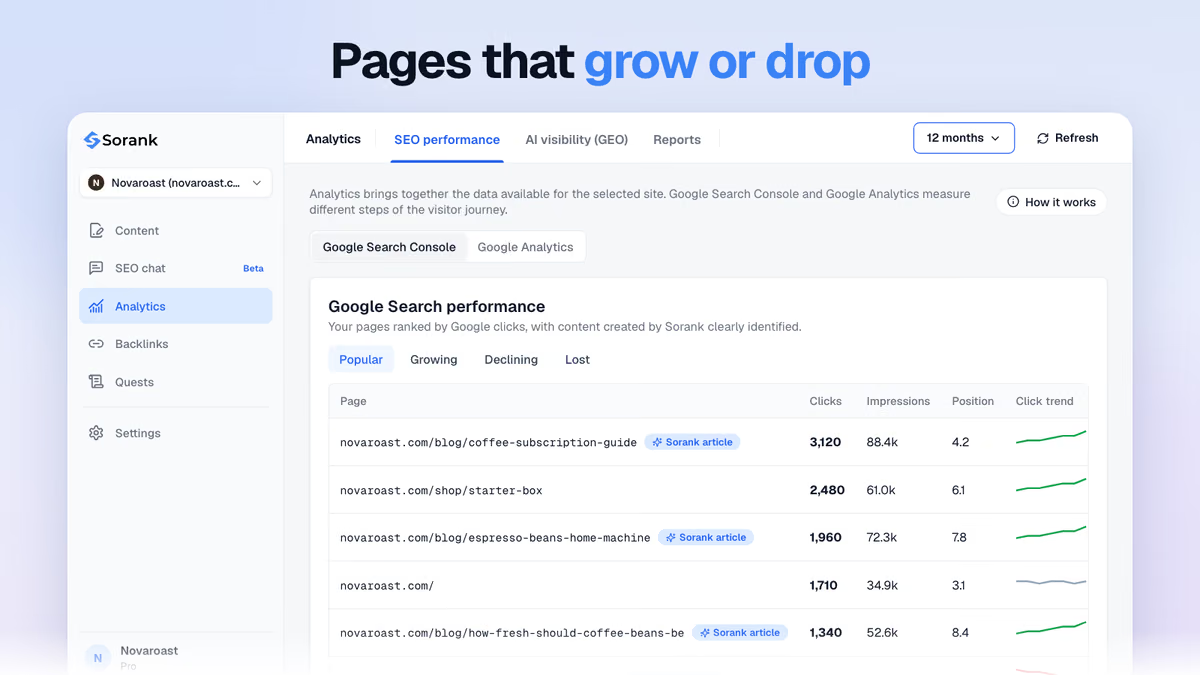
If you would rather read this signal than maintain the pipeline that produces it, the Sorank GEO and SEO dashboard shows Search Console performance, pages going up or down and visits coming from AI assistants in one place.
Technically yes: a typical pipeline reads a keyword from a sheet, fetches the top results through a SERP API, asks a model for an outline and a draft through the AI Agent node, then sends the text to WordPress with the WordPress node or to any CMS with an HTTP call. Building it takes a few hours. Making the output good enough to rank takes far longer, because the hard parts sit outside the workflow: picking keywords you can win, adding facts and sources the top results do not have, internal links that match your site, images, structured data, and a consistent voice. Our guide to content automation details what to keep in human hands.
Watch out
Google's spam policies list scaled content abuse, which includes using generative AI tools to produce many pages without adding value for users. A workflow that turns a keyword list into hundreds of unreviewed posts is exactly that pattern.
Two safer set-ups work in practice. The first keeps n8n for research and briefs (our free content brief generator shows what a good brief contains) and leaves the writing to a person. The second hands the writing and publishing to a dedicated tool and uses n8n only around it. The Sorank article generator, for instance, publishes to WordPress, Shopify, Webflow, Wix or any system through a webhook, which an n8n Webhook node can receive to trigger your own steps (a Slack message, a social post, a task for the editor). If you are comparing ready-made options, see our list of the best content automation tools.
Both tools can run the workflows above. The difference is how they bill and how much code they let you write, and SEO pipelines tend to be long and data-heavy.
| Criterion | n8n | Zapier |
|---|---|---|
| Billing unit | One execution per workflow run, whatever the number of steps | One task per successful action (triggers, filters and formatters excluded) |
| Entry price (annual billing, checked October 2026) | Starter: €20 per month for 2,500 executions | Professional: $19.99 per month for 750 tasks |
| Free option | Community edition, self-hosted | 100 tasks per month, two-step Zaps only |
| Custom code | JavaScript and Python nodes | Code steps with limited runtime |
| AI agents and MCP | AI Agent node, MCP Client Tool node | AI steps and agents, billed separately or by usage |
| Learning curve | Steeper, closer to programming | Gentler, more ready-made app actions |
A worked example shows the gap. A weekly workflow with 15 action steps runs about 4 times a month: that is 4 executions on n8n, and roughly 60 tasks on Zapier. Multiply by several sites or a daily rhythm and the per-step model adds up fast. For long SEO pipelines, n8n is usually the cheaper and more flexible choice; Zapier stays the faster option for short, two- or three-step automations between mainstream apps (prices from the n8n and Zapier pricing pages).
GEO is about being cited by ChatGPT, Gemini, Perplexity and Claude, and it adds a type of workflow that classic SEO did not need: asking the same buyer questions to several assistants on a schedule and recording whether your brand appears. You can build a basic version in n8n by sending prompts to model APIs and searching the answers for your brand name. Two limits apply: API answers can differ from what users see in the consumer apps (which add web search, location and personalization), and a useful panel needs dozens of prompts across several assistants, re-run often enough to see a trend.
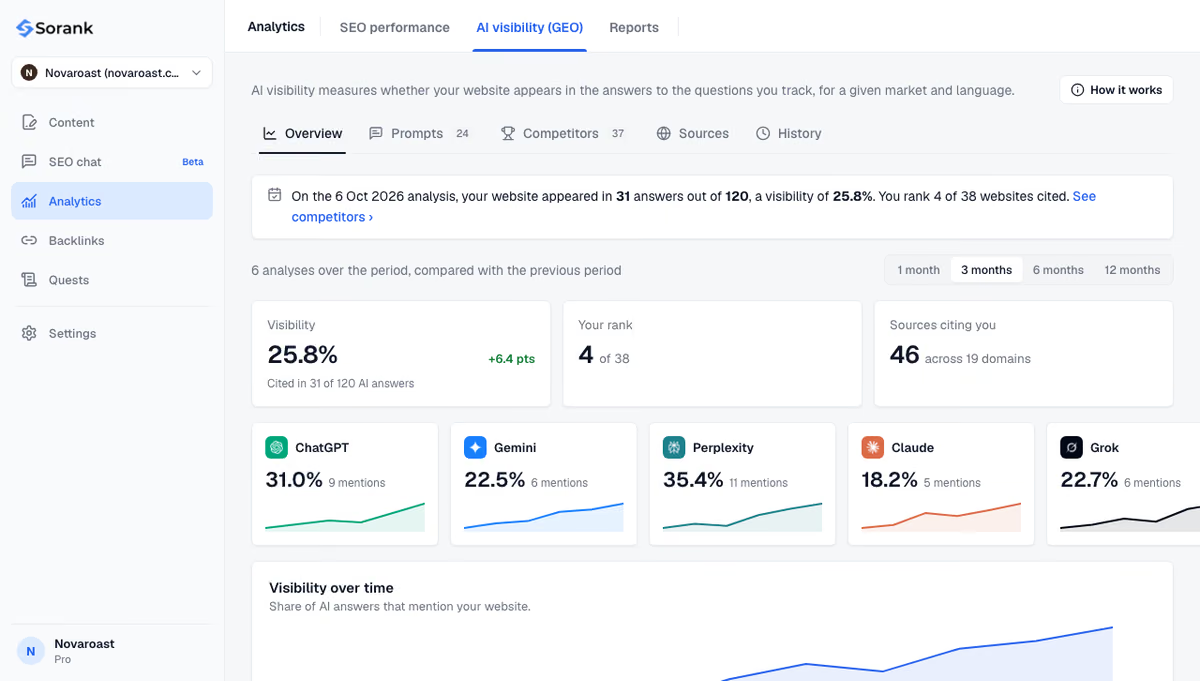
That is why most teams pair n8n with a tool for this part. Sorank AI mention tracking follows 10 to 50 prompts depending on the plan, on ChatGPT, Claude and Gemini, plus Grok from the Pro plan, and shows who is cited in your place. On the agent side, the n8n MCP Client Tool node lets an AI Agent call tools exposed by an MCP server; the Sorank MCP server, for its part, brings your SEO and Search Console data into Claude, ChatGPT and code editors. If you prefer a terminal to a canvas, the same jobs can be scripted with Claude Code.
Note
A good rule: automate collection, checks and alerts end to end, automate drafts with a review step, and never automate a decision you could not explain to a client or a colleague.
Start with one data workflow (the Search Console alert above), run it for a month, and only then add model-based steps. n8n is excellent at moving and checking SEO data, and weak at deciding what deserves to be published. If you would rather skip building the content and AI visibility part, Sorank does it on autopilot: keyword research, articles published to your CMS, natural backlinks and tracking in ChatGPT, Claude and Gemini, from $49 per month on annual billing with a 3-day free trial on the pricing page.

The self-hosted Community edition of n8n is free, so you only pay for the server and for the APIs your workflows call (Search Console is free, SERP data and language models are not). The n8n cloud plans start at €20 per month on annual billing for 2,500 executions (checked October 2026).
No for simple workflows: triggers, Google Sheets, Slack and CMS nodes are configured visually. Calling the Search Console API, handling pagination or comparing two periods is much easier with basic JavaScript or Python in a Code node, and with some understanding of how APIs and authentication work.
n8n does not collect rankings by itself. It can call a SERP data provider or the Search Console API on a schedule and store the positions in a sheet or database. Search Console gives average positions for your own site only, while a SERP provider shows the full results page, competitors included.
We analyse your competitors, your website and your AI visibility to create a tailored content plan for free.
 AI Content Brief Generator
 FAQ Schema Generator
 AI Blog Post Ideas Generator
 Structured Data Validator (Schema Validator)
 Alt Text Checker
 Internal Link Analyzer
 Backlink Challenge
 AI Meta Description Generator
 AI Blog Title Generator
 Google Indexability Checker
 AI Blog Outline Generator
 UTM Link Builder
 Keyword Clustering Tool
 Canonical Tag Checker
 XML Sitemap Generator
 Broken Link Checker
 AI SEO Title Generator
 Headline Analyzer
 SERP Preview Tool
 Redirect Checker
 Hreflang Tag Generator
 Heading Structure Analyzer
 HTTP Headers Checker
 Favicon Extractor
 SERP CTR Calculator
 SEO vs Paid Search Savings Calculator
 SEO Share of Voice Calculator
 SEO ROI Calculator
 SEO Traffic and Revenue Forecast Calculator
 SEO Budget Calculator
 SEO Break-Even Calculator
 SaaS SEO ROI Calculator
 ROAS Calculator
 Reading Time Calculator
 Ranking Gain Simulator
 Organic Traffic Value Calculator
 Organic Traffic Estimator and Website Traffic Checker
 LTV to CAC Ratio Calculator
 Local SEO ROI Calculator
 Link Building Cost Calculator
 Keyword Value Calculator
 Keyword Opportunity Score Calculator
 Keyword Density Calculator
 GEO ROI Calculator
 GEO Content Investment Calculator
 Ecommerce SEO ROI Calculator
 Customer Lifetime Value Calculator
 Customer Acquisition Cost Calculator
 CTR Calculator
 Cost Per Article Calculator
 Conversion Rate Calculator
 Content Marketing ROI Calculator
 ChatGPT Referral Traffic Estimator
 Bounce Rate Calculator
 Backlink ROI Calculator
 AI Visibility Score Calculator
 AI Traffic Value Calculator
 AI Share of Voice Calculator
 Cost of AI Invisibility Calculator
 AI Citation Rate Calculator
 llms.txt Validator
 AI Overview Checker and AI Overviews Rank Checker
 Robots.txt Checker
 AI SEO Audit
 LLM Readability Checker
 SearchGPT Readiness Checker
 Structured Data LLM Audit
 Website Crawlability AI Audit
 Why ChatGPT Is Not Recommending My Website
 Gemini Ranking Tool
 Perplexity Ranking Checker
 LLM Citation Checker
 Answer Engine Optimization Audit
 GEO Audit
 AI Search Visibility Test
 ChatGPT Visibility Checker
 llms.txt Generator
 URL Extractor
 Webpage to Markdown
 Sitemap Checker
 SERP Volatility Sensor
 Page Size Checker
 Word Counter
 Slug Generator
 Schema Generator
 Robots Generator
 OG Preview
 Meta Tags Generator
 Image Compressor
 Favicon Generator
 On-Page SEO Audit: SEO Checker and SEO Analyzer
 Backlink Analysis Tool
 Keyword Research Tool
 Domain Authority Checker
THEY TRIED SORANK BEFORE YOU
 “I tested Sorank on a real client site and it's insane. It does everything an agency would bill you $1500 a month for. It's going into production on that client now.”

 Guillaume Guersanguersanguillaume.com“We are an Ads agency and we wanted to get our SEO back on track once and for all. Sorank gave us a clear view of our site, helped us prioritize optimizations, and properly structure our content. The tool is easy to use, well designed for a team, and very practical for centralizing tracking without having to juggle multiple platforms. A very solid foundation to start fresh with our SEO.”
 Gaspard MadouiAds Agency
 “I just let the Sorank software do its thing, and now my DR is 25 and my page is ranking higher.”
 Lucas Flandrefoundertrace.fr“I specialized in GEO thanks to Sorank. The GEO Leaderboard allows me to show my clients their position vs competitors on ChatGPT. It’s a real commercial differentiator.”
 MélanieSEO Freelance“Great service, works well for our website and helps us understand how to improve it to rank better on Google and elsewhere. Congrats, keep going, I recommend it.”
 Hugo T.E-commerce merchant