
Preferences
Privacy is important to us, so you have the option of disabling certain types of storage that may not be necessary for the basic functioning of the website. Blocking categories may impact your experience on the website. More information
Privacy is important to us, so you have the option of disabling certain types of storage that may not be necessary for the basic functioning of the website. Blocking categories may impact your experience on the website. More information

Pay per crawl lets sites charge AI crawlers for each page they fetch. Learn how Cloudflare's model, HTTP 402 and pricing work, and when to use it.







Founder Sorank, 7+ years in SEO.
Summary
Pay per crawl is a model where a website charges AI crawlers a fee each time they fetch a page. Cloudflare launched it in 2025 as a private beta: the site sets a price per request, bots that do not offer to pay get an HTTP 402 Payment Required response, and Cloudflare bills the crawler and pays the publisher.
Want to go further? Ask
Pay per crawl gives site owners a third choice between letting AI crawlers like GPTBot and ClaudeBot in for free and blocking them. You put a price on your content, and an AI company that wants it pays for every successful fetch. The idea is simple. The mechanics (bot authentication, payment headers, a status code that sat unused for decades) are what this page explains.
Pay per crawl means each request an AI bot makes to your site can carry a price. Cloudflare describes it as a way to "control and monetize AI crawler access" by setting a price on your domain, in its pay per crawl documentation. It is part of AI Crawl Control, Cloudflare's dashboard for managing bots.
The model answers a real problem. Search engines crawl your pages and send visitors back. Many AI systems read the same pages to train models or build answers, and send far less traffic in return. Pay per crawl turns that one-way flow into a transaction: the crawler gets the content, you get paid.
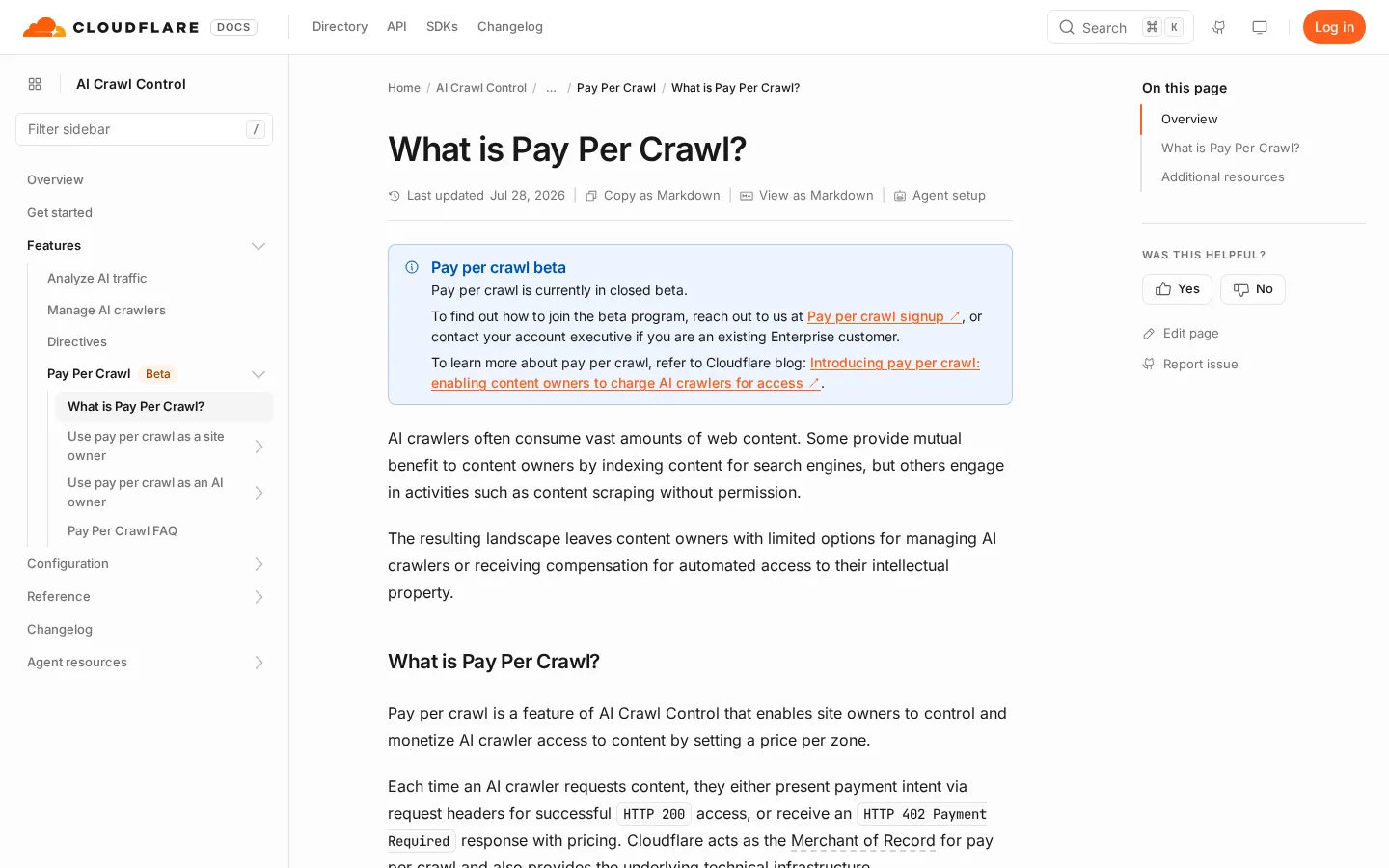
Pay per crawl works through a price check at the network level, before your page is served. Here is the flow Cloudflare describes in its announcement of pay per crawl:
There are two ways for a crawler to pay. In the reactive flow, it requests a page, receives the 402 with the price, then retries with a header that accepts that exact price. In the proactive flow, it sends the maximum it is willing to pay up front. If your price is at or below that maximum, it gets the page in one request.
HTTP 402 is a status code that tells the client the content is not available until it pays. MDN calls it "a nonstandard response status code reserved for future use" in its reference page on 402 Payment Required. It was created for digital cash and micropayments, but no standard convention for its use ever emerged.
Pay per crawl gives 402 a concrete job. A 403 says "no". A 402 says "yes, at this price". That difference matters: the crawler learns that a deal is possible and how much it costs, instead of hitting a wall.
Pay per crawl relies on a few HTTP headers exchanged between the crawler and the server. The announcement lists them:
| Header | Sent by | Purpose |
|---|---|---|
| signature-agent, signature-input, signature | Crawler | Identify and authenticate the bot (Web Bot Auth) |
| crawler-price | Server, with a 402 | Announce the price of the page |
| crawler-exact-price | Crawler | Accept the announced price |
| crawler-max-price | Crawler | Declare the highest price it will pay |
| crawler-charged | Server, with a 200 | Confirm the amount charged |
A crawler uses only one of the two price headers per request. A reactive exchange looks like this (the announcement uses a placeholder for the amount):
GET /article HTTP/2
signature-agent: "https://crawler.example.com"

HTTP/2 402
crawler-price: USD XX.XX

GET /article HTTP/2
crawler-exact-price: USD XX.XX

HTTP/2 200
crawler-charged: USD XX.XX
If you want to see which bots already request your pages, and how often, your AI crawler logs show each request with its user agent.
You choose your own price, charged for each successful retrieval. Cloudflare's guide to setting a pay per crawl price says the default price applies to "each successful content retrieval (HTTP 200 response)" and that "the minimum price is $0.001 USD per crawl". The same page lets you turn on dynamic pricing to set different prices for different content.
A 402 response costs the crawler nothing. Only pages actually delivered are billed. Cloudflare publishes no recommended price, so start from what your content is worth to an AI system: original data, expert analysis and fresh news are harder to find elsewhere than generic text.
No. Cloudflare's documentation says pay per crawl is in closed beta. You request access through a signup form, and Enterprise customers can ask their account team. The feature also only works for domains whose traffic goes through Cloudflare.
Cloudflare called pay per crawl "our first experiment in this area" and listed possible next steps in its announcement: pricing by path or content type, licenses that separate training, inference and search, and "agentic paywalls" where AI agents spend within a budget. Treat the details as moving parts and check the documentation before you plan around them.
The difference is enforcement and money. A robots.txt file asks bots to stay away and relies on their good faith. A firewall block stops them. Pay per crawl lets them in on your terms.
| Option | Enforced? | Revenue | Effect on AI visibility |
|---|---|---|---|
| Allow (open access) | Not needed | None | Content can be read and cited |
| robots.txt Disallow | No, voluntary | None | Compliant bots stop reading |
| Firewall block | Yes | None | Blocked bots cannot read or cite |
| Pay per crawl | Yes | Per successful fetch | Only paying bots read |
The settings stack in a fixed order. Cloudflare's documentation says blocks in its firewall (WAF) or Bot Management override the Charge action. For a crawler with no billing relationship, Charge acts like a block, with a signal that a deal is possible later. Our guide to what to allow and block in robots.txt for AI bots covers the free option in detail.
It depends on what you sell. If your content is the product (news, research, databases), charging protects its value. If your content exists to bring customers to your business, charging can cost you more than it earns, because a bot that does not pay does not read you, and an AI that has not read you cannot recommend you.
Before you decide, check what the AIs can reach today. The free AI crawlability audit from Sorank tests whether AI bots can access your site, and Sorank's AI mention tracking shows whether ChatGPT, Gemini and Claude cite you, so you can see the effect of a change.
Tip
Look at the data before you set a price. A crawler that visits your site rarely will not bring much revenue, whatever your price.
Most mistakes come from treating pay per crawl as a simple switch.
Pay per crawl matters because access is the first step of generative engine optimization. An AI can only cite pages its crawlers can read. Every crawler you charge or block is one more AI that may describe your market without you.
It also changes the economics of the web. If AI companies pay for content, they will choose what they buy, and original, well-structured pages become more valuable. For most businesses, the winning move is to stay readable by the AIs that send customers, and to earn citations in AI answers with content worth quoting.
Pay per crawl puts a price on AI access: you set an amount per request, bots that do not pay get an HTTP 402, and Cloudflare handles authentication and billing. It is still a closed beta. Use it if your content is your product. If your content brings you customers, keep the AI crawlers that cite you on Allow, check your access with a robots.txt checker, and measure what the AIs say about you.
Sources
Not if you only charge AI crawlers and keep search engine crawlers like Googlebot and Bingbot on Allow. Charging or blocking a search crawler removes your pages from its results. Charging AI crawlers can reduce how often AI assistants read and cite you, so weigh that against the revenue.
Cloudflare's pay per crawl only works for domains whose traffic goes through Cloudflare. HTTP 402 is an open status code, so any server can return it, but you would then need your own way to verify bots and collect payment.
Blocking denies access with no way in. Pay per crawl answers with a 402 and a price, so a crawler that agrees to pay gets the page and you get paid. Both are enforced at the network level, unlike robots.txt, which bots follow voluntarily.
 “I tested Sorank on a real client site and it's insane. It does everything an agency would bill you $1500 a month for. It's going into production on that client now.”

 Guillaume Guersanguersanguillaume.com“We are an Ads agency and we wanted to get our SEO back on track once and for all. Sorank gave us a clear view of our site, helped us prioritize optimizations, and properly structure our content. The tool is easy to use, well designed for a team, and very practical for centralizing tracking without having to juggle multiple platforms. A very solid foundation to start fresh with our SEO.”
 Gaspard MadouiAds Agency
 “I just let the Sorank software do its thing, and now my DR is 25 and my page is ranking higher.”
 Lucas Flandrefoundertrace.fr“I specialized in GEO thanks to Sorank. The GEO Leaderboard allows me to show my clients their position vs competitors on ChatGPT. It’s a real commercial differentiator.”
 MélanieSEO Freelance“Great service, works well for our website and helps us understand how to improve it to rank better on Google and elsewhere. Congrats, keep going, I recommend it.”
 Hugo T.E-commerce merchant



















