
Preferences
Privacy is important to us, so you have the option of disabling certain types of storage that may not be necessary for the basic functioning of the website. Blocking categories may impact your experience on the website. More information
Privacy is important to us, so you have the option of disabling certain types of storage that may not be necessary for the basic functioning of the website. Blocking categories may impact your experience on the website. More information

OpenAI crawlers are GPTBot, OAI-SearchBot, ChatGPT-User and OAI-AdsBot. Learn what each one does and how robots.txt controls its access.







Founder Sorank, 7+ years in SEO.
Summary
OpenAI crawlers are the bots that OpenAI uses to read web pages, each with a separate purpose: GPTBot for model training, OAI-SearchBot for ChatGPT search, and ChatGPT-User for fetches that a person triggers. Each one can be allowed or blocked on its own in your robots.txt file.
Want to go further? Ask
OpenAI crawlers are automated programs that request pages from websites on behalf of OpenAI. They are not one bot but several, and each has a distinct job. Knowing which is which matters, because the rules you set decide whether your content can train models, appear in ChatGPT search, or both. Blocking the wrong bot can quietly remove you from AI answers.
This is a practical topic at the heart of generative engine optimization. To be cited inside ChatGPT, your pages must be reachable by the right bot, and you need to understand the difference between training access and search access. OpenAI's bots belong to the wider family of AI crawlers, and they follow the same basic rules that classic search bots follow.
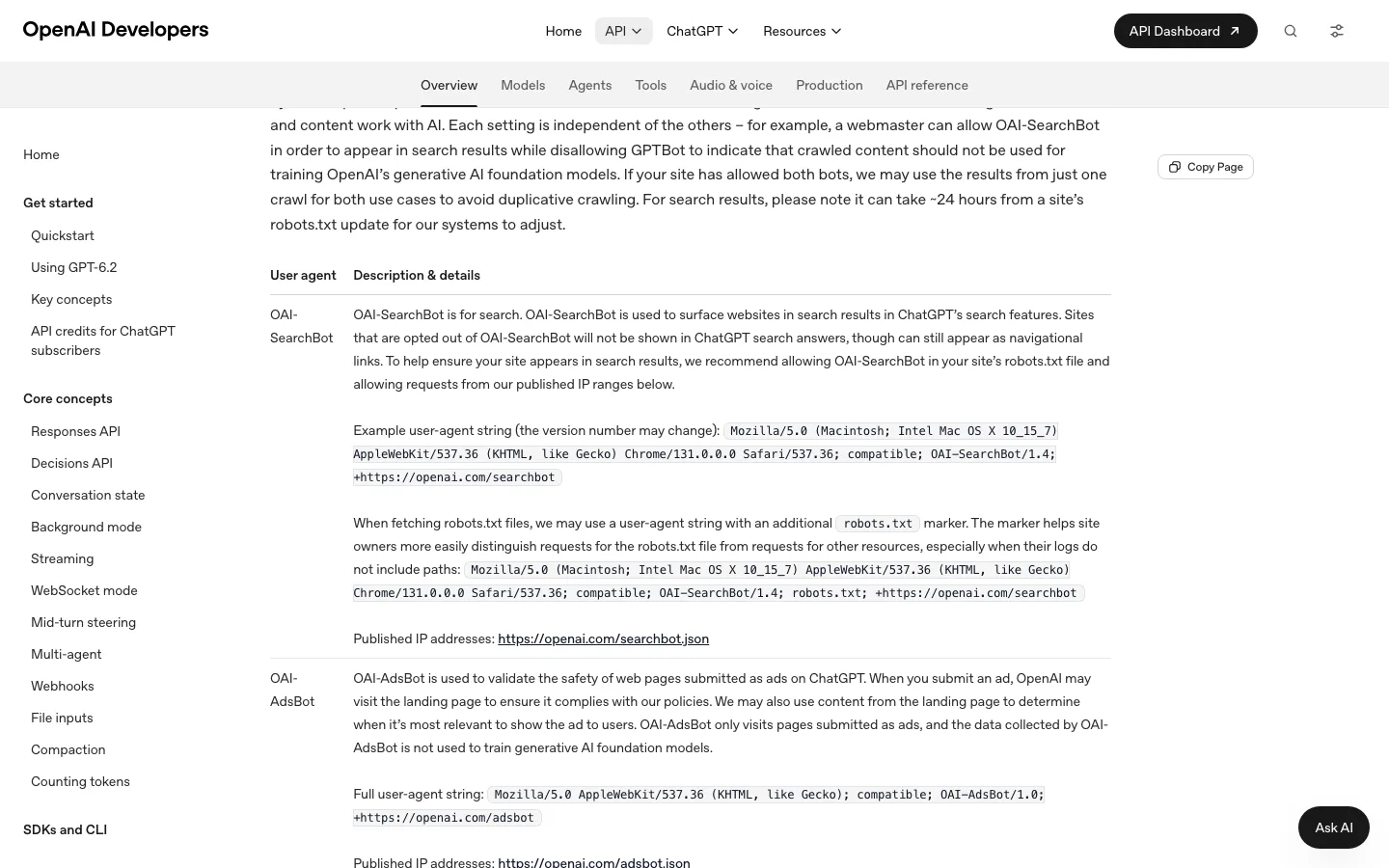
OpenAI crawlers are a type of crawler bot. Each one identifies itself with a user agent string, and OpenAI publishes the details of every bot in its official bot documentation. That page lists each user agent, what it is used for and how robots.txt applies to it.
The key idea is separation. OpenAI runs different bots for different purposes, and each one can be allowed or blocked independently. That lets you make a precise choice, for example allowing search while refusing training, rather than an all or nothing decision.
The robots.txt file is a set of rules that crawlers are requested to honor. The IETF standard for it, RFC 9309, says that these rules are not a form of access authorization and that the protocol is not a substitute for real content security measures (RFC 9309, the Robots Exclusion Protocol). In practice, robots.txt is a public request to well-behaved bots, not a lock.
Each rule group targets one crawler by its product token. A rule written for GPTBot does not change how OAI-SearchBot behaves, which is why you should write a separate group for each OpenAI bot you want to manage.
GPTBot is the crawler that gathers content which may be used to train OpenAI's generative AI foundation models. OpenAI's documentation states that disallowing GPTBot indicates a site's content should not be used in training. Blocking it is therefore a training decision. It does not remove you from ChatGPT search, because search relies on a different bot.
OAI-SearchBot is used to surface websites in search results in ChatGPT's search features. A site that is opted out of OAI-SearchBot will not be shown in ChatGPT search answers, although it can still appear as a navigation link. This is the bot that matters most for visibility in ChatGPT search.
OpenAI notes that it can take around 24 hours from a robots.txt update for its systems to adjust. Plan changes ahead of time instead of expecting an instant effect.
ChatGPT-User is not used for crawling the web in an automatic fashion. It is triggered when a person asks ChatGPT or a custom GPT to act on a specific page. Because the action is initiated by a user, OpenAI notes that robots.txt rules may not apply. Blocking ChatGPT-User therefore does not decide whether your site appears in search. That job belongs to OAI-SearchBot.
OAI-AdsBot validates the safety of web pages that advertisers submit as ads on ChatGPT. It visits only those submitted pages, and OpenAI states that the data it collects is not used to train its generative AI foundation models. It is a separate system from the search and training bots, so each decision stays independent.
OpenAI publishes the IP addresses for OAI-SearchBot and OAI-AdsBot as JSON files on its own domain, so you can compare the address of a visit with the published list. A user agent string alone is easy to copy, which makes the IP check the stronger test. Use the log files of your server to run this check before you trust a spike in bot traffic.
Decide your policy first. To stay visible in ChatGPT search while opting out of training, allow OAI-SearchBot and disallow GPTBot. To stay out of both training and search, disallow each bot, accepting that you will lose ChatGPT search visibility. Set rules per user agent, since each crawler is independent. Then run the free Sorank robots.txt checker to confirm that your file says what you intend.
After any change, check that the bots can read the content itself. Keep key information out of client-side JavaScript and out of images, because a crawler can cite only the text it can access and parse. For a worked example of how crawler setup affects citations, read our guide to robots.txt and AI crawlers.
These bots are the gatekeepers of ChatGPT visibility. ChatGPT cannot cite a page it was never allowed to read, so a misconfigured robots.txt can keep a brand out of AI answers without any warning. Getting crawler access right comes before every other part of generative engine optimization.
The bot split also lets you treat training and search as two separate decisions. You can contribute to ChatGPT search while declining training, which is a choice that a single blanket rule could never offer.
OpenAI crawlers are GPTBot for training, OAI-SearchBot for ChatGPT search, ChatGPT-User for user-triggered actions, and OAI-AdsBot for ad review, each controllable on its own. For AI visibility, allow the search bot so ChatGPT can cite you, and make a deliberate choice about training. Review the file regularly, since the bot list changes. Then follow the results with Sorank's AI mention tracking.
Sources
GPTBot gathers content that may train OpenAI's foundation models. OAI-SearchBot surfaces pages in ChatGPT search, where they can be cited. ChatGPT-User fetches a page only when a person asks ChatGPT to act on it, and OAI-AdsBot validates pages submitted as ads.
No. GPTBot controls only training collection, while ChatGPT search relies on OAI-SearchBot. You can block GPTBot to opt out of training and still allow OAI-SearchBot to keep your pages visible in ChatGPT search.
Allow OAI-SearchBot in your robots.txt, because disallowing it removes your pages from ChatGPT search results. Expect around 24 hours for the change to take effect, and make sure key information is readable text rather than JavaScript-only content or images.
 “I tested Sorank on a real client site and it's insane. It does everything an agency would bill you $1500 a month for. It's going into production on that client now.”

 Guillaume Guersanguersanguillaume.com“We are an Ads agency and we wanted to get our SEO back on track once and for all. Sorank gave us a clear view of our site, helped us prioritize optimizations, and properly structure our content. The tool is easy to use, well designed for a team, and very practical for centralizing tracking without having to juggle multiple platforms. A very solid foundation to start fresh with our SEO.”
 Gaspard MadouiAds Agency
 “I just let the Sorank software do its thing, and now my DR is 25 and my page is ranking higher.”
 Lucas Flandrefoundertrace.fr“I specialized in GEO thanks to Sorank. The GEO Leaderboard allows me to show my clients their position vs competitors on ChatGPT. It’s a real commercial differentiator.”
 MélanieSEO Freelance“Great service, works well for our website and helps us understand how to improve it to rank better on Google and elsewhere. Congrats, keep going, I recommend it.”
 Hugo T.E-commerce merchant



















