
Preferences
Privacy is important to us, so you have the option of disabling certain types of storage that may not be necessary for the basic functioning of the website. Blocking categories may impact your experience on the website. More information
Privacy is important to us, so you have the option of disabling certain types of storage that may not be necessary for the basic functioning of the website. Blocking categories may impact your experience on the website. More information

Universal search is how Google blends web pages, images, videos, news and maps into one results page. Learn how it works and how to appear in it.








Founder Sorank, 7+ years in SEO.
Summary
Universal search is a search engine feature that blends results from different indexes, such as web pages, images, videos, news, maps and books, into one results page. Instead of a single list of ten blue links, you see the formats that best match the query. Google introduced it in May 2007.
Want to go further? Ask
Universal search is the reason one query can show a video, a row of images, a map and a few web pages on the same screen. Google's own description of the change was short: the results are no longer limited to web pages. This guide explains what universal search shows, how it affects your rankings and clicks, and how to get your content into the blocks that matter for your keywords.
Universal search is a search engine's ability to pull results from separate indexes, such as web, images, videos, news and maps, and show them together when the query calls for it. Google announced the change in May 2007. In its Webmaster Central post of 17 May 2007, Google wrote that the search results "may include video, news, images, maps, and books" in addition to web pages, according to its 2007 post on taking advantage of universal search.
You will also see the idea called blended search. The name matters less than the effect: a results page is no longer a list of web pages only. Each block has its own rules, so a page can earn a place in one block and be absent from another.
Google's Visual Elements gallery groups the common elements of Google web search into five categories. The gallery describes each one and says whether you can optimize for it. The table below uses those categories.
| Category | What Google says it is | What you can influence |
|---|---|---|
| Text result | A result based on the textual content of the page | Your page copy, title and snippet |
| Rich result | A result that typically relies on structured data in the markup of your page | The JSON-LD you add to the page |
| Image result | A result based on an image embedded on that web page | The images you embed and how you describe them |
| Video result | A result based on a video embedded on that web page | The videos you embed and their metadata |
| Exploration features | Features that help searchers expand and refine their first search, such as related searches and "People also ask" | Little direct control, but you can study the related queries |
The gallery is the reference to use for the names of these elements. It shows each one as it appears in a results page, so you can match what you see in your own searches to the category it belongs to.
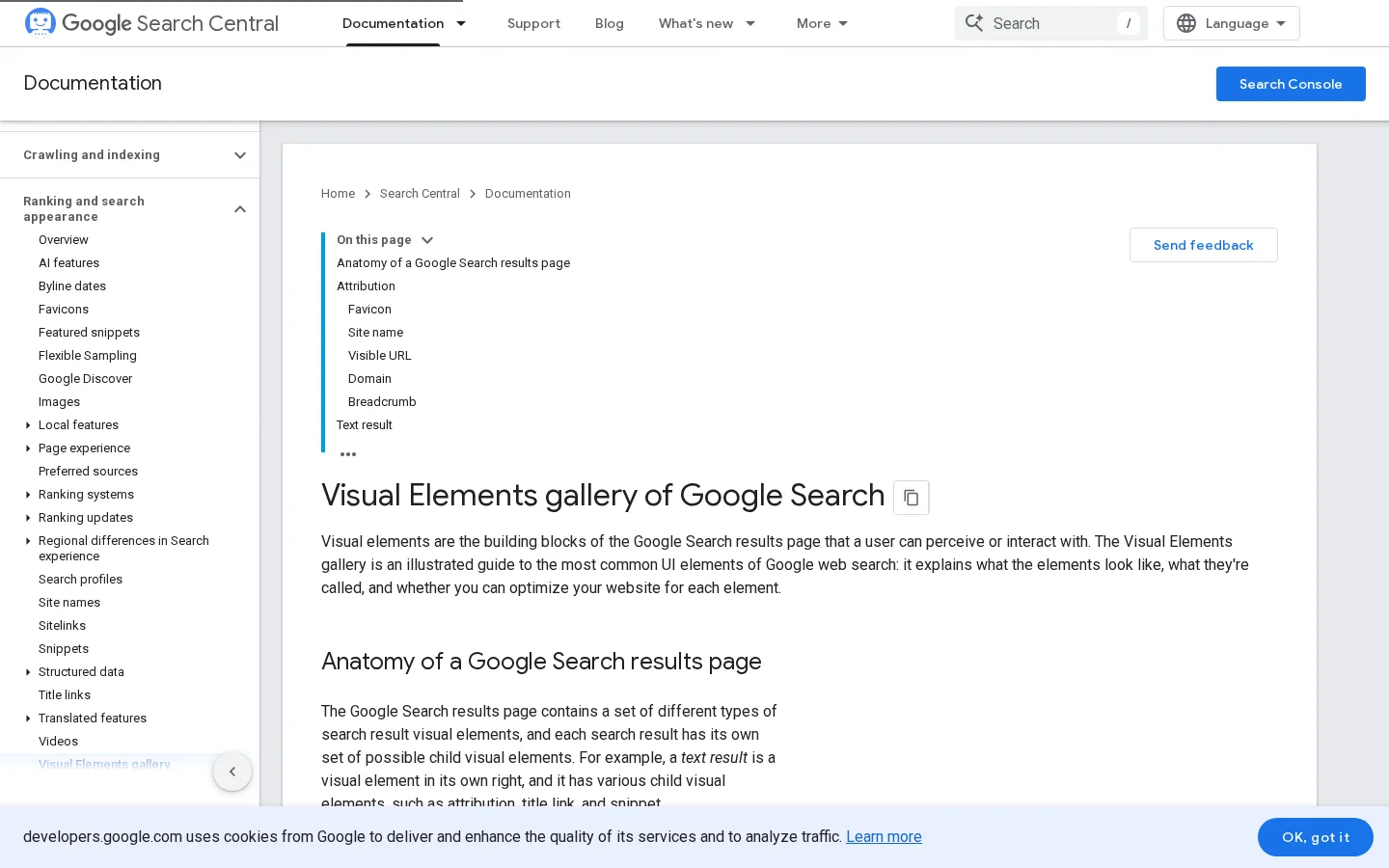
Google does not publish the full logic behind each results page. What you can do is watch the pattern for your own queries. In practice, a query about a place tends to bring up a map block, and a query about a how-to step often brings up videos. A query about a brand may show a knowledge panel next to the usual links.
The safest way to learn the pattern is to test. Take your ten most important keywords, search each one, and write down the blocks in the order they appear. Patterns show up quickly, and they tell you which formats are worth preparing for.
Start with the format that matches the query. If the query already shows a video block, and your page has a video that answers it, make that video part of the page. Google's gallery says that to optimize your video for video results, you should follow its video best practices. For images, the gallery says that to optimize your image for image results, you should follow the image SEO best practices. The full checklist is in our image search optimization guide.
Media has to sit on the page itself. A video result is based on a video embedded on the web page, so a link to a video hosted elsewhere does not give you the same chance. Embed the file, add a short text that explains what it shows, and make sure the text around it answers the same question as the query.
Structured data is the second lever. Google's gallery says a rich result typically relies on structured data in the markup of your page to display graphical elements or interactive experiences. A simple VideoObject block for an embedded video looks like this:
{
  "@context": "https://schema.org",
  "@type": "VideoObject",
  "name": "How to Change a Bike Inner Tube",
  "description": "A short video that shows how to replace a bike inner tube at the roadside.",
  "thumbnailUrl": "https://www.example.com/images/bike-tube.jpg",
  "uploadDate": "2026-11-01",
  "contentUrl": "https://www.example.com/videos/bike-tube.mp4"
}
Before you publish, test the block. Sorank's free Structured Data Validator reads the JSON-LD of a page or pasted code and checks it against the requirements Google publishes for each rich result, and it points to the line with a syntax error.
Tip
Search your keyword in a private browser window, using the country and language of your audience. A private window shows results closer to what a new visitor sees than the results you get while signed in.
Universal search is the principle, and SERP features are the parts. A SERP feature is a single block on the results page, such as a featured snippet, a local pack or a video carousel. Universal search is what lets those blocks sit beside ordinary links. If you want the full list of blocks, start with our guide to SERP features.
Two of the most visible blocks are worth knowing well. A featured snippet lifts a short answer from one page and places it above the other results. A local pack shows a map and a few businesses for queries with local intent. Each one has its own requirements, so optimize for them one at a time.
Search the keyword, then write down each block in order from top to bottom. Note the result types that fill the first screen, and where your page would fit if it appeared. A list like this is the fastest way to see whether a keyword is worth writing for, or whether the page is already dominated by video or images.
Results change over time, so the check is not a one-off. Set a schedule and repeat it. Our guide to SERP monitoring explains how to track rankings and the blocks that appear alongside them.
The three mistakes below come up often when sites try to earn a place in blended results. For each one you get what it is, how to spot it, and how to fix it.
What it is: You optimize the title and the body text, and nothing else. The page has no image or video that matches the query.
How to spot it: Your keyword shows an image or video block above the results, and your page has no media at all.
How to fix it: Add one relevant image or video that answers the query, embed it on the page, and describe it in the text around it.
What it is: The page points to a video or image hosted on another site, but does not embed it.
How to spot it: Open the page source and look for the media element. If the file is only a link, the page does not carry that media itself.
How to fix it: Embed the media on the page. Give it a clear file name, descriptive alt text for images, and a short caption that matches the query.
What it is: The JSON-LD describes a review, a price or a video that does not appear on the page.
How to spot it: Compare each property in the markup with the visible page. Any value you cannot find on the page is a warning sign.
How to fix it: Remove the properties that are not visible, or add the visible content they describe. Then validate the page again.
Universal search changes how much space the blue links get on the page. A page that wins a video or image block can earn visits that a plain text result would not. Understanding the blocks is therefore part of choosing which keywords to target.
The same preparation also helps with generative answers. Clear headings, embedded media and accurate structured data give search engines and AI assistants more to work with. For the answer layer that sits on top of the page, read our guide to AI Overview.
Universal search is why one query can return a video, an image, a map and a web page on the same screen. Google named it in 2007, and its gallery still documents the result types today. Check the blocks for your keywords, prepare the matching media and markup, and repeat the check, because the mix of blocks keeps changing.
Sources
Not quite. Universal search is the idea that one results page can mix different kinds of results. SERP features are the individual blocks, such as featured snippets, local packs and video carousels, that appear on that page.
In practice, it affects clicks. A page that appears in an image or video block can get visits even when its normal blue link sits lower on the page. Check your keywords to see which blocks appear before you decide where to focus.
Search the keyword in a private browser window, using the country and language of your audience. Write down the blocks in order from top to bottom, and repeat the check every few weeks, because the mix of blocks changes.
 “I tested Sorank on a real client site and it's insane. It does everything an agency would bill you $1500 a month for. It's going into production on that client now.”

 Guillaume Guersanguersanguillaume.com“We are an Ads agency and we wanted to get our SEO back on track once and for all. Sorank gave us a clear view of our site, helped us prioritize optimizations, and properly structure our content. The tool is easy to use, well designed for a team, and very practical for centralizing tracking without having to juggle multiple platforms. A very solid foundation to start fresh with our SEO.”
 Gaspard MadouiAds Agency
 “I just let the Sorank software do its thing, and now my DR is 25 and my page is ranking higher.”
 Lucas Flandrefoundertrace.fr“I specialized in GEO thanks to Sorank. The GEO Leaderboard allows me to show my clients their position vs competitors on ChatGPT. It’s a real commercial differentiator.”
 MélanieSEO Freelance“Great service, works well for our website and helps us understand how to improve it to rank better on Google and elsewhere. Congrats, keep going, I recommend it.”
 Hugo T.E-commerce merchant



















