
Preferences
Privacy is important to us, so you have the option of disabling certain types of storage that may not be necessary for the basic functioning of the website. Blocking categories may impact your experience on the website. More information
Privacy is important to us, so you have the option of disabling certain types of storage that may not be necessary for the basic functioning of the website. Blocking categories may impact your experience on the website. More information

HowTo schema is JSON-LD markup that lists the steps of a task. Learn how to write it, its properties and its status in Google.








Founder Sorank, 7+ years in SEO.
Summary
HowTo schema is a type of structured data from schema.org that describes a task as an ordered list of steps. You add it to a page as JSON-LD, a block of code that does not change what the visitor sees. Google stopped showing HowTo rich results in 2023, but the markup is still valid schema.org code.
Want to go further? Ask
HowTo schema is the markup for pages that teach one task, such as changing a bike tire or setting up a tool. It names the task, lists the steps in order, and can add details such as tools, supplies and total time. This guide explains what the type holds, how to write it in JSON-LD, and why you should check its status in Google before you spend time on it.
HowTo is a type defined by schema.org, the shared vocabulary that search engines and other tools use to read page data. The schema.org definition reads: "Instructions that explain how to achieve a result by performing a sequence of steps."
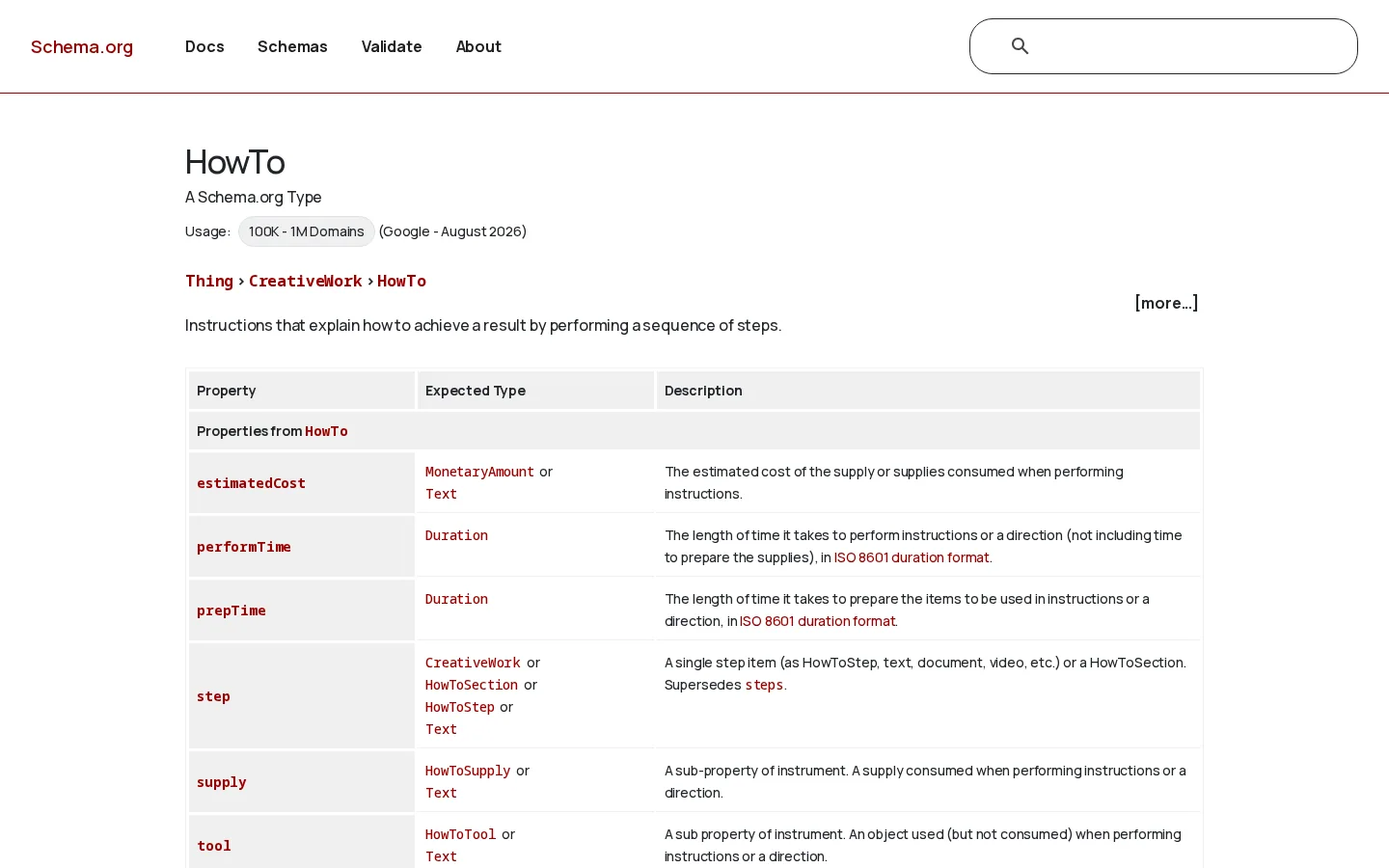
The type has one main job, which is to hold the steps. Each step is a HowToStep with its own name and text. Steps that belong together can be grouped in a HowToSection, which helps on long guides. For the general idea of marking up page data, read our schema markup glossary entry.
Warning
Do not add HowTo markup to get a Google result. Google no longer shows HowTo rich results in search.
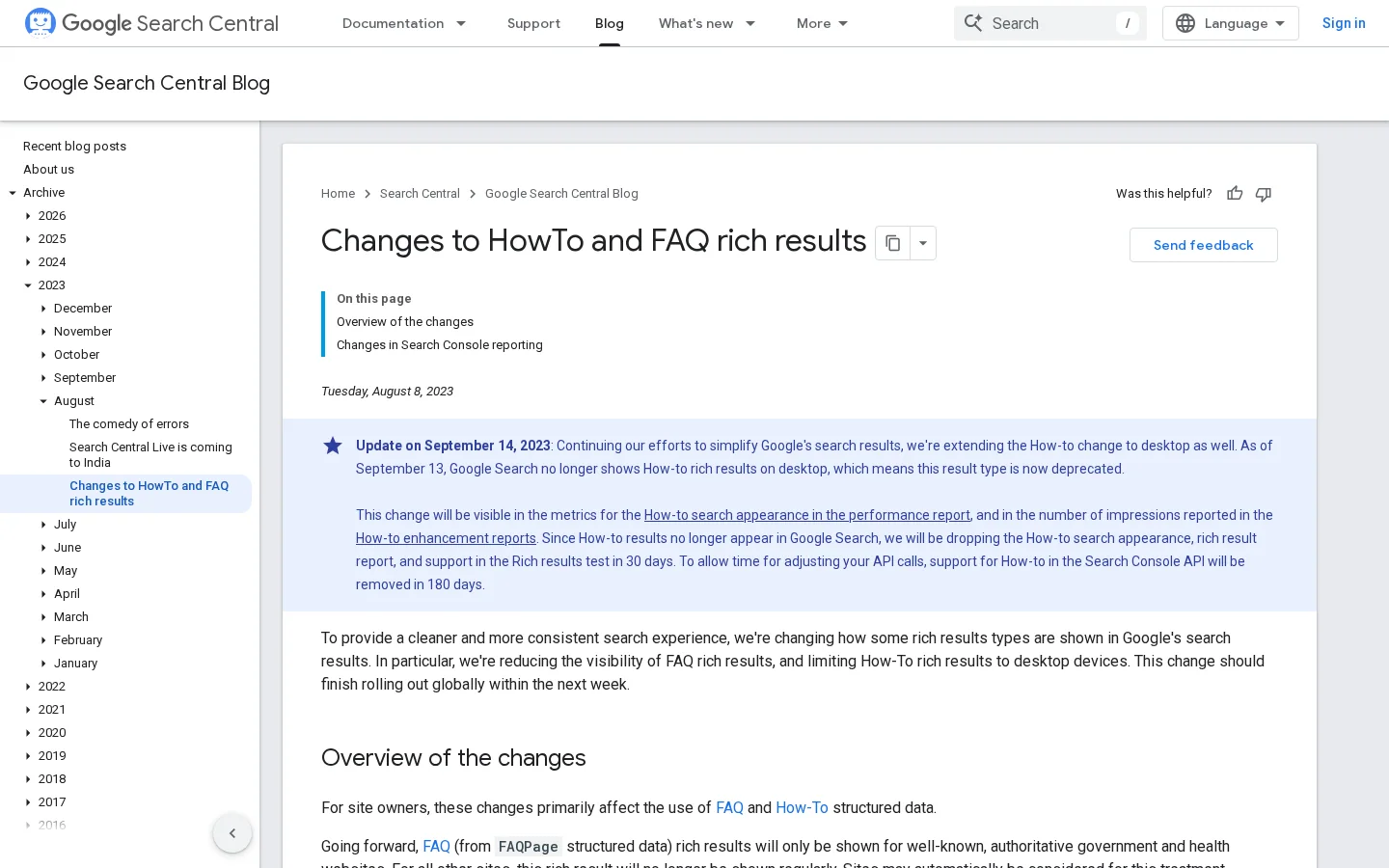
The change came in stages. On August 8, 2023, Google announced that HowTo rich results would only show on desktop, and not on mobile. The update added to that post says that as of September 13, 2023, Google no longer shows HowTo rich results on desktop either.
Google's Recipe guide still uses the HowTo steps, but only inside the Recipe type. It says to specify a HowToStep directly within the definition of recipeInstructions, which is where a recipe's steps go. So the step type lives on, while the standalone HowTo type no longer gives you a result. Read Google's Recipe structured data guide for the current rules.
The FAQ type changed in the same post, and we cover it in our FAQ schema guide. To see how search results display these features, read about rich snippets.
Schema.org does not mark any HowTo property as required. The table lists the properties the type defines, with the value each one expects. In practice, a useful HowTo has a name and at least one step, and every step has text.
| Property | Expected type | What it holds |
|---|---|---|
| name | Text | The title of the task |
| description | Text | A short summary of the task |
| image | ImageObject or URL | A picture of the finished result or of a step |
| step | HowToStep, HowToSection or Text | The steps, in order |
| totalTime | Duration | The total time, such as PT30M for 30 minutes |
| estimatedCost | MonetaryAmount or Text | The cost of the task |
| supply | HowToSupply or Text | Materials the user uses up, such as glue |
| tool | HowToTool or Text | Equipment the user reuses, such as a wrench |
Each HowToStep can hold a name, a text, a url and an image. Write the text for every step. Add a name when a step needs a short label, such as "Remove the wheel".
Put the code in a script tag with the type application/ld+json, in the HTML of the page. The example below describes how to change a bike tire. Copy it, replace the text with your own task, and keep the steps in the same order as on the page.
{
  "@context": "https://schema.org",
  "@type": "HowTo",
  "name": "How to change a bike tire",
  "description": "Replace a flat tire on a road bike with a spare inner tube.",
  "totalTime": "PT30M",
  "estimatedCost": {
    "@type": "MonetaryAmount",
    "currency": "USD",
    "value": "10"
  },
  "tool": [
    {"@type": "HowToTool", "name": "Tire levers"},
    {"@type": "HowToTool", "name": "Pump"}
  ],
  "supply": [
    {"@type": "HowToSupply", "name": "Spare inner tube"}
  ],
  "step": [
    {"@type": "HowToStep", "name": "Remove the wheel", "text": "Open the quick release lever and lift the wheel out of the frame."},
    {"@type": "HowToStep", "name": "Remove the tire", "text": "Push one edge of the tire off the rim with a tire lever, working around the rim."},
    {"@type": "HowToStep", "name": "Fit the new tube", "text": "Insert the spare inner tube, then press the tire back onto the rim."},
    {"@type": "HowToStep", "name": "Inflate the tire", "text": "Pump the tire to the pressure printed on its sidewall."}
  ]
}
The example uses name, description, totalTime, estimatedCost, tool, supply and step. Leave out any property you cannot fill with real facts from your page. If you do not want to write the code by hand, use our free schema markup generator. For a complete example of a different type, see our local business schema guide.
Paste the page or the code into a validator before you publish. Our free structured data validator tests the JSON-LD of any page or code, so you can find syntax errors and misspelled property names before they go live. A validator checks the syntax and the property names. It does not tell you whether Google will show a rich result, because HowTo results are no longer shown.
These errors come up often in HowTo markup. Check each one before you publish.
This mistake is a HowTo on a product page, a news article or a category page, where the steps do not describe a task. To spot it, ask whether a reader can finish the task by following the page from top to bottom. To fix it, remove the markup, or use a type that fits the page, such as Article.
Each step has a name, but the text is empty or missing. To spot it, read the JSON-LD and look for steps with no text property. To fix it, write one or two sentences that describe the action.
The code lists steps, tools or times that the visible text does not show. To spot it, compare the code with the page, one step at a time. To fix it, change the page or the code so that both say the same thing.
The team adds the markup and waits for a result in search that Google no longer shows. To spot it, check whether the plan counts on a HowTo result. To fix it, judge the page by how clear the steps are to a reader, and treat the markup as a record of those steps.
For SEO, the markup no longer brings a Google result, so it should not be a project of its own. Its value is that the steps are written as data in a standard format. Any tool that reads schema.org can see the order of the steps without guessing it from the layout.
For GEO, the visible text does more of the work. A numbered list with clear headings is the part that readers see first, so keep the steps in plain language on the page itself. For the broader idea of data that describes a page, see structured content. For how structured data supports AI answers, see knowledge graphs.
HowTo schema is a standard way to write steps as data, and the example above is ready to adapt. Google no longer shows HowTo rich results, so write the markup as a record of the page, and keep the steps visible for the reader. If you need the basics first, start with the schema markup entry.
Sources
Not for a Google result. Google stopped showing HowTo rich results in 2023. The code is still valid schema.org markup, so add it only if the page already lists clear steps.
Yes, but inside the Recipe type. Google's Recipe guide says to put HowToStep items directly within recipeInstructions, so recipe steps are marked up that way.
Yes. Your markup should match what the reader sees. Write the same steps in the visible text, in the same order, so the code and the page agree.
 “I tested Sorank on a real client site and it's insane. It does everything an agency would bill you $1500 a month for. It's going into production on that client now.”

 Guillaume Guersanguersanguillaume.com“We are an Ads agency and we wanted to get our SEO back on track once and for all. Sorank gave us a clear view of our site, helped us prioritize optimizations, and properly structure our content. The tool is easy to use, well designed for a team, and very practical for centralizing tracking without having to juggle multiple platforms. A very solid foundation to start fresh with our SEO.”
 Gaspard MadouiAds Agency
 “I just let the Sorank software do its thing, and now my DR is 25 and my page is ranking higher.”
 Lucas Flandrefoundertrace.fr“I specialized in GEO thanks to Sorank. The GEO Leaderboard allows me to show my clients their position vs competitors on ChatGPT. It’s a real commercial differentiator.”
 MélanieSEO Freelance“Great service, works well for our website and helps us understand how to improve it to rank better on Google and elsewhere. Congrats, keep going, I recommend it.”
 Hugo T.E-commerce merchant



















