
Preferences
Privacy is important to us, so you have the option of disabling certain types of storage that may not be necessary for the basic functioning of the website. Blocking categories may impact your experience on the website. More information
Privacy is important to us, so you have the option of disabling certain types of storage that may not be necessary for the basic functioning of the website. Blocking categories may impact your experience on the website. More information

Content personalization adapts each visitor's experience using data. Learn how it works, its privacy limits, and how to keep it safe for SEO and AI search.








Founder Sorank, 7+ years in SEO.
Summary
Content personalization is the practice of adapting the messages, pages, and recommendations a visitor sees to their interests, needs, and past behavior, based on data about that person. Unlike customization, it happens automatically, and it must respect privacy rules and the search engine rule against cloaking.
Want to go further? Ask
Content personalization is the practice of dynamically tailoring content to the specific interests, needs, and preferences of each visitor. Instead of showing everyone the same page, a personalized experience adapts headlines, product recommendations, offers, and layouts based on who the visitor is and how they have behaved on the site before.
The goal is to make each visit feel built for one person. A returning reader who looked at one product category can see related guides on the next visit, while a visitor from another country can see shipping information that fits where they live. Done well, this turns a generic visit into a relevant one.
Content personalization covers far more than inserting a first name into an email. It can change the homepage hero, the order of a product list, the call to action at the end of an article, or the set of articles an app suggests. The common thread is that the system decides what to show based on data, rather than one editor choosing a single version for everyone.
Personalization works at different levels. Simple rules change content for a segment, such as visitors from one region. More advanced programs apply predictive models that estimate what each person is likely to want next. Both levels follow the same logic: the content depends on the person, not only on the page.
The process runs in three stages. First, capture data at the points where visitors reveal something about themselves, such as sign-up forms, clicks, and purchases. Second, consolidate that data into one profile per person, which breaks down the silos that keep email, website, and app data apart. Third, act on the profile with experiences that stay consistent across channels.
The third stage is where machine learning models make personalization scale. They find patterns that no manual rule set could list, such as which product categories tend to be viewed together, and they help predict the next page a visitor will want. The results are only as good as the data behind them, so the first stage matters most.
Most programs combine three kinds of data. Demographic data covers attributes such as age, location, and language. Behavioral data covers what people do, such as pages viewed, products bought, and emails opened. Zero-party data is information that visitors give you on purpose, such as the topics they choose in a preference center.
| Data type | What it includes | Example use |
|---|---|---|
| Zero-party | Preferences the visitor states directly | Showing the topics a reader asked to follow |
| First-party | Behavior recorded on your own site and channels | Suggesting a guide after a visit to the pricing page |
| Demographic | Age, location, language, or company size | Showing shipping information for the visitor's country |
Once data is collected, it has to be grouped into usable segments. Google Analytics audiences are a good illustration: Google describes them as a way to segment users by dimensions, metrics, and events, with each user's membership reevaluated as new data arrives. Personalization rules follow a similar model. Keep the whole process within data privacy rules, and collect only the data you actually use, because over-personalization can feel intrusive.
AI personalizes content by predicting which item, message, or layout a visitor is most likely to respond to, then serving that version without manual work. In practice it runs on two kinds of engines: recommendation models that match visitors to items, and generative models that adapt the words on the page. You can start with either, but you need to know which one your tool uses, because each fails in a different way.
Collaborative filtering finds visitors who behaved like the current one and shows what they viewed or bought next. Content-based filtering compares the attributes of your pages (topic, price, format, reading level) with the pages the visitor already read. Collaborative filtering needs a lot of traffic to work, so a smaller site usually gets better results from content-based rules.
A language model can rewrite a headline, intro, or call to action for a specific segment, such as visitors who arrived from a search about one problem. Give the model the segment's goal, the product facts it may use, and a list of claims it must not make. Review every variant before it goes live, because models fill gaps with plausible details and some of those details will be wrong.
| Approach | Good for | Main risk |
|---|---|---|
| Rules (if/then) | Predictable and easy to audit | Hard to maintain at scale |
| Recommendation models | Product and article suggestions | Weak for new visitors and new items |
| Generative copy | Headlines, intros and calls to action per segment | Invented facts and off-brand tone |
Whichever approach you pick, test it against a control group. A model that looks strong in a demo can still lower conversions in production. Compare the personalized version with the default until you have enough visits for the difference to mean something. For a simple way to split traffic, see the best A/B testing tools.
Personalization is automatic. The system decides what to show using data analysis. Customization is manual: the user changes their own settings, such as the language, the theme, or the topics in a newsletter. Dynamic content is a broader term for any content that changes in real time.
Most modern programs combine all three, but data-driven personalization is the part that scales to thousands of visitors without each one doing the work. Customization still matters, because a visitor who has chosen their own preferences gives you cleaner data for personalization.
It can, if it is done the wrong way. Google's spam policies define cloaking as presenting different content to users and search engines with the intent to manipulate search rankings and mislead users.Personalization is not cloaking by itself, because the policy targets content shown with the intent to manipulate. The safe approach is to make sure the default version of each page, the one a crawler reaches without any visitor data, contains the same core text and links that a visitor sees.
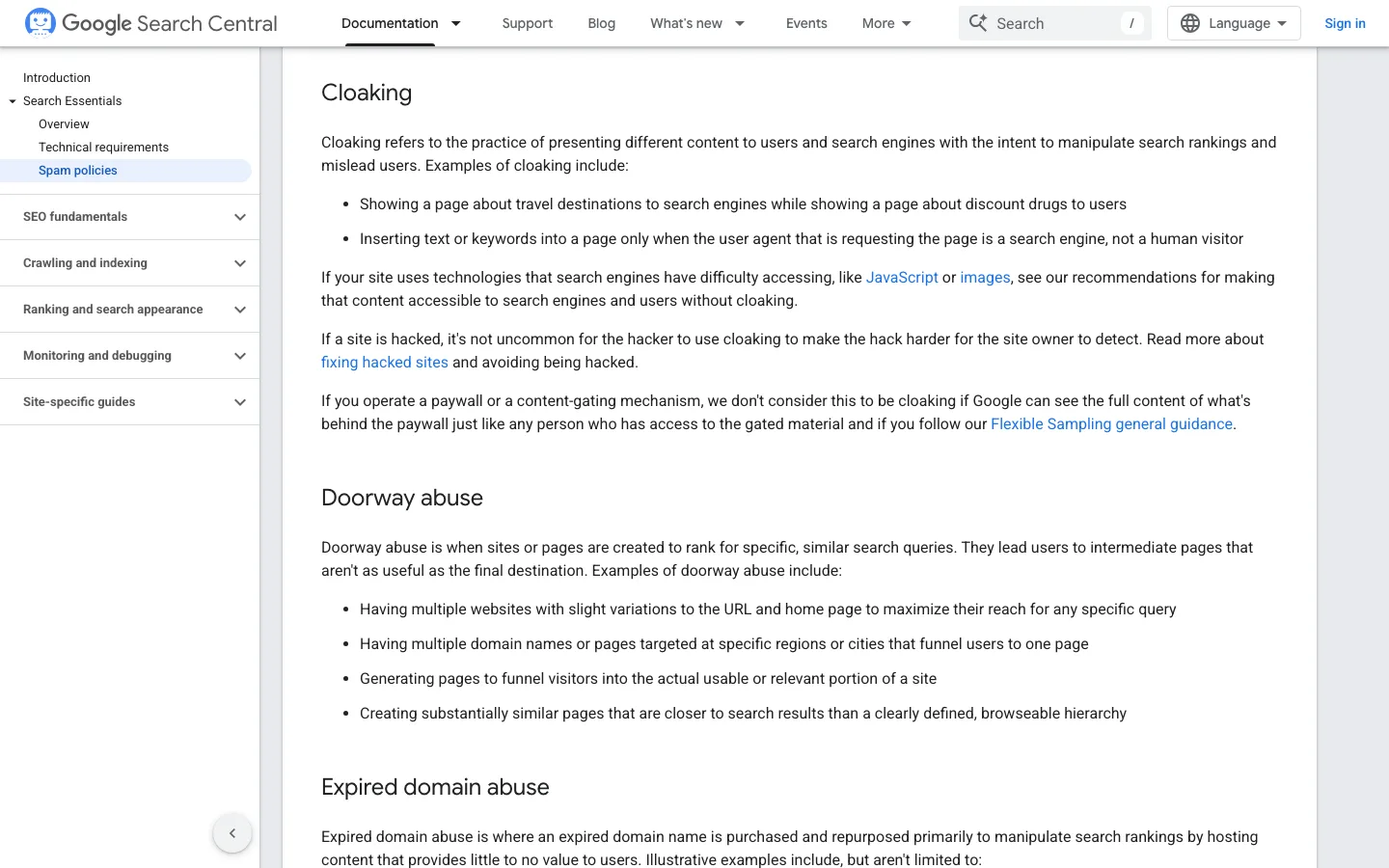
The cloaking rule is the one that matters most when personalization changes what a crawler sees. For a deeper look at the search side, read our guide on how Google personalizes search results.
Personalization and search intent do different jobs. Search intent is about understanding what a query means so the right page can answer it. Personalization adapts that page to the individual once they arrive. One brings the visitor to relevant content, and the other deepens the fit.
The strongest setups chain the two. A search brings in a visitor who wants a comparison, and the landing experience then highlights the comparison table or the pricing details that their region needs. The first step earns the click, and the second makes the visit useful.
The first mistake is starting too broad. Teams try to personalize every element of every page before they have one clean segment that works. Start with one high-impact change, measure it, and widen it only when the result is clear.
The second mistake is creating a large set of near-identical pages for each segment. Each version adds duplicate pages that can compete with each other in search results. Keep one main page per topic and personalize the blocks inside it instead.
The third mistake is hiding the default version from crawlers, which breaks the cloaking rule described above. The fourth is ignoring consent. Using data without clear permission erodes trust, and personalization built on trust lasts longer than tactics that feel clever but intrusive.
Start with one page, one visitor signal, and one changed element. Pick a signal you can read on arrival, such as the search query, the traffic source, or whether the visitor has been on your site before. Change one thing for that group, keep the default for everyone else, and compare the two. Add more segments only after the first test shows a clear lift.
Use data you already collect or can collect with consent. The search query and referrer are free and available immediately. Location is coarse but useful. Returning visits and products viewed need your own tracking or a login, so they take more setup.
| Signal | Example change | Source |
|---|---|---|
| Search query | Headline repeats the wording of the query | Referrer or URL parameter |
| Location | Local hours, shipping or pricing | IP-based location (coarse) |
| Returning visitor | Skip the intro and show the next step | First-party cookie or login |
| Product viewed | Related items from the same category | Your own event data |
Search results can also differ from one person to the next, so check how Google Personalized Search works before you assume the ranking you see is the one everyone gets.
Keep each rule simple enough to explain in one sentence. The default version must work on its own, because some visitors block cookies, arrive without any signal, or match no segment. A personalized page that breaks for them is worse than no personalization at all.
if visitor.returning and not visitor.logged_in:
    show("next-step-banner")
else:
show("default-hero")Check which signals need consent where your visitors live before you store them. Many personalization tools set cookies by default, so review what they collect. Keep only the data your rules use. For a broader look at handling personal data, read Data Privacy AI.
Send a share of visitors to the default version and compare conversions, engagement, and return visits. Do not judge a change on one good week. Wait until each group has enough visits for the gap to be meaningful, and write down what you changed so you can explain the result later.
Tip
Start with the page that already earns the most search traffic. A small gain there reaches more visitors than a large gain on a page nobody visits.
For SEO, personalization mostly affects engagement rather than rankings directly. Returning visitors who see relevant recommendations tend to stay longer and explore more, which supports a healthier user experience from the traffic you already earn.
For generative engine optimization, the picture is different. AI assistants increasingly tailor answers to the person asking, so the way your content is structured affects how it gets reused. Clear answers, named entities, and well-organized sections are easier to reuse in any version of an answer. Teams that run personalization at scale can use Sorank's tools for content teams to keep their pages structured and up to date.
Content personalization uses data and automation to show each visitor the content that fits their interests, needs, and context. It works through a loop of capturing data, building a profile, and acting across channels. Keep the default version of every page complete and crawlable, respect privacy, and start with one change you can measure.
Marketing personalization is the practice of changing campaign messages, offers, and timing based on what the data says about each person or segment. A marketer uses it to decide which email, ad, or landing page block someone sees, based on what they bought, read, or told you about their interests.
It applies the same logic as content personalization to campaigns. The goal is usually more sign-ups, more clicks, or repeat purchases, so the work runs across email, paid ads, the website, and the app at the same time.
| Channel | What gets personalized | Example |
|---|---|---|
| Subject line, product block, send time | A restock alert for people who viewed an item that sold out | |
| Paid ads | Audience lists and ad copy | A comparison ad for visitors who read your pricing page |
| Website | Hero banner, offers, recommended guides | A guide on the topic a returning reader explored last time |
| Mobile app | Push messages and in-app suggestions | A tutorial suggested right after onboarding is complete |
Judge every step by the goal from the first step. If the variant does not beat the control group, fix the message before adding more targeting, since targeting does not repair a weak message.
Tip
Personalize the message that already performs best. A small change to a proven email is easier to measure than a new campaign built on guesses.
Teams that run these steps across several channels usually rely on marketing automation tools, and A/B testing in marketing explains how to confirm that a variant really wins. For the consent side of tracking, see Google Consent Mode v2.
Sources
Personalization is automatic: the system chooses what to show based on data about the visitor. Customization is manual, because the user sets their own preferences. Most programs use both, but data-driven personalization is what scales to thousands of visitors.
It can if search engines see something different from what visitors see in order to manipulate rankings, which is cloaking. Personalization is safe when the default version of each page holds the same core text and links that visitors see.
Most programs combine demographic data, such as location and language, with behavioral data, such as pages viewed and products bought. Zero-party data, which visitors give you on purpose, is often the most respectful starting point, used within privacy rules.
 “I tested Sorank on a real client site and it's insane. It does everything an agency would bill you $1500 a month for. It's going into production on that client now.”

 Guillaume Guersanguersanguillaume.com“We are an Ads agency and we wanted to get our SEO back on track once and for all. Sorank gave us a clear view of our site, helped us prioritize optimizations, and properly structure our content. The tool is easy to use, well designed for a team, and very practical for centralizing tracking without having to juggle multiple platforms. A very solid foundation to start fresh with our SEO.”
 Gaspard MadouiAds Agency
 “I just let the Sorank software do its thing, and now my DR is 25 and my page is ranking higher.”
 Lucas Flandrefoundertrace.fr“I specialized in GEO thanks to Sorank. The GEO Leaderboard allows me to show my clients their position vs competitors on ChatGPT. It’s a real commercial differentiator.”
 MélanieSEO Freelance“Great service, works well for our website and helps us understand how to improve it to rank better on Google and elsewhere. Congrats, keep going, I recommend it.”
 Hugo T.E-commerce merchant



















