Preferences
Privacy is important to us, so you have the option of disabling certain types of storage that may not be necessary for the basic functioning of the website. Blocking categories may impact your experience on the website. More information
Privacy is important to us, so you have the option of disabling certain types of storage that may not be necessary for the basic functioning of the website. Blocking categories may impact your experience on the website. More information

The robots meta tag tells search engines whether to index a page or follow its links. Copy-ready code, every value, and how it differs from robots.txt.








Founder Sorank, 7+ years in SEO.
Summary
Robots meta tag is an HTML tag in the head of a page that tells search engine crawlers what to do with that page. It can keep the page out of results (noindex), stop crawlers from following its links (nofollow), or limit how the page appears in search.
Want to go further? Ask
Robots meta tag is one line of code that you place in the head section of a web page. Crawlers such as Googlebot read it when they visit the page. The tag does not change the content of your page. It only sets rules for search results and for links.
This guide gives you copy-ready code, every value Google documents, and the difference between a robots meta tag and robots.txt. If you need a quick check of your own pages, the free tools linked below can help.
Follow these steps:
Use name="robots" to address all crawlers. This example tells crawlers not to index the page and not to follow its links:
<head>
  <meta name="robots" content="noindex, nofollow">
</head>
The name and content attributes are not case sensitive. You can also split the rules into several tags, one rule per tag, if that is easier for you to read.
A page with a noindex value stays out of Google Search results for as long as the tag is in place. Check that the page is one you really want hidden before you save the change.
Google documents the values below. Each value is one rule. You can combine several values with commas, such as noindex, nosnippet.
| Value | What it does |
|---|---|
all | No restrictions. It is the default, so writing it changes nothing. |
noindex | Keeps the page out of search results. |
nofollow | Tells Google not to follow the links on the page. |
none | Same as noindex, nofollow together. |
nosnippet | No text snippet or video preview. A static image may still appear. |
max-snippet:[number] | Limits the snippet to a number of characters. 0 works like nosnippet, and -1 lets Google choose the length. |
max-image-preview:[none, standard, large] | Sets the size of image previews. |
max-video-preview:[number] | Limits the video preview to a number of seconds. |
noimageindex | Stops Google from indexing the images on the page. |
unavailable_after:[date] | Removes the page from results after the date you set. |
notranslate | Stops Google from offering a translation of the title and snippet. |
indexifembedded | Works only together with noindex. Lets Google index content embedded in an iframe. |
noarchive | Google Search no longer uses this rule and ignores it. |
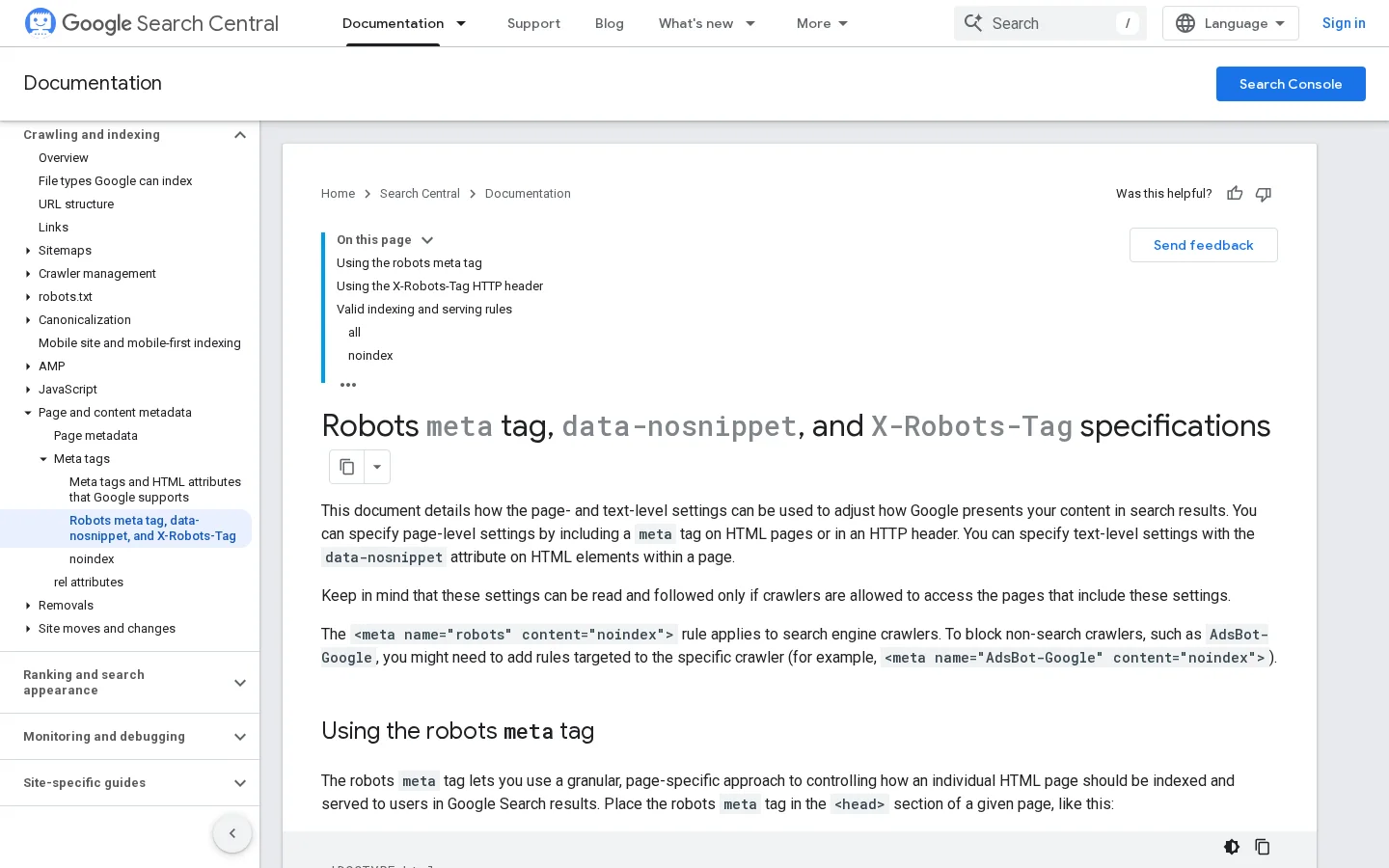
The two values you will use most often are noindex and nofollow. Read the guide to nofollow links before you put nofollow on a large group of pages.
Replace robots with the name of one crawler. Google recognizes two names: googlebot for web results and googlebot-news for news results. This example hides the text snippet for the page in web results only:
<meta name="googlebot" content="nosnippet">Targeting one crawler is useful when a rule should apply to one search engine only. Keep the set of tags short. A page with many rules for many crawlers is hard to check, and a mistake in one rule is easy to miss.
The meta tag belongs in an HTML page. For files that are not HTML, such as PDFs or images, send the same rules in an HTTP header called X-Robots-Tag. Your server sends this header with the file itself. Google says that when rules conflict, "the more restrictive rule applies." Two examples:
X-Robots-Tag: noindex
X-Robots-Tag: otherbot: noindex, nofollowThey do different jobs. A robots meta tag sits on one page and controls whether that page can appear in results and whether its links are followed. Robots.txt is a separate text file that asks crawlers which paths they may request. It controls crawling, not indexing. If you are new to it, start with the robots.txt basics.
Google says that a robots.txt file is "used primarily to manage crawler traffic to your site." A page blocked this way "can still appear in search results, but the search result won't have a description." To keep a URL out of Google Search, Google recommends the noindex meta tag or response header, or password protection.
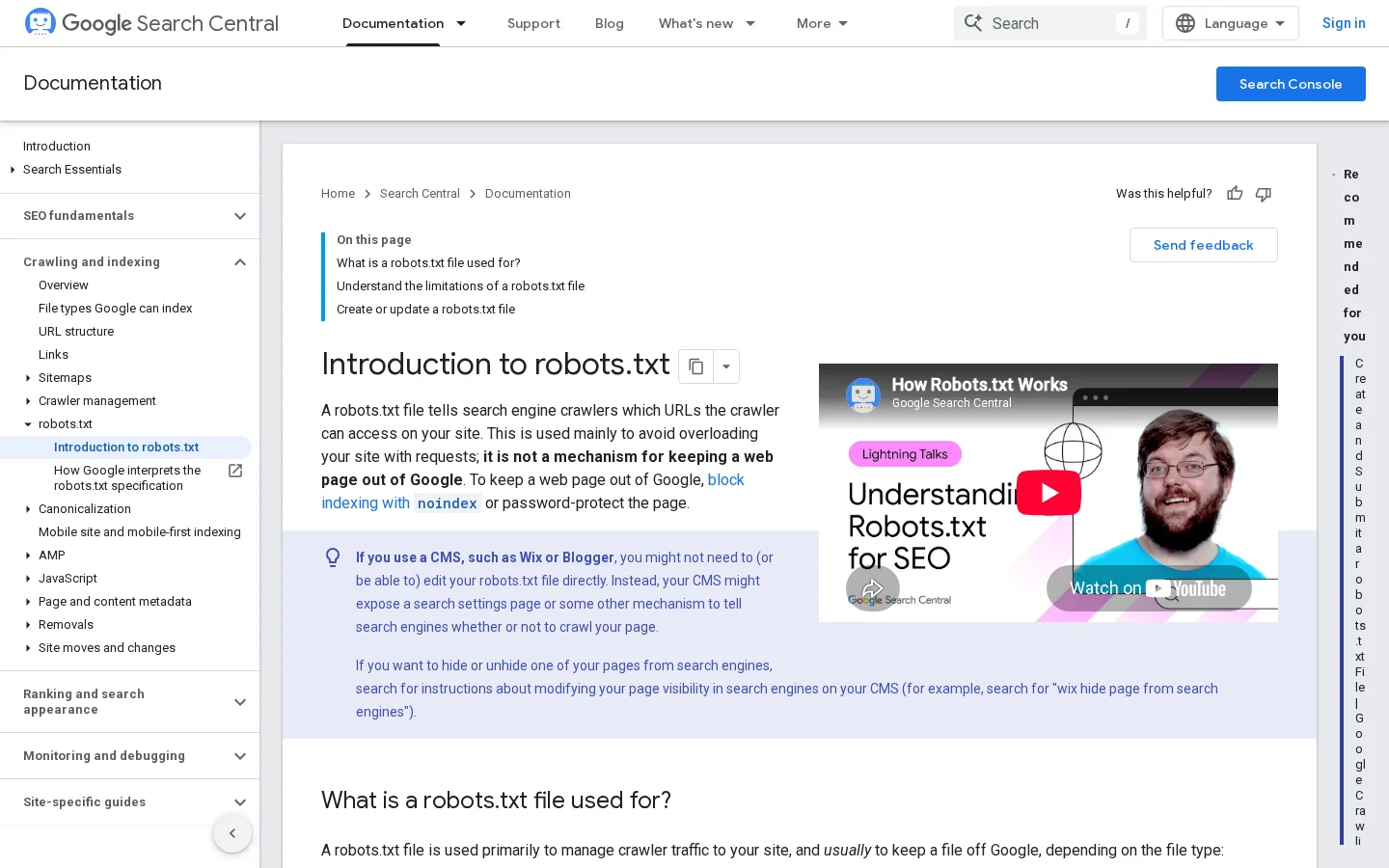
Robots.txt is not a security tool either. The IETF standard RFC 9309 says its rules "are not a form of access authorization," and that the protocol "is not a substitute for valid content security measures." A path listed in the file is also visible to anyone who reads the file. Do not rely on robots.txt to hide private content.
Do not confuse the robots meta tag with the canonical tag. The canonical tag points to the main version of a page. The robots meta tag controls indexing and display.
Google reads the robots meta tag only when it crawls the page. If robots.txt blocks crawling, Google never sees the tag. Google's documentation says that for these rules to be seen, "the URLs containing those rules cannot be disallowed from crawling." A page you want to hide with noindex must therefore stay open to crawling.
Use the free Robots.txt Checker to confirm that the file does not block the page. The same tool checks the file's syntax and whether AI crawlers can access your site, which matters for AI crawlers too.
Open the page, view its source, and search for robots inside the head section. Compare the values with the table above. Then test the address with the free Google indexability checker, which shows whether Google can index the page.
Tip
Change one page first, check it, and only then apply the same rule to a group of pages.
These are the four mistakes to check first.
This is a noindex value that was added for testing or for a staging site and never removed. To spot it, check whether the page is missing from Google results and whether its source still contains noindex. To fix it, delete the tag and ask Google to crawl the page again. Our guide to the Excluded by noindex tag status explains what Google shows in that case.
This is a page that robots.txt disallows and that also carries a noindex tag. You spot it when the URL appears in results without a description, or when the noindex tag never seems to work. To fix it, allow crawling of the page in robots.txt so Google can read the tag, then wait for Google to crawl the page again.
This is a meta robots tag placed in the body of the page, or a value written wrong. To spot it, view the source and search for robots. If the tag sits outside the head section, or the value is not on the list above, do not expect it to work. To fix it, move the tag into the head section and copy a value from the table.
This is a nofollow value on a page of your own site, so Google does not follow the links from that page to your other pages. To spot it, check the source of the pages you want to rank for nofollow. To fix it, remove the value, or keep nofollow only on pages whose links you do not want followed. The meta tags you use on the rest of the site should be checked the same way.
The tag decides whether a page can appear in Google Search. A page you want to rank must not carry noindex. A page you want to keep out of results needs the tag, or a password, and must stay open in robots.txt so Google can read the tag.
For GEO, the same question applies to AI crawlers, which also read your pages. Google documents its rules for Google Search. Other crawlers may read the tag differently, so check their documentation before you rely on it. To see how AI bots read a site, start with the guide to AI crawlers and our article on robots.txt for AI crawlers.
The robots meta tag is a short line in the head section of a page. Use noindex to keep a page out of results, nofollow to stop Google from following its links, and keep the page open in robots.txt so Google can read the tag. Check the source after every change.
Sources
Place it inside the head section of the HTML page. Use name="robots" for all crawlers, or name one crawler such as googlebot to target it alone.
It keeps the page out of Google Search results. Google can only see the tag if robots.txt lets it crawl the page, so the page must stay open to crawling.
No. Robots.txt asks crawlers to skip paths and controls crawling. The meta tag sits on the page and controls indexing and display. Blocking a page in robots.txt does not keep its URL out of results.
 “I tested Sorank on a real client site and it's insane. It does everything an agency would bill you $1500 a month for. It's going into production on that client now.”

 Guillaume Guersanguersanguillaume.com“We are an Ads agency and we wanted to get our SEO back on track once and for all. Sorank gave us a clear view of our site, helped us prioritize optimizations, and properly structure our content. The tool is easy to use, well designed for a team, and very practical for centralizing tracking without having to juggle multiple platforms. A very solid foundation to start fresh with our SEO.”
 Gaspard MadouiAds Agency
 “I just let the Sorank software do its thing, and now my DR is 25 and my page is ranking higher.”
 Lucas Flandrefoundertrace.fr“I specialized in GEO thanks to Sorank. The GEO Leaderboard allows me to show my clients their position vs competitors on ChatGPT. It’s a real commercial differentiator.”
 MélanieSEO Freelance“Great service, works well for our website and helps us understand how to improve it to rank better on Google and elsewhere. Congrats, keep going, I recommend it.”
 Hugo T.E-commerce merchant