
Preferences
Privacy is important to us, so you have the option of disabling certain types of storage that may not be necessary for the basic functioning of the website. Blocking categories may impact your experience on the website. More information
Privacy is important to us, so you have the option of disabling certain types of storage that may not be necessary for the basic functioning of the website. Blocking categories may impact your experience on the website. More information

Progressive web apps (PWAs) are websites that install like apps. Learn what makes a PWA installable and how to keep its pages crawlable for SEO.







Founder Sorank, 7+ years in SEO.
Summary
Progressive web apps (PWAs) are websites built with web technologies that can be installed on a device and used like native apps. They run from a single codebase, need a web app manifest and HTTPS to be installable, and stay crawlable and indexable like any other site.
Want to go further? Ask
Progressive web apps, or PWAs, are web applications that offer an experience close to a platform-specific app. Like a website, a PWA runs on many platforms from one codebase. Like a native app, it can be installed on the home screen, keep working offline, and connect with the device. The part that matters most for marketing is that a PWA stays a website at its core, so search engines can still crawl and index its public pages. That is the key difference from a native app that lives only inside an app store.
MDN Web Docs, the reference maintained by Mozilla, describes a progressive web app as an app built with web platform technologies that provides a user experience like that of a platform-specific app. The app is delivered through the browser, so it has a real URL, can be shared and bookmarked, and can appear in search results. Installation is an added layer on top of that web foundation, not a separate product.
For a web app to be installable, it must include a web app manifest and be served over HTTPS. The manifest is a JSON file that tells the browser how the app should behave once installed, including its name, icons, start URL and display mode. MDN's guide to making PWAs installable lists these requirements, as shown in the capture below.
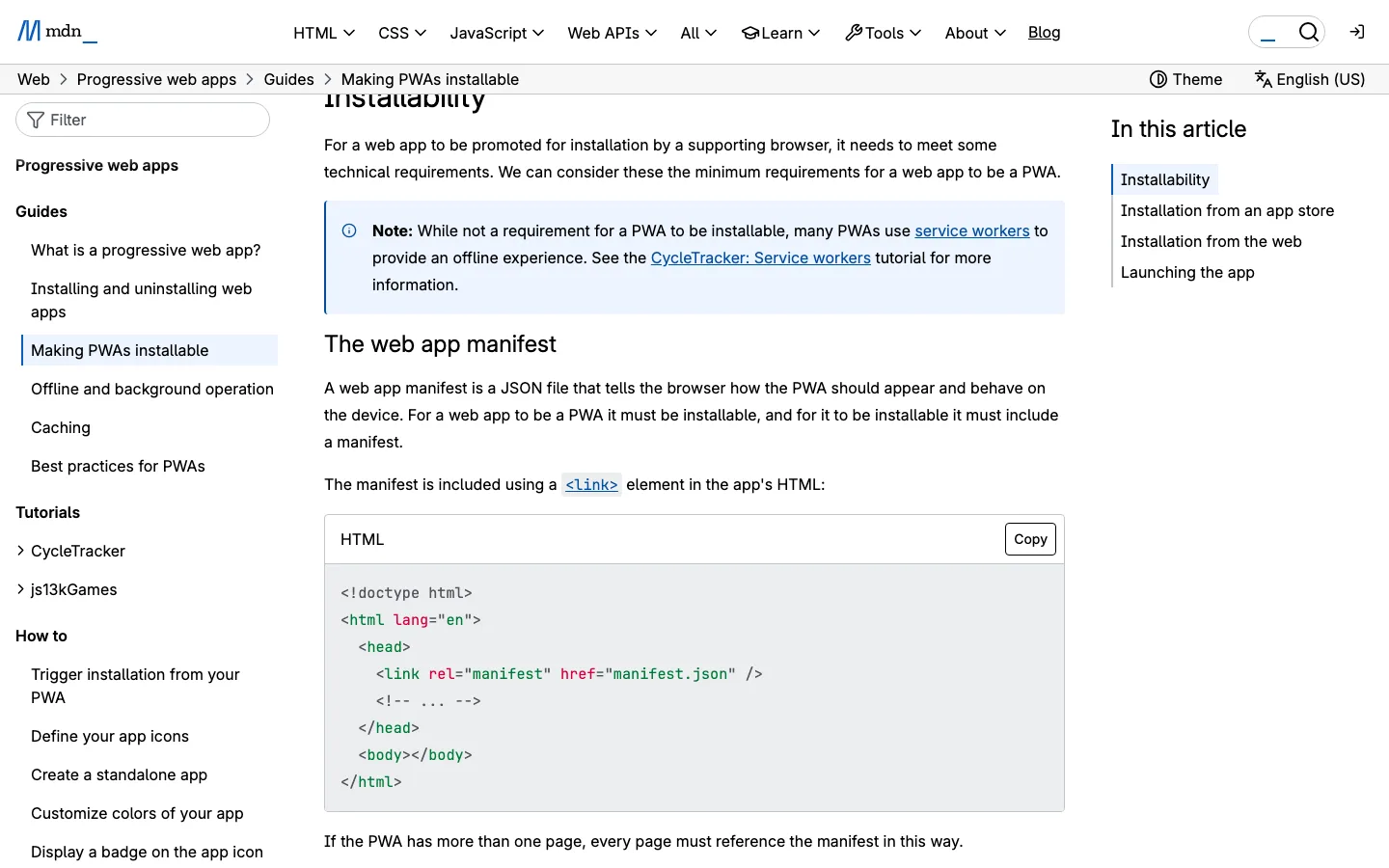
Chromium-based browsers, including Google Chrome and Microsoft Edge, expect the manifest to include a 192x192 pixel icon and a 512x512 pixel icon. A minimal manifest looks like this:
{
  "name": "Example Store",
  "short_name": "Store",
  "start_url": "/",
  "display": "standalone",
  "icons": [
    { "src": "/icon-192.png", "sizes": "192x192", "type": "image/png" },
    { "src": "/icon-512.png", "sizes": "512x512", "type": "image/png" }
  ]
}
HTTPS is required for installability, with an exception for local development on localhost. A service worker is not required for installability, although most PWAs use one to deliver an offline experience.
A service worker is a JavaScript file that the browser runs between the page and the network. Once it is registered, it can answer requests from a cache, which lets the app load quickly and keep working on a weak connection. Offline support is what gives a PWA much of its app-like feel, but it does not change how search engines read the content, which is why the rest of this page focuses on crawling and rendering. Offline caching is a user benefit in its own right, so it is worth having even though installation does not require it. For how visitors judge the result, see page experience.
PWAs are good for SEO when they are built correctly. Because a PWA stays a website, its public pages can be crawled and indexed like any other site. The risk comes from rendering. Google's JavaScript SEO basics explain that a headless Chromium renders the page and executes its JavaScript before Google indexes the rendered HTML. The same guide still recommends server-side rendering or pre-rendering for important pages, because it makes the site faster for users and crawlers, and because not all bots can run JavaScript.
Keeping every important page reachable is the core of crawlability, and a PWA that hides content behind client-side scripts makes that harder to verify.
Give every meaningful view its own real URL. Google's guide advises single-page applications with client-side routing to use the History API for navigation between views, and it warns against using fragments to load different content, because Googlebot needs to extract the URLs. A PWA that shows everything under one address gives search engines a single page to index, and each view that lacks a URL is a view that cannot rank on its own. Those URL choices are also part of a sound technical SEO setup, which matters as much for a PWA as for any other site.
Compared with a native app, a PWA is usually cheaper to build and maintain because it runs from a single codebase, and it avoids the delays of app store review. Native apps still reach further into the device, but for many products a PWA closes most of that gap. Compared with a plain website, a PWA adds installability and offline behavior that a standard page cannot offer.
The trade-off is discoverability. A native app is found through the store, while a PWA can be found through search and also installed from the browser. For a product that needs both organic traffic and a presence on the home screen, that combination is the main argument for a PWA.
PWAs suit ecommerce stores, news sites, travel tools and software dashboards, especially where users have unreliable networks or older devices, since caching and light loading keep the experience usable. If you run a PWA and want to confirm that a key page can be indexed, Sorank's free indexability checker tests the URL directly. For a JavaScript-heavy build, our guide to SEO for React apps covers the rendering choices in more depth.
Unlike native apps locked inside stores, a PWA can be found in search and can also sit on a user's home screen, which captures demand from both directions. AI assistants work in a similar way: they can only cite content they can crawl and parse, so a PWA that serves readable HTML for its key content has a better chance of appearing in AI answers. Treat the PWA as a website first, and the search and AI benefits follow.
A progressive web app combines the reach of the web with an app-like experience. Built from one codebase, it becomes installable with a manifest served over HTTPS, and it stays discoverable because it remains a website. To keep that advantage, render your content so crawlers can read it, give every view a real URL, and check that key pages are indexable before you rely on the app for traffic.
Sources
PWAs are good for SEO when built correctly, because they stay websites at their core and their public pages can be crawled and indexed like any site, unlike native apps locked in a store. The main risk is client-side rendering hiding content from crawlers. Use server-side rendering or pre-rendering for important pages, give each view a real URL, and confirm key pages are indexable.
To be installable, a web app needs a web app manifest and must be served over HTTPS (localhost is allowed for development). The manifest holds the name, icons including 192x192 and 512x512 pixel sizes, the start URL and the display mode. A service worker is not required for installability, but most PWAs use one to support offline use.
A PWA runs from a single web codebase across platforms and is discoverable in search, while a native app is platform-specific and distributed through an app store. PWAs usually cost less to build and maintain and avoid store review delays. Native apps still reach deeper into the device, but PWAs close much of that gap for most products.
 “I tested Sorank on a real client site and it's insane. It does everything an agency would bill you $1500 a month for. It's going into production on that client now.”

 Guillaume Guersanguersanguillaume.com“We are an Ads agency and we wanted to get our SEO back on track once and for all. Sorank gave us a clear view of our site, helped us prioritize optimizations, and properly structure our content. The tool is easy to use, well designed for a team, and very practical for centralizing tracking without having to juggle multiple platforms. A very solid foundation to start fresh with our SEO.”
 Gaspard MadouiAds Agency
 “I just let the Sorank software do its thing, and now my DR is 25 and my page is ranking higher.”
 Lucas Flandrefoundertrace.fr“I specialized in GEO thanks to Sorank. The GEO Leaderboard allows me to show my clients their position vs competitors on ChatGPT. It’s a real commercial differentiator.”
 MélanieSEO Freelance“Great service, works well for our website and helps us understand how to improve it to rank better on Google and elsewhere. Congrats, keep going, I recommend it.”
 Hugo T.E-commerce merchant



















