Preferences
Privacy is important to us, so you have the option of disabling certain types of storage that may not be necessary for the basic functioning of the website. Blocking categories may impact your experience on the website. More information
Privacy is important to us, so you have the option of disabling certain types of storage that may not be necessary for the basic functioning of the website. Blocking categories may impact your experience on the website. More information

A lead is a contact who showed interest and left their details. Learn what a lead means, the MQL and SQL stages, and how to qualify leads.








Founder Sorank, 7+ years in SEO.
Summary
A lead is a contact who has shown interest in your business and left their contact details, such as an email address or a phone number. Marketing teams track leads through stages, from a Marketing Qualified Lead (MQL) to a Sales Qualified Lead (SQL), before a sales conversation starts.
Want to go further? Ask
A lead is the first step in turning a stranger into a customer. The person has done more than visit your site. They have given you a way to reach them again. From there, you can send them useful content, learn what they need, and decide when a sales call makes sense.
Each word describes a different level of interest. Mixing them up leads to bad reports and wasted sales time.
The key difference is the contact details. Without them, you cannot follow up. The HubSpot help center defines a lead as "a contact or company that has converted on your website." In other words, a visitor took an action on your site and became known to you.
Marketing and sales teams use two labels to sort leads. They decide who gets a sales call now, and who needs more time first.
A Marketing Qualified Lead (MQL) is a contact that the marketing team has judged ready for the sales team. The HubSpot help center puts it this way: "a contact or company that your marketing team has qualified as ready for the sales team."
A Sales Qualified Lead (SQL) is a contact that the sales team has checked and sees as a potential customer. The same help center says: "a contact or company that your sales team has qualified as a potential customer."
The handoff from MQL to SQL is where teams often clash. Marketing thinks a lead is ready, and sales thinks it is not. The fix is to write the criteria down before you start, and to review them together every month.
Here is how the stages fit together.
| Stage | Who qualifies it | What it means |
|---|---|---|
| Lead | Your website | The contact left their details. |
| MQL | Marketing team | The contact fits your target and shows interest. |
| SQL | Sales team | Sales sees a real chance to sell. |
| Customer | Payment | The contact has paid. |
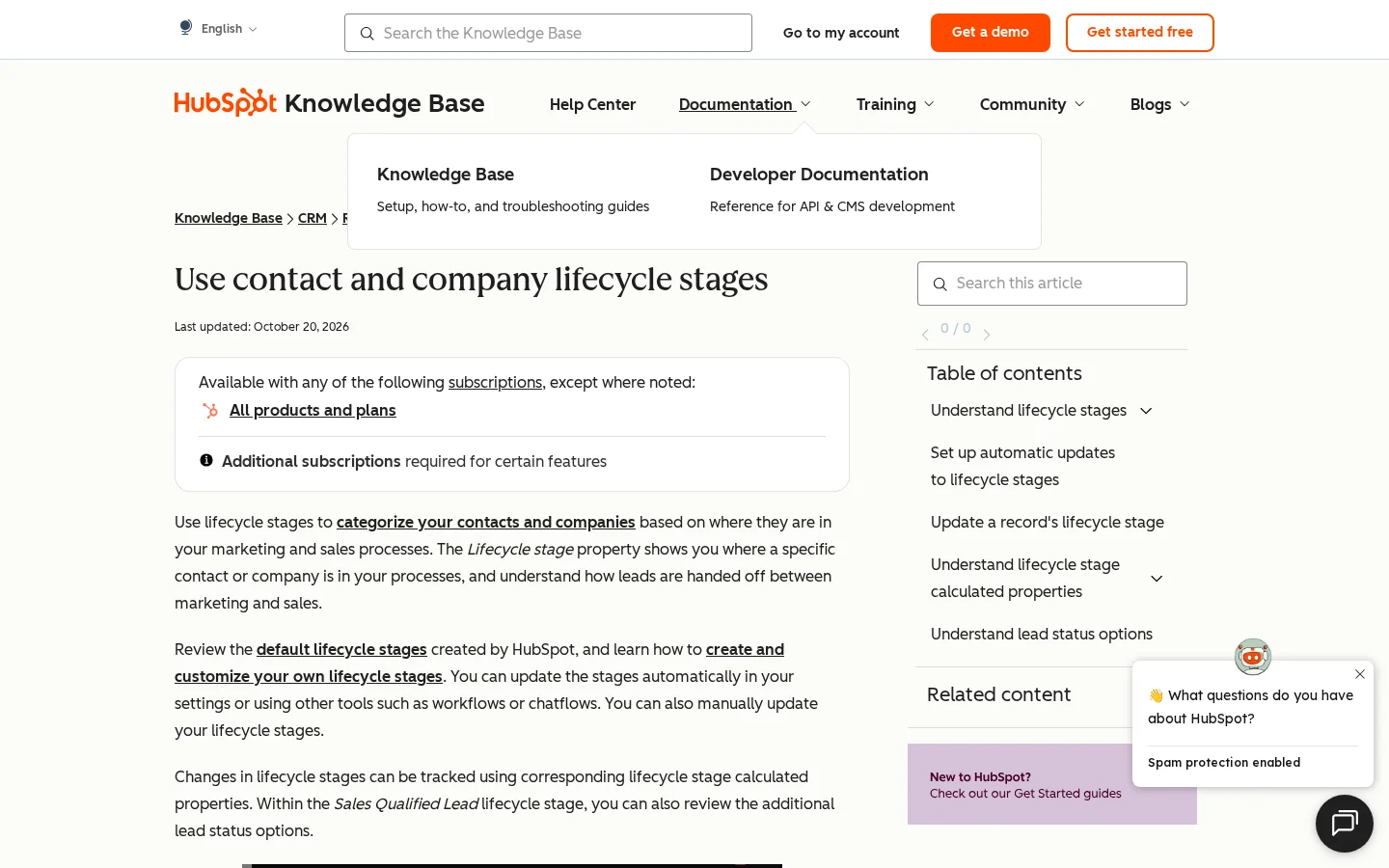
HubSpot lists its default stages in this order: Subscriber, Lead, MQL, SQL, Opportunity and Customer. The help page below shows that sequence. To see how these stages fit the whole customer journey, read our lifecycle marketing entry.
To qualify a lead, check two things: fit and intent.
Fit asks whether the contact matches your ideal customer profile (ICP). Salesforce says an MQL meets the ICP requirements, based on things like company size, industry, region and job seniority.
Intent asks whether the contact wants to buy now. Salesforce describes an SQL as a prospect that has progressed to show clear buying intent. In business software, this often means booking a demo or starting a free trial.
Many teams turn these checks into a lead score. HubSpot's blog defines a lead score as "a numerical value that indicates how closely a lead matches the ideal customer profile." Points for fit come from profile data. Points for intent come from actions, such as a pricing page visit or a demo request.
Lead score = fit points + intent points
Fit points: company size, industry, job title
Intent points: pricing page visit, demo request, email clickTo get more inbound leads, offer something useful in return. Our lead magnet guide shows how to build that offer so it actually converts.
Some leads come from places you cannot track, such as a word of mouth referral or a podcast mention. This is the dark funnel, and it is why a lead count alone does not tell the full story.
If you sell to companies, the rules change. Several people in a buying team may need to agree before a contact counts as a qualified lead. The B2B marketing entry explains how those buying teams work.
Tip
Write the MQL and SQL rules in one shared document. Use the same labels in your customer relationship management (CRM) tool, so a lead means the same thing to every person on the team.
Track the lead conversion rate: the share of visitors who become leads. Use this formula.
Lead conversion rate = (leads / visitors) x 100Example
Imagine 100 visitors, and 5 of them leave their email address. Your lead conversion rate is 5%.
To run the numbers on your own pages, use Sorank's free Conversion Rate Calculator. It shows your rate and the revenue it could bring.
To raise the rate, test changes one at a time, such as a shorter form or a clearer offer. The conversion rate optimization entry lists the main levers.
Counting every sign-up as a lead. Some sign-ups never buy, such as people who only wanted a free file. You spot it when sales says the leads never answer. Fix it by adding a fit question to the form, such as company size or job title.
Having no shared MQL rule. Marketing and sales each use their own idea of a ready lead. You spot it when sales rejects most of the leads marketing sends. Fix it by writing the criteria down and reviewing them with both teams every month.
Letting leads go cold. A lead gets one email and then nothing. You spot it when the lead list shows no activity for weeks. Fix it by setting a follow-up date for each lead, and sending useful content until they are ready.
Dropping disqualified leads without a reason. The same person returns later with a new form, and nobody remembers the first contact. You spot it when duplicate records appear in your customer relationship management (CRM) tool. Fix it by noting why a lead was disqualified, so you can recycle it when their needs change.
For search engine optimization (SEO), a lead is the point where search traffic becomes a business result. A page that ranks but never gets a lead brings visits, not revenue. Give every page a clear next step, such as a demo, a trial or a download. Our SEO lead generation guide covers how to build that path.
For generative engine optimization (GEO), a lead starts with being named in AI answers. Put the direct answer first, as this page does, so an AI model can quote it without digging. Sorank's marketing teams page is built for teams that want traffic from search and AI to grow on autopilot.
A lead is a contact who showed interest and left their details. Sort leads into MQL and SQL, write the rules down, and follow up before they go cold. Each lead you keep is a chance to earn a customer later.
Sources
An MQL is a contact that the marketing team has judged ready for the sales team. An SQL is a contact that the sales team has checked and sees as a potential customer. The MQL comes first, and the SQL is the handoff to a salesperson.
No. A lead has shown interest and shared contact details, but has not bought yet. A customer has paid you. Many leads never become customers, so track both numbers separately.
Check how closely the lead matches your ideal customer profile, such as company size, industry and job role. Then check whether they show buying intent, such as visiting your pricing page or asking for a demo.
 “I tested Sorank on a real client site and it's insane. It does everything an agency would bill you $1500 a month for. It's going into production on that client now.”

 Guillaume Guersanguersanguillaume.com“We are an Ads agency and we wanted to get our SEO back on track once and for all. Sorank gave us a clear view of our site, helped us prioritize optimizations, and properly structure our content. The tool is easy to use, well designed for a team, and very practical for centralizing tracking without having to juggle multiple platforms. A very solid foundation to start fresh with our SEO.”
 Gaspard MadouiAds Agency
 “I just let the Sorank software do its thing, and now my DR is 25 and my page is ranking higher.”
 Lucas Flandrefoundertrace.fr“I specialized in GEO thanks to Sorank. The GEO Leaderboard allows me to show my clients their position vs competitors on ChatGPT. It’s a real commercial differentiator.”
 MélanieSEO Freelance“Great service, works well for our website and helps us understand how to improve it to rank better on Google and elsewhere. Congrats, keep going, I recommend it.”
 Hugo T.E-commerce merchant