
Fix your whole site on autopilot
Fix everything on autopilot is the fastest way to bring your old articles up to date. One click, one confirmation, and Sorank fixes or rewrites every article that needs it, in the background.- Open Improvements in the main menu.
- Click Fix everything on autopilot.
- Check the summary: the articles to fix, the targeted fixes, the rewrites, and the AI credits needed compared with your balance.
- Confirm. You can close the page: Sorank keeps working and the table shows the progress page by page.
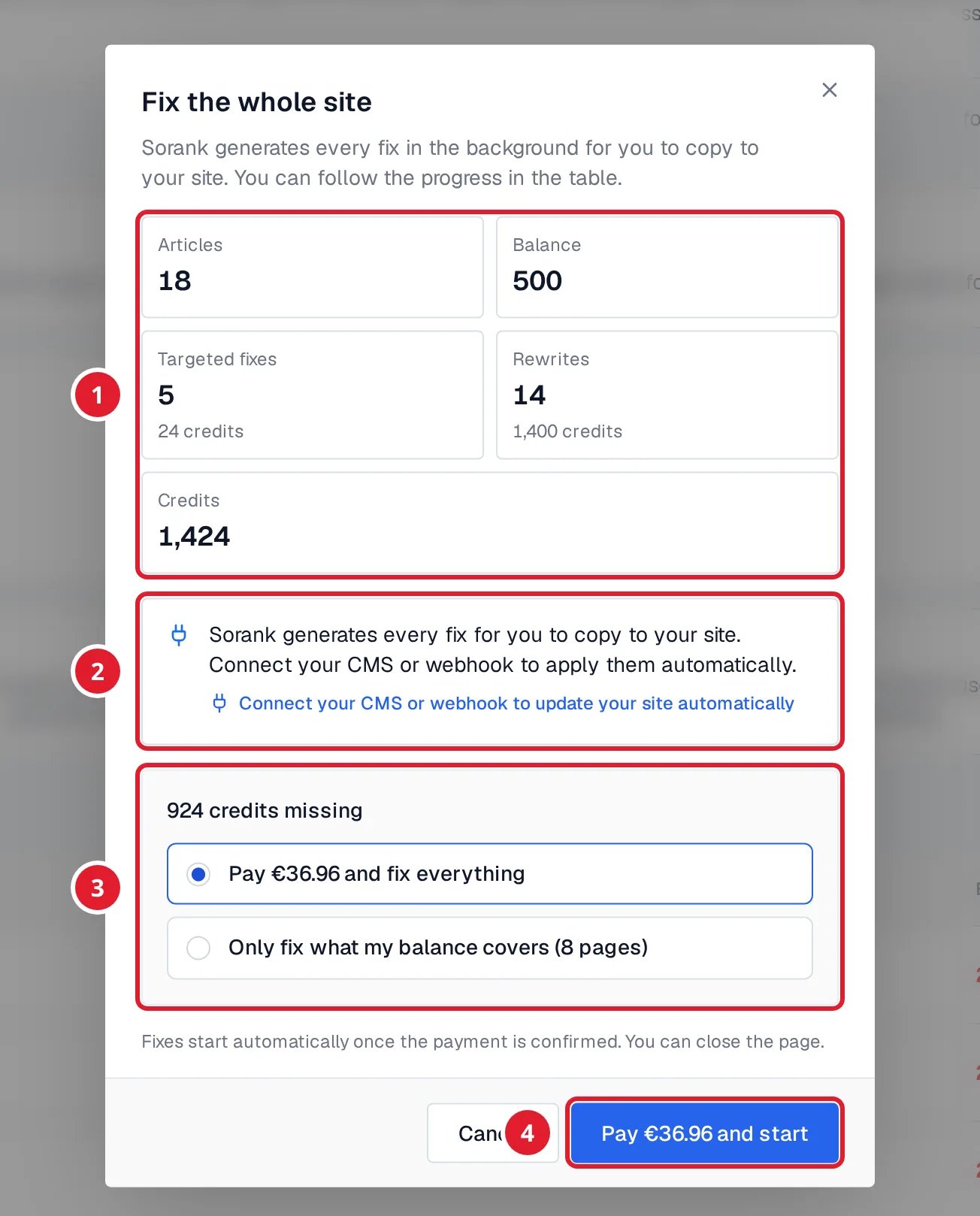
- The summary: articles, targeted fixes, rewrites and credits needed, next to your balance.
- Where the fixes go. With a connected CMS, they are applied to your site. Without one, Sorank prepares them for you to copy.
- When your balance is short: pay the difference and fix everything, or fix only what your balance covers.
- The button that starts the fixes.
- With a connected CMS, fixes and rewrites are published directly on your site. A rewrite replaces the whole article and keeps its URL. You can restore the original afterwards.
- Without a connected CMS or webhook, Sorank prepares every fix for you to copy to your site. Click Connect my CMS to let Sorank apply them for you.
- Fixes that can only be copied by hand are left for page-by-page work.
- A fix that could not run because your balance ran out is not charged.
How the audit works
Sorank runs a first audit when your site is set up. It reads the articles of your blog through your connected CMS when you have one, or visits your site the way a visitor would. Only blog articles are audited. Run a new audit when you want with Run a new audit. The number of audits depends on your plan. If your plan does not include the audit, the page offers to choose a plan. When Google Search Console is connected, Sorank uses your recent Google traffic. It protects the pages that already bring visitors and points out the ones that deserve a rewrite. Improvements covers the articles of your blog, not the other pages of your site. To check a product, service or landing page, use the free Sorank Chrome extension: it runs an SEO and GEO audit of the page you are viewing, one page at a time. Install it from the Chrome Web Store or learn more on the extension page.Read the dashboard
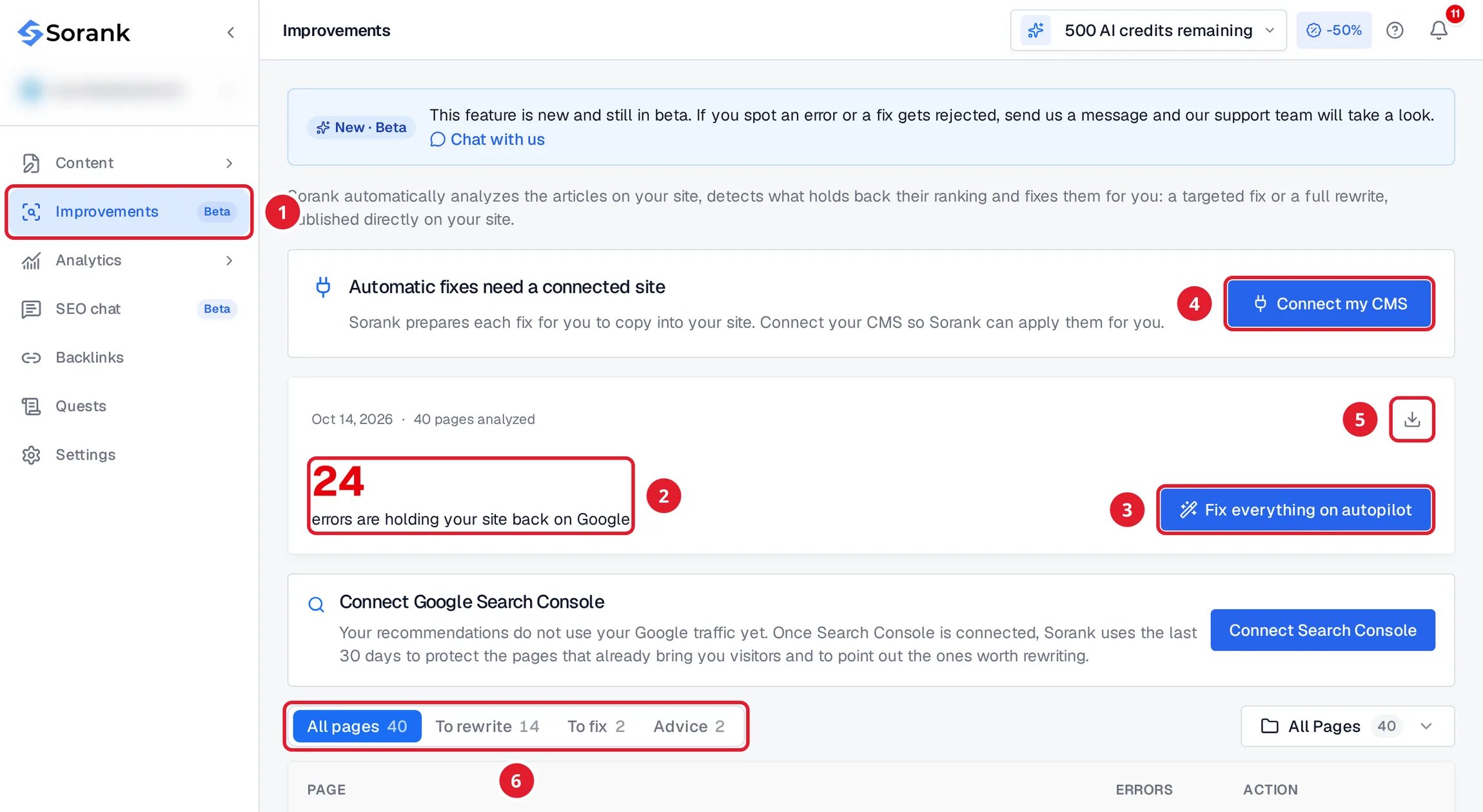
- Improvements in the main menu.
- The number of errors that hold your site back on Google.
- Fix everything on autopilot fixes the whole site.
- Connect my CMS lets Sorank apply the fixes to your site.
- Export errors downloads the errors of each page as CSV or Excel.
- The tabs that sort your pages.
The errors are grouped into Meta Tags, Content, Links, Images, Indexation and Structured data. Examples: a title that is too long, a missing meta description, too few internal links, broken links, images without alt text, heavy images, or an article missing its structured data.
Fix one page
- In the table, click the action of a page to open Fix this page.
- Choose the fixes, then check their cost in AI credits.
- Generate, review the preview, then click Apply to site.
For a full rewrite of a single page, the URL is kept and you review the article before it is published.
If you fixed a page yourself, click I fixed it to have Sorank check it again.