
העדפות
הפרטיות חשובה לנו, ולכן יש לך אפשרות להשבית סוגים מסוימים של אחסון שייתכן שאינם נחוצים לתפקוד הבסיסי של האתר. חסימת קטגוריות עלולה להשפיע על חווית השימוש שלך באתר. מידע נוסף

הפרטיות חשובה לנו, ולכן יש לך אפשרות להשבית סוגים מסוימים של אחסון שייתכן שאינם נחוצים לתפקוד הבסיסי של האתר. חסימת קטגוריות עלולה להשפיע על חווית השימוש שלך באתר. מידע נוסף
הבא את Google Search Console שלך לתוך Claude, ChatGPT, Cursor וכל לקוח MCP. אבחון SEO + נראות AI (GEO) חינם, ישירות בצ'אט שלך.
















Sorank חושף שרת MCP מרוחק כך שהעוזר האישי שלך מבוסס AI יכול לקרוא את נתוני Google Search Console שלך בשפה פשוטה: הישגים מהירים, מגמות ביצועים, סטטוס אינדוקס, מפות אתר, היסטוריה ארוכת טווח שנשמרת מעבר למגבלת 16 החודשים של גוגל, והשינויים הגדולים ביותר.
הוא לקריאה בלבד ומשתמש בחשבון הגוגל האישי שלך. Sorank לעולם לא משנה את האתר שלך או את חשבון הגוגל שלך.
כתובת URL של שרת MCP
https://mcp.sorank.com/functions/v1/mcp
כל לקוח למטה משתמש באותו תהליך. אתה מדביק את ה-URL פעם אחת; הלקוח פותח את הדפדפן שלך כדי להתחבר באמצעות גוגל ולהעניק גישת קריאה בלבד ל-Search Console. אין דבר נוסף להגדיר: אין מפתח API, אין מזהה לקוח, אין טוקן. השרת מטפל ברישום ובאימות באופן אוטומטי (OAuth 2.1 עם רישום לקוח דינמי).
דוגמאות לשאלות:
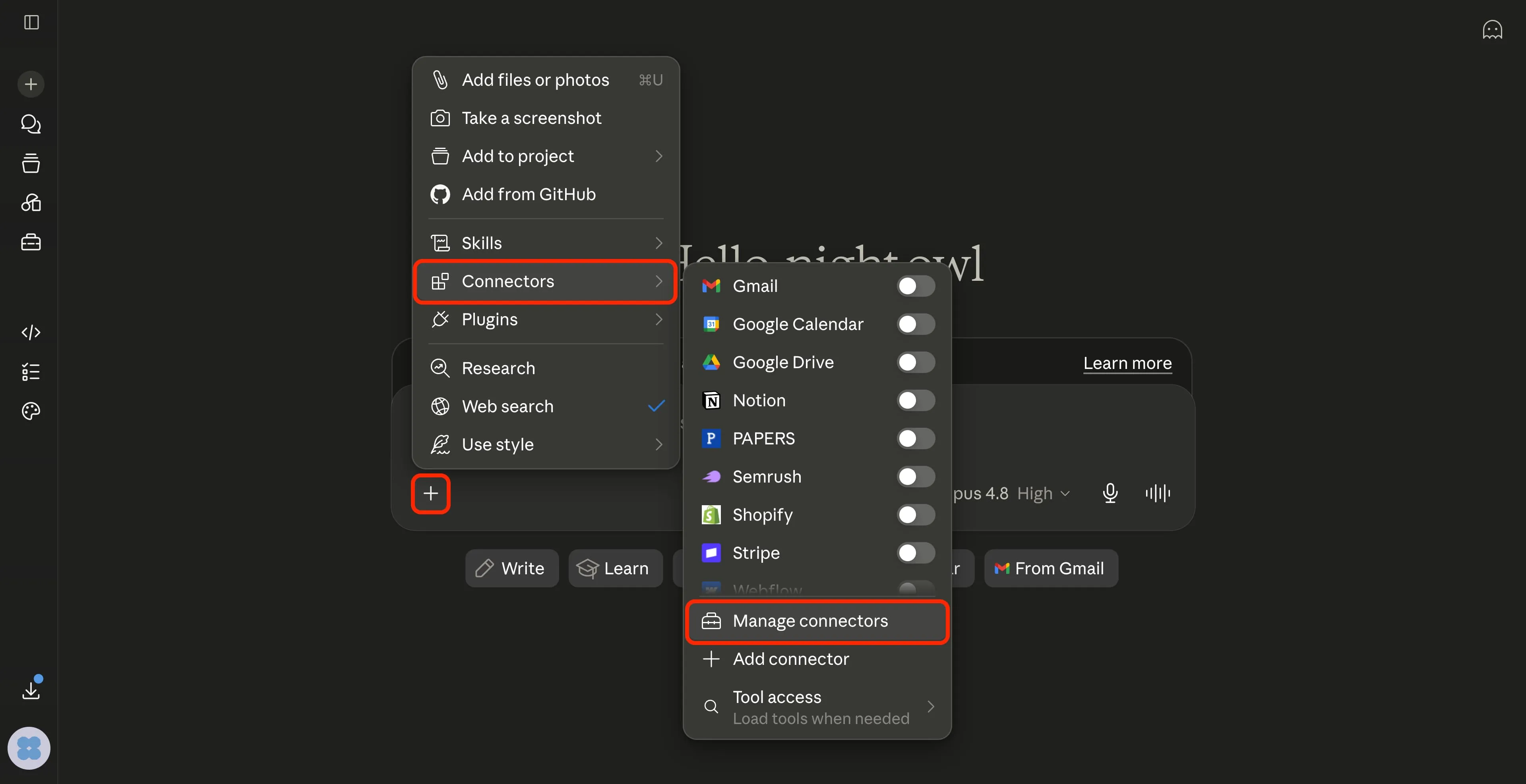
במסך הבית של Claude, לחץ/י על כפתור ה-+ בפינה השמאלית התחתונה של תיבת ההודעות. בתפריט, רחף/רחפי מעל מחברים, ולאחר מכן לחץ/י על ניהול מחברים בתחתית.
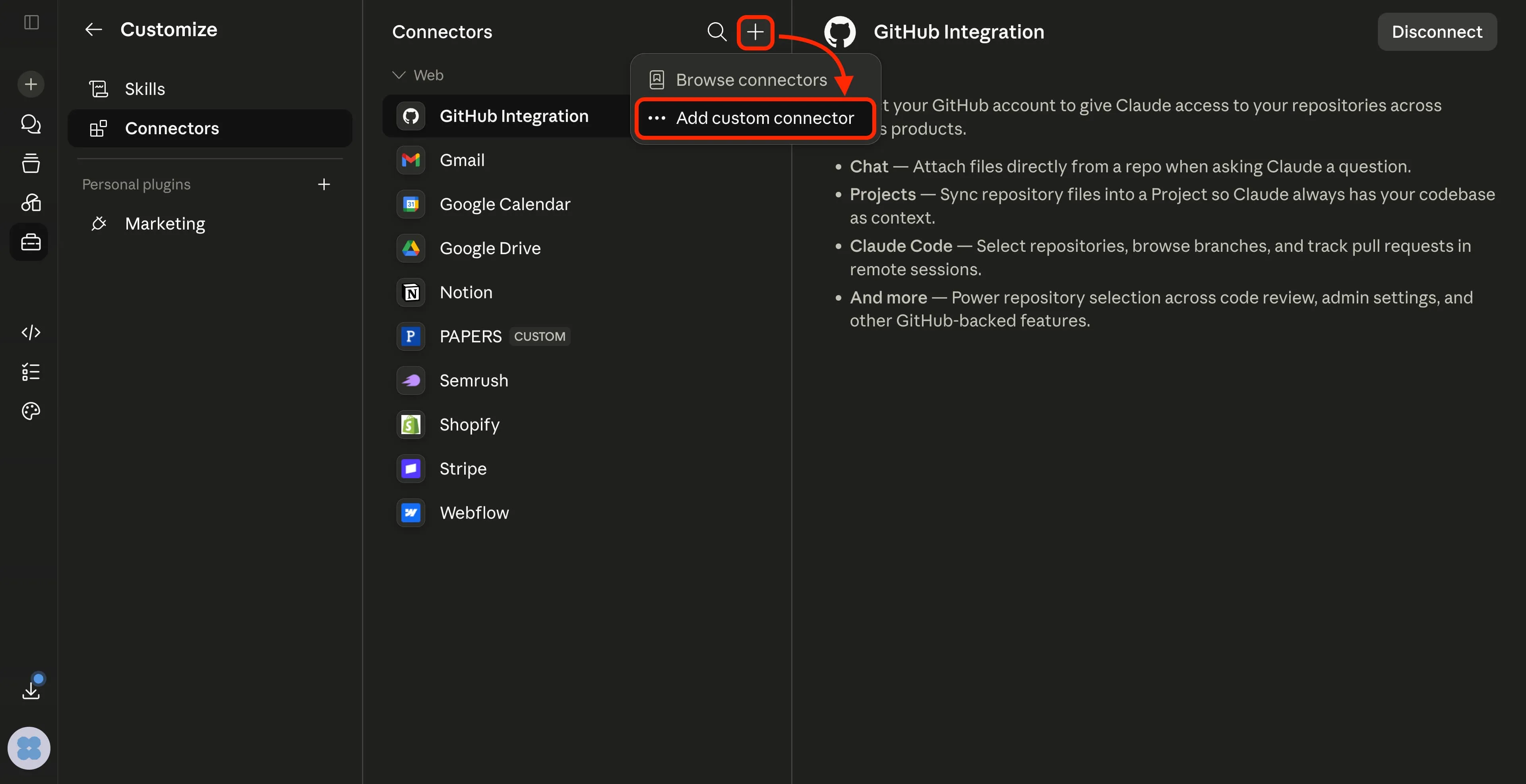
כעת אתה/את נמצא/ת ב-התאמה אישית ← מחברים. לחץ/י על ה-+ בפינה הימנית העליונה של רשימת המחברים, ולאחר מכן בחר/י הוסף מחבר מותאם אישית.
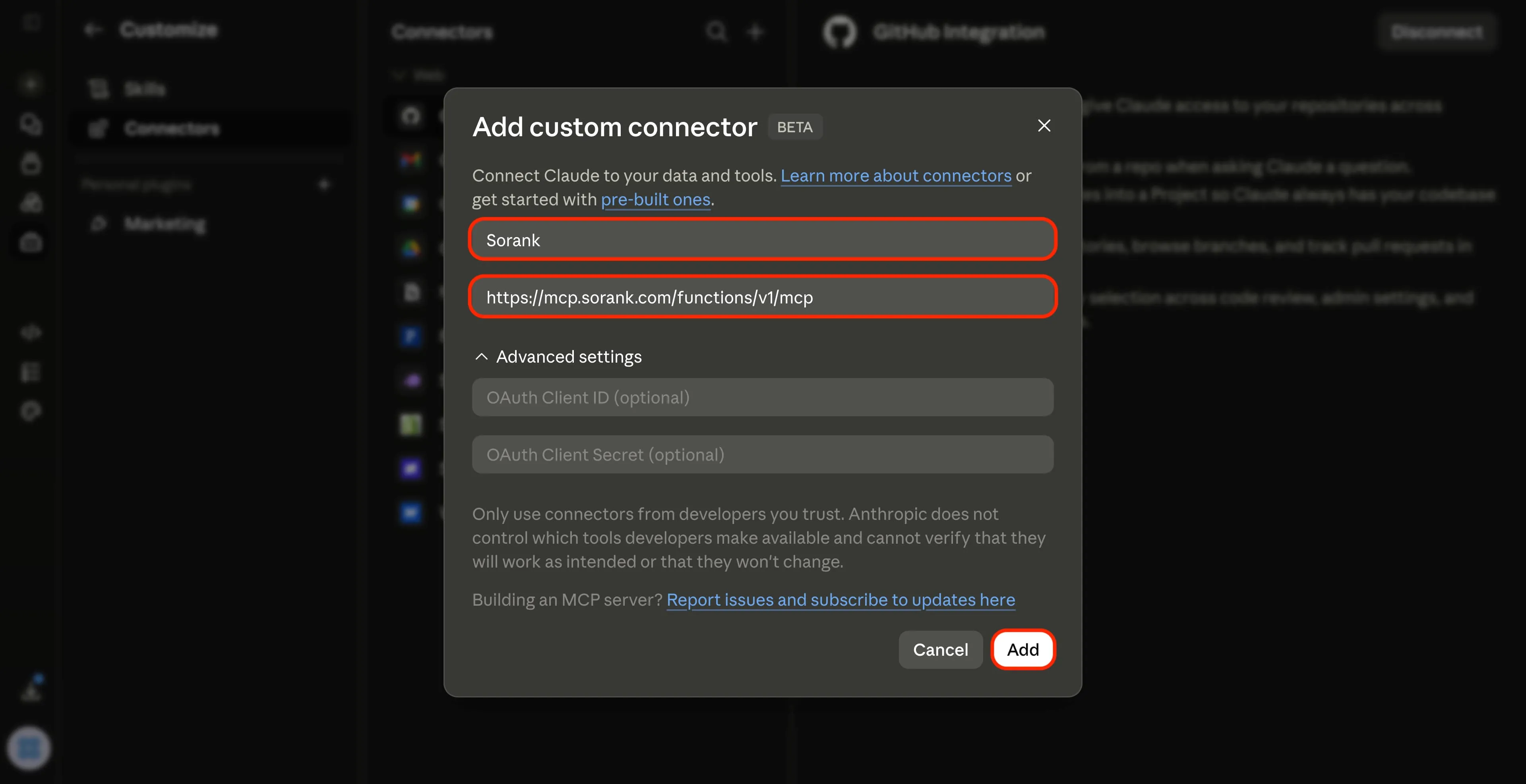
בתיבת הדו-שיח, מלא/י את הפרטים הבאים:
שם : Sorank
כתובת URL : https://mcp.sorank.com/functions/v1/mcp
השאר/י את מזהה לקוח / סוד OAuth ריק/ה.
לחץ/י על הוספה.
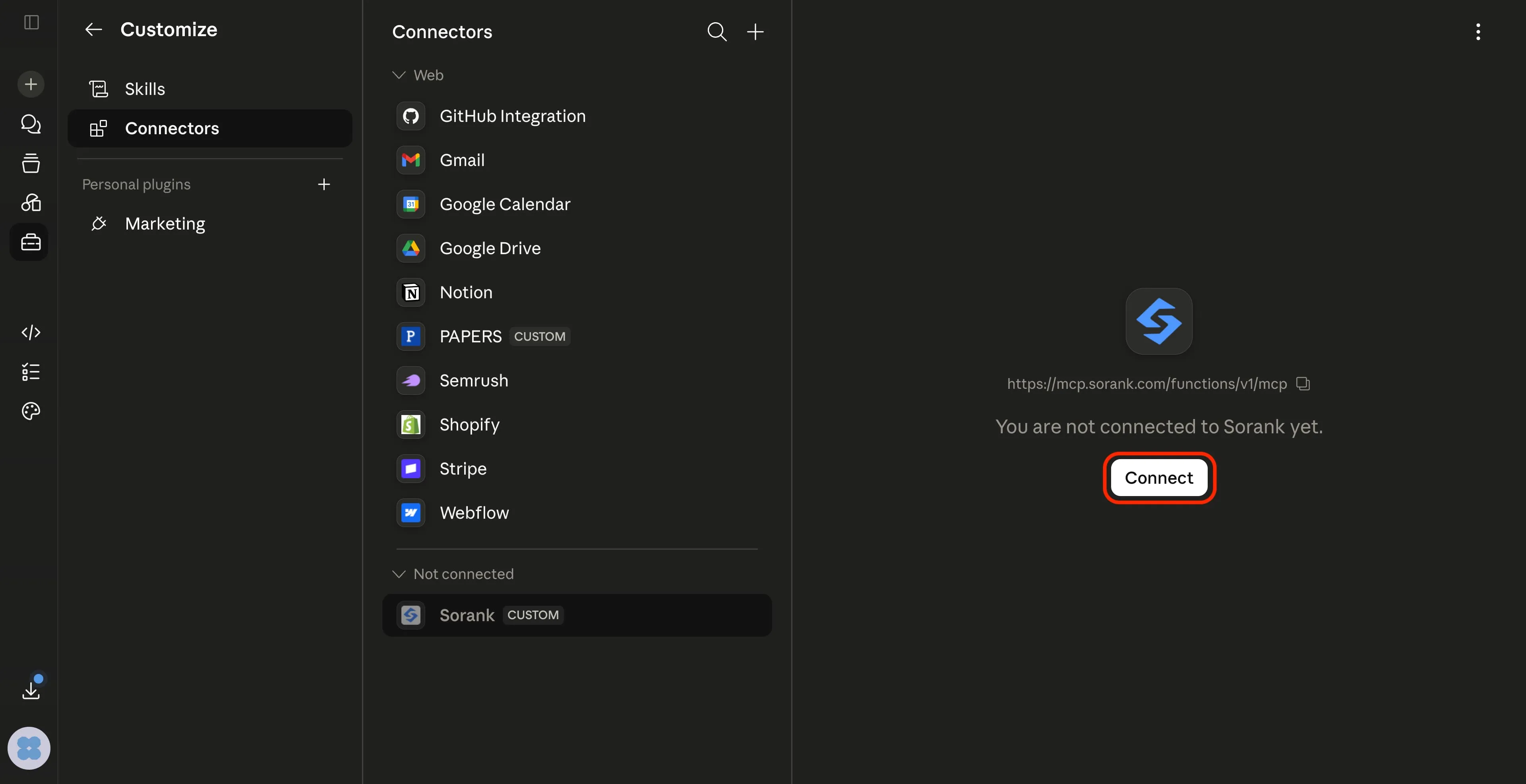
Sorank now appears under Not connected.
Select it and click Connect.
A Google window opens. Pick your account and approve read-only access to your Search Console.
(Read-only, Sorank never modifies your Search Console.)
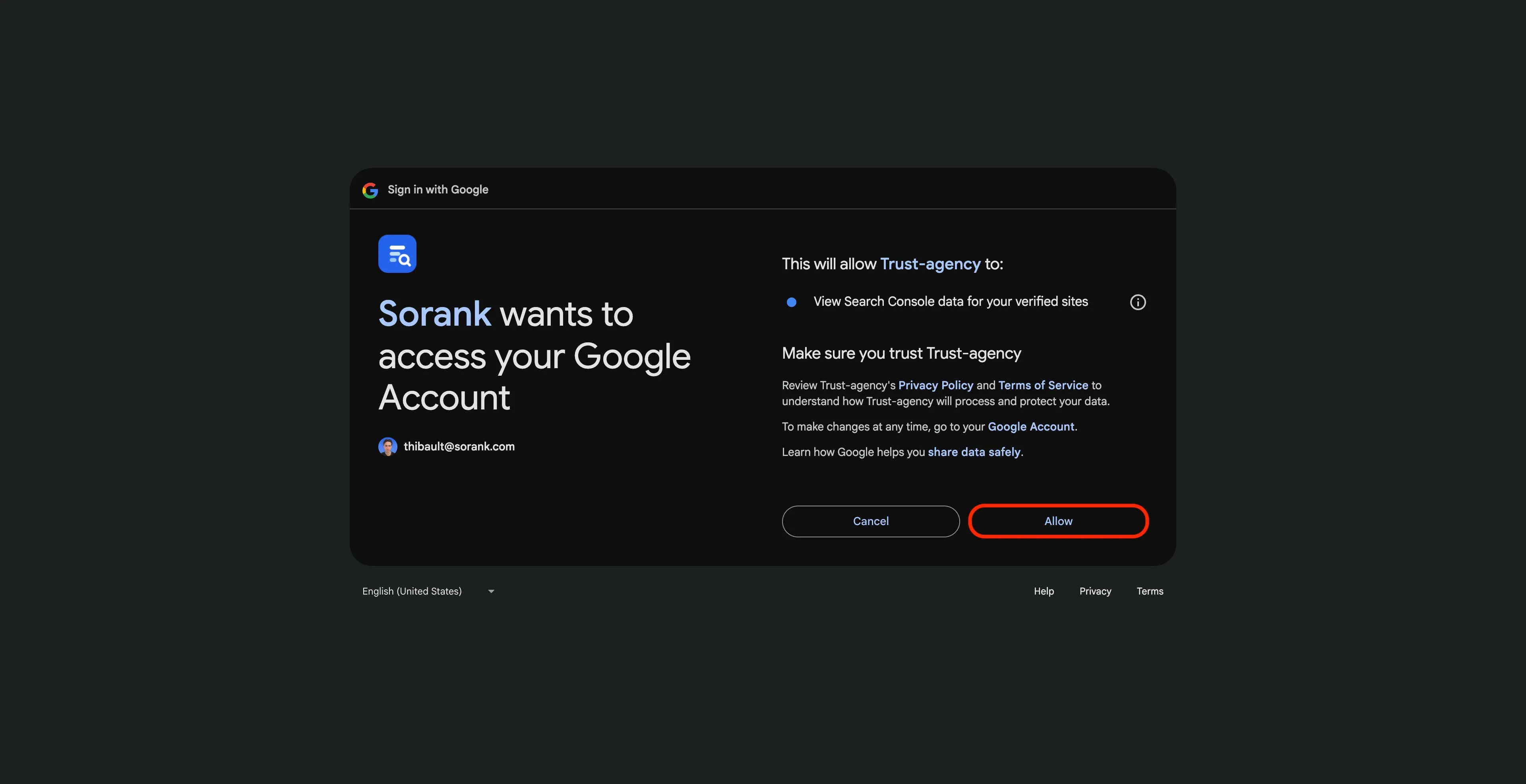
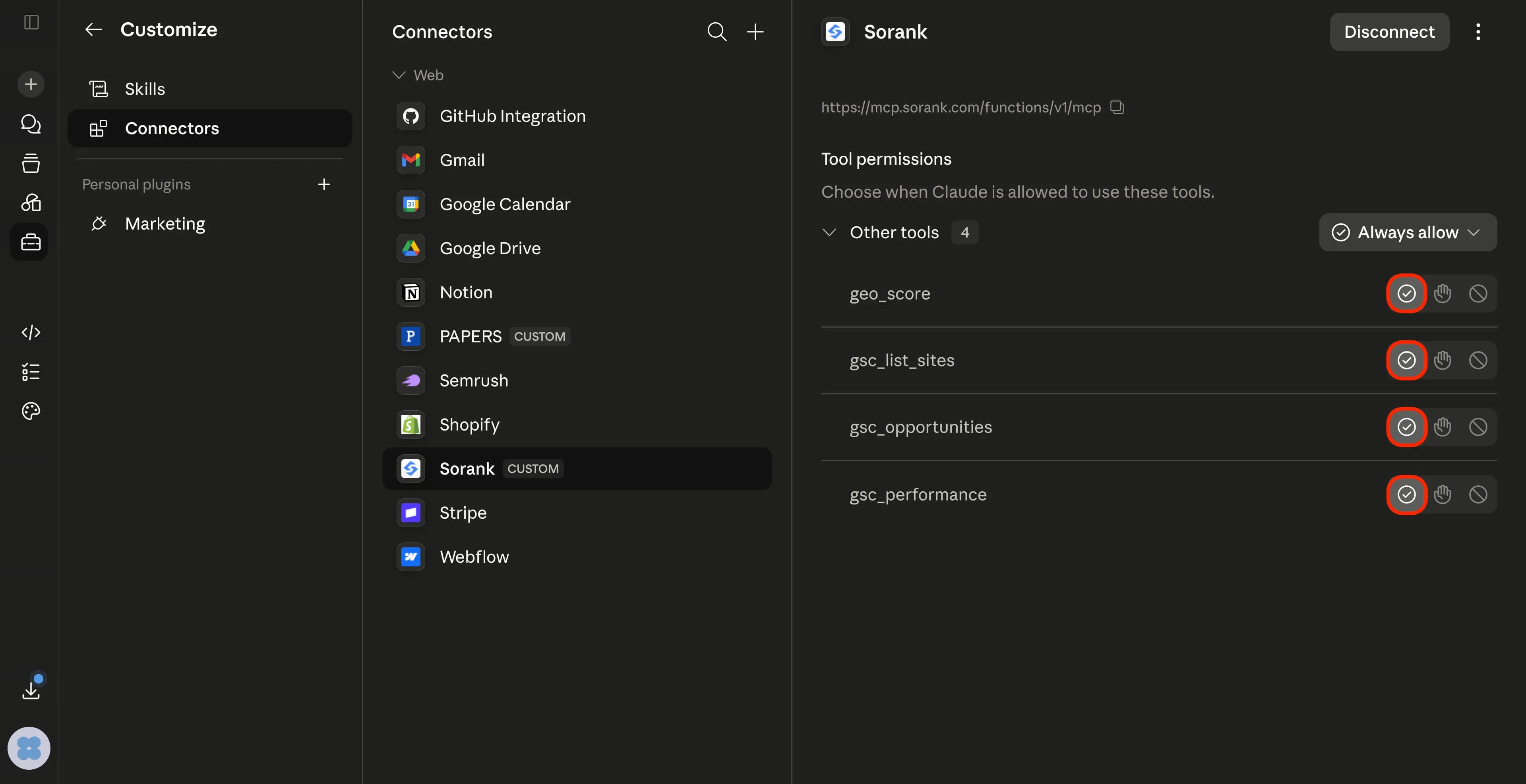
Sorank is now connected.
On its page you'll see Tool permissions with four tools: gsc_list_sites, gsc_performance, gsc_opportunities and geo_score.
Leave them on Always allow so Claude can run them without asking every time.
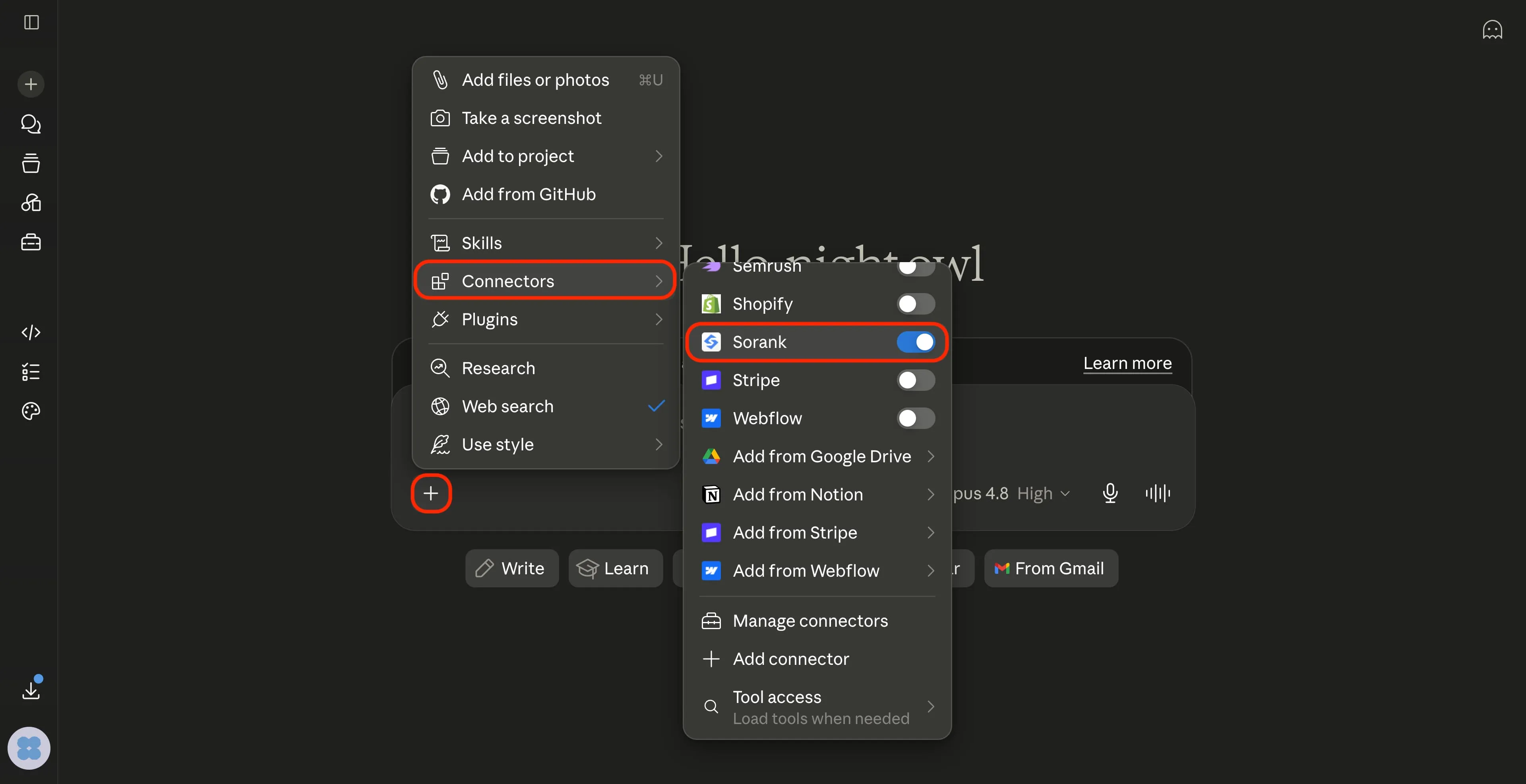
In any chat, click + → Connectors and make sure the Sorank toggle is on. Then ask, for example:
"With Sorank, list my Search Console sites, then show my top quick-win keywords."
You'll get your live Search Console insights right in the conversation.
Requires VS Code 1.102 or newer, GitHub Copilot signed in, and Agent
mode in Copilot Chat.
One click:
Ctrl/Cmd + Shift + P) -> MCP: Add Server.Or with a file - create .vscode/mcp.json (per project) or add the sameservers block to your user settings.json under mcp:
{
  "servers": {
    "sorank": {
      "type": "http",
      "url": "https://kcgtdxrygpvazuecnggt.supabase.co/functions/v1/mcp"
    }
  }
}
Click Start above the entry, then complete the Google sign-in.
Use it in Copilot Chat -> Agent mode (make sure Sorank is enabled in the
tools picker).
~/.cursor/mcp.json.cursor/mcp.json for one project):{
"mcpServers": {
"sorank": {
"url": "https://kcgtdxrygpvazuecnggt.supabase.co/functions/v1/mcp"
}
}
}
~/.codeium/windsurf/mcp_config.json:{
"mcpServers": {
"sorank": {
"serverUrl": "https://kcgtdxrygpvazuecnggt.supabase.co/functions/v1/mcp"
}
}
}
geo_score
Returns a rough GEO (generative-engine / AI search) citability score from 0 to 100 for a given URL, based on signals AI engines favour (structured data, Q&A blocks, concrete stats, clear headings, freshness). It is a light server-side approximation; the full GEO engine lives in the Sorank extension.
Input: url (required)
gsc_list_sites
Lists the Search Console properties the connected Google account can access (verified properties only). This is the starting point, since most other tools need a site_url from here.
Input: none
gsc_sitemaps
Lists the sitemaps submitted for a property and their health: last submitted / downloaded dates, error and warning counts, and submitted-vs-indexed URL counts.
Input: site_url (required)
gsc_inspect_url
Inspects one URL's Google index status (URL Inspection API): indexed or not, last crawl time, coverage state, the canonical Google chose, robots/fetch state, mobile usability and rich-result types. Ideal for diagnosing why a page is (or is not) in Google.
Input: site_url, url (both required)
gsc_performance
Returns Search Console performance for a property: clicks, impressions, CTR and average position, broken down by chosen dimensions (query, page, country, device, date, searchAppearance) over a date range. With compare=true, it also returns the previous equal-length period plus deltas.
Input: site_url (required); optional days, start_date, end_date, dimensions, row_limit, compare
gsc_opportunities
Surfaces quick-win SEO opportunities: queries ranking just off the top (positions 4-20) with real impressions, ranked by the clicks they could gain by reaching the top of page 1. (Free diagnosis; fixes and content are Sorank's paid layer.)
Input: site_url (required); optional days, limit
gsc_movers
Returns the biggest movers from Sorank's long-term store: the queries (or pages) whose clicks rose or fell the most between a recent month and an earlier one, including comparisons further back than Google's 16-month limit.
Input: site_url (required); optional dimension (query/page), months_back, limit
ga_list_properties
Lists the GA4 properties the connected Google account can access. This is the starting point for Analytics, since every other GA tool needs a property_id from here.
Input: none
ga_performance
Returns GA4 traffic performance for a property: users, new users, sessions, engaged sessions, engagement rate, average engagement time and views, broken down by chosen dimensions (date, page, channel, country, device) over a date range. With compare=true, it also returns the previous equal-length period plus deltas.
Input: property_id (required); optional days, start_date, end_date, dimensions, metrics, compare
ga_traffic_sources
Breaks down traffic by acquisition channel, source and medium (organic search, direct, referral, paid, social, email and AI assistants), so you can see where users actually come from and how each source performs.
Input: property_id (required); optional days, limit
ga_conversions
Reports key events and conversions (goal completions, sign-ups, purchases and revenue) by channel and landing page, so you can tie SEO/GEO traffic to real outcomes rather than vanity sessions.
Input: property_id (required); optional days, event_name
ga_audience
Audience and behaviour overview: new vs returning users, devices, countries / languages, and top landing and exit pages with engagement and bounce. A quick read on who your visitors are and how they behave.
Input: property_id (required); optional days
psi_analyze_url
Runs a Google PageSpeed Insights analysis for a single URL: the overall Lighthouse performance score plus the key audits (LCP, Total Blocking Time, CLS, Speed Index) and the top opportunities to make the page faster, for mobile and/or desktop.
Input: url (required); optional strategy (mobile/desktop)
psi_core_web_vitals
Returns the Core Web Vitals for a URL - LCP, INP and CLS - using both lab (Lighthouse) and field (CrUX real-user) data when available, with a clear pass / needs-improvement / fail verdict against Google's thresholds.
Input: url (required); optional strategy (mobile/desktop)
psi_site_audit
Runs PageSpeed across a set of key pages (home plus your main templates) and aggregates a site-wide speed picture: average scores, worst offenders and the opportunities that recur most often, so you know what to fix first.
Input: site_url or urls (required); optional strategy, limit




.webp)
.webp)











.svg)
.svg)


