
Preferences
Privacy is important to us, so you have the option of disabling certain types of storage that may not be necessary for the basic functioning of the website. Blocking categories may impact your experience on the website. More information

Privacy is important to us, so you have the option of disabling certain types of storage that may not be necessary for the basic functioning of the website. Blocking categories may impact your experience on the website. More information
Learn how a sitemap generator helps search engines crawl and index your site faster. Best practices, tools, and expert tips for 2026 SEO success.


Around 15% of websites are still missing an XML sitemap entirely, according to a 2025 SE Ranking analysis. That means roughly one in seven sites is making it harder for search engines to discover and index their content. For website owners, founders, and agencies focused on organic growth, this gap represents a significant missed opportunity. A sitemap generator eliminates that problem by automatically producing structured files that guide crawlers to every important page on your site. Before building or updating your sitemap, you can verify whether your current one follows best practices with our sitemap checker.
Whether you manage a five-page portfolio or a 50,000-page e-commerce catalog, the logic is the same: if search engines cannot find your pages, those pages will not rank. This article walks you through what a sitemap generator does, why it matters for technical SEO and crawl efficiency, how to choose the right tool, and how to avoid common pitfalls that silently undermine your indexing.
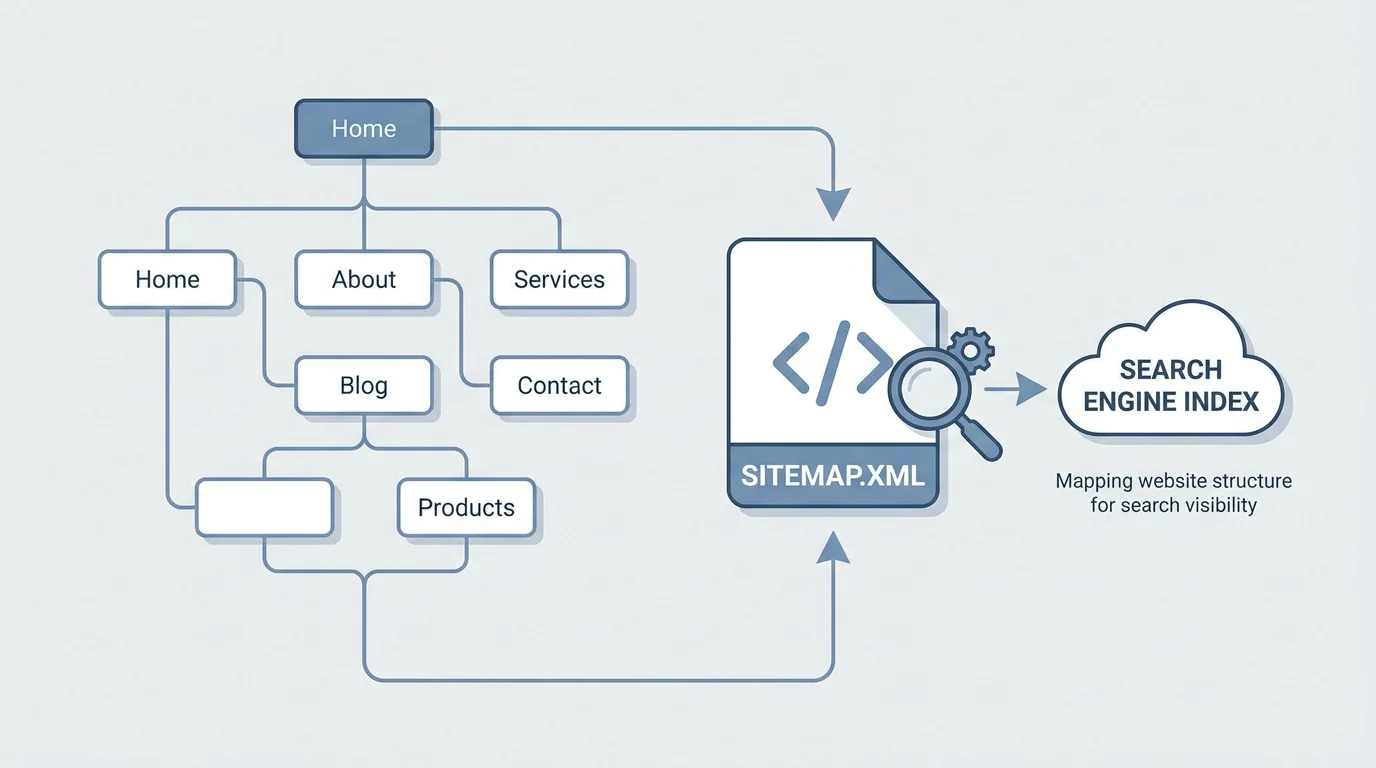
A sitemap generator is a tool that crawls your website, identifies every accessible URL, and compiles them into a formatted file (typically XML) that search engines can read. This file acts as a roadmap, telling Google, Bing, and other crawlers exactly which pages exist, when they were last updated, and how they relate to one another.
The resulting XML sitemap follows a standardized protocol originally developed in collaboration between major search engines. Each entry in the file contains metadata such as the URL location, last modification date, change frequency, and priority. These signals help crawlers allocate their crawl budget more efficiently, ensuring that your most important pages are visited and indexed first.
There are several types of sitemaps a generator can produce. XML sitemaps serve search engine bots directly. HTML sitemaps provide a navigable page list for human visitors. Some tools also create image sitemaps, video sitemaps, and news sitemaps for specialized content types. The choice depends on your site structure and content strategy.
Does every site truly need a sitemap? Google itself acknowledges that most websites will benefit from having a sitemap and that it "can improve the crawling of larger or more complex sites." According to a 2026 compilation from Searchlab citing Moz data, websites with XML sitemaps are indexed an average of 33% faster by Google. For any business competing in organic search, that acceleration can translate directly into earlier visibility and faster traffic growth.
The stakes are high. Around 94% of all web pages receive no traffic from Google, according to a 2025 SE Ranking study. While multiple factors contribute to this, poor crawlability is one of the most preventable. Without a properly formatted sitemap, search engines may never discover orphaned pages, freshly published content, or deep category pages buried behind multiple layers of navigation.
Crawl budget, the number of pages Google crawls on a site within a given period, is rarely an issue for sites with fewer than 10,000 pages. However, for large websites, an average of 26% of all pages on enterprise sites are not crawled. A well-structured sitemap directly addresses this by prioritizing the URLs that matter most.
According to SE Ranking's 2025 data, 23% of websites have pages that do not link to their XML sitemap in the robots.txt file, and over 17% have sitemaps containing redirecting URLs (3XX). These are not minor oversights; they actively confuse crawlers and waste crawl budget on URLs that lead nowhere useful.
Here are the most frequent mistakes to watch for:
Resolving these issues is a core component of technical SEO. Even a perfectly written sitemap will underperform if it references broken or irrelevant URLs.

Not all sitemap generators are built for the same use case. Free online tools, such as XML-Sitemaps.com, can generate a sitemap for up to 500 pages with no registration. That works for small portfolios or personal sites. However, businesses with dynamic content, multiple subdomains, or thousands of product pages need more robust solutions.
When evaluating a tool for generating sitemaps, consider these criteria:
For teams that want an automated approach, platforms that combine sitemap generation with broader SEO auditing offer the most value. Instead of managing a standalone generator, you receive continuous monitoring that catches issues as they appear. If your site is still in development or is being rebuilt, this is also the point where a specialist pays off; the 10 best creation sites agencies in France compares agencies that bake proper sitemap structure into a new build from day one.
Manually creating a sitemap is technically possible. You write XML by hand, listing each URL with its metadata. For a site with five pages, this takes minutes. For a site with 5,000 pages, it is impractical and error-prone.
Most professionals rely on one of three automated methods:
The automated route also ensures your sitemap stays current. According to a HubSpot finding cited in Searchlab's 2026 statistics roundup, content that is regularly updated receives 106% more organic traffic than outdated content. The same principle applies to the sitemap itself: an outdated sitemap signals neglect to crawlers.
A sitemap does not operate in isolation. It is one element within a broader ecosystem of files and signals that guide search engine behavior. The robots.txt file, for instance, tells crawlers which pages to avoid. Your sitemap tells them which pages to prioritize. When these two files contradict each other, indexing suffers.
Best practice is to include a direct reference to your sitemap URL inside your robots.txt file. If you do not yet have a properly configured robots.txt, you can create one with our robots.txt generator to ensure crawlers can locate your sitemap efficiently.
The 2025 Web Almanac data, as reported by Search Engine Land, showed near-universal HTTPS adoption at 91%+, title tag usage at nearly 99%, and canonical tag adoption rising from 65% in 2024 to 67%+ in 2025. These improvements reflect a maturing web, but sitemap adoption and accuracy still lag behind. Closing that gap is one of the highest-leverage technical tasks any site owner can undertake.
Once you have selected a tool, the process is straightforward. Here is a practical workflow:
This process becomes even more efficient when your SEO platform handles sitemap monitoring, technical audits, and content publishing as part of a single workflow.
The global SEO market was valued at $82.3 billion in 2023 and is projected to grow to $143.9 billion by 2030, according to Research and Markets (2025). Within that expanding landscape, the sites that get indexed first gain a compounding advantage. Faster indexing means earlier rankings, earlier traffic, and earlier revenue.
In 2024, 91% of digital marketers reported that SEO had a positive impact on website performance and marketing goals, according to a Conductor survey cited by Searchlab. For those marketers, sitemaps represent one of the simplest, most measurable optimizations available. Unlike content strategy or link building, sitemap generation delivers results in days, not months.
For busy founders and agencies, the takeaway is clear: a properly generated and maintained sitemap is not optional infrastructure. It is a competitive advantage that compounds over time, especially when paired with automated technical SEO monitoring and continuous content updates. Founders without in-house technical SEO expertise can also lean on outside specialists to keep this infrastructure maintained; the 10 best seo agencies in France profiles agencies experienced in exactly this kind of technical upkeep.
If you are looking for a platform that handles sitemap generation alongside automated audits, content creation, and crawl monitoring, we built Sorank to do exactly that. Our AI-powered platform identifies technical issues, generates optimized content, and keeps your site visible across both traditional search and AI engines. To see how it works, explore our sitemap checker and technical SEO tools and take the first step toward faster, more reliable indexing.
For most websites, regenerating the sitemap whenever you publish, update, or remove content is ideal. Sites with frequent changes (daily blog posts, new product listings) benefit from automated generation that runs on a schedule. Static sites may only need monthly updates.
Even small sites benefit from a sitemap, particularly if they have orphaned pages or limited internal linking. While Google has stated that very small sites with strong internal linking may not strictly require one, having a sitemap removes guesswork and ensures every page is discoverable. Sorank's technical auditing tools can help you identify whether any of your pages are being missed by crawlers.
An XML sitemap is a machine-readable file designed for search engine crawlers. It contains URLs, metadata, and priority signals. An HTML sitemap is a web page designed for human visitors, listing links to all major sections of your site. Both serve distinct purposes, and using them together strengthens both crawlability and user navigation.
THEY WIN WITH SORANK







.webp)





.webp)
.webp)











.svg)
.svg)


